How to Automate Instagram Engagement Without Getting Banned: Rate Limits, Warming, and Action Schedules
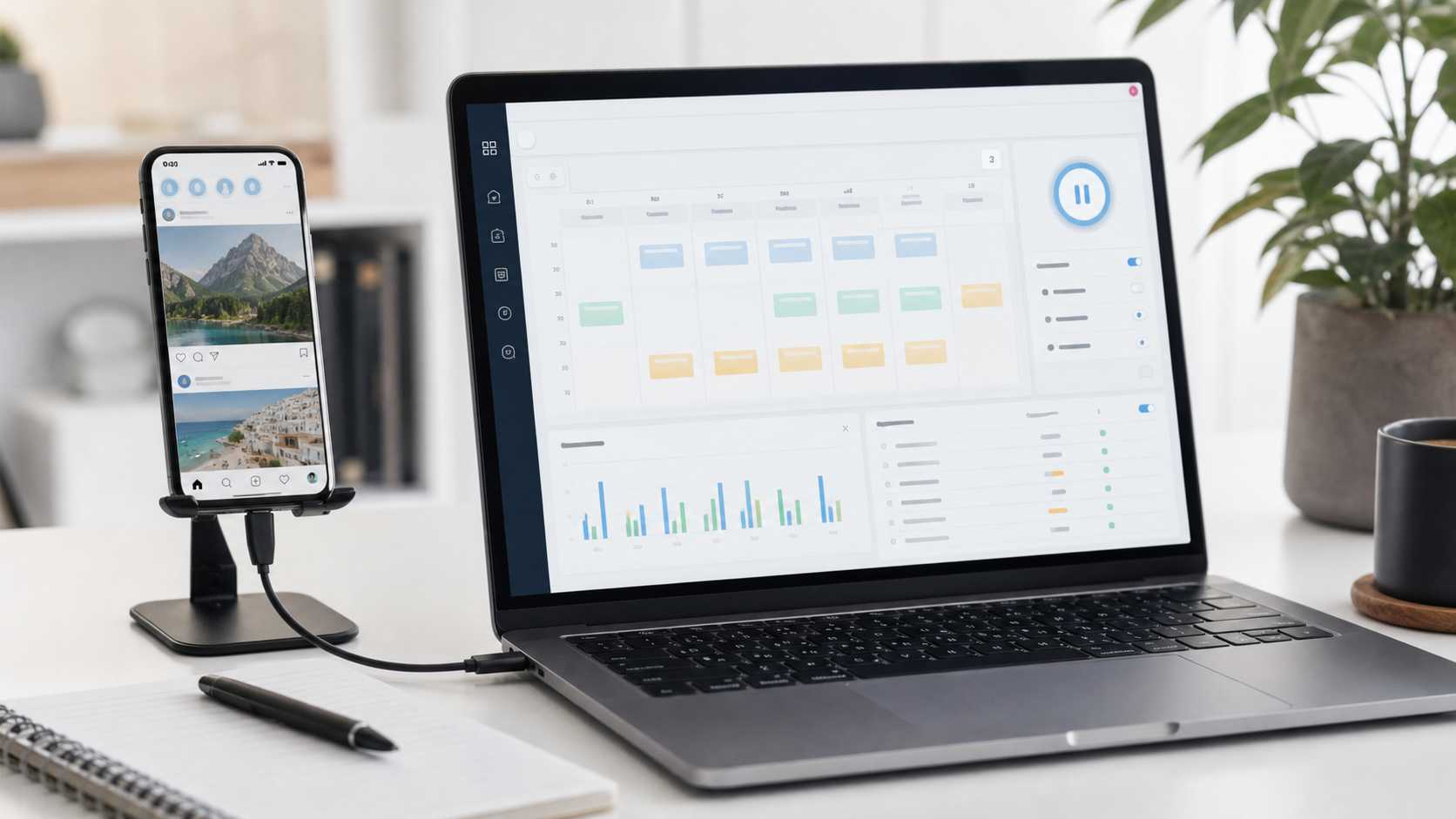
Most answers throw out a daily number for likes, follows, or comments as though every account starts with the same history, audience, content, device, and trust profile. A mature creator, a lightly used local-business profile, and an agency account returning from a quiet period should not receive the same settings. The useful unit is an operating envelope: account maturity, action sensitivity, daily total, hourly density, active-day cadence, source relevance, content readiness, and recovery rules.
This guide gives exact starting parameters for campaign planning without pretending they are Instagram’s private detection triggers. It explains warming, active days, action budgets, and how a device-native setup such as SMTasker fits a repeatable operating process.
The Honest Answer About Instagram Rate Limits
The phrase “Instagram automation rate limits safe 2026” sounds like it should produce a clean table from Instagram itself. It does not. Instagram does not publish universal daily or hourly UI-action thresholds for likes, follows, comments, story views, or DMs. Accounts do not all receive the same practical headroom, and the usable range can change with account history, action type, content quality, audience response, and recent friction.
There is one relevant published hard cap: Instagram says an account cannot follow more than 7,500 accounts in total. It is a total-following ceiling, not a recommendation for daily follow volume.
Use better controls instead of guessing: start with a small budget, limit sensitive actions, schedule rest, and record results. With clean history and relevant targets, increase one variable; with friction, stop and simplify.
The important mindset shift is this: the goal is not to discover the edge of a limit. The goal is to build a schedule that never needs to approach it.
Hard Caps, API Quotas, and Action Budgets
Three different ideas are often mixed together in automation conversations. Separating them makes the rest of this article much easier to use.
1. Hard caps
Hard caps are platform-wide limits with a clear published number. The 7,500 follow ceiling is the obvious Instagram example. A hard cap is binary: an account either remains below it or it reaches it.
2. API quotas
API quotas apply to approved technical requests made through developer endpoints. Meta’s Graph API rate-limit documentation explains how API call limits and throttling work. Those limits matter when you are publishing, reporting, or integrating supported workflows through the API. They are not a conversion chart for normal actions performed inside the Instagram app.
3. Action budgets
An action budget is the internal limit you set for a specific account and workflow. It is the useful concept for a marketer. It has a daily total, an hourly density, a schedule, a source, and a review point. You decide it before a campaign runs, then compare the logs and results against that plan.
For example, a building-stage account may have a budget of 30 likes, 8 follows, one relevant comment, and 80 story or Reels views across several active windows. That is not a claim about an Instagram threshold. It is a deliberately small campaign design. It gives you enough activity to learn from a source while leaving plenty of room to inspect what happens.
For agencies, this means using a decision framework rather than copying one “safe limit” template. Confirm the account age, recent activity, content readiness, source, and essential action before the first campaign.
What Grey- and Black-Hat Rate Tables Actually Tell You
To make this guide useful, I reviewed current automation-vendor blogs, private-API discussions, proxy and multi-account guides, and community reports alongside official material. Their rate tables disagree sharply, especially for follows, unfollows, comments, and DMs. Some publish a precise maximum; others call the same type of number a safe target, a first-week setting, or an observed limit. The contradiction is the finding.
Three patterns explain why these tables cannot be treated as a universal settings sheet. First, they often separate one action from the combined daily workload, even though an account may be viewing, liking, following, and messaging in the same period. Second, they usually omit the variables that make their anecdotes hard to reproduce: account history, recent posting, target quality, consecutive active days, recipient feedback, and recovery history. Third, claims about hidden “trust scores,” detection thresholds, or guaranteed recovery times rarely come with a method that an outside operator can audit.
An academic study of commercial account-automation services documented how the ecosystem has historically ranged from automated reciprocity campaigns to collusion networks and private-client request emulation. It is valuable context for understanding why the execution environment and campaign discipline matter; it is not evidence that any published action number is a transferable threshold. See the account-automation research for the distinction between these models.
The usable conclusion is simple. Grey- and black-hat material can reveal the questions operators are trying to answer, but it cannot reveal a dependable hidden limit for your account. Treat its numbers as unverified observations, not a setting to copy. The budget table below is therefore intentionally a lower, reviewable starting range for a real campaign, not a high-volume target dressed up as a safety rule.
The Account-Readiness Baseline
Before you set an Instagram engagement schedule, establish a baseline. It is what makes later limits meaningful.
Start with the profile. A visitor should understand who it is for, what it posts, and why following matters. Check the bio, image, recent posts, highlights, link destination, and visual consistency. Automation cannot improve a profile that gives relevant people no reason to stay.
Then inspect the account’s recent rhythm. Look at the last seven to fourteen days and write down a baseline:
- How many posts, Stories, or Reels were published?
- How often did the account browse, like, comment, follow, or reply manually?
- Which hours usually receive genuine replies or profile visits?
- Has the account been quiet for months, recently restarted, or consistently active?
- Are there any unresolved feature limitations in Account Status?
Keep the baseline in a short campaign note so an almost-empty profile is not treated like a mature account. Set one success metric before engagement begins: profile visits, relevant follows, Story replies, saves, or qualified local traffic. Action count is a process metric, not the outcome.
The 30-Day Instagram Warming Plan
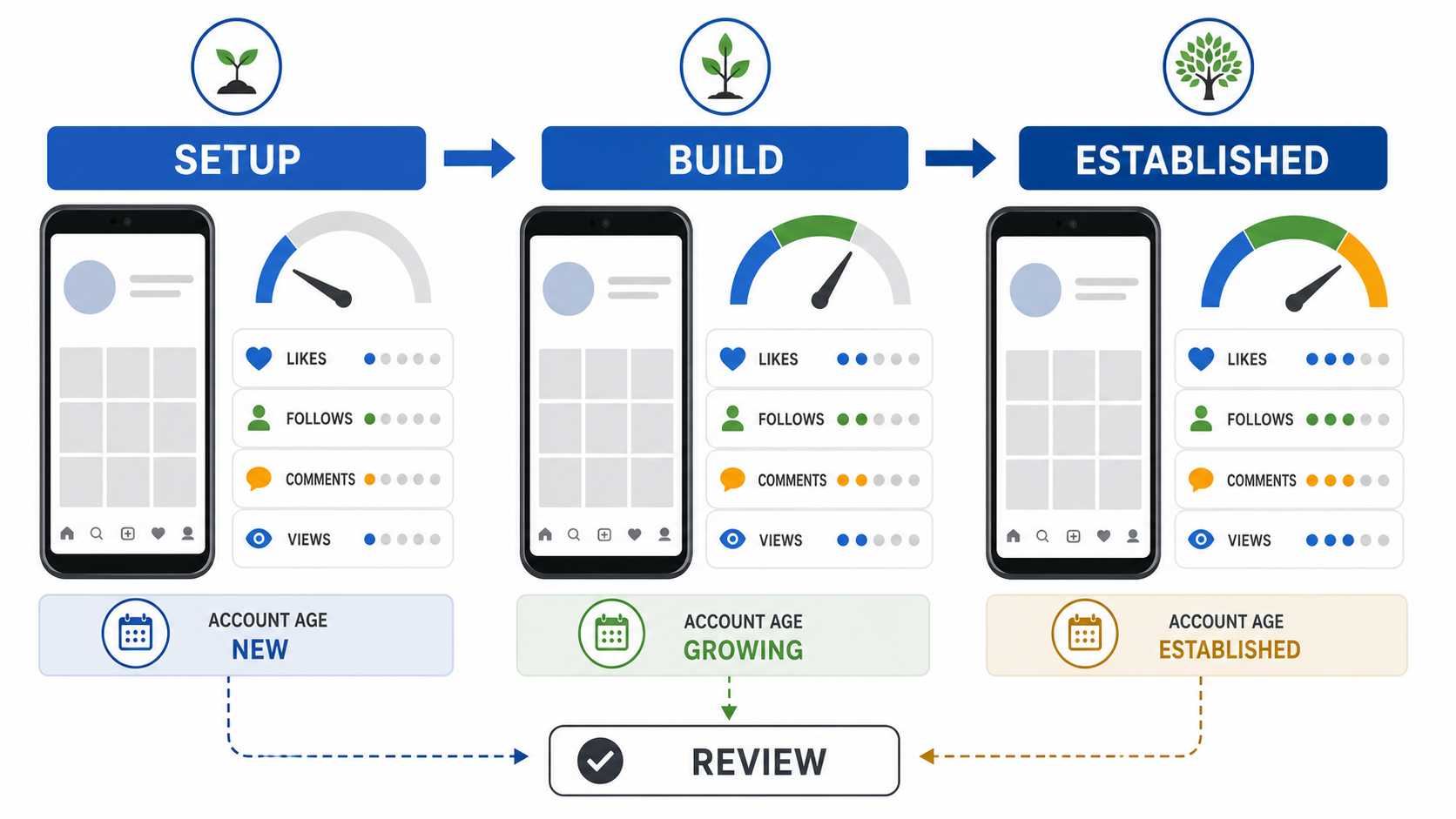
Instagram account warming before automation is best understood as a sequence of milestones, not as a ritual where you click randomly for a week and hope the account becomes “trusted.” The work should make the profile more complete, the audience source more accurate, and the operating data more useful.
The plan below is deliberately practical. It is designed for a new account, a recently restarted account, or an account that has been quiet long enough to need a careful re-entry. If an account already has a long, clean history and normal engagement, you can begin from the building stage, but it is still worth confirming the baseline first.
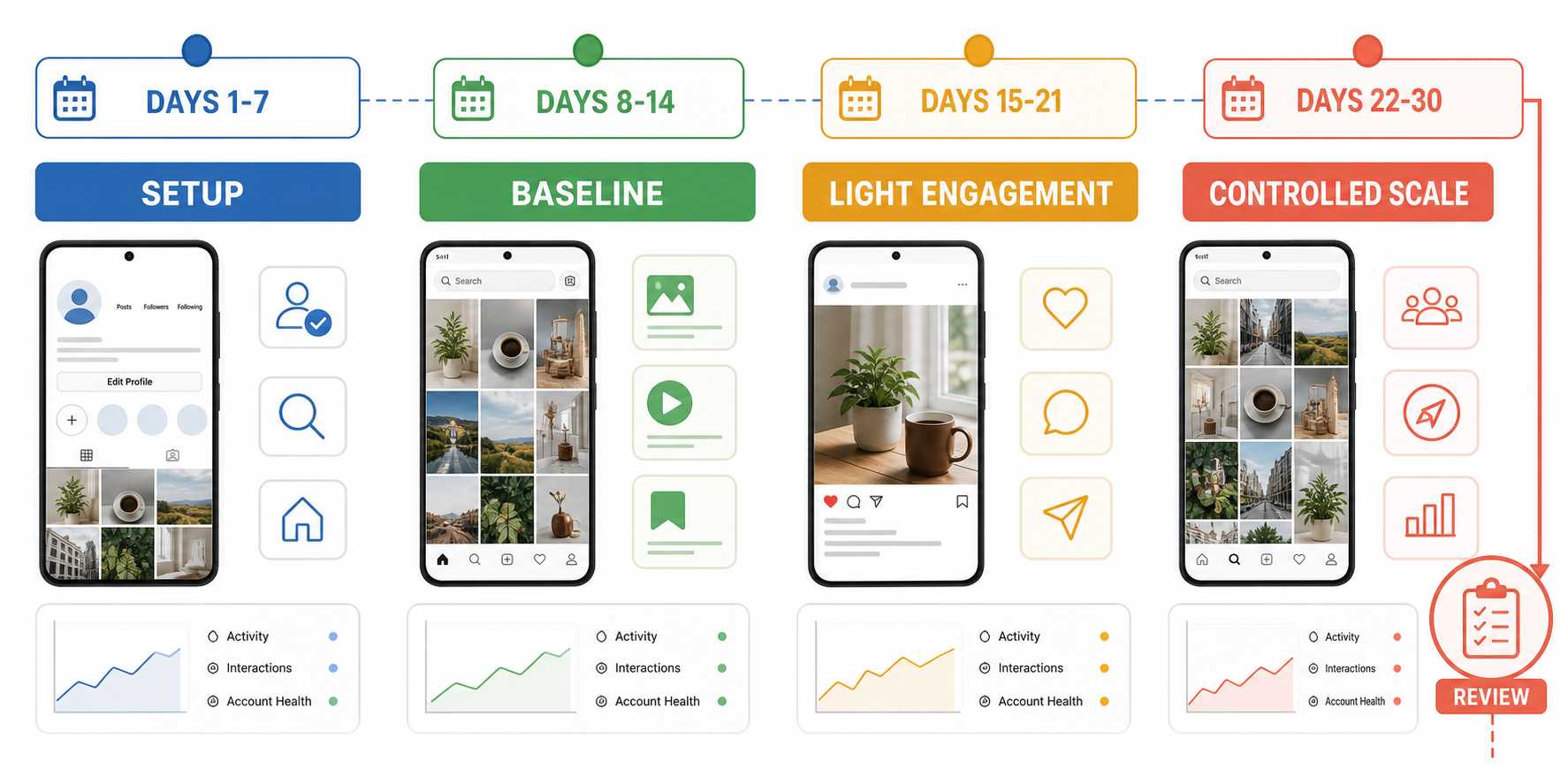
Days 1-7: Setup and normal use
The first week is for profile readiness and normal app use. Finish the profile and publish enough real content that a first-time visitor sees a coherent account. For most brands or creators, three to five good pieces are more useful than a rushed pile of low-quality posts. Browse the niche, watch relevant Stories and Reels, save useful posts, and follow a small number of genuinely relevant accounts manually.
Do not start multiple engagement tools in this phase. Keep the work simple enough that you can clearly see what the account is doing and how the profile is developing. At the end of the first week, you should have a complete profile, several pieces of content, a basic niche map, and a record of when the audience is active.
Days 8-14: Baseline and light activation
In the second week, you can introduce a small amount of structured activity. The lowest-sensitivity starting point is usually discovery: targeted story or Reels viewing, light browsing, and a small number of relevant likes. Keep the source narrow. One niche creator, one local location, one content theme, or one carefully chosen hashtag group is enough for a first test.
This is where a device-native workflow becomes helpful: set one account, one source, one active window, and a small limit. On SMTasker, choose the device and source, define active hours, then check logs rather than adding every option at once. The week-two milestone is clean operating data: relevant profiles, useful profile visits, a spread-out schedule, and a workflow a teammate can explain.
Days 15-21: One engagement objective
By week three, the account should have a more complete profile, a short activity history, and at least one source you understand. Now choose one objective. Examples include light visibility around a creator audience, relevant profile discovery, local awareness, or content distribution around a niche topic.
Add one primary action to support that objective. For a content-led creator, it may be likes around a tightly selected source. For a local business, it may be viewing and light engagement around nearby creators or locations. For an agency, it may be a small follow campaign around accounts that already demonstrate interest in the client’s category.
Keep comments minimal and specific. A useful comment can open a conversation. A generic comment is just noise. The same rule applies to contact workflows: use a reply-led, reviewed approach rather than treating a new account like an outbound machine.
At the end of the week, review logs and account results. If the source is weak, change the source, not the volume. If content is weak, improve the profile before increasing engagement.
Days 22-30: Controlled scale
The final warming phase is where teams often double every setting after clean logs, making it impossible to see which change produced the next result. Scale one variable only: add a window, modestly raise a primary range, introduce one source, or add a small follow component.
Use four active days as the default weekly pattern, with review days after consecutive active days. That gives the account a sustainable rhythm and gives the operator time to compare sources, skips, profile visits, follower quality, and content performance. A fifth active day should be the result of a clean review period and a genuine business reason, not a default setting.
Conservative Action Budgets for 2026
The table below answers the request for exact starting parameters. These are conservative operating ranges for campaign planning, not Instagram-published thresholds or a promise that every account will receive the same result. Use the lower end when an account is new, quiet, recently changed, or still developing content. Move only after clean logs and a useful result from the current source.
| Account stage | Likes/day | Follows/day | Unfollows/day | Comments/day | Story/Reels views/day | Contact approach |
|---|---|---|---|---|---|---|
| Days 1-7: setup and baseline | Manual only | Manual only | 0 | Manual only | Manual browsing | Reply-led manual handling |
| Days 8-14: light activation | 10-25 | 0-5 | 0 | 0-1 | 30-60 | Manual only |
| Days 15-30: building history | 25-50 | 5-12 | 0-5 | 1-3 | 60-120 | Reply-led and reviewed manually |
| 30+ days with clean history | 50-80 | 10-20 | 5-12 | 2-5 | 120-200 | Curated, reply-led workflows only |
The table is intentionally more conservative than many high-volume guides. That is by design. A pillar article about how to automate Instagram engagement without getting banned should optimize for durable operations, not a screenshot of impressive daily totals.
There are three details worth noticing.
First, likes and views are lower-sensitivity discovery actions, but they still need a relevant source. A hundred views from people who have nothing to do with the niche do not build a useful audience signal. Second, follows and unfollows need more restraint because they visibly change the profile’s network. Third, comments and direct messages should be treated as quality actions, not as a place to spend a large quota. One specific comment that adds something to a conversation is worth more than twenty generic lines.
The established-account row does not mean every established account should run every action at the maximum at the same time. Pick one main workflow. If you run likes, follows, comments, views, and contact together, the combined pattern becomes harder to review and harder to improve. A good operating budget has a purpose, not just a ceiling.
Hourly Density, Active Hours, and Action Mix
Daily totals are not enough. The same 40 likes can look very different as one compressed burst versus several short operating windows. That is why every budget needs an hourly-density rule and an active-hours rule.
For a new or recently restarted account, keep the initial density at roughly three to five interactions per hour during a short active window. For a building account, four to six interactions per hour is a measured place to start. An established account with clean history can use a five to ten interactions-per-hour range when the source and objective justify it. Those are operating controls, not performance targets.
The active window should match the account’s real working rhythm and the audience’s likely availability. A creator may prefer two short evening windows around posting and reply activity. A local business may run one lunch window and one early-evening window. An agency may use client-specific windows and avoid running every account at the same time.
Do not schedule activity for every hour of every day. The purpose of active hours is operational clarity: the team knows when a workflow is expected to run, when it is expected to be quiet, and when to inspect logs. Use the rest of the day for content preparation, replies, source research, client review, and performance analysis.
Action mix matters too. Do not begin with a heavy combination of follows, unfollows, comments, and contact. Start with one primary action and one supporting discovery action. A simple building-stage mix might be targeted Reels viewing plus likes from one source. A later mix might add follows only after you are confident the source produces accounts that would genuinely care about the profile.
Active-Day Schedules for Creators and Agencies
The most usable schedule is usually weekly. A weekly plan gives you enough repetition to build a process but enough breathing room to review it. It also stops the common mistake of treating the same account settings as a seven-day-per-week switch.
The default four-active-day schedule
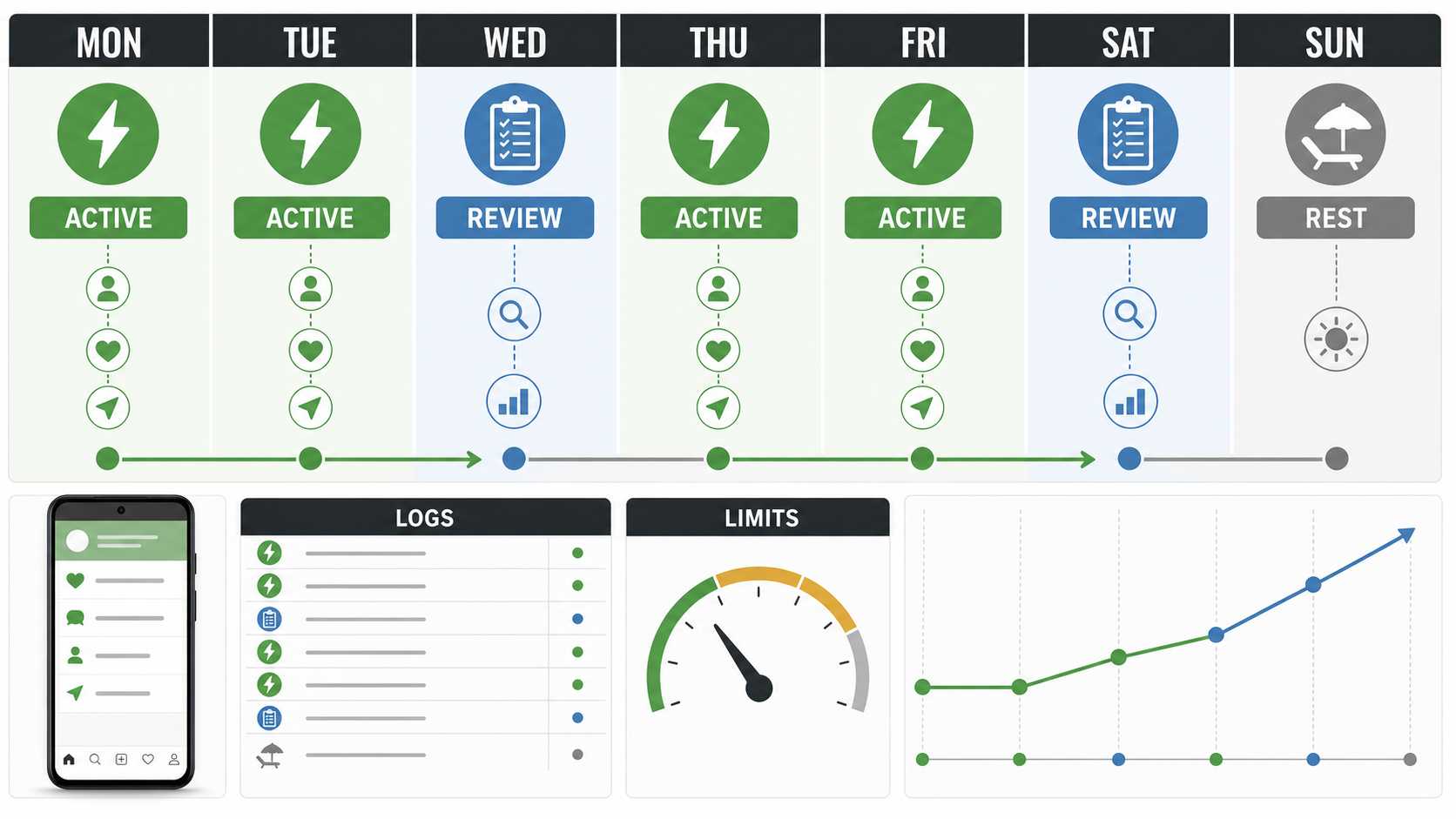
For a building or established account, I like a four-active-day schedule with two review points and one full rest day:
| Day | Operating focus | What the team checks |
|---|---|---|
| Monday | Active: primary source and one engagement workflow | Source relevance and log quality |
| Tuesday | Active: same source or a controlled second source | Profile visits and target fit |
| Wednesday | Review: no new variables | Skips, logs, content readiness, Account Status |
| Thursday | Active: repeat the best-performing workflow | Quality before volume |
| Friday | Active: limited second test or content-support workflow | Results against the weekly objective |
| Saturday | Review: no expansion | Follower quality, replies, and campaign notes |
| Sunday | Rest | No new workflow changes |
This schedule is simply easy to operate. If Monday and Tuesday produce a weak target pool, Wednesday is a clean decision point: replace the source before Thursday instead of adding more actions to a weak campaign.
For a creator, the active days can sit around publishing days. Run light discovery and engagement when a new post, Story, or Reel gives profile visitors something current to explore. For a local business, use the days when staff can actually respond to messages or enquiries. For an agency, document the schedule in the client brief so the person reviewing results knows what was supposed to happen on each day.
The important parameter is not the name of the weekday. It is the rhythm: two active days, one review point, two active days, one review point, one rest day. During a warm-up period, reduce that to two or three active days. During a strong established period, a fifth active day can be added after a clean review, but it should not eliminate the review days.
Which Engagement Actions to Introduce First
Not every action has the same operational value at the start. The order below keeps early campaigns focused on discovery and relevance before adding higher-intent interaction.
Start with viewing and source research
Story and Reels viewing help you understand whether a source is active, relevant, local where needed, and aligned with the account’s content. They are also useful for building a cleaner source list before you spend a like or follow action.
Add targeted likes
Likes are a straightforward way to support visibility around recent, relevant content. They work best when the account profile is ready and the source is small enough that you can explain why each target was selected. Avoid treating likes as a bulk task detached from content strategy.
Add follows carefully
Follows are useful when the target profile is genuinely relevant to the account’s niche and when the profile has something worthwhile for that person to discover. They should not be the first response to a weak source or an empty profile. If the target quality falls, fix the source before increasing the follow budget.
Introduce comments and contact last
Comments and messages create a much higher bar for quality. A generic comment, irrelevant outreach, or repeated wording can damage the account’s reputation even when the raw action count is low. Add them only when the account voice, source selection, and manual review routine are already working.
This approach also protects brand trust. The goal is real discovery and useful engagement, not artificial numbers.
Why Device-Native Automation Helps
Rate limits and warming plans are only as good as the environment used to run them. A browser-based workflow adds browser-specific technical and behavioral layers. Recent 2026 research on fingerprinting AI browsing agents found that behavior such as typing, scrolling, and mouse movement can distinguish agents from people in a controlled web setting. That research is not an Instagram rate-limit study, but it reinforces a practical point: browser automation has its own operational fingerprint stack.
Device-native automation takes a different path. The account remains in the Android app environment on a phone or emulator, while the operator controls the workflow from a dashboard. The value is not that a device makes strategy automatic. The value is that the execution layer, the account, the source, the limit, the active hours, and the logs can live in one visible operating system.
For a marketer, that makes the rate plan easier to enforce. You can configure a building-stage account with one source, a daily budget, a short active window, an Ignore List, and a pause rule. You can see whether the device is connected and whether the workflow performed the actions it was assigned. You can compare one account against another without copying the same settings blindly.
That is why SMTasker’s Instagram automation is useful for this kind of work. It is built around connected Android phones and emulators, with per-account tools, sources, limits, active hours, logs, restrictions, and pause behavior. The dashboard turns a warm-up plan from a document into an operating routine.
What to Do When an Account Shows Friction
The right response to friction is not more activity. It is a smaller, clearer workflow.
Define the stop conditions before you launch a campaign. Common examples are an action block, an unexpected logout, a verification prompt, repeated failed attempts, a sudden decline in target relevance, or an unusual pattern in the logs. When one appears, pause the affected tool, keep the account environment consistent, and review the campaign rather than restarting it immediately.
Start with the simplest questions. Did the account recently change devices, sources, content direction, or campaign scope? Did two workflows overlap? Did the source become low quality? Did a new comment or contact template become repetitive? Is the account’s content still ready for the attention the workflow sends toward it?
Then reduce one variable. Lower the primary action range, remove the secondary action, narrow the source, or return to a shorter active window. Do not change every setting at once. The aim is to learn what the account is comfortable sustaining, not to return to a maximum as quickly as possible.
SMTasker’s Auto-Suspend and logs are valuable here because they create a visible record of the moment a workflow paused. Instead of relying on a vague memory that “something looked wrong on Thursday,” an operator can identify the tool, source, limit, device, and time window involved.
The Weekly Review Dashboard
A good Instagram automation schedule includes a review dashboard, even if it is only a short spreadsheet next to the SMTasker logs. Every week, review five categories.
1. Account health
Check Account Status, login consistency, device connection, pauses, failed attempts, and feature friction.
2. Source quality
How many targets were actually relevant? Which source produced the best profile visits, follows, replies, or content interactions? Which source produced skips or low-quality profiles? Source quality is often the first lever to adjust.
3. Content readiness
Review recent posts, Story highlights, captions, the bio, and the offer. An engagement schedule cannot compensate for content that does not match its audience.
4. Action quality
Which action produced a useful result? Did likes create profile visits? Did follows bring relevant reciprocal interest? Did a comment start a real conversation? Treat these as separate questions instead of combining every action into one vanity total.
5. Scale decision
Choose one of four outcomes: keep the current settings, improve the source, reduce the budget, or scale one variable. Write down why. This small discipline makes an agency’s work easier to explain and makes a creator’s experimentation much less random.
Where SMTasker Fits
SMTasker fits the rate-limit and warming model because it gives the operator the controls that turn guidelines into a repeatable account routine. You connect a real Android phone or emulator, choose the account, add a focused tool, select the source, set limits and active hours, and review what ran from the logs.
For a new account, that may mean using the device for profile readiness and light discovery while keeping engagement automation off or minimal. For a building account, it may mean a small like-and-view workflow around one source on three active days. For an established account, it may mean several carefully separated routines with account-specific limits, Ignore Lists, restrictions, and Auto-Suspend enabled.
The Android Instagram automation setup is a practical starting point for physical devices. Agencies that need standardized client environments can use the phone and emulator automation path to keep accounts, devices, and schedules easier to manage.
The quiet advantage is operational clarity. A good marketer should be able to open a dashboard and answer: Which device is running this account? What source is active? What is the daily budget? Which days are review days? Did the tool pause? What did the logs show? What will we change next week?
That is a much better reason to use automation than chasing the highest action count.
FAQ
What is the exact Instagram follow limit?
Instagram’s published account-level follow cap is 7,500 total accounts followed. That is different from a daily follow budget. Daily operating ranges should be lower and shaped by account maturity, source quality, recent activity, and the rest of the campaign.
What are safe Instagram automation rate limits in 2026?
There is no official daily table for in-app actions. A conservative model starts with no automation in week one, 10-25 likes and 0-5 follows in days 8-14, then 25-50 likes and 5-12 follows as history builds. The established-account ranges remain operating ranges, not daily targets.
How long should I warm an Instagram account before automation?
Use a 30-day progression for a new, restarted, or quiet account: profile completion and normal use, light discovery, one engagement objective, then one-variable scale after reviewing source, logs, content, and account health.
What is the safest first automated Instagram action?
For most accounts, start with targeted viewing and a small number of likes from one narrow, relevant source. They let you evaluate source quality and profile readiness before you add follows, comments, or contact workflows.
How many active days should an Instagram automation schedule use?
During days 8-14, use two to three active days each week. During days 15-30, use three to four. A strong default for established accounts is four active days, two review days, and one rest day. Add a fifth active day only after a clean review period and a clear reason to do so.
Should I use the same settings for every account?
No. Each account needs its own baseline, content review, source list, active hours, and action budget. A quiet local-business account and an established creator should not be treated as interchangeable templates.
Are comments and DMs safe to automate early?
They should be introduced later than viewing, likes, or carefully selected follows. Comments and DMs are quality-sensitive actions. Use them only when the account voice is clear, the source is narrow, and the team can review what is being sent.
What should I do after an action block or unexpected pause?
Pause the affected workflow, inspect the logs, check the account, and reduce one variable before resuming. Do not restart every tool at the same settings. The smallest clean restart is the fastest way to understand what needs attention.
Can SMTasker help with Instagram account warming before automation?
Yes. SMTasker gives you a controlled device-based environment where you can set active hours, sources, limits, restrictions, Ignore Lists, logs, and Auto-Suspend behavior. That makes it easier to run a staged plan instead of switching on a full engagement stack on day one.
Final Takeaway
The practical answer to how to automate Instagram engagement without getting banned is not a secret number. It is a system: a ready profile, a documented baseline, a 30-day warming path, conservative action budgets, active and review days, relevant sources, quality content, device continuity, logs, and one-variable scaling.
The only widely published follow number is the 7,500 total-account cap. Everything else should be treated as an operating range that you earn through account history and verify through results. Start smaller than feels exciting. Review more often than feels necessary. Let relevance, not volume, decide what you scale.
When you use a device-native control layer such as SMTasker, that process becomes easier to run across one account or many. The phone or emulator executes the routine; the marketer keeps the judgment. That is how a sustainable Instagram engagement schedule should work in 2026.