What Is Device-Native Social Media Automation and How Does It Reduce Account Ban Risk?
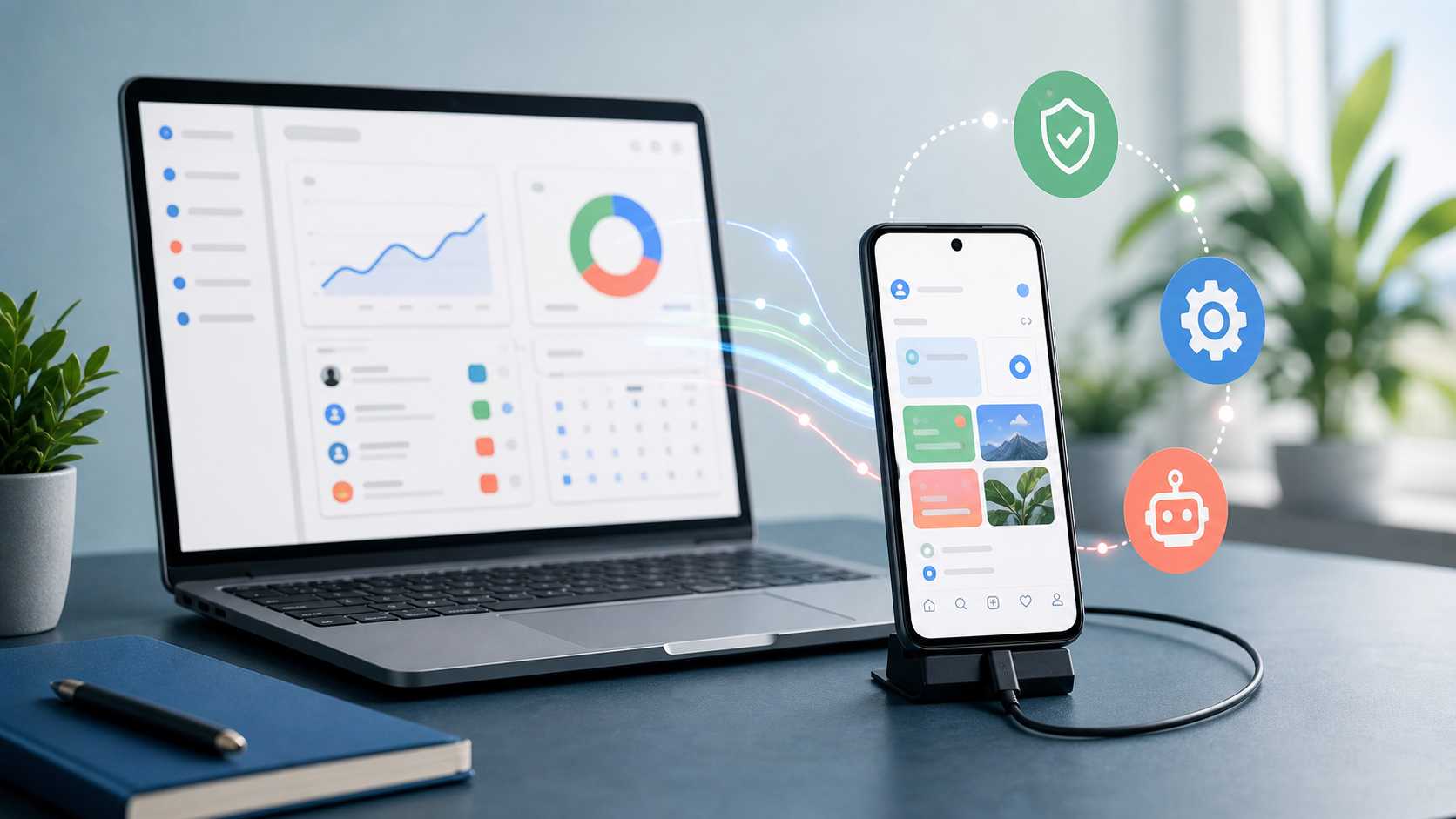
Device-native social media automation is automation that runs through the same mobile environment a normal user would use: an Android phone or Android emulator, the official app, and a dashboard that controls device-level actions. Instead of asking a public API to perform an action, or pretending to be the mobile app through a private API wrapper, device-native automation keeps the account inside a real app environment and controls the workflow from the device layer.
That distinction matters more in 2026 than it did a few years ago. The social media automation market is crowded with tools that all use the same vague language: human-like, safe, natural, AI-powered, undetectable. Most of that language hides the real question: where does the action actually happen?
If you are a marketer, creator, or agency operator, this is one of the questions that most directly affects account stability. Not the color of the dashboard. Not the number of features on the pricing page. The execution layer.
There are five broad ways social media automation is usually done:
- Official public API automation.
- Unofficial private API SDK automation.
- Browser automation and scraping.
- Device-native Android automation through a phone or emulator.
- SMM panels, bot farms, and fake engagement networks.
Those categories are not equally risky. They do not fail in the same way. They do not leave the same signals behind. And they do not give the marketer the same level of control when an account starts showing friction.
That is why device-native social media automation has become such an important topic. Used properly, it reduces account ban risk by avoiding many of the structural mistakes that get accounts restricted: repeated logins, session mismatch, request-layer fingerprints, unstable private endpoints, bad recovery behavior, high velocity, weak targeting, and blind retries after action blocks.
This is also the reason SMTasker is built around Android phones and emulators instead of a black-box API-only model. The point is not to push accounts harder. The point is to run repeatable work from a device environment you control, with sources, limits, active hours, logs, restrictions, and pause behavior visible from the dashboard.
The New 2026 Reality: Platforms Are Fighting Automation From Every Angle
The old automation conversation was simple: “Can this tool like, follow, comment, or post for me?” That is no longer enough.
In 2026, platforms are dealing with fake engagement markets, AI-generated content, bot farms, private API abuse, scraping, browser agents, coordinated influence operations, and large-scale account fraud. A creator who wants to automate a few repeatable tasks is operating inside the same ecosystem as people selling fake followers, AI bot swarms, and manipulation services. That means platforms are more sensitive to automation patterns than ever.
The pressure is not only coming from platforms. The FTC’s final rule on fake reviews and testimonials includes fake social media indicators, such as fake followers or views, when those indicators misrepresent influence. For marketers, that changes the frame. Fake engagement is not only an account-safety problem. It can also become a trust, brand, and compliance problem.
At the same time, AI agents are making automated behavior more sophisticated. Researchers and journalists are now discussing AI bot swarms that can coordinate, mimic human tone, infiltrate communities, and fabricate consensus. The Guardian’s January 2026 coverage of AI bot swarm warnings is not about normal creator workflows, but it explains the macro context: platforms have strong incentives to become more aggressive about authenticity signals.
So the question is not whether automation exists. It obviously does. The question is whether your automation looks like a controlled extension of a real account routine, or whether it looks like another piece of the fake engagement economy.
That is the line this article is about.
The Five Automation Models You Need to Understand
Before we talk about device-native automation, it helps to separate the models that often get mixed together.
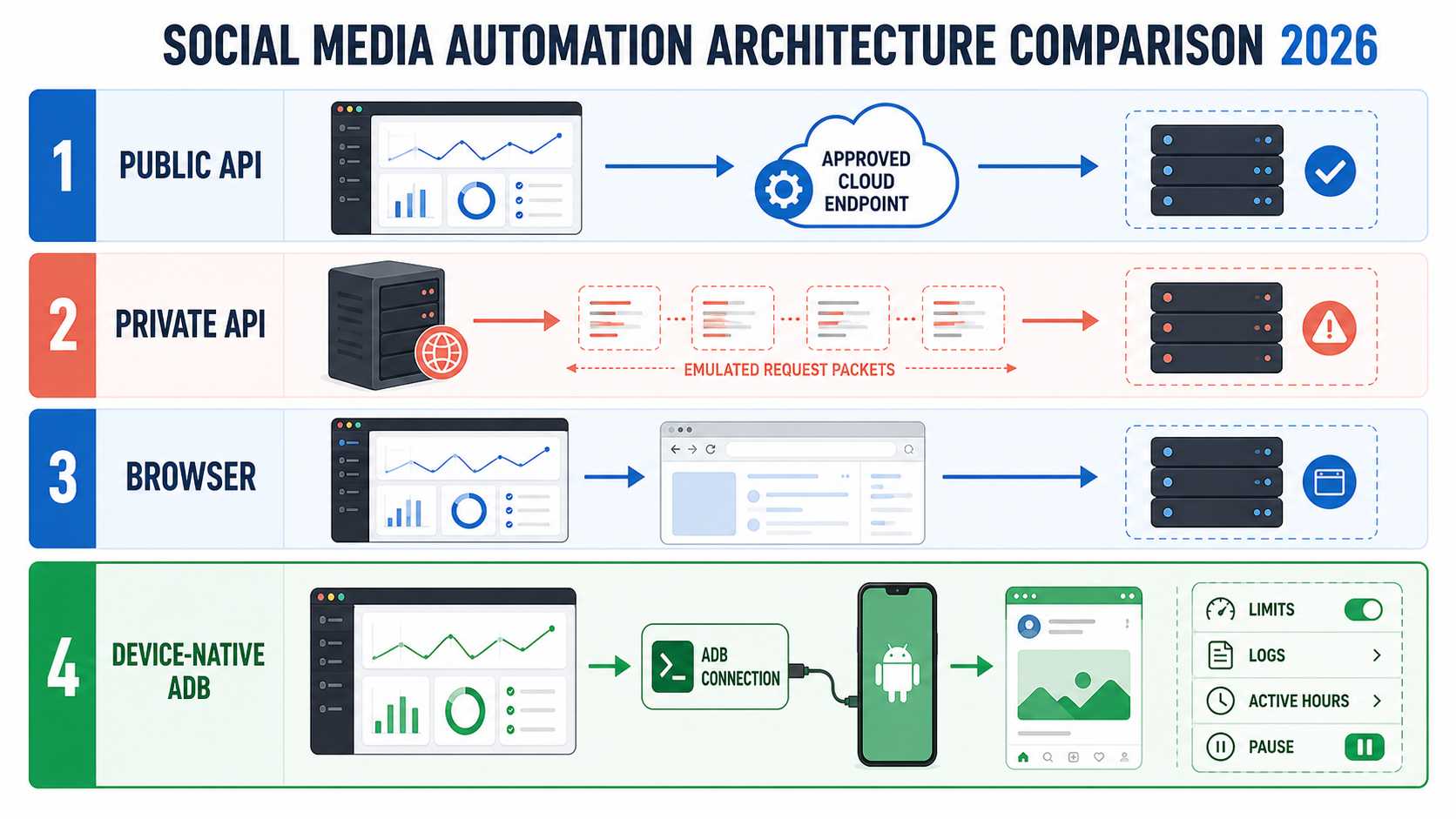
| Automation model | Where the action happens | Why people use it | Operational profile |
|---|---|---|---|
| Official public API | Approved platform endpoints | Publishing, analytics, comments, business integrations | Stable for supported actions, but limited in scope |
| Private API SDK | Unofficial emulation of app/web API flows | Access to actions not exposed publicly | Broad access with session and endpoint maintenance overhead |
| Browser automation | Web browser or headless browser | Scraping, web workflows, browser-based actions | Flexible, with browser-specific technical and behavioral signals |
| Device-native Android automation | Android phone or emulator running the real app | Controlled in-app routines | Consistent app environment with visible operator control |
| SMM panels / bot farms | Networks of fake or low-quality accounts | Bought followers, likes, views, comments | Artificial off-account activity with little operational visibility |
This table is the heart of the topic. A lot of bad automation advice treats these methods as interchangeable. They are not.
Official APIs are clean when the use case fits. Private APIs are powerful but fragile. Browser automation can be convenient but increasingly fingerprinted. Bot farms are a different category entirely because they sell artificial influence rather than controlled work from your own account. Device-native automation sits in the practical middle: it gives marketers a way to automate repeatable in-app routines while keeping the account in a visible device environment.
That structural difference is the central advantage of device-native automation.
Official API Automation: Clean, But Limited
Official APIs are the safest route when they support the exact workflow you need. If you are publishing approved content, pulling analytics, managing comments, handling business messaging, or integrating reporting into a dashboard, public APIs can be the right tool.
But public APIs are not built to reproduce every normal mobile app action. They are permissioned, scoped, reviewed, and rate-limited. Meta’s Graph API rate limit documentation explains that API calls are subject to limits and that throttled apps or users can fail requests. Meta’s Platform Terms also make it clear that apps must comply with developer documentation and platform rules.
This is why public API automation often disappoints growth operators. A marketer may want to automate discovery, profile visits, follows, unfollows, story viewing, or other normal app routines. The public API usually does not expose that kind of broad engagement automation in the way a person performs it inside the app.
That limitation pushed part of the market toward private API wrappers.
Private API Automation: Powerful, But Fragile
This is the part most generic automation articles skip.
Not every “API-based Instagram automation” tool uses the official public API. Some tools use unofficial private API flows. In simple terms, they try to emulate the network calls made by Instagram’s own mobile app or website. These private API wrappers can expose actions that the public API does not make available in the same way.
That is why private API tools are attractive. They can appear flexible, fast, and feature-rich. They may support feeds, media actions, follows, comments, messages, stories, uploads, session persistence, realtime events, and challenge handling.
But the same thing that makes private API automation attractive is what makes it fragile. The tool has to keep a believable account session at the request layer. It has to manage credentials, cookies or session data, user-agent and device identity, proxy trust, challenge states, rate limits, app-version assumptions, endpoint changes, and private parameters that can change without warning.
That is a lot of moving parts.
If a private API wrapper logs in too often, imports unstable sessions, changes device identity, routes through suspicious proxies, retries after challenges, or falls behind a platform change, the account can start looking less like a person using the app and more like a remote client trying to impersonate the app.
The important distinction:
- Public API automation asks the platform for approved access.
- Private API automation imitates app or web requests outside the normal app environment.
- Device-native automation uses the app environment itself and controls it from the device layer.
That is why private API automation should not be treated as the same thing as official API automation. It is a different risk category.
What Is ADB Bridge Automation for Instagram?
ADB already stands for Android Debug Bridge, although marketers often search for the phrase “ADB bridge automation for Instagram.” It describes a workflow where a computer communicates with an Android phone or emulator through ADB. Google’s Android Debug Bridge documentation describes it as a command-line tool that lets a computer communicate with a device. In Android development, it is used for debugging, testing, installing apps, viewing logs, and interacting with devices.
In a social media automation workflow, ADB is the communication channel, while the automation platform provides the orchestration. The dashboard decides which workflow should run, the control layer applies sources, limits, active hours, restrictions, and pause rules, and the Android device executes the action inside the app environment.
For Instagram, that means the account can remain logged into the Instagram app on an Android phone or emulator. The automation system can use a device bridge to coordinate actions, check state, respect limits, and log results. The marketer still chooses the sources, active hours, exclusions, and risk level.
This is not the same as a private API SDK. A private API wrapper tries to reproduce app behavior through network calls. ADB bridge automation works closer to the actual device and app environment.
The difference can be put simply:
- Private API: emulate the app at the request layer.
- Browser automation: automate activity through the web interface.
- Device-native ADB automation: use the app environment and control it through the device layer.
That is the structural reason device-native automation is more interesting for account safety.
The Three Layers That Determine Account Stability
The execution method matters, but the strongest workflow combines good architecture with good operating controls. I use a three-layer model when evaluating any social media automation setup:
| Layer | What it controls | Why it matters |
|---|---|---|
| Execution layer | Where the action happens: API, browser, or Android app | Determines session continuity and the technical environment |
| Behavior layer | Sources, action mix, timing, relevance, and content quality | Determines whether the routine supports a believable account strategy |
| Operations layer | Limits, active hours, logs, restrictions, pauses, and review | Determines how quickly the operator can spot and correct a weak workflow |
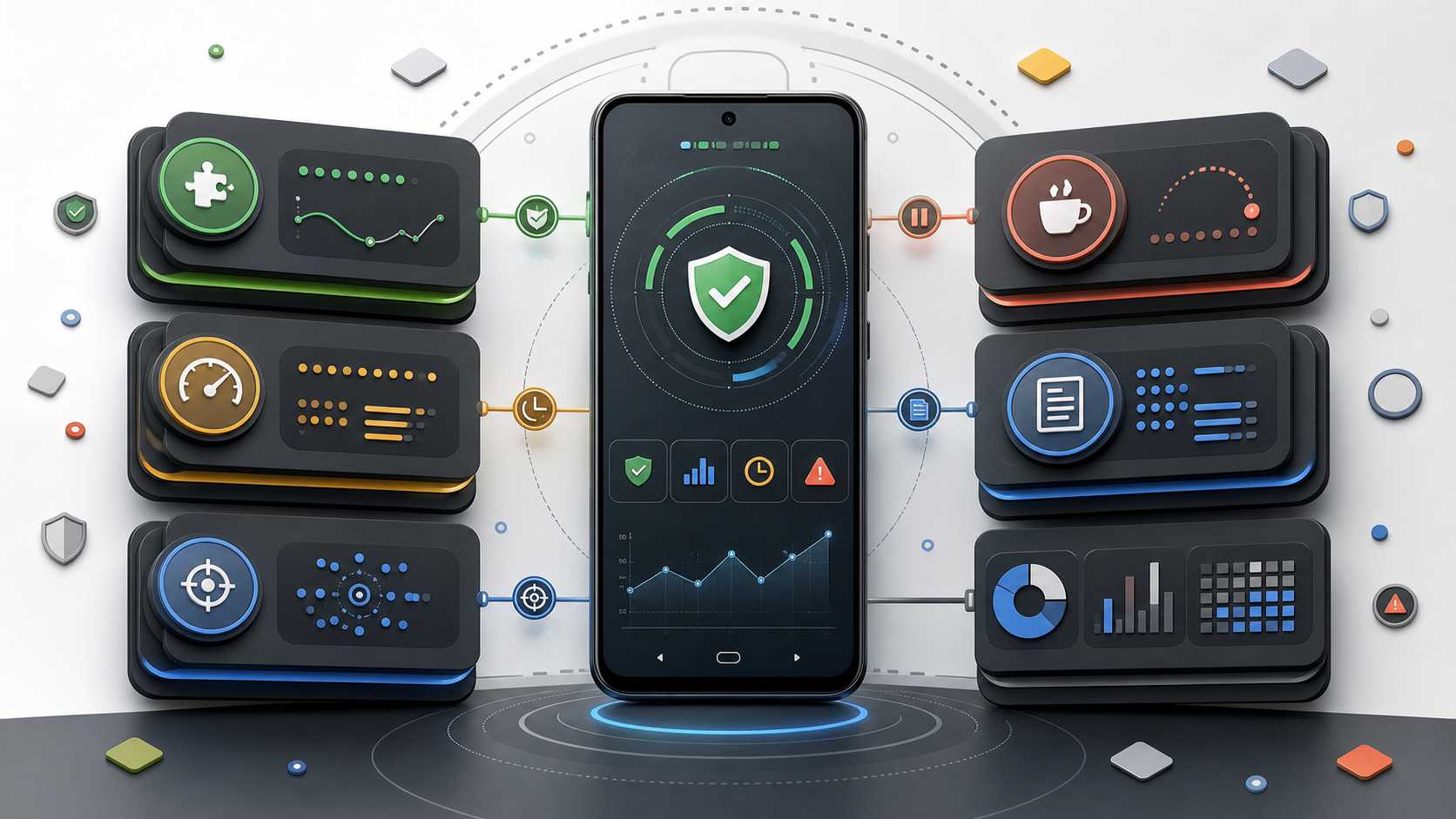
Device-native Android automation strengthens the execution layer by keeping activity close to the app environment. A platform such as SMTasker then connects that architecture to the behavior and operations layers through account-specific sources, limits, active hours, logs, Ignore Lists, restrictions, and pause controls.
This distinction is useful because ADB alone is not the entire product. The practical value comes from the complete system: a stable device connection, a clear automation plan, and controls that make every account observable.
Browser Automation Has Its Own Fingerprint Problem
Browser automation used to feel like the safe middle ground. A tool could open a browser, click around, scrape pages, and perform actions without dealing with private mobile APIs.
In 2026, that approach has its own risk stack. Modern bot detection can look at browser fingerprints, TLS fingerprints, headers, JavaScript behavior, canvas and WebGL signals, timing patterns, mouse movement, scrolling, typing, and automation artifacts. Research on AI browsing agents and multi-layer fingerprinting shows that even advanced agents using real browsers can often be distinguished from humans or from each other.
A useful example is the 2026 research on fingerprinting AI browsing agents, which found that behavioral fingerprints such as typing, scrolling, and mouse behavior can separate AI agents from humans. That research is not about Instagram specifically, but it reflects the broader direction of anti-bot systems: detection is moving beyond “is this a real browser?” toward “does this session behave like a real person?”
That matters for social automation because browser-based Instagram workflows can expose a different kind of mismatch. Instagram is primarily a mobile app environment. Running sensitive activity through a browser automation stack can create a behavioral and technical profile that differs from normal app usage.
Device-native automation avoids the browser automation layer entirely and keeps the workflow closer to the mobile app environment.
Bot Farms and SMM Panels Are Not Marketing Automation
This is another line worth drawing clearly.
Buying followers, likes, views, comments, or story views from panels is not the same thing as running a controlled automation workflow from your own account. SMM panels and bot farms sell artificial signals. They often use fake accounts, low-quality accounts, compromised accounts, or click-farm style systems to inflate metrics.
That may create a short-term number on a profile, but it damages the trust layer that real marketing depends on. It can pollute audience quality, distort analytics, attract suspicious engagement patterns, and create compliance risk when fake metrics are used to imply influence.
Device-native automation should not be used to fake popularity. The legitimate use case is operational: reduce repetitive manual work while keeping the account strategy, content, targeting, and review process human.
This is the position I would take as a marketer. I do not want fake followers. I want a workflow that helps me consistently reach the right people, support content distribution, review what happened, and avoid doing the same small tasks manually every day.
That is a very different intent.
Why Device-Native Automation Reduces Account Ban Risk
Account stability is usually shaped by a stack of technical, behavioral, and operational factors rather than one action count.
From an operator’s perspective, the practical risk stack includes login history, device continuity, IP and network patterns, velocity, repeated action types, account age, content quality, target quality, reports, failed attempts, duplicate comments, direct message patterns, and recovery behavior after limits.
Device-native automation helps because it reduces several structural mismatches at once.
First, it improves session continuity. The account can stay inside a known Android app environment instead of bouncing between browsers, servers, private API sessions, imported cookies, and fresh proxies.
Second, it reduces request-layer imitation. The tool is not trying to rebuild Instagram’s private app calls directly. The app is already running on the device.
Third, it works especially well with a control layer that enforces pacing. The operator can set daily caps, active windows, rest periods, and per-tool limits instead of relying on fast request loops.
Fourth, it makes recovery more human. If a task hits friction, the right response is to pause, review, and lower limits. A bad automation stack retries. A good operating stack stops.
Fifth, it creates visibility. You can inspect logs, sources, skipped accounts, blocked tools, and unusual behavior before you scale.
This is why a tool like SMTasker’s Instagram automation is best understood as an operating layer, not a shortcut. It gives you device-based execution, dashboard control, limits, logs, restrictions, active hours, and pause behavior around real marketing work.
The Account Ban Risk Stack
If you want social media automation without account bans in 2026, stop thinking only about action counts. Think in layers.
1. Session Risk
Repeated logins, new devices, imported sessions, changing proxies, and unstable cookies can create trust problems before any engagement action happens. Private API systems are especially sensitive here because they often rely on session persistence and device-state assumptions. Device-native setups reduce this risk by keeping the account tied to a visible Android environment.
2. Request Fingerprint Risk
Private API and browser automation can expose fingerprints at the request, browser, TLS, or behavior layer. If the tool imitates the app poorly, or if the platform changes something the tool has not adapted to, the account may start producing unusual technical patterns.
3. Velocity Risk
Even a perfect device setup can get an account restricted if the pace is wrong. New accounts, quiet accounts, or accounts with recent friction should not suddenly run like mature high-trust profiles. The first goal is clean logs, not maximum volume.
4. Targeting Risk
Bad sources produce bad behavior. Random targets, inactive accounts, irrelevant niches, mega accounts, and suspicious profiles reduce ROI and increase the chance that interactions look spammy. Good automation starts with good source selection.
5. Content Risk
Comments and messages are much more sensitive than passive viewing. Duplicate wording, generic praise, irrelevant outreach, or AI-generated replies that do not fit the niche can create reports and visible spam signals.
6. Recovery Risk
The most dangerous moment is after the first block. A real user stops when the app says slow down. A poor automation system retries. The correct response is cooldown, review, and lower limits.
This is where SMTasker-style safety behavior matters: pause the blocked tool, keep lower-risk workflows separate, review the source and limits, then resume carefully.
What Device-Native Automation Still Needs From the Marketer
Device-native automation provides a stronger execution foundation, while the marketer supplies the strategy that makes the workflow useful.
First, it needs relevant targeting. Clean creator lists, niche sources, local audiences, and curated prospects produce better interactions than broad random sources.
Second, it needs content worth discovering. A clear bio, recent posts, useful highlights, a recognizable offer, and a consistent point of view give profile visitors a reason to stay.
Third, it needs account-specific decisions. Comments, messages, source quality, and scaling choices should reflect the niche and account history instead of using identical settings everywhere.
Finally, it needs regular review. The tool can run repeatable work, while the marketer still owns the audience, creative, offer, message quality, and judgment.
That division of work is a strength: device-native automation handles consistent execution, and the marketer keeps control of the decisions that shape growth.
A Safer 2026 Operating Model
If I were setting up a creator, local business, or agency account today, I would use this sequence.
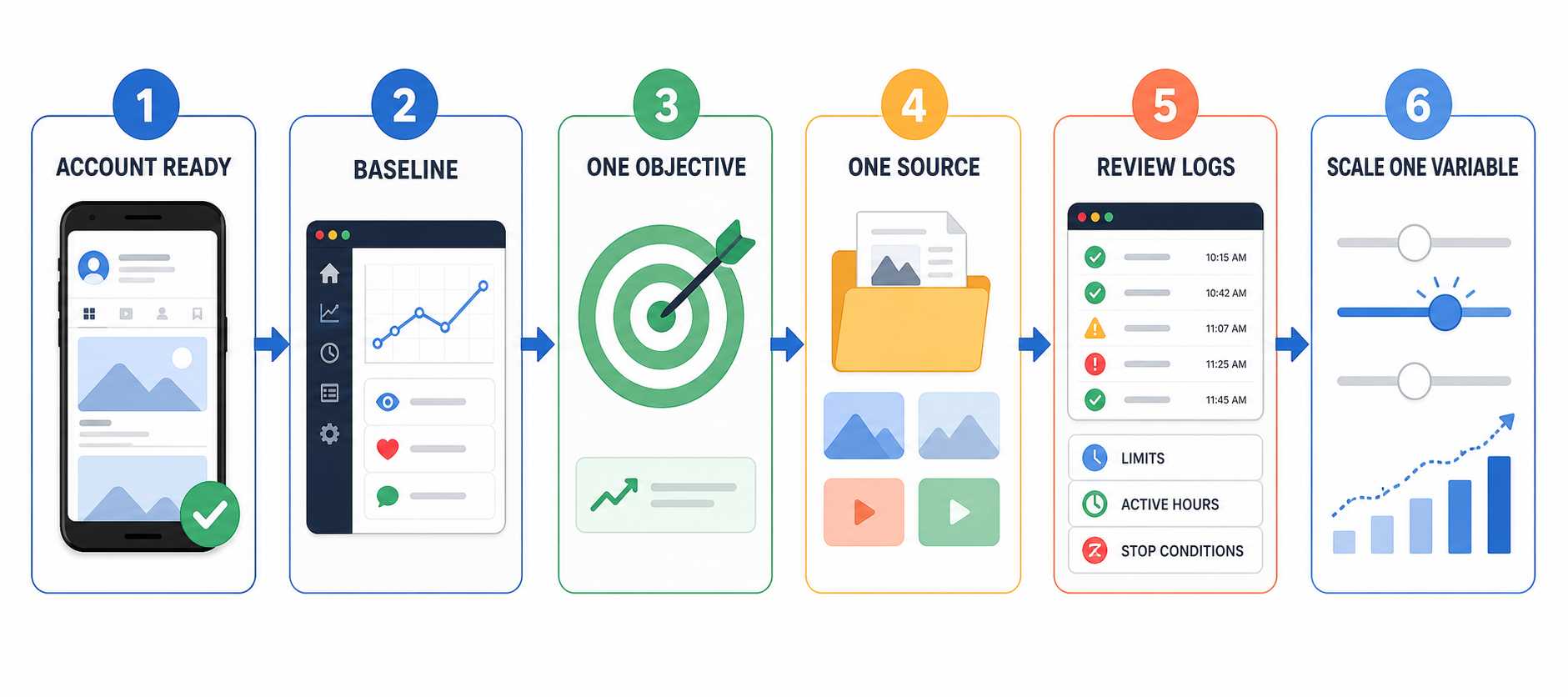
Start With the Account, Not the Tool
Before automation, the account should look worth visiting. Bio, profile image, recent content, highlights, offer, and audience direction should be clear. Automation cannot rescue a profile that looks empty or random.
Record a Seven-Day Baseline
Look at the account’s recent normal activity before choosing limits. Record how often it posts, engages, follows, replies, and receives account prompts. The baseline gives you an account-specific starting point instead of applying the same number to every profile.
Pick One Objective
Do not start with everything. Choose one:
- Light visibility through viewing or likes.
- Targeted awareness through follows.
- Follow-ratio cleanup through unfollow.
- Content cadence through publishing.
- Careful prospecting through a small curated list.
Each objective has different risk. Treat them differently.
Start With One Source
Use one clean source first: a competitor audience, niche creator list, local hashtag, or curated prospect list. Review whether the targets are actually relevant before adding more.
Set Conservative Limits
The first settings should feel boring. Boring is good. Start with one lower-sensitivity action, keep the starting range below the account’s established rhythm, use defined active hours, and avoid running every tool on day one.
Review Logs Before Scaling
Review logs every day, but treat the first three to seven clean days as an observation window rather than a race to increase volume. Were targets relevant? Were there repeated skips? Did one source produce low-quality accounts? Did the workflow stay inside its active hours? Did the resulting profile visits or conversations justify continuing?
Define Stop Conditions in Advance
Decide before launch what should pause a workflow: an action block, an unexpected logout, a verification prompt, repeated failed attempts, or a sudden change in results. When a stop condition appears, pause the affected tool, preserve the logs, review the source and settings, and resume only after the account is stable.
Scale One Variable at a Time
Do not increase actions, add sources, add comments, and add accounts all at once. If something breaks, you will not know why.
In 2026, this is the practical route to social media automation with lower account ban risk: controlled device-native workflows, visible limits, and decisions based on account-level data.
Real Android Phone or Emulator: Which Should You Choose?
Both options keep the workflow inside an Android app environment. The right choice depends on how many accounts you manage and how standardized the operation needs to be.
| Setup | Best fit | Main advantage |
|---|---|---|
| Physical Android phone | Creators, founders, and small teams | Simple, visible setup that is easy to understand and monitor |
| Android emulator | Agencies and technical operators | Repeatable environments, easier scaling, and cleaner separation between client workflows |
For a first account, a physical phone is often the fastest route from setup to a working routine. For an agency, emulators can make training, device naming, account separation, and repeatable deployment easier. SMTasker supports both models, so the operating process can evolve without changing the core device-native approach.
Where SMTasker Fits
SMTasker fits this operating model because it is built around device-native execution. The account runs through an Android phone or emulator, while the marketer controls the workflow from a dashboard.
That matters because serious automation needs more than buttons. It needs operating discipline:
- Which device is this account using?
- Which source is this workflow targeting?
- What are the active hours?
- What is the daily cap?
- Which accounts should be ignored?
- What happened in the logs?
- Did a tool pause?
- Should limits go up, down, or stay the same?
SMTasker is strongest when you use it this way: as a controlled system for repeatable account work. The Android Instagram automation setup is the clearest starting point if you want a real phone workflow. The phone and emulator automation route makes sense when you need more operational flexibility.
The practical recommendation is simple: do not choose automation based on who promises the highest action count. Choose the workflow that gives you the most control over device continuity, pacing, logs, pauses, and account-specific decisions.
That is the workflow SMTasker is trying to make usable.
Red Flags Before You Automate
These are the warning signs I would never ignore:
- The tool asks for repeated fresh logins.
- Every account uses the same proxy or keeps changing proxies.
- There is no clear device identity or session continuity.
- The tool cannot explain whether it uses official API, private API, browser automation, or device-native automation.
- The workflow has no logs.
- The tool retries immediately after blocks.
- Comments are generic or duplicated.
- Sources are broad and random.
- Multiple accounts share identical settings.
- There is no ignore list for clients, partners, competitors, or protected relationships.
- The account has weak content but aggressive engagement settings.
If several of those are true, the problem is not just the tool. The problem is the operating model.
FAQ
What is device-native social media automation?
Device-native social media automation is automation that runs through a real app environment on an Android phone or emulator. The user controls the workflow from a dashboard, but the account activity happens through the device, not only through an API endpoint or browser script.
What is ADB bridge automation for Instagram?
ADB bridge automation for Instagram is a device-level approach where a computer communicates with an Android phone or emulator and coordinates activity through the Instagram app environment. It is different from a private API SDK because it uses the device and app layer rather than directly emulating private network calls.
Is private API automation the same as official API automation?
No. Official API automation uses approved endpoints and permissions. Private API automation imitates mobile or web app API flows that are not part of the public API. Private API tools can be powerful, but they are more fragile because account trust, session state, proxies, challenge flows, rate limits, and endpoint changes all matter.
Is browser automation safer than private API automation?
Not automatically. Browser automation has its own detection surface: browser fingerprints, TLS fingerprints, JavaScript behavior, interaction timing, mouse movement, scrolling, and automation artifacts. It may be useful for some workflows, but it is not a universal safe option.
Can device-native automation reduce account ban risk?
Yes. It reduces structural risk by keeping execution inside a consistent Android app environment and avoiding direct private-request emulation. The strongest results come when that architecture is paired with relevant sources, account-specific limits, active hours, logs, pause controls, and regular human review.
Why does device-native automation help prevent account bans?
It helps because it keeps the account closer to a consistent mobile app environment, reduces reliance on private request emulation, makes pacing easier to control, and gives the marketer logs and pause behavior. It prevents many common operational mistakes, not every possible platform action.
Should I use a real Android phone or emulator?
A real Android phone is usually the simplest starting point for creators and small teams. Emulators are especially useful for agencies and technical operators that want repeatable environments, cleaner client separation, and a setup that can scale.
What does “social media automation without account bans 2026” mean in practice?
It means building a lower-risk operating model rather than chasing an unlimited-action promise. In practice, that combines device-native execution with one account baseline, relevant sources, defined active hours, account-specific limits, visible logs, stop conditions, and gradual scaling based on results.
How should I start?
Start with one account, one device, one clean source, and one lower-sensitivity action. Record the current baseline, define active hours and stop conditions, then review three to seven clean days before adding another action or increasing volume.
Final Takeaway
The interesting question in 2026 is not “can automation look human?” Everyone says that. The better question is “does the automation model reduce the kinds of signals that get accounts restricted?”
Official APIs are clean but limited. Private API SDKs are powerful but fragile. Browser automation is increasingly fingerprinted. SMM panels and bot farms are fake engagement, not real marketing. Device-native automation is different because it keeps execution close to the mobile app environment and gives the operator a practical control layer.
That is why device-native social media automation matters.
When it is used with conservative limits, relevant sources, visible logs, cooldowns, and human review, device-native automation gives marketers a stronger foundation than blind API calls, unstable private sessions, or fake engagement panels. It handles the repeatable execution while the marketer keeps control of strategy, content, targeting, and message quality.
If you are building a lower-risk social media automation workflow in 2026, do not chase the tool that promises the most volume. Build the workflow that gives you the most control.
That is the real advantage of device-native automation, and it is the reason SMTasker is built around Android phones, emulators, and controlled dashboard workflows instead of another opaque growth bot.