Originally published June 5, 2026. Substantially updated October 21, 2026.
LinkedIn profile views can provide useful context about professional visibility and help you research relevant people. They can also be easy to overinterpret. A visit may reflect curiosity, recruiting, a shared discussion, or an accidental selection. It does not establish a buying intention, an invitation to connect, or a guarantee that the visitor will return to your profile.
A practical networking strategy combines a clear profile, appropriate privacy settings, thoughtful research, and relevant follow-up. This guide explains how to interpret the information LinkedIn makes available and use it without treating every visit as a lead. It also separates the availability of an automation feature from the rules and judgment required for its use.
Distinguish visiting a profile from reviewing your visitors
Viewing someone else’s profile is a research action. Reviewing the people who viewed yours is an account insight. These actions are connected through privacy settings, but they serve different purposes. Before planning a workflow, decide whether you are learning about a professional, assessing your own visibility, or evaluating a particular networking effort.
LinkedIn’s profile-viewing visibility guidance describes named viewing, private profile characteristics, and private mode. The information shown to a recipient depends on the viewer’s setting. A visit therefore does not guarantee that the other person will see your name or receive the same notification you saw in another situation.
Open the current visibility settings and read the options before changing them. On the website, these are reached through Settings & Privacy and Visibility; the wording can vary by interface. Choose the mode that fits your legitimate research and privacy needs. Keep that choice separate from assumptions about how much attention a visit might generate.
Understand what viewer information can show
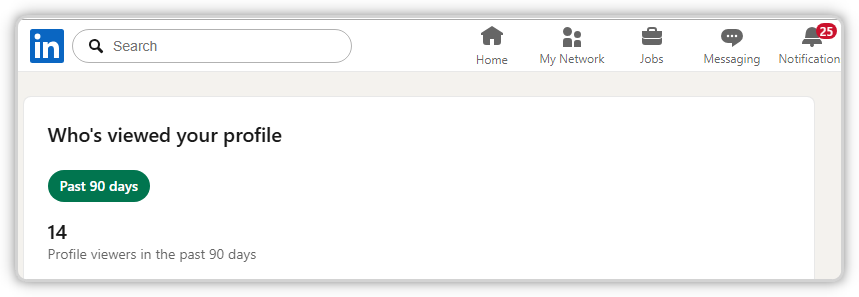
Inspect the visitor and profile-insight information actually available to your account. Plans, activity, and the relevant settings can affect the detail and period shown. Avoid designing a reporting process around a screenshot from another subscription or an old guide that assumes every member has the same history.
LinkedIn states that a Premium subscription does not reveal the names of people who choose complete private mode. Respect that boundary rather than relying on a service that claims to identify all anonymous visitors. The available data can suggest areas for investigation, but unavailable information should remain an acknowledged limit in your interpretation.
Distinguish viewer details from aggregate activity measures. Several visible visits do not necessarily represent several suitable prospects, and a change in profile activity does not identify its cause. Record what the screen actually reports and the period it covers. This keeps later comparisons grounded in the information the platform provided.
Give your profile a clear professional purpose
Before seeking more attention, decide what the intended visitor should understand about you. State your current role, the people or problems you work with, and the relevant experience behind that work. A specific explanation is easier to evaluate than a headline filled with broad claims about growth, success, or leadership.
Review the profile as someone arriving from a useful comment or shared resource. Does the headline match the work described in the About section? Do the examples support the stated expertise? Is the next step appropriate for the visitor’s likely question? Consistency makes it easier for a relevant person to decide whether to continue the conversation.
Keep evidence honest and current. Describe a real responsibility or project with suitable context and permission. Remove obsolete offers, broken destinations, and exaggerated claims. A professional profile should help someone understand the fit, including relevant boundaries, rather than attempting to make every visitor believe you are the right contact for everything.
Research people for a specific reason
Choose a clear research purpose, such as understanding a potential partner’s work, preparing for a meeting, identifying a relevant speaker, or checking the background behind a professional contribution. Read enough context to understand the person’s role and perspective. A profile visit becomes useful when it informs a real decision or conversation.
Use public professional information appropriately and keep only what the task requires. Distinguish a person’s current statements from your inference about their priorities. A job title can help orient the research, but it cannot tell you exactly what the person is buying, responsible for, or interested in discussing at that moment.
Maintain a small research record if several teammates are involved. Include the source, relevant professional context, and reason for a potential follow-up. Avoid building a large collection of personal details without a clear purpose. A focused record helps the team act thoughtfully and reduces the chance of several people independently approaching the same person with unrelated messages.
Interpret a visit in the surrounding context
Ask what else happened around the time of the visit. You may have contributed to a discussion, published a useful resource, attended an event, or been mentioned by someone else. These possibilities can suggest where professional interest came from, but the visit alone cannot confirm which route the person followed.
Review patterns over a sensible period instead of reacting to every individual change. If more people from a relevant professional area appear after a focused content series, that can justify further investigation. It still does not establish that the series caused each visit or that the visitors want a commercial approach.
Use the insight to improve clarity. If people repeatedly ask what you actually do after visiting the profile, the description may need work. If the wrong audience keeps arriving, review the subjects and language you publish. A useful response to profile-view data may be a better explanation rather than more outreach.
Follow up when there is a genuine conversational reason
Choose a reason grounded in shared professional context. You might refer to a discussion the person contributed to, a question you can usefully answer, or an event where you met. Keep the message proportionate and specific. Avoid announcing that you monitored their visit or treating the visit as permission for a sales sequence.
A hypothetical workshop organizer could follow up with a professional who asked a relevant question during an event, offering the specific resource discussed. The reason is the exchange and the useful next step. A profile view may help identify the appropriate contact, but it is not the entire justification for the message.
Respect a lack of response or an explicit decline. Keep the team’s follow-up record clear so someone else does not restart the same approach as if nothing happened. A relevant connection is more useful than a growing count of people who received messages they did not understand or want.
Use public contributions to make your expertise discoverable
Publish or contribute material that helps the intended professional audience. A documented example, a clear explanation of a tradeoff, or a thoughtful response to a question gives people a reason to explore your background. The profile then provides context for work they have already found useful.
The comment-section guide explains how to select conversations and add substantive replies. Bring the same discipline to LinkedIn: read the surrounding discussion, contribute a specific point, and keep your relationship to any product clear. A promotional line attached to generic praise provides little professional context.
Connect recurring questions with maintained resources. If an explanation needs more depth, a focused article or demonstration can help. Give interested readers a relevant destination while keeping the contribution useful on its own. This creates a clearer reason for returning to your work than relying on profile visits to provoke curiosity without substance.
Evaluate automation against the actual rules
LinkedIn’s automated-activity guidance states that it does not allow third-party software or browser extensions that scrape or automate activity on its website. Review the current rules and the proposed method before using a tool. A provider’s technical capability is a separate question from platform permission.
Randomized delays, low daily counts, and realistic-looking activity do not establish compliance or guarantee that an account will avoid restrictions. Do not build a strategy around claims that ordinary-looking automated browsing is inherently safe. If an account receives a restriction, follow the actual notification and official review route rather than continuing the same activity through another setup.
The SMTasker LinkedIn hub describes available product workflows. Evaluate the exact action and method alongside LinkedIn’s requirements, and keep responsibility for the account’s decisions explicit. Useful internal assistance with planning or review should not be confused with permission to automate every public interaction.
Measure professional progress separately from profile activity
Choose outcomes that fit the networking purpose: relevant conversations, useful introductions, suitable event participation, or qualified inquiries where appropriate. Record how the opportunity actually developed rather than automatically assigning it to the most recent profile visit. A contact can encounter your work through several routes before responding.
Keep a simple review of time spent, relevance of the exchanges, and the next steps completed. If profile visits rise while meaningful conversations remain unchanged, inspect the profile and content proposition. If the right discussions are happening with a modest audience, more browsing volume may not be the most useful investment.
Run a focused profile and networking review
Start with one audience and one professional objective. Confirm privacy settings, improve the profile’s explanation, select a small set of relevant discussions, and follow up only where there is an appropriate reason. Review the quality of the resulting interactions after a defined period, noting which assumptions proved useful and which remained uncertain.
LinkedIn profile views are one piece of context in that process. Use them to ask better questions, respect the information the platform does and does not reveal, and make your professional contribution easier to understand. Durable networking grows from relevance, clarity, and follow-through that another person can actually find useful.