Turn your ad results into a clearer next test
Ad Creative Performance Analyzer
Compare the cost, click and conversion outcomes of your creatives. Keep audience slices, reporting gaps and reference differences visible instead of choosing an ad by one headline number.
A lower number still needs context
Which creative deserves a closer look?
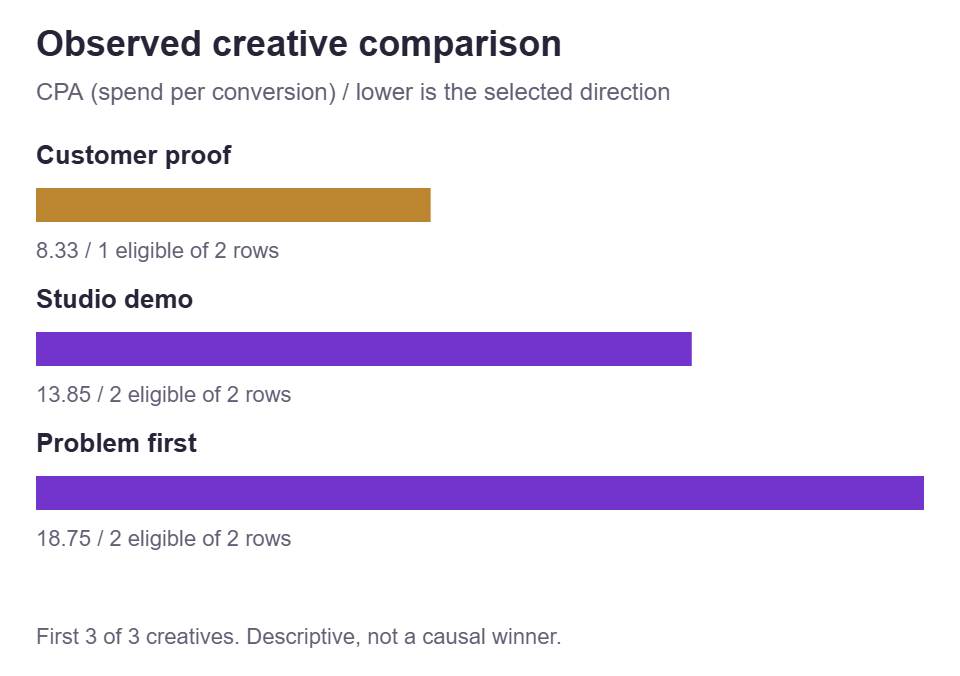
Customer proof has the lowest eligible CPA, but one of its rows has no conversion measurement. Inspect that gap and compare the same audience slice before planning a change.
Separate delivery, clicks and outcomes
Build your creative review
Start with the fictional example, add records manually, or prepare a CSV with the local template. Keep one account, currency, period and attribution definition in each project.
Full report exports retain every raw project row, even outside the selected filters. Account labels, attribution settings and next-test notes are included in copy, CSV and PDF attachments. Inspect them before sharing.
Reporting context and records
Import prepared records from CSV
This is our eight-column input template, not an automatic importer of native ad-platform exports. A valid file replaces the dataset after confirmation; pasting requires Replace records.
Your creative review
Selected objective by creative
This table retains all selected creatives. The chart shows the first five in descriptive objective order. Amber bars indicate incomplete cohorts, not an inferior creative.
| Creative | Objective and coverage | Reference difference |
|---|
Audit the selected ratio
A favorable number is a question to investigate, not a proven winner. Costs and rates use eligible rows for each metric; missing or zero-denominator rows can change which records contribute.
Delivery, clicks and conversions side by side
Each cell gives its own eligible numerator, denominator and record coverage. Metrics can use different cohorts. Values are ratios of sums, not averages of row percentages. Conversions per 100 supplied clicks is not a verified matched-person conversion rate.
| Creative | CTR | CPC | CPM | Conversions / clicks | CPA |
|---|
Questions for the next review
All saved project records
This list keeps every source row, including rows excluded by filters. Edit a correction on its original row rather than importing a duplicate total.
| Record ID | Creative | Audience | Placement | Spend | Impressions | Clicks | Conversions | Actions |
|---|
Processing stays in your browser. No API, login, upload, scraping, budget changes, ad creation or autosave. Save project and full reports contain all raw records and notes, even outside filters. Report CSV is not an input template; JSON is the editable backup. Ordinary website analytics are separate from local tool processing.
How the comparison is built
Compatible records before creative conclusions
Keep the right slice
Filter audience and placement while preserving the complete working dataset.
Use weighted denominators
Sum eligible inputs for each metric; retain unknowns and zero-denominator exclusions.
Plan a focused next test
Compare with a reference and write down the next creative question.
Set one decision and one reporting context
Start with a decision that the available measurements can support. You may want to compare the reported cost per purchase for three product demonstrations, or inspect which opening received more supplied clicks per impression. Those are different questions, so choose the primary objective before reading the ranking. The analyzer groups your saved records by creative label and calculates the selected ratio for each group. It does not inspect the actual image, video, script, or audience delivery. A strong result beside a creative name is an observed relationship in your records, not proof that a particular visual element caused the difference.
Keep one account, currency, event definition, and reporting convention within a project. Instagram, TikTok, YouTube, Facebook, LinkedIn, Threads, X, Snapchat, and Reddit are available paid-report contexts. Selecting one describes the records; it does not import a native report or make counters from different platforms equivalent. Choose USD, EUR, or GBP to label the supplied money without currency conversion. Enter the reporting start and end dates, then describe the conversion event and attribution settings clearly. The dates declare a window only. They cannot reconstruct earlier snapshots, give recent observations more time to mature, or verify how your source assigned conversion credit.
For a useful first review, limit the question to a recognizable offer and audience situation. Comparing a new-customer demonstration with a returning-customer reminder may describe two different jobs rather than two competing creative ideas. Keep that difference in the audience labels and examine it before interpreting the combined result. The fair creative comparison guide shows how audience mix can change the apparent order. If the available records cannot answer the question you started with, write a narrower conclusion. Identifying a collection problem or an unresolved comparison is a valid outcome and often a better next step than naming a winner.
Build records that do not count delivery twice
Each row needs a unique record ID, creative label, audience label, placement label, and whichever of spend, impressions, clicks, and conversions you actually know. One row can represent a creative’s Feed delivery to a prospecting audience during the declared window. Another can represent its Stories delivery during that same window if those slices do not overlap. Do not add a total row alongside the placement rows that already make up that total. The analyzer cannot recognize that relationship from names, so it would add the same delivery twice. Choose one consistent level of detail and reconcile its totals against your source before importing it.
Use labels that distinguish genuine variants while keeping repeated observations together. Studio demo and studio demo group together after the tool’s spelling normalization, but Studio demo opening B remains a separate creative. Grouping applies Unicode compatibility normalization, trimming, lowercase conversion, and final Unicode normalization; it is not visual or semantic matching. The first spelling is retained for display. Record IDs follow a separate rule: they are trimmed and normalized but remain case-sensitive and unique throughout the project. If you accidentally give the same asset two different meaningful names, correct your records deliberately rather than expecting the tool to recognize the footage.
A blank numeric field means unknown, while zero means a known measurement of zero. Spend accepts up to two decimal places, impressions and clicks are whole counts, and conversions can have up to six decimal places for supplied fractional attribution. Keep plain nonnegative numbers, without currency symbols, thousands separators, or scientific notation in manual and CSV entries. The tool does not require conversions to be no greater than clicks, because these fields are not guaranteed to track one matched sequence of people. It also retains completely unmeasured rows. These are useful placeholders, but they cannot provide evidence for a ratio until its required fields are known.
Read five ratios with their actual denominators
CTR is one hundred times supplied clicks divided by impressions. CPC is supplied spend divided by clicks, and CPM is one thousand times spend divided by impressions. CVR is one hundred times conversions divided by supplied clicks. CPA is spend divided by conversions. For ranking, higher CTR and CVR come first, while lower CPC, CPM, and CPA come first. These directions belong to the chosen objective, not to a universal definition of business success. A low CPM can accompany weak conversion results, and a high CTR can accompany expensive acquisitions. The analyzer does not blend the columns into a hidden overall quality score.
Every ratio requires both of its fields to be known and its denominator to be positive on a row. The tool then sums the numerator and denominator from only those eligible rows before dividing. It does not average the row percentages or average the displayed creative values. For example, a row with ten clicks from one hundred impressions has ten percent CTR, while another with ninety clicks from nine thousand impressions has one percent. Together their CTR is one hundred divided by 9,100 times one hundred, approximately 1.10 percent, not 5.50 percent. Their different delivery volumes are preserved by the ratio of sums.
Check the click definition before using any click-based result. All clicks, destination clicks, and other source-specific action counts should not be swapped midway through a review. Likewise, a supplied purchase event must not become a registration event simply because both appear under conversions in separate reports. This tool’s CVR always means conversions per one hundred supplied clicks; it is not a promise to match every native column called CVR. Action ratios can exceed one hundred without representing more than all unique people. Keep event definitions and attribution compatibility under human review. The clicks versus conversions guide develops that distinction further.
Check the six-row example before drawing a conclusion
The fictional example gives Studio demo two prospecting rows. Feed has spend of 120, 10,000 impressions, 200 clicks, and ten conversions; Stories has 60, 5,000, seventy-five, and three. The group’s totals are therefore 180 spend, 15,000 impressions, 275 clicks, and thirteen conversions. Its CTR is about 1.83 percent, CPC about 0.65, and CPA about 13.85 in the selected currency. Problem first also has two prospecting rows: Feed records 100, 10,000, 300, and six, while Stories records fifty, 5,000, 120, and two. These numbers illustrate calculation, not expected performance for an industry or a suggested campaign budget.
Problem first totals 150 spend, 15,000 impressions, 420 clicks, and eight conversions. Its CTR is 2.80 percent and CPC is approximately 0.36, both more favorable than Studio demo on those selected measures. Its CPA, however, is 18.75, compared with approximately 13.85 for Studio demo. Its CVR is about 1.90 percent, compared with about 4.73 percent for Studio demo. Changing the ranking objective can therefore change the order without changing a single observation. The combination of higher CTR and lower CVR is a reason to inspect audience, destination, and event context, not a diagnosis that the opening attracted the wrong people.
Customer proof has a prospecting Feed row with 100 spend, 8,000 impressions, 120 clicks, and twelve conversions. Its retargeting Stories row has forty spend and forty clicks, but unknown impressions and conversions. Known spend totals 140, yet its CPA uses only the Feed row: 100 divided by twelve, approximately 8.33. Its CPC uses both rows and equals 140 divided by 160, or 0.875. Overall CPA uses five eligible rows: 430 divided by thirty-three, approximately 13.03. Overall CTR uses 815 clicks and 38,000 impressions, approximately 2.14 percent. The apparently attractive Customer proof CPA must stay attached to its one-eligible-row, one-missing-row coverage.
Treat missing values and zero denominators separately
Coverage is calculated independently for every metric. A row can contribute to CPC when spend and clicks are known, yet remain missing for CTR when impressions are unknown. A group’s known-field totals answer another question: they add every known value for that field, including values on rows that are ineligible for a particular ratio. That is why Customer proof can show known spend of 140 while its CPA numerator is only 100. Neither number is an error. The important task is to distinguish the complete field inventory from the narrower paired observations behind each ratio, rather than assuming every column summarizes identical delivery.
A known zero denominator is excluded from the relevant ratio, including its numerator. Suppose one row has spend of forty and zero conversions, while another has spend of sixty and three conversions. The displayed eligible-row CPA is sixty divided by three, or twenty, with one zero-denominator row excluded. It is not one hundred divided by three, and it is not an infinite CPA assigned to the first row. All known spend still totals one hundred. This rule can make the displayed CPA look more favorable than an all-spend calculation, so read the zero-denominator count and known spend before using the result in a decision.
A zero numerator behaves differently when the denominator is positive. Zero clicks with positive impressions gives zero CTR; zero spend with positive conversions gives zero CPA. A group without any eligible rows has an unavailable value, not a fabricated zero, and remains visible behind groups with values. The overall metric follows the same eligibility rules across selected rows. It is not an average of the group’s displayed ratios. When coverage is incomplete or zero-denominator exclusions are important, describe those facts in the conclusion. Do not remove a difficult row merely to make a metric appear complete; repair it from the source or retain the limitation honestly.
Use filters, references, and review prompts carefully
Audience and placement filters select saved rows; they do not adjust the remaining records to resemble the excluded ones. Filtering the example to Prospecting removes the incomplete Customer proof Stories row. Customer proof then has complete measurements within that selected scope, but it still received different delivery volumes from the other creatives. A Feed-only review and an all-placement review answer different questions. Keep the selected audience, placement, reporting window, and objective beside any result you quote. When you change a filter, review the new overall coverage and creative inventory before comparing the revised ranking with an earlier screenshot or downloaded report.
Choose a named reference when you want a consistent comparison point. The absolute difference is the creative’s objective value minus the reference value. For percentage objectives, that difference is in percentage points; the relative difference is one hundred times the absolute difference divided by a positive reference value. In the example, Problem first CPA is about 4.90 higher than Studio demo, approximately 35.42 percent higher. Lower is preferred for CPA, so that is not an improvement on the selected objective. If the reference value is zero, relative difference is unavailable. If a filter excludes the requested reference, comparison stays unavailable rather than silently adopting another creative.
The Impression review threshold and Conversion review threshold controls are review prompts, not sample-size recommendations or statistical tests. A creative meets a prompt only when every one of its selected rows has that field known and its summed count reaches your setting. The example’s Customer proof cannot meet the conversions prompt with its missing Stories conversion value, even though the known Feed value is twelve. Missing impressions similarly prevent its impression prompt from passing. Reaching either threshold does not guarantee adequate evidence or equal delivery, and groups below the settings remain available for inspection. Use these prompts to spot records needing attention, while planning any formal experiment separately from this descriptive ranking.
Keep the editable project and full review exports distinct
For batch input, adapt the exact eight-column template: record_id, creative, audience, placement, spend, impressions, clicks, and conversions. Header order can vary, but extra or repeated headers are not accepted. Quote CSV fields when their text contains commas, and keep all labels on a single line. CSV quoting does not override field validation. A native advertising export needs deliberate mapping into these fields; selecting a platform does not perform that mapping. The complete candidate import is validated, so a duplicate ID or an invalid last row rejects the replacement instead of saving an earlier portion. Review your source before retrying. Do not replace unknown measurements with zeros just to get a file accepted.
Save project produces the editable JSON backup, while Open project restores that project format. Keep it when you want to resume the settings, raw rows, reference, filters, and next-test note later. The report CSV is a separate review document and is not the input template. Copy results and the PDF also describe the review rather than retrieving fresh platform measurements. The tool does not maintain automatic saved history, so download the editable project deliberately before closing the page or making a substantial correction. A useful filename identifies the account alias, reporting window, and version without exposing more private detail than your storage location requires.
Every full review can include private material beyond the rows currently visible under filters. Copy results, the report CSV, and the PDF retain the complete project context and raw settings, including excluded rows, account labels, and the next-test note. The PDF’s visible summary covers up to six creative groups and attaches the full project JSON and full report CSV. That is a bounded presentation, not a redacted export. For wider sharing, create a separate project containing only appropriate records and neutral labels, then inspect the output and attachments. Browser-only calculation avoids account connection and source upload, but it does not make a downloaded report anonymous.
Carry one useful question into the next creative brief
Write a conclusion that includes both the observation and its boundary. For the example, you could say that Problem first received more clicks per impression than Studio demo in the supplied prospecting rows, but had higher reported cost per conversion. Customer proof had the lowest eligible-row CPA with incomplete all-placement coverage. That summary preserves the trade-off and the missingness without implying a proven creative effect. It does not establish profitability, forecast future acquisitions, or demonstrate fatigue from one reporting window. The tool contains no revenue or margin model, no statistical confidence result, and no automatic pause, spending, or campaign action.
Make the next-test note specific enough for another person to understand. Record the proposed creative difference, primary objective, event definition, audience and placement boundaries, collection timing, and what must remain unchanged. A practical follow-up might compare two openings for the same product explanation while collecting complete conversion data for both. Plan that work through the appropriate advertising process outside this tool. Use the Instagram creative guide or TikTok creative guide for platform-specific collection cautions. A clean manual record supports discussion, but it does not turn an ordinary reporting comparison into a randomized test.
When the lesson also suggests an organic content idea, create a separate brief for that work. A clearer product demonstration or a better answer to a customer question may be worth exploring in supported organic publishing routines, without expecting paid performance to carry over unchanged. SMTasker supports platform-specific organic account workflows; Skye and permissioned MCP can assist with available workspace actions. Those capabilities do not connect this analyzer to ad reporting or manage paid campaigns, bidding, or budgets. Explore supported SMTasker workflows for the operational work, and return to all free tools for related planning. Keep the paid-review evidence and the organic brief distinct.
Use the right reporting context
Platform and comparison guides
Choose a paid-media context or learn how to keep creative comparisons and click-to-conversion interpretation fair.
Instagram Ad Creatives
Compare a desk-lamp brand’s room reveal, assembly close-up, and owner example across Feed and Reels, with incomplete conversion coverage.
Read the guideTikTok Ad Creatives
Review three lunch-box demonstrations, distinguish destination clicks from broader actions, and inspect a zero-conversion CPA exclusion.
Read the guideYouTube Ad Creative Analysis
Compare two workshop video cuts across in-stream and Shorts records, separating click response, attributed actions, and incomplete conversion coverage.
Read the guideFacebook Ad Creative Analysis
Review a flat-pack shelving campaign where an offer gets more clicks but assembly proof has a lower recorded purchase cost, with Feed and Reels kept visible.
Read the guideLinkedIn Ad Creative Analysis
Compare a checklist and a product tour for a fictional training webinar, keeping audience mix, website registrations, form leads, and lead quality separate.
Read the guideThreads Ad Creative Analysis
Compare a pottery kit demonstration with a shelf reveal, separate Threads delivery from mixed placements, and keep missing click data visible.
Read the guideX Ad Creative Analysis
Review a bookkeeping course campaign, separate promoted delivery from organic activity, and explain why a lower CPC can sit beside a higher CPA.
Read the guideSnapchat Ad Creative Analysis
Compare language app creatives, distinguish clicks from engaged views and loaded pages, and retain zero-click conversion rows without inventing a funnel.
Read the guideReddit Ad Creative Analysis
Review storage product creatives across Feed and Conversations, keep attribution windows compatible, and separate paid clicks from community reactions.
Read the guideFair Creative Comparison
Work through an audience-mix reversal, weighted ratios, missing measurements, and reference differences before writing the next-test brief.
Read the guideClicks vs Conversions
Follow a ceramics-class example to separate CTR, CPC, CVR, and CPA, then investigate disagreements without inventing a matched funnel or a causal winner.
Read the guideQuestions about creative performance
Does this connect to my advertising account?
No. It calculates from manually supplied records or files in the tool format. Platform selection labels the paid-report context without retrieving analytics or managing ads.
Why can CPA spend differ from known spend?
CPA uses only rows with known spend and positive known conversions. Known spend also includes rows with missing or zero conversions, which remain visible in coverage but do not enter that ratio.
Does CVR match every platform conversion-rate column?
No. Here CVR always means conversions per one hundred supplied clicks. Check the source click definition, conversion event, attribution settings, and reporting timing before entry.
Do the minimum counts establish a reliable winner?
No. They are user-selected review prompts. They do not calculate significance, choose a sufficient sample, control delivery, or establish a causal creative effect.
Are filtered-out rows removed from reports?
No. Full review exports retain all raw project rows and settings. The PDF also attaches the complete project JSON and report CSV. Prepare a separate reduced project before sharing sensitive material.
A separate home for organic account work
Explore supported organic workflows
Use SMTasker for supported organic publishing and account routines. Paid-ad setup, reporting, and budget decisions remain outside this analyzer and those workflows.