Keep the next conversation in view
Social Media Outreach Results Tracker
Track contact references, replies, outcomes and due follow-ups in one local ledger. See which results are known, keep repeat touches out of your contact denominator, and prepare a useful handoff.
Replies and positive replies are not the same
Five contacted references. Three replies. One positive.
Fictional example: three replies from four references with known reply status gives 75%. A fifth contacted reference has unknown tracking, so coverage is shown separately.
One reference, one saved record
Review the cohort and the next follow-up
Use stable internal aliases, not message bodies. Campaign labels and reference matching are your own records, not automatic platform identity verification.
Save project includes every raw record, including contacts outside the selected report. Keep project files private. Summary reports omit contact references, but account and campaign names may still be private.
Scope and contact entry
Reports use this first-contact cohort and filter. The working view may show aliases; Report detail controls copied/CSV/PDF reports, not the saved project. Dates are calendar days, not time-zone-adjusted timestamps.
Import contact records from CSV
Paste requires Replace records. Opening a valid file replaces the saved-record list after asking before unsaved replacement. The template has fictional rows, not report settings. Duplicate references are rejected, not merged.
Your outreach review
Campaign review
| Campaign and coverage | Reply rate | Positive rate |
|---|
Follow-ups due in this cohort
| Reference | Campaign | Scheduled | Due state |
|---|
No open follow-up is due in this selected contacted cohort.
Rows worth a review
The queue follows your Open, Paused and Closed choices. Negative replies or bookings are not silently removed from an explicitly open schedule; review flags help you decide what to change.
All saved project records
All campaigns are shown here, including uncontacted and outside-cohort records. The review and report filter does not delete or hide them from your saved project.
| Reference | Campaign | First contact | Reply | Outcomes | Next follow-up | State | Actions |
|---|
Processing stays in this browser: no upload, login, sending, background monitoring or autosave. Summary reports omit references and row-level data; Include contact references adds only eligible filtered-cohort rows. Project JSON is different: it retains the complete ledger. Report CSV/JSON attachments are not a project backup or input template.
How the review is built
Count contacts, preserve unknowns, review the next task
Keep references distinct
Record repeated touches against the same stable alias and one primary campaign.
Show tracking coverage
Separate a tracked no reply from an unknown reply status before reading a rate.
Use dates as a work queue
Review open scheduled follow-ups in the selected cohort and inspect unusual status combinations.
Start with a contact cohort, not a message total
An outreach review becomes useful when it identifies the contacts under discussion. A list of messages cannot answer that question by itself: one contact may receive an introduction, a clarification, and a later reminder. This tracker keeps one record for that contact reference and treats those activities as touches, not three newly contacted people. Begin with a specific operational question, such as which creator partnership contacts have a documented reply or which open records need a review today. The result describes the ledger you supply. It does not discover recipients, inspect conversations, verify identities, or establish that a campaign caused a business outcome.
Set Platform for the context of your own records, then enter an Account label that identifies the working account without exposing unnecessary personal information. Instagram, TikTok, YouTube, Facebook, LinkedIn, Threads, X, Snapchat, and Reddit are nine supported ledger contexts. Choosing one does not imply a native private-message feature, a connection to that service, or a matching SMTasker action. A YouTube project can describe creator contact handled through public comments and separately maintained correspondence. Keep unlike collection methods separate in your supporting notes so a platform label does not conceal the actual route by which a reply was observed and recorded.
Choose Cohort start and Cohort end to include contacts whose known First contact falls inside that inclusive interval. As of date declares the snapshot cutoff and must be on or after the cohort end. Campaign filter narrows that eligible population further. Saved prospects with no first-contact date and contacts first approached outside the interval remain in the project, but they do not enter the rates or due queue. Aggregate scope counts explain those exclusions without listing their references in a report. This distinction lets you retain a useful working list while reviewing a precisely described contacted group instead of every record ever collected.
Give each reference one place in the project
Use Contact reference as a stable internal alias, not a place for message bodies, email addresses, or unnecessary profile details. Each exact reference can appear only once across the entire project, including across campaigns. Leading and trailing space is removed and Unicode text is normalized to NFC; case remains significant. Therefore Studio17 and studio17 are different references, even if your team intended one person. The tool does not resolve that identity question. Agree on a naming convention before entering records and maintain the identity mapping separately where authorized. A short alias makes later editing easier and reduces disclosure when references are deliberately included in a report.
Assign one primary Campaign to each record. If a contact later discusses another initiative, decide which primary grouping this project should retain rather than adding a duplicate row to make both campaigns look larger. Campaign names ignore case for grouping after trimming and normalization, while the first display spelling is retained. Contact references do not use that case-insensitive rule. Keep campaign names descriptive enough to distinguish actual work, such as Creator partnerships and Local collaborations, without embedding a private briefing in the label. The campaign table summarizes the same eligible contacts under that single grouping; it is not a multi-touch attribution model or proof of exclusive campaign influence.
Record First contact when the initial outreach actually happened, Last touch when your latest counted activity happened, and Touch count when that total is known. A repeated follow-up updates the existing record instead of creating another contact. Leave an unavailable touch total blank; the report separates known and unknown touch counts. A prospect not yet approached may remain without First contact, with no activity dates or affirmative outcomes. Its scheduling date can be kept for planning, but it will not become a due contacted record. Use Add contact for a new alias and Update contact when revising the saved record you selected to edit.
Separate a tracked silence from a tracking gap
Reply status distinguishes unknown, none, neutral, positive, and negative. Unknown means the tracking state is unavailable. None means you have tracked the record and have no reply recorded yet. These are different observations, not interchangeable ways to leave a field unfinished. Neutral, positive, and negative count as replies and need a Reply date. A tracked no-reply record does not have a reply date, and neither does an unknown record. Agree on the meaning of sentiment before reviewing results: asking a procedural question may be neutral, expressing relevant interest may be positive, and declining may be negative. The tool cannot interpret the conversation for you.
Reply rate is replied contacts divided by contacts with a known reply status, multiplied by one hundred. Positive reply rate uses positive contacts over that same known-status denominator. Positive share instead divides positive contacts by all replied contacts. Reply coverage reports known reply statuses divided by all eligible contacts. Read those four measures together. A high observed reply rate with incomplete coverage is not the reply rate of an entirely checked cohort. When a denominator is zero, its rate is unavailable rather than automatically zero percent. A real zero rate requires a positive known denominator and a known numerator of zero, which is a narrower and useful statement.
Lead status and Booking status are separate yes, no, or unknown observations with their own coverage. Their rates divide affirmative outcomes by the corresponding known outcome statuses, not by reply totals. A lead without a logged reply or a booking without a recorded lead can be valid, although each deserves a review flag. Neither outcome is forced into a sequential funnel. Lead recorded on and Booking recorded on describe the dates those outcomes were recorded; the booking field is not an appointment date. Keep the qualification rule outside the ledger explicit so two reviewers do not silently apply different meanings to the same affirmative lead status.
Reproduce the six-record fictional example
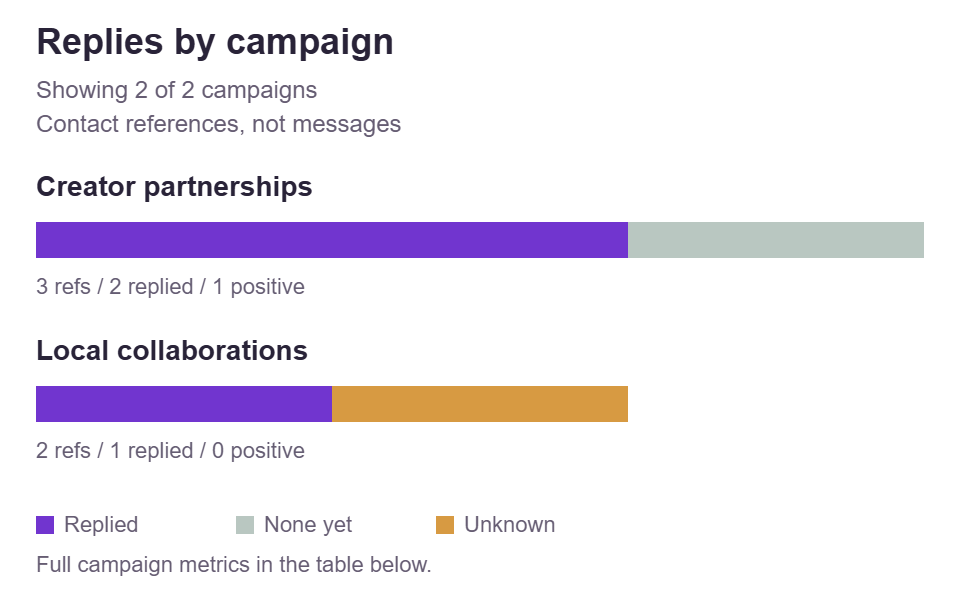
Load example supplies Fictional studio with As of date 2026-11-10 and a cohort from 2026-11-01 through 2026-11-07. In Creator partnerships, c001 starts on November 2, has three touches through November 6, a positive reply on November 5, a lead recorded that day, and a booking recorded November 7; it is closed. Contact c002 starts November 3, has two touches through November 5 and a neutral reply November 4, and stays open with a November 9 follow-up. Contact c003 starts November 5, has one touch, a tracked no-reply status, and an open follow-up on November 10. These are invented teaching records, not performance targets.
The Local collaborations records complete the example. Contact c004 starts November 1, has two touches through November 4, a negative reply November 3, and a November 8 follow-up, but its state is paused. Contact c005 starts November 6 with unknown Last touch, Touch count, reply, lead, and booking observations; it remains open with a November 7 follow-up. Contact c006 has not been contacted, has no activity dates or known outcomes, and has an open November 10 scheduling date. The first five records qualify for the contacted cohort. The sixth contributes to the uncontacted scope count and uncontacted scheduling count, not to a reply denominator or contacted due item.
Four of the five eligible contacts have known reply statuses and three replied. The example therefore gives 75 percent reply rate, 25 percent positive reply rate, approximately 33.33 percent positive share, and 80 percent reply coverage. Lead and booking rates are each one divided by four known statuses, or 25 percent, with 80 percent coverage each. Eight touches are known across four contacts; one eligible touch count is unknown. The due queue contains c005, c002, and c003, in that date order: two overdue and one due today. Only c005 has the missing-last-touch flag. Contact ages span four through nine calendar days at the cutoff.
Treat the cutoff as a snapshot boundary
All dates are day-only business-calendar values, written as YYYY-MM-DD. They are not timestamps and do not convert a conversation into a time-zone history. First contact establishes cohort membership, while As of date limits every recorded activity date, including last touch, reply, lead, and booking observations. Next follow-up may be later because it is a plan rather than completed activity. Keep the cohort start no later than the cohort end and the cohort end no later than the cutoff. An explicit calendar boundary makes the report reproducible without implying that a contact approached yesterday has had as long to answer as one approached last week.
Changing As of date does not reconstruct an earlier version of the ledger. If a current record contains a reply dated November 12, moving the cutoff to November 10 cannot infer what that record looked like two days earlier. Future activity is rejected at the earlier cutoff instead of silently removed or rewritten as no reply. Preserve separately saved project versions when you need genuine historical snapshots. Those versions document what you recorded at each review, rather than a history manufactured from today’s statuses. When correcting an erroneous date, use the evidence that supports the correction; do not move activity merely to satisfy a preferred reporting window.
The age range shows calendar days between eligible first contacts and the cutoff. A broad range warns that contacts have unequal opportunity to produce an observed response, even when they share one cohort interval. Campaign comparisons need the same care. A campaign concentrated at the beginning of the week and another concentrated at the end should not be described as equal-window experiments. Inspect campaign counts, coverage, and first-contact timing before discussing differences. This tool offers observed summaries, not significance tests, winner rankings, or normalized response predictions. Set your next review date deliberately and explain which additional observations you expect to check by then.
Use the due queue as a human review list
A due item must belong to the currently eligible contacted cohort, have Record state set to open, and have a known Next follow-up on or before As of date. Due today means zero calendar days late; an earlier scheduling date is overdue. Sorting uses the follow-up date first and the exact reference as the tie-breaker. Paused and closed records stay out of the queue, even if their old schedule dates remain in the project. Uncontacted prospects and contacts outside the chosen cohort also stay out. This is a review list assembled from your declarations, not a background reminder service, an instruction to send, or evidence of a missed conversation.
A negative reply or recorded booking does not automatically exclude an explicitly open scheduled record. Instead, the tracker flags that combination for judgment. A booked creator may still need a logistics check; someone who declined may need the schedule removed rather than another approach. Review the reason in the authorized source before acting. If there is no appropriate next task, change the state or clear the scheduling date. Keep the difference between outcome and workflow state intact: positive or negative describes the recorded reply, while open, paused, and closed describe how you want the ledger to handle further scheduled review of that record.
Other flags highlight unknown Last touch, a lead recorded without a reply, a booking without an affirmative lead, and a follow-up scheduled before the last touch. A flag is a prompt to inspect, not a proven mistake or a reason for automatic correction. One contact can produce several flag occurrences, so the number of flagged contacts and the number of occurrences answer different questions. Days since touch remains unavailable when Last touch is unknown; it is not treated as zero. Resolve the underlying fact or leave the uncertainty visible. A tidy-looking report is less valuable than a truthful one with a clearly owned review task.
Choose report detail before sharing anything
Summary only reports aggregate context, scope, counts, rates, campaign summaries, follow-up date totals, and flag totals. They omit contact references, raw record rows, and row-level activity details from copied results, review CSV, PDF, and report attachments. Account and campaign labels can still identify a client or project, so summary is not anonymization. Read those labels before sharing. Include contact references is a deliberate alternative for an operational handoff: it adds only records eligible under the current campaign filter and first-contact cohort, including the relevant due and flag rows. It must not expose aliases belonging to excluded campaigns, outside-cohort contacts, or uncontacted prospects.
Save project serves a different purpose. Its JSON contains the full editable project and all raw records, including aliases excluded from the current review. A campaign filter and Summary only do not make that backup share-safe. Use it to reopen your own work, store it with appropriate access, and distinguish it clearly from a report. The PDF may display only a stated selection of due and contact rows, with a maximum of fifteen of each, while its report attachments retain the complete chosen report scope. Check the selected detail mode rather than assuming that a short visible PDF means the downloadable material contains no further details.
Analyze outreach creates results from committed records and current context. Changing data, dates, filters, or report detail invalidates previous results, so analyze again before Copy results, Download CSV, or Download PDF. There is no automatic persistent storage or reconstructed history. Save a project version before closing or replacing important work. A review CSV or attached report JSON is not a reopenable project backup and is not the input CSV template. Keep a simple handoff convention: one restricted project file for continuation, one intentionally scoped report for review, and any identity mapping or conversation evidence separately in the system authorized to hold it.
Build a repeatable review without pretending to sync
CSV template provides six fictional contact rows and the exact thirteen required columns, from contact_ref and campaign through next_follow_up and state. It does not contain reporting settings or establish a platform connection. Prepare plain ISO dates, accepted status values, and whole-number touch counts, leaving unknown numeric or date cells blank where permitted. Paste CSV is a draft until Replace records is chosen. Open CSV validates and can replace the saved rows directly after the required confirmation. Both replace the dataset rather than merging contacts or appending follow-ups. Invalid imports preserve the working dataset, which is why checking the file before accepting replacement matters.
Finish any pending row edit or pasted CSV decision before analysis or project saving so the saved records match the work you intend to review. Use the paginated saved-record table to inspect and edit your working list; Campaign filter controls the review, not which records exist in that table. For a routine weekly check, reconcile known statuses first, verify newly recorded outcome dates, inspect the eligible scope, and then review due items and flags. Compare campaign summaries only after reading their denominators and coverage. Close the review with an owner and a next evidence check, not a claim that a higher observed percentage proves a better outreach method.
The ledger can inform a broader account routine without becoming its execution system. Explore SMTasker for supported work across nine platforms on connected Android devices, with Skye and permission-based MCP options for account operations. Keep this manual review separate: neither that context nor choosing Platform imports a CRM, matches contact identities, synchronizes an inbox, sends a follow-up, or attributes a booking. Decide what action is appropriate in the actual account environment, perform or approve it there, and update the existing reference afterward. The useful connection is a disciplined human workflow between evidence, review, and a recorded decision, not an automatic pipeline claimed by the tracker.
Match the ledger to the conversation
Platform and outreach guides
Use the platform context or focus on reply denominators and the follow-up queue. Each guide has its own example and decisions.
Instagram Outreach Tracking
Review a refill-bottle brand’s creator contact cohort, separate shortlist entries from outreach, and check reply coverage before planning partnership follow-ups.
Read the guideTikTok Outreach Tracking
Follow a fictional stationery collaboration shortlist, calculate replies among known statuses, and compare the time each creator has had to respond.
Read the guideYouTube Creator Outreach Tracking
Track a workshop team’s creator collaboration approaches using public-comment evidence and separately supplied contact records, independent of messaging rollouts.
Read the guideFacebook Outreach Tracking
Review a fictional repair-day partnership ledger without counting group reactions, event interest, or several volunteers as one confirmed partner.
Read the guideLinkedIn Outreach Tracking
Audit a fictional supplier-readiness offer, separating accepted requests, substantive replies, qualification decisions, and recorded bookings.
Read the guideThreads Outreach Tracking
Work through a fictional roundtable ledger, distinguish conversational replies from positive interest, and review promised agenda follow-ups.
Read the guideX Outreach Tracking
Review a fictional technical-preview ledger, distinguish message-request state from a logged reply, and preserve campaign ownership across repeat contacts.
Read the guideSnapchat Outreach Tracking
Follow a fictional pop-up collaboration ledger, preserve unknown response history, and distinguish a booking date from a scheduled event.
Read the guideReddit Outreach Tracking
Inspect a fictional usability-study ledger, keep public discussions separate from individual contacts, and review research-material follow-ups.
Read the guideOutreach Reply Rate
Audit a twelve-contact example to distinguish known-status reply rate, positive reply rate, positive share, and the coverage behind each interpretation.
Read the guideOutreach Follow-Up Tracker
Inspect a twelve-record calendar example with overdue, due-today, paused, booked, declined, outside-cohort, and uncontacted cases.
Read the guideQuestions about outreach tracking
Does the tracker connect to my messages or send follow-ups?
No. You enter or import your own records. The tool calculates a local review and a date-based queue; it does not log in, monitor an inbox, synchronize conversations, or send anything.
Why is reply rate based on known statuses?
Unknown tracking is not a confirmed absence of replies. Reply rate divides replied contacts by known reply statuses, while reply coverage shows how much of the eligible cohort has a known status.
Should I add another row for a second follow-up?
No. Keep one exact contact reference once across the project, under one primary campaign. Update its Last touch and known Touch count instead of increasing the contacted denominator.
Can an open booked contact still appear as due?
Yes. An eligible open record with a follow-up date on or before the cutoff remains due. A recorded booking or negative reply produces a review flag rather than an automatic exclusion.
Does Summary only also remove references from Save project?
No. Summary reports omit references and raw rows, but Save project always contains all records for reopening, including filtered-out, outside-cohort, and uncontacted aliases.
Take the reviewed task to your account workflow
Keep account operations organized
Discover supported SMTasker workflows, Skye, and MCP options while keeping contact evidence and this local ledger separate.