Find the wait behind your response average
Social Media Response Time Analyzer
Review first human reply times, incomplete tracking and the requests still waiting at your chosen cutoff. Compare accounts without turning unanswered cases into zero-minute replies.
A fast median can hide a waiting queue
Who still needs a closer look?
The fictional review has a 20-minute reply median, yet two cases are still pending and one is beyond the chosen 60-minute target. The median describes only completed first replies.
Separate reply speed from waiting age
Review your response records
Load the fictional example, add a few cases, or use the local CSV template. Each row represents one request and its first human reply, not every follow-up message.
Full report exports include all raw project rows, even outside filters. Account aliases, original timestamps, later replies and next-step notes remain in copy, CSV and PDF attachments. Inspect them before sharing.
Clock, scope and case entry
Import prepared case records from CSV
Use the six-column template and exact status keys. This is not an automatic native inbox export importer. File replacement is validated as a whole; pasted CSV needs Replace records.
Your response review
Account response snapshot
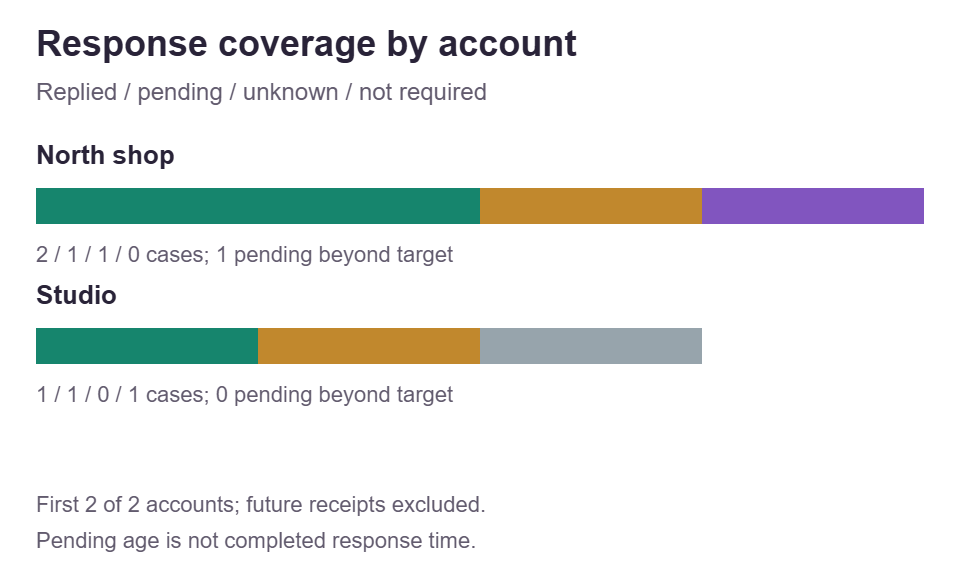
All selected accounts remain in the table, including accounts with only future or no-reply-needed records. The chart shows at most six, ordered by pending cases beyond target.
| Account | Completed reply times | Tracking and reply rate | Waiting cases |
|---|
Read this snapshot correctly
First response time is not resolution time. Completed replies and pending ages describe different populations. A backdated queue may contain a case that received a later reply; verify its current state before acting.
Completed replies and ongoing waits
Reply times include only first human replies observed by the cutoff. Waiting ages include only known pending cases. P90 uses R7 linear interpolation; it is a descriptive quantile, not a prediction or a promise about all cases.
| Population | Cases | Median | Mean | P90 | Minimum | Maximum |
|---|
Pending at the selected cutoff
| Case and account | Channel | Received in review zone | Waiting age | Target state | Later reply recorded |
|---|
No known pending cases in this selected snapshot. Unknown tracking is shown separately, not hidden inside a zero backlog.
All saved source cases
This working list keeps every raw record, including cases outside filters and receipts after cutoff. Use account aliases and avoid pasting private message bodies.
| Case ID | Account | Channel | Received timestamp | Reply tracking | First reply timestamp | Actions |
|---|
Local processing, without API, account login, scraping, upload, sending or autosave. All raw cases and notes remain in full reports and PDF attachments, even outside filters. Report CSV is not the input template; project JSON is the editable backup. Ordinary website analytics are separate from local tool processing.
How the review is built
A clear clock, honest coverage and a useful queue
Fix the observation cutoff
Parse timestamped records in an explicit zone and reconstruct the first-reply state at that instant.
Keep unknown separate
Measure completed first replies while preserving pending, unknown and excluded cases.
Choose a practical next step
Compare account coverage, elapsed waiting ages and your own target before following up.
Define one case before measuring a response
Social media response time starts with a clear unit of work. In this analyzer, one row represents one case or request that you have decided to review, not every message someone sends. Record when that case arrived and, when known, the first human reply. A customer who adds three details before receiving an answer usually still represents one case under that convention. Give it one stable record ID so those follow-ups do not become three separate response opportunities. The tool cannot recognize a repeated person, merge conversations by meaning, or decide which comments deserve an answer. Your collection rule establishes that boundary before calculation begins.
Choose a narrow question for the project, such as how long first replies took for the requests collected during a product release. Keep a private source ledger explaining which received cases were included, what counted as a human reply, and where each timestamp came from. An automated acknowledgement is not the endpoint. A human reply can count without finishing the request, because this is not a resolution clock or a measure of answer quality. If the team needs to assess whether the response was accurate, useful, or complete, review that separately rather than interpreting a short duration as proof of good service.
The platform setting provides context for Instagram, TikTok, YouTube, Facebook, LinkedIn, Threads, X, Snapchat, or Reddit records. It does not create the same conversation features on every platform or import a native inbox. Use channels that describe the actual source: comment, direct message, mention, or other. A YouTube comment is a real collection context; selecting YouTube does not promise a direct-message integration. Keep unlike case definitions in separate projects when a combined result would hide the difference. The platform guides below explain collection decisions, while all free tools provides other planning resources without changing the meaning of these supplied records.
Set the cutoff, time zone, and elapsed target deliberately
Give the review a short project title, select the project time zone, and enter the cutoff that defines the snapshot. The initial cutoff is fixed at 2026-11-11T12:00:00Z; it is not a live clock and does not advance when you leave the page open. Change it deliberately when preparing another review. Receipt at or before the cutoff can enter the snapshot, while receipt after it is marked future and kept outside in-scope metrics. The tool has no separate receipt-date range filter. If you want one arrival cohort, prepare that cohort in your source records instead of assuming the cutoff also chooses its starting date.
Enter full calendar dates and clock times rather than relative labels such as yesterday. The accepted pattern uses year-month-day, a T or one space, hours and minutes, optional seconds, and an optional Z or numeric offset such as +02:00. Without an offset, the selected project zone determines the instant. With an explicit offset, that offset wins even when it differs from the zone’s seasonal offset. Ambiguous repeated daylight-saving times and nonexistent local times need correction; the tool will not guess which instant you intended. Preserve the original timestamp evidence so a later reviewer can distinguish a source correction from a display-zone change.
Set the response target in whole elapsed minutes, from one through 525600. It is your review threshold, not an official platform benchmark or a prediction of customer satisfaction. Elapsed time continues overnight, on weekends, and during holidays; there is no business-hours calendar, pause button, or exclusion for unstaffed periods. A Friday evening receipt and Monday morning reply therefore include the intervening elapsed hours. Changing the display zone does not shorten that interval. If your organization also maintains a separate working-hours measure, label it as a different calculation outside this tool and do not present the two clocks as directly interchangeable.
Save statuses that preserve what you actually know
Each saved row needs a unique ID, an account label, a channel, a received timestamp, and a reply status. Recorded means you know the first human reply timestamp, which must not precede receipt. Pending means no human reply has been observed in the supplied record. Unknown means reply tracking is incomplete, not that the customer is definitely waiting. Not-required marks a known case that does not need a response under your stated rule. Use the last status for a genuine classification decision, not to remove an inconvenient delay. Pending, unknown, and not-required rows must have no first-reply timestamp; recorded rows must supply one.
A recorded reply can occur after your chosen cutoff. In that historical snapshot, the case is treated as pending, with waiting age measured only up to the cutoff. Its later reply timestamp remains in the source and the review warns that the historical backlog may now be answered. For example, receipt at 10:00, a noon cutoff, and a recorded reply at 13:15 produce a two-hour pending age at noon, not a completed 195-minute reply in that snapshot. This behavior lets you review known timestamp evidence against a declared instant, but it cannot reconstruct status changes or missing source history that you never collected.
Keep account labels consistent so group comparisons remain readable. The tool groups normalized account keys rather than verifying an account identity; spelling aliases can therefore matter, and visually similar names are not a reliable identity system. IDs are trimmed, Unicode-normalized, case-sensitive, and unique across the whole project. Use neutral case references rather than message text, customer names, or order details. A project can hold up to two hundred rows and forty account keys, within a one-MiB project limit. Those are local tool limits, not native platform limits. Save a deliberate reduced cohort when a larger collection would exceed them, and describe how that cohort was selected.
Reproduce the fixed eight-row example
The fictional example uses UTC on 11 November 2026, a noon cutoff, and a sixty-minute target. North shop has four records. Case a1 is a comment received at 08:00 with its first human reply at 08:10. Case a2 is a direct message received at 09:00 and replied to at 10:30. Case a3 is a mention received at 10:00 and still pending. Case a4 is a comment received at 11:30 with unknown reply tracking. These produce two completed durations, ten and ninety minutes, one pending age of 120 minutes, and one unknown case. The unknown record is not added to the pending queue.
Studio supplies the other four rows. Case b1 is a direct message received at 11:00 and replied to at 11:20. Case b2 is a comment received at 11:50 and pending at noon. Case b3 is a comment received at 11:40 that does not require a response. Case b4 is a pending comment with receipt at 13:00, after the cutoff. It remains a selected source row but is future received, not part of the noon backlog. Across both accounts there are eight source rows, seven in scope, one not-required case, one unknown case, three replied cases, and two pending cases.
The three reply durations are ten, ninety, and twenty minutes. Their mean is forty minutes, median twenty, and R7 interpolated P90 seventy-six. The two pending ages are 120 and ten minutes, giving mean and median sixty-five and P90 109. Three replies out of five known-needed cases give sixty percent reply rate. Five known-needed cases out of six needed cases give about 83.33 percent tracking coverage. Two of three replies meet the target, about 66.67 percent, while one pending case is overdue. These are separate denominators. North shop’s reply median is fifty minutes and P90 eighty-two; Studio’s single replied case gives twenty minutes for both.
Read median and P90 beside the missing part of the picture
Completed response-time summaries use only cases with a recorded first human reply at or before the cutoff. The mean adds those elapsed durations and divides by their count. The median is the middle sorted value, or the average of the two middle values for an even count. Minimum and maximum show the observed endpoints. A genuine zero-minute duration is valid when receipt and reply identify the same instant; an unanswered case is not a zero. Without any eligible replies, timing fields are unavailable rather than zero. State the replied count beside any summary, especially when a small handful of quick replies sits beside a much larger waiting queue.
P90 uses R7 linear interpolation, not a nearest-rank lookup. Sort the durations, locate position one plus 0.9 times the quantity (count minus one), and interpolate between adjacent observations when that position is fractional. For ten, twenty, and ninety minutes, the position is 2.8, giving twenty plus 0.8 times seventy, or seventy-six minutes. No case in that example took exactly seventy-six minutes. With a single observation, P90 simply equals that observation. This is a descriptive sample summary, not a confidence bound, service guarantee, or claim that exactly ninety percent of a tiny sample falls below the displayed number.
The replied subset can look faster when slow cases remain unanswered. Those cases are censored in the ordinary sense that their completed response duration is not yet observed; this tool does not estimate their eventual times or fit a survival model. It summarizes their waiting ages separately. Unknown cases are also excluded from both timing distributions because their reply state cannot be established. Read the median and P90 response-time guide for worked interpolation and cohort examples. A lower median alone does not prove improvement if tracking coverage fell, the arrival mix changed, or more difficult cases remained outside the replied subset.
Use coverage, filters, and the target for different questions
Reply rate divides replied cases by known-needed cases, where known-needed equals replied plus pending at the cutoff. Tracking coverage divides that known-needed count by all needed cases, adding unknown cases to the denominator. Both exclude not-required cases and future receipts. If there are no known-needed cases, reply rate is unavailable. If there are no needed cases at all, coverage is unavailable too. A project containing only unknown records can therefore show zero percent known coverage and no reply rate without being an invalid review. The point is to expose a collection gap, not invent a favorable percentage from an empty denominator.
Account and channel filters select saved rows for the analysis. They do not retrieve more conversations, verify an account, or balance differences in request complexity. Review each account’s own counts and coverage before comparing its median with another account. Do not average account medians or P90 values to recreate the overall value; overall timing is calculated from the selected eligible durations themselves. An account containing only future or not-required rows can still appear with unavailable timings. An empty project or a filter combination with no selected saved row cannot be analyzed. Clear the filter or add the intended records instead of interpreting that empty selection as a successful zero-backlog result.
For replied cases, a duration less than or equal to the chosen target is on time; a longer one is late. Reply on-time rate uses replied cases only. For pending cases, waiting age must be strictly greater than the target to be overdue. At exactly sixty minutes against a sixty-minute target, a pending case remains within target. The pending overdue count is not added to the numerator or denominator of reply on-time rate. Read the queue as an age-ordered snapshot, with oldest waiting cases first, then review their current source status before acting. The targets and backlog guide develops that operational handoff.
Keep input files, editable backups, and review exports distinct
For batch entry, map your source into exactly six CSV headers: record_id, account, channel, received_at, reply_status, and first_reply_at. Their order can vary, but each must appear once with no extra header. Use the status keys recorded, pending, unknown, and not-required, and the channel keys comment, direct-message, mention, and other. A blank first_reply_at means no timestamp. CSV quoting supports commas inside labels, not multiline labels or invalid dates. Native social exports require your own mapping; platform selection does not translate them. The complete candidate must validate, including duplicate IDs and its final row, before it can replace the dataset.
Save project creates the editable JSON backup, and Open project restores that project format. Use that pair when you want to resume settings, all source rows, filters, and your next-step note. The tool does not autosave your review or preserve a hidden account history. Report CSV is a flattened review output, not the six-column input template or a substitute for the editable project. Copied results and downloaded reports describe the supplied snapshot; they cannot refresh its timestamps from a platform. Keep filenames and notes clear enough to distinguish a corrected source version from a later-cutoff review of the same records.
Full review exports retain the whole project, including rows outside active filters, future timestamps, account aliases, and notes. Filtering the screen is not redaction. The PDF presents a bounded summary of up to six accounts and the oldest eight pending cases, with the complete project JSON and report CSV attached. Inspect those attachments before sharing, not just the visible pages. For a wider audience, create a separate project containing only appropriate neutral records and check its output. Browser-only processing means the calculator works on supplied data locally; it does not make downloaded files anonymous, remove private details you entered, or decide where a recipient stores them.
Turn a snapshot into a careful next review
Write a conclusion that keeps observation, uncertainty, and action separate. For the example, three of five known-needed cases had received a human reply at noon, while one additional needed case had incomplete tracking. The replied median was twenty minutes, and one known pending case had waited beyond the sixty-minute target. That statement does not claim that all social requests were answered in twenty minutes or that the queue still exists now. Add the collection boundary and selected filters when passing it to another person. A timestamped descriptive review is useful precisely because someone else can see which facts were supplied and which questions remain open.
Use the next-step note for one specific follow-up, within its five-hundred-character and eight-line limit. You might ask a reviewer to verify a4’s tracking, check the current status of a3, and collect the next comparable arrival cohort using the same first-human-reply rule. Do not infer required staffing, revenue loss, retention effects, or a guaranteed recovery from these counts alone. Those decisions need information about demand, task complexity, capacity, and outcomes that this project does not hold. Repeating a review with a consistent collection rule can reveal descriptive changes, but a lower P90 does not by itself establish why those changes occurred.
Repeated questions can also inform a separate organic content brief. If several genuine requests ask where to find a size guide, consider a clearer post or product explanation while still handling the actual cases in their authorized native context. SMTasker supports platform-specific organic publishing and account routines, and Skye can help prepare supported workspace settings for review. Those are separate capabilities: this analyzer does not connect their activity to a human-response inbox, import this backlog into a reply manager, or send answers. Explore supported SMTasker workflows for that separate account work, and return to the response review when you have a new, deliberately collected snapshot.
Make the response question specific
Platform and response-workflow guides
Use the relevant manual conversation context, then explore percentiles and target-based backlog reviews.
Instagram Response Time
Review a workshop account’s public questions and private requests without counting a handoff as a second case or treating missing tracking as no reply.
Read the guideTikTok Response Time
Follow a repair creator’s comment surge through case selection, delayed replies, request eligibility, and an age-ordered manual review queue.
Read the guideYouTube Comment Response Time
Review public viewer questions, first human replies, moderation gaps, and older video comments without confusing reactions with answers.
Read the guideFacebook Response Time
Compare supplied Page comment and Messenger response records, distinguish human replies from acknowledgements, and inspect the waiting cases.
Read the guideLinkedIn Response Time
Review supplied LinkedIn Page comments and enabled Page-message records, keep later replies visible, and separate native displays from elapsed-time analysis.
Read the guideThreads Response Time
Review a workshop announcement through public replies and mentions, with clear case boundaries, human reply times, and an honest historical backlog.
Read the guideX (Twitter) Response Time
Measure fictional event questions across X replies, mentions, and recorded private conversations without counting a channel handoff as fresh demand.
Read the guideSnapchat Response Time
Use a fictional creator collaboration log to separate retained reply evidence, incomplete tracking, and pending ages without claiming to recover disappeared content.
Read the guideReddit Response Time
Review a fictional community help thread with distinct questions, community reply boundaries, valid zero-minute replies, and a clearly dated pending queue.
Read the guideResponse-Time Percentiles
Calculate median and R7 P90 with a six-reply example, then examine small samples, waiting ages, and the danger of averaging account percentiles.
Read the guideResponse Targets and Backlog
Choose an elapsed-time review target, understand exact boundary rules, and use pending ages without turning unanswered cases into completed reply times.
Read the guideQuestions about social response time
Does this connect to my social media inbox?
No. You supply records manually or in the tool file formats. Selecting a platform adds context, not login, native monitoring, message retrieval, or reply sending.
Does the clock stop outside business hours?
No. All durations use elapsed time between instants, including nights, weekends, and holidays. There is no working-hours calendar or resolution-time calculation.
Why are unanswered cases missing from median and P90?
Their completed response duration is not observed. Pending ages are summarized separately, while unknown tracking stays in its own coverage category. Neither becomes a zero-minute reply.
What happens when a recorded reply is after the cutoff?
The case is pending in that historical snapshot, with age measured to the cutoff. The later reply timestamp is retained and flagged, so check its current source status before acting.
Do account filters remove private rows from the PDF?
No. Full review outputs retain the complete project, and the PDF attaches full project JSON and report CSV. Build and inspect a separate reduced project before sharing.
Use recurring questions in your content planning
Prepare clearer organic account routines
Explore supported SMTasker publishing workflows and Skye-assisted setup. Human inbox review and this local response analysis remain separate.