Two drafts. A clear change trail.
Social Media Text Compare & Diff Checker
See exactly what changed in a caption, post or description. Compare the original and revised text, review additions and removals, and hand over the version you actually approved.
An edit you can follow
Catch the change before you post.
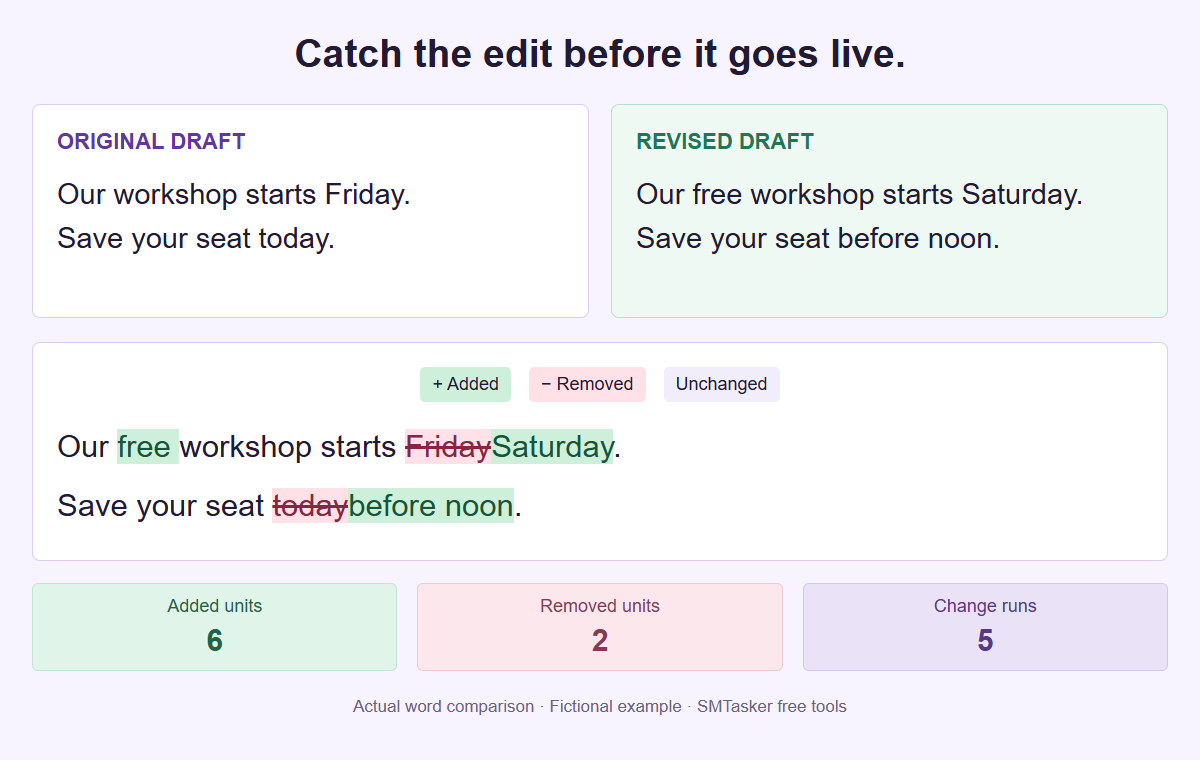
A fictional workshop edit, processed by this tool. Highlighted changes show different text, not proof that the revision is more accurate or effective.
Review both versions together
Check the draft, not your memory
Paste the text before and after editing. Pick a comparison unit, then review the exact changes without connecting an account or uploading your drafts.
Copy review, CSV, PDF and project JSON include both versions, including deleted material. They are not redacted reports. Copy revised and Download TXT contain only the revised draft.
Your two drafts
Each draft: up to 10,000 Unicode characters, 1,000 lines and 64 KiB. CRLF and CR line endings become LF. Other spaces, case and punctuation are kept.
The visible difference
Words mode includes spaces and punctuation as tokens. Characters mode uses grapheme clusters; line mode keeps each ending with its line. Runs are highlighted chunks, not a count of editorial decisions.
This is a literal comparison, not a plagiarism, fact or quality check. Moved text may appear as a removal and addition. It cannot choose which draft should be published.
Comparison runs locally in a dedicated browser worker. Your drafts are not fetched, uploaded or saved in the background. Choose Save project for an explicit backup; retain it privately if either draft contains sensitive text.
Pick a useful level
Review wording with Words, inspect punctuation and emoji with Characters, or compare a longer draft line by line.
Read additions and removals
Green additions and red struck-through removals appear in the same reading flow. Unchanged text supplies the context.
Hand over the right file
Download the revised TXT for the new draft, or a full review when someone needs to inspect both versions and their changes.
Use a diff to answer a precise editorial question
A text comparison answers what changed between two supplied versions. That sounds modest until a reviewer must locate a moved deadline, a missing condition, or a revised request inside familiar copy. Reading only the newer draft can hide those changes because the surrounding sentence still looks right. A diff makes additions and removals visible against a chosen baseline, giving the reviewer a concrete starting point. It does not choose the better draft. Your useful question is whether each visible difference matches the brief and whether the revised version still carries every fact, qualification, and instruction needed for its intended use.
Begin by naming the relationship between the drafts outside the tool. The original might be the last client-approved caption, while the revision is a proposed update after a venue change. Those are stronger reference points than two files both called latest. Confirm that they describe the same planned post and that the newer text came from the person you expect. Comparing unrelated alternatives is possible, but the resulting removals and additions will not explain their editorial history. The tool receives two strings, not the decisions, comments, permissions, or chronology behind them. Supply that context in your existing review notes.
For a fictional community workshop, an editor changes a Friday event to Saturday and replaces a general invitation with a registration deadline. The reviewer needs to see both changes without losing sight of the unchanged subject. That is genuine diff value: attention is directed toward the exact material requiring a decision. The comparison cannot verify the date against a calendar, establish that registration remains available, or judge whether the invitation is persuasive. Check those matters with the responsible owner. A tidy difference display supports a human decision; it is not evidence that the underlying information is correct.
Prepare the two source versions without hidden cleanup
Put the baseline in Original draft and the candidate in Revised draft. Keep the complete relevant passage in both fields so an unchanged condition is not mistaken for an omission caused by selective copying. Paste text directly; this version has no source TXT import. Open project is for the specific saved JSON project, not an arbitrary text document or a report. At least one source must contain text before comparison can run. An empty original can represent a wholly new passage, and an empty revision can represent a complete removal. Both fields may be empty in an editable saved project, but not in an analysis.
Each source is limited to 10,000 Unicode codepoints, 1,000 LF-delimited lines, and 64 KiB of UTF-8 text. These are tool limits, not native social-platform allowances. All three apply independently, so a short-looking passage can still need attention if it contains many lines or multibyte characters. Reduce the review scope deliberately if a source is too large, and preserve any excluded material in your own records. Do not describe a selected excerpt as the complete post. For a multi-part campaign, compare one clearly identified asset at a time rather than merging unrelated captions merely to use one report.
CRLF and CR line endings are normalized to LF. Beyond that documented change, case, spacing, punctuation, Unicode codepoints, and Unicode normalization differences remain meaningful. The tool rejects NUL and unpaired surrogates; tabs, other Unicode text, and bidirectional text are retained rather than sanitized. A visually similar letter sequence can therefore remain different internally. Do not silently tidy both drafts before comparing if the task is to inspect the actual supplied revision. If cleanup is intentional, make it a separate revision with its own baseline. That preserves the distinction between an editorial change and preparation you performed before the review began.
Choose the unit that exposes the decision
Words is a practical first pass for sentences because it groups text into English word segments while retaining every segment, including spaces and punctuation. It is not a count of vocabulary items alone. The segmentation locale is fixed to English, and browser ICU differences can affect boundaries. This matters when comparing multilingual copy or unusual punctuation: the displayed units describe the chosen segmentation method, not a universal linguistic judgment. Start with the mode that makes the revision understandable, then use another mode when the question becomes more precise. Changing mode does not alter the underlying source text or rewrite a sentence.
Characters compares user-perceived grapheme clusters, which can include several codepoints in one visible character. Use it when a small spelling change, punctuation mark, accent, or emoji sequence deserves close attention. The source character totals in the summary use Unicode codepoints instead, so they are distinct from Characters mode units. Do not treat a difference between those totals as missing content. For example, a visible symbol may be composed of multiple codepoints even though the segmentation treats it as one grapheme cluster. The report records text differences; it does not decide whether two visually similar sequences should be considered interchangeable.
Lines is useful when line boundaries carry the editorial structure, such as a description with a resource block or a caption with separate credit lines. Line tokens include their trailing LF when present; the method does not manufacture an extra empty token after a final newline. A changed line can include mostly unchanged wording, so return to Words or Characters to inspect the detail. None of the modes is a native platform preview. Choosing Instagram, TikTok, YouTube, or another context leaves the comparison algorithm unchanged and supplies no platform-specific formatting, publishing validation, approval status, or current character-limit check.
Read the example and interpret changes carefully
Select Load example to inspect the supplied workshop drafts. The original reads Our workshop starts Friday. followed on the next line by Save your seat today. The revision reads Our free workshop starts Saturday. followed on the next line by Save your seat before noon. Choose a mode and select Compare drafts. The important editorial differences are the added description free, the replacement of Friday with Saturday, and the change from today to before noon. The example demonstrates comparison, not an assertion that any real workshop has those details. Verify the actual event facts before applying a similar revision.
Read the inline result using its legend as well as its colors: green added material belongs to the revision, red removed material belongs to the original, and unchanged material connects the two. A replacement can appear as a removal followed by an addition; it is not necessarily a separately labelled replacement operation. Whitespace is preserved in the display, with wrapping or scrolling available for long material. User text is not interpreted as HTML, and pasted addresses are not automatically turned into links. Read the surrounding unchanged sentence whenever a highlighted word changes its meaning, especially when the change concerns negation or a condition.
Summary units describe the selected mode. Added and removed totals measure changed tokens, not the number of editorial decisions, and change runs count non-unchanged chunks rather than a chronological edit history. Repeated phrases can have more than one plausible alignment, so a moved passage may appear as removal and addition instead of a special move marker. A large changed total is not a poor-quality score, and a small total is not a low-risk approval. Replacing Friday with Saturday may matter more than restructuring several harmless sentences. Follow the meaning of each change instead of treating the summary as a verdict.
Review social revisions by the risk they introduce
For a caption revision, read the opening promise, factual detail, credit, and requested action as separate responsibilities. A shortened introduction may accidentally remove the condition that makes an offer accurate. A changed credit may name the wrong contributor even though most of the caption is identical. A revised request may ask readers to do something that the current campaign cannot support. The Instagram caption comparison guide develops this kind of caption review without claiming to reproduce a native composer. Keep media checks alongside the text task because the diff cannot compare the image, video, or spoken message.
For a short hook, inspect the claim before judging how compact it feels. Changing a question into a certainty, removing a qualifying word, or replacing a specific audience with everyone can alter the promise substantially. Compare the caption against the actual clip separately; this tool never watches or transcribes it. The TikTok short-hook review guide shows how to use a small comparison to identify a decision that deserves a clear owner. Two alternative hooks can be reviewed as text, but the diff cannot predict which will attract attention or assign either version a performance advantage.
Long descriptions create a different problem: information may still exist but sit in a different order, or one resource line may change among many familiar entries. Use Lines to locate affected blocks, then Words or Characters for timestamps, names, and literal address text. The YouTube description comparison guide covers that longer review. A timestamp is not tested against a video, and an address is neither fetched nor validated as a destination. A readable change list helps you find what to verify; it does not replace watching the relevant segment or checking your approved resources in an appropriate separate workflow.
Keep review state tied to the current drafts
Select Compare drafts after preparing the sources and settings. Any input change invalidates results and exports, so a previously reviewed display is not permission to copy a newly edited candidate. Run the comparison again after changing text, mode, or context. Swap drafts reverses the baseline and candidate, changing which material is added or removed without establishing which version is newer. Clear drafts removes the working text; save deliberately before clearing if you need to resume. Load example is for learning the workflow, not a recovery mechanism for your earlier paste. Keep your authoritative originals in the records you already control.
The comparison runs in a dedicated browser worker with bounded work. Its default comparison budget is 1,500 milliseconds with a maximum edit length of 6,000; a bounded-comparison error produces no partial result. An input can fit the source limits yet still be too expensive to compare under those bounds. In that case, identify smaller coherent passages and label their scope rather than assuming an unseen remainder was checked. Cancel operation stops the active operation; it does not approve the current text or restore a prior decision. Treat a canceled or failed comparison as unfinished work until a fresh valid result is available.
Save project creates an editable JSON file containing the original text, revised text, mode, and platform context. Open project accepts the strict versioned project format, with a maximum JSON size of 1 MiB. A review CSV or PDF is not that project format. There is no account connection, autosave, or background storage for recovering drafts later, so use a deliberate local save when continuity matters. A project also contains material you may have removed from the candidate. Name it for its asset and review stage in your own file system, and handle it according to the sensitivity of both versions, not only the final caption.
Choose the export with the right disclosure scope
Copy revised and Download TXT provide only the revised text. They are the narrow choices when the next editor needs the candidate itself rather than the revision record. Inspect the actual pasted or downloaded copy before using it elsewhere, and keep its approval status in your existing workflow. These actions do not publish, schedule, or obtain approval for anything. A revised-only file can still contain sensitive information, but it does not intentionally include the removed original passage. Choose this scope deliberately when the person receiving the copy should not receive the earlier wording or abandoned details from the baseline.
Copy review, Download CSV, and Download PDF are different: all report exports include both versions and deleted material. Removing a private detail from Revised draft does not redact that detail from a report. CSV includes the full source versions and change data, not merely a few summary totals. Before sharing any review, read Original draft as carefully as Revised draft and ask whether the recipient is authorized to receive both. If you require a genuinely redacted review, prepare separate appropriate source copies under your own process and compare those. Do not rely on display colors, a collapsed area, or an excerpt to remove data.
The PDF presents a bounded, explicitly labelled excerpt of the change list and practical review guidance. Its attached review JSON and CSV contain the full original, full revision, and full changes. Those attachments travel with the document; a short visible preview does not limit the disclosure. The tool processes entered text in the browser without an API, upload, or network lookup for the comparison, while existing site analytics are separate. That browser-only design is not a claim that pasted material has been sanitized or made anonymous. Store downloaded projects and reports with the same care as the drafts they contain.
Make the handoff a decision rather than a screenshot
Complete the review by naming the exact candidate, the baseline used, the person making the decision, and any unresolved issue in your existing approval record. The tool does not provide those workflow fields or a native approval system. For the workshop example, a useful note says that the date owner confirmed Saturday, the organizer confirmed free admission, and the registration owner confirmed the noon wording. If any point remains uncertain, mark that specific question for follow-up instead of calling the entire diff approved. The resulting handoff tells the next person what was checked, rather than merely showing that a comparison was run.
After applying an accepted revision elsewhere, compare the actual destination copy against the approved candidate if a transfer error is possible. A copy-and-paste operation can leave an older final line, merge paragraphs, or omit a credit even when the original review was correct. This is a new comparison with a new purpose: checking transfer fidelity, not reopening every editorial decision. Keep platform presentation checks separate because the tool displays supplied text rather than simulating a native post. The final recipient should know whether they received revised-only text, an editable project, or a report exposing the complete earlier version as well.
Use the result for what it can establish: the exact textual relationship between two bounded inputs under a stated comparison mode. It does not rewrite, check facts, detect plagiarism, measure readability, assign semantic similarity, or guarantee SEO, growth, reach, or engagement. Browse the platform guides for a more focused review task, or return to all free tools when another preparation step is needed. For recurring supported account routines, explore SMTasker separately after the text decision. Your team retains responsibility for the media, source facts, disclosure choices, destination checks, and final publishing approval.
Make the comparison fit the task
Platform and revision guides
Choose a specific writing context or learn how comparison units and a clear approval handoff work together.
Instagram Caption Comparison
Review caption promises, collection details, contributor credits, and calls to action against the last agreed Instagram draft.
Read the guideTikTok Caption Comparison
Inspect short-hook revisions for changed claims, missing conditions, and mismatches with the clip before sharing the candidate caption.
Read the guideYouTube Description Comparison
Review long description order, timestamp digits, resource address text, and contributor lines without fetching links or inspecting the video.
Read the guideFacebook Post Comparison
Review changed dates, rooms, attendance instructions, and conditions before approving a revised community announcement.
Read the guideLinkedIn Post Comparison
Inspect altered outcomes, qualifications, client references, and permissions before handing a professional draft back for approval.
Read the guideThreads Post Comparison
Review pronouns, follow-up questions, corrections, and changes of tone without losing the surrounding conversation.
Read the guideX (Twitter) Post Comparison
Compare concise drafts for altered quantities, units, exceptions, and calls to action without treating text counts as native platform rules.
Read the guideSnapchat Text Comparison
Compare text supplied for a Snapchat creative handoff, check frame-specific revisions, and separate wording approval from native rendering and publishing.
Read the guideReddit Draft Comparison
Review Reddit title and body revisions, preserve quoted wording, and distinguish a changed question from added evidence before a manual posting decision.
Read the guideWord, Character, and Line Diff
Understand word segments, grapheme clusters, LF line tokens, whitespace preservation, and the difference between comparison units and character totals.
Read the guideReviewing Social Media Revisions
Build a practical revision review around a stable baseline, named decisions, external approval notes, sensitive report handling, and a checked final transfer.
Read the guideQuestions about comparing social media drafts
Does the tool decide which draft is better?
No. It compares the supplied text in Words, Characters, or Lines mode. It provides no winner, quality grade, similarity percentage, automatic rewrite, or predicted publishing outcome.
Does choosing a platform change the comparison?
No. Platform is editorial context only. The same algorithm applies, without connecting an account, checking native limits, rendering a native preview, or publishing the revision.
What are the source and project limits?
Each source allows up to 10,000 Unicode codepoints, 1,000 LF-delimited lines, and 64 KiB of UTF-8 text. Open project accepts the strict saved JSON format up to 1 MiB. At least one source must be nonempty to compare.
Why can Characters units differ from character totals?
Characters mode compares user-perceived grapheme clusters. The summary character totals use Unicode codepoints. A single grapheme can contain several codepoints, so these measures need not match.
Will a report reveal text deleted from the revision?
Yes. Copy review, CSV, and PDF include both versions and deleted material. PDF attachments hold the full sources and changes even when the visible change list is excerpted. Copy revised and Download TXT contain only the revision.
After the editorial decision
Plan the recurring account work separately
Explore SMTasker for supported account routines while your team keeps ownership of copy approval, media checks, and publishing decisions.