A cleaner copy, with a visible change list
URL Cleaner & Tracking Parameter Remover
Paste a list of links, remove selected tracking parameters, and keep the parts that identify the content. Review every change before reusing a link in a social post.
Keep the destination. Choose the tracking.
See what changes—and what stays.
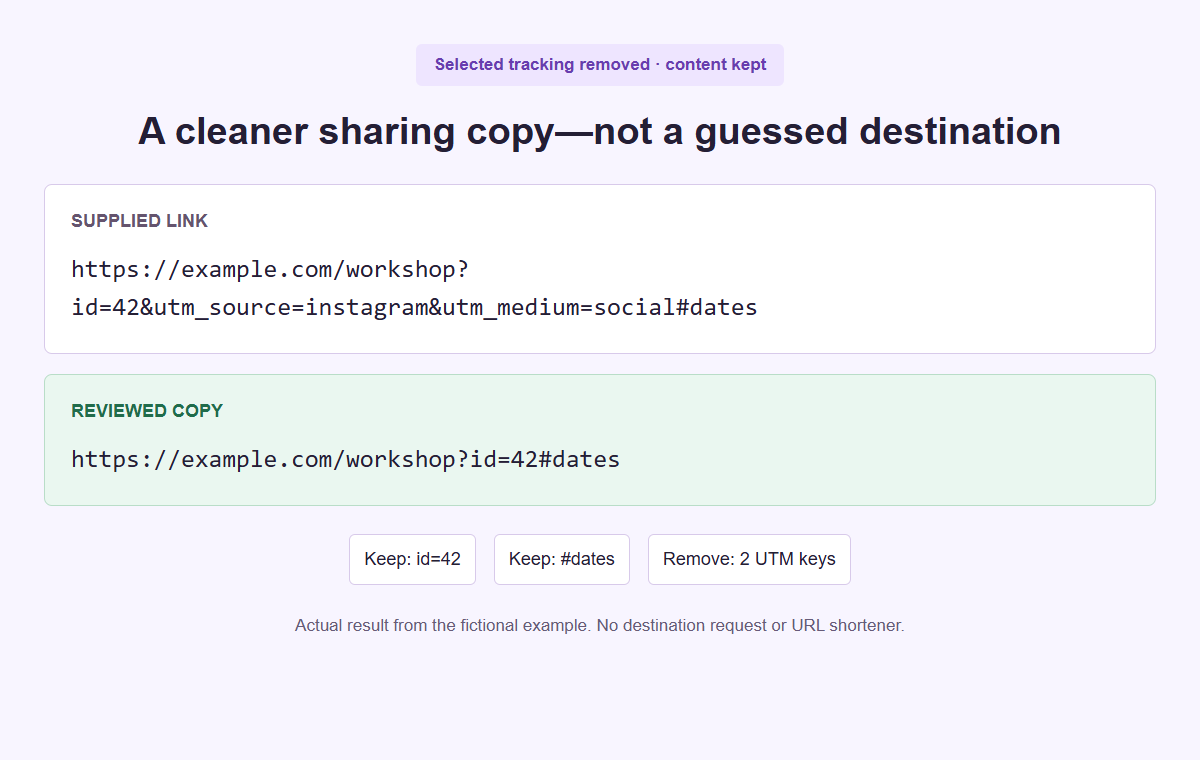
Fictional links illustrate the actual cleaning rules. A shorter URL is not proof of privacy, safety or identical destination behavior.
Review the link before it travels
Clean one link or a whole list
One complete public HTTP or HTTPS URL per line. Keep content identifiers, unknown parameters and fragments intact; choose which known attribution fields to remove.
Save project contains everything pasted, including private, protected or invalid links. Copy, TXT, CSV and PDF use the reviewed output only. Remaining URL values can still be sensitive.
Your links and cleaning rules
Exact names only. Content IDs and protected keys cannot be added.
Overrides the selected removal rules. Maximum 12 names per field.
Up to 200 nonempty lines, 4,096 characters per URL and 256 KiB of input. Blank lines are ignored; line numbers stay attached to each review.
Your reviewed output
Known signed or token-bearing query patterns are held out of the ready list. That safeguard is not exhaustive. The tool does not follow redirects, strip fragments or certify that a destination is safe.
Your pasted links stay in this browser. No API, URL fetch or background saving. Output reports omit original and skipped URLs, but any retained values are still part of the cleaned links.
What happened on each line
All input rows are available here. Raw invalid and protected URLs are not repeated in the review or exported reports.
| Line | Review | Original eligible URL | Result or issue | Removed keys | Exact repeat |
|---|
Choose what to remove
Known UTM and click-ID lists are separate. Add a small exact-key rule or keep a selected campaign field when it still serves a purpose.
Preserve what you did not select
The cleaner retains raw query segments in their original order, including encoded values, repeated keys and the fragment after the hash.
Check the ready list
Review changed and unchanged links separately from skipped rows. Duplicate removal uses exact output text, not a guess that two destinations are equivalent.
Choose the purpose of your sharing copy
A URL cleaner removes selected query parameters from a copy of an address. It does not shorten a link through a hosted service or discover where a redirect ends. The useful starting question is why this particular copy needs changing. A reading list may not need the campaign labels attached to the email where you found an article. An active promotion may need those same labels for measurement. Decide which job the link will do before removing anything. Keep the source in your existing records when the original campaign context matters, and make the sharing copy a separate, deliberate choice.
UTM fields and click IDs can support attribution: they may help a destination associate a visit with a campaign, source, or advertising click. Removing them can reduce or change that measurement. A shorter-looking address is therefore not automatically the right address for every handoff. Ask the campaign owner before replacing measured links in paid work, partner instructions, or a live launch. If the task is to build a measured address rather than remove selected fields, use the UTM Campaign Link Builder as a separate step. Cleaning and campaign construction serve different purposes, even when both work with query parameters.
Consider a fictional community workshop team making a public resource sheet. Its editor received a workshop address through a social campaign, but the sheet needs the workshop page and its dates section rather than a record of that earlier campaign. The team agrees to prepare a neutral resource copy while retaining the measured source in its campaign log. That is an editorial choice, not a claim about improved privacy, trust, reach, or algorithm ranking. The cleaner cannot judge the destination or guarantee that its server treats both addresses the same. Those questions need their own checks after the text review.
Prepare a bounded list of public addresses
Supply one complete public HTTP or HTTPS URL on each line, without bullets, labels, or an accompanying sentence. Blank lines are ignored, and the review keeps the original one-based line numbers so an issue can be traced back to the input. The limits are 200 nonempty lines, 256 KiB of source text, and 4096 characters per trimmed URL. A limit failure needs a smaller or corrected input, not an assumption that an unseen remainder was processed. Split a large task into named batches in your own workflow. The tool does not quietly truncate the list to make an oversized job appear successful.
Outer whitespace is trimmed for each address, but interior whitespace and tabs are not a supported way to format a URL. Broken percent escapes, backslashes, unsupported schemes, and malformed text can produce invalid rows. Use an address supplied by the source owner rather than guessing how to repair an unfamiliar string. Localhost names, local or internal hostnames, single-label hosts, numeric-only hosts, and IP-literal addresses are outside this public-domain workflow. There is no DNS lookup to establish whether a host exists. Passing the text checks means the address is eligible for this transformation, not that its destination is available or trustworthy.
Leave account recovery links, private invitations, signed downloads, and other access-bearing addresses out of a public sharing task. Known protected patterns are skipped before cleaning, including recognized authorization, token, signature, expiry, and signed-storage keys. An address containing credentials in its user-information part is invalid. These checks are not exhaustive security detection, so an unfamiliar private link can still require your judgment. The original paste remains visible in the input, while invalid and protected URLs are not echoed into the results or report. Avoid using real private material merely to see which status the tool assigns to it.
Set removal rules without guessing at unknown keys
The UTM option targets a fixed set of names: utm_source, utm_medium, utm_campaign, utm_id, utm_term, utm_content, utm_source_platform, utm_creative_format, and utm_marketing_tactic. It does not remove every name beginning with utm_. The click-ID option likewise uses a defined list, including fbclid, gclid, dclid, msclkid, ttclid, twclid, li_fat_id, gbraid, wbraid, gad_source, and gad_campaignid. These are removal families, not evidence about how a specific platform currently builds its links. Select the families that match the agreed purpose, then read the actual removed names in the review rather than inferring them from the length of the result.
Keep keys override a selected family or an extra removal key when you need a particular name retained. Extra keys are exact names, not wildcard rules, and should be used only when you understand the destination contract. Each custom list accepts up to twelve unique names, with case-insensitive classification and a restricted name format. Reserved destination and affiliate names cannot be added for custom removal. Unknown parameters stay in place by default. A field named ref, ap_id, c_id, affiliateid, or affiliate_id is not disposable just because it resembles a source label. Preserve it unless a separate, informed destination workflow calls for something else.
Content identifiers, video IDs, timestamps, search terms, pagination, language choices, product variants, and fragments can explain which content the recipient should see. The cleaner preserves these rather than applying a broad delete-everything-after-the-question-mark rule. Protected links remain skipped even if a protected key appears in Keep keys; keeping a name is not an override for access-bearing URLs. Platform selection records the sharing context only. Choosing Instagram instead of TikTok does not activate a hidden native parameter list or change platform requirements. The same explicit removal settings govern the transformation, so document the settings that matter rather than attributing the result to the selector.
Understand how the remaining text is preserved
The tool validates addresses with the browser URL parser and classifies decoded query-key names. It then removes selected raw query segments without rebuilding all retained pairs through a serializer. This distinction matters when a destination uses repeated keys, an unusual order, plus signs, or a particular percent-encoding style. Retained segments keep their original spelling, encoding, order, duplicate keys, and empty segments. Values are not decoded and rewritten for reconstruction. A key encoded as utm%5Fsource can still match utm_source after decoding, but an unrelated retained value does not get reformatted merely because another segment was removed from the same address.
The literal fragment beginning with # is preserved exactly. Parameters embedded inside that fragment are not removed, nor are tracking-looking words inside the path or inside a nested redirect value. For example, a public address containing a next value that itself encodes another address is not unwrapped into that inner destination. Short links also stay short links; the cleaner never follows them to discover a longer address. This keeps the operation bounded to the supplied text. If you need a different destination, obtain an approved direct URL from its owner and review that address as its own input instead of treating a redirect wrapper as transparent.
When removal leaves no nonempty query segment, the question mark is removed. If nothing is removed, an existing empty question mark is retained, apart from trimming the outside of the input line. These text rules make the output predictable, but exact preservation of retained pieces cannot guarantee equivalent server behavior. A server may use query combinations in ways the cleaner does not know. Compare the output against the purpose of the link, especially where order, repeated fields, or a particular resource view matters. The review reports a transformation of text; it is not a live test of the resulting page or an approval from the destination owner.
Work through the six-line example
Select Example to inspect the fictional six-line batch, then use Clean links with UTM removal, click-ID removal, and duplicate removal selected. Line 1 is https://example.com/workshop?id=42&utm_source=instagram&utm_medium=social#dates. It loses two selected parameters and becomes https://example.com/workshop?id=42#dates. Line 2 already contains that exact resulting address, so it is unchanged and duplicates the earlier eligible output. The workshop identifier and dates fragment remain in both. This illustrates two separate decisions: removing campaign labels changes a row, while duplicate removal decides whether an identical eligible output needs to appear twice in the final list.
Line 3 is https://example.com/watch?v=demo&t=90&gclid=fictional. Removing gclid leaves the fictional video identifier v=demo and time value t=90 untouched. Line 4 is the example private address with a token key; it is protected and skipped rather than partially cleaned. Line 5 uses a javascript scheme and is invalid for this public HTTP or HTTPS workflow. Neither skipped address is reproduced in the review exports. Line 6 is https://example.com/search?q=tea%20cup&ref=partner. It is unchanged because the search value and partner reference are not selected tracking-family names. No destination is fetched while these statuses are assigned.
The expected counts are 6 lines, 4 eligible, 2 changed, 2 unchanged, 1 protected, 1 invalid, 1 duplicate, 3 output URLs, and 3 removed parameters. The removed total comes from two UTM fields on line 1 and one click ID on line 3. With duplicate removal enabled, the ready list contains the workshop address, the watch address, and the search address, in their first eligible order. Turning duplicate removal off would retain both eligible workshop copies and produce four outputs; the duplicate count still records the repeated exact result. Use these counts to understand the labels, not as a prediction for a different list.
Review every status and repeated output
Read changed and unchanged rows alongside their removed names. Changed means the trimmed input text differs from the output; unchanged means no selected removal altered that text. Neither status is a quality score. A changed link can lose attribution you intended to retain, and an unchanged link can still point to the wrong article. Check the host, path, retained destination fields, and fragment against your task. If a removal was unwanted, adjust the family or Keep keys and run Clean links again. Editing the source or settings invalidates the previous exports, so finish the current review before copying a result.
Invalid and protected rows need a separate decision rather than an attempt to make their count disappear. Invalid rows identify unsupported or malformed input. Protected rows identify recognized access-bearing or signed patterns that the tool will not clean. Their report entries contain a line number, status, and explanation, not the raw address. Return to the source privately if clarification is needed. Do not erase a token or signature simply to force a protected row into the eligible list. Obtain a public alternative where appropriate. A batch with skipped rows can still have useful eligible outputs, but it is not a complete replacement for every pasted line.
Duplicate detection compares exact eligible output strings, not the meaning of pages. Different fragments, parameter orders, encodings, capitalization, or destination variants can remain distinct. Conversely, two differently tagged sources may become one exact output after cleaning. With duplicate removal selected, the first eligible occurrence supplies the output position and later matching rows point back to it. This is useful for a simple resource list but may be wrong for a worksheet that needs one line per planned placement. Preserve that placement map outside the cleaner or disable duplicate removal. Do not interpret fewer output URLs as fewer source campaigns, fewer readers, or proof that two pages are equivalent.
Choose a deliverable or an editable project
Copy cleaned URLs places the ready list on the clipboard, and Download TXT provides the cleaned URL text as a file. Both are convenient when another editor needs the approved addresses without a full review document. Inspect the actual pasted or downloaded text before using it. Download CSV records the structured review, including rules, counts, eligible outputs, removed names, and issue information. It is not a source-list backup or an Open project file. Eligible output values remain present because they are the deliverable; these values may still contain sensitive information. A review that omits skipped source addresses is not an anonymized list.
Download PDF creates a review document rather than a screenshot of the input. It includes summary information, selected rules, a bounded preview of ready URLs, issue line numbers and statuses, and practical checks. Long preview addresses are labelled as shortened, and full eligible outputs are available in its attached review JSON and CSV. The attachments do not contain raw input text, removed parameter values, or invalid and protected addresses. They do contain retained output values. Review the attachments as part of the document you intend to share, not as an invisible technical extra, and choose TXT or CSV when complete copyable addresses are the immediate need.
Save project is different: it explicitly saves all pasted source text, including private, invalid, and protected links, together with the settings. Store that file according to the source material, not according to the appearance of the cleaned list. Open project accepts the strict, versioned project format, up to one MiB, and restores a valid candidate without needing the current draft fields to be valid first. A refused file leaves the draft intact. Project line endings are normalized to LF; URL encoding and Unicode spelling are not normalized. There is no autosave or hosted recovery copy, so saving is a deliberate local action with a broader data scope than the review exports.
Approve the final destination in its real context
Finish with a short acceptance test for the exact copy you plan to use. It should point to the intended public host and resource, retain needed IDs and view choices, keep useful fragments, and reflect the attribution decision agreed with the owner. Confirm whether duplicate removal matches the target list. Check that skipped rows have an owner or an approved replacement rather than silently vanishing from the task. The tool never opens the addresses for you. When appropriate, manually test your own approved copies outside the tool, under conditions suitable for those destinations, and verify the content that the recipient is meant to receive.
For the fictional workshop sheet, the editor checks that the approved workshop page still identifies workshop 42 and that the dates section is the intended reference. The watch resource keeps its chosen time, while the search link keeps the tea-cup query and partner reference. The private source is not published; the editor requests a public alternative if the resource sheet needs that material. The unsupported scheme is removed from the publication task rather than relabelled as a clean link. A simple handoff names the accepted three-address list and the person who reviewed it, without copying rejected private input into a shared approval note.
Keep link preparation separate from publication and performance claims. This process does not make a domain trustworthy, bypass access controls, establish native URL requirements, or improve algorithm ranking. It also cannot remove every way a destination might identify a visit. Its useful result is narrower: a reviewed text copy with explicit selected removals and retained destination details. Use the platform guides for examples of that decision in different sharing tasks, or browse all free tools for another preparation step. For recurring supported account routines, explore SMTasker after the addresses and accompanying content have their own approval.
Use the right link for the next context
Platform and link-cleaning guides
Work through a specific sharing task, or learn how parameters, fragments and protected links change the review.
Instagram Link Cleaner
Prepare a carousel source list while retaining collection IDs, search views, language choices, and useful page fragments.
Read the guideTikTok Link Cleaner
Review tutorial resources while preserving supply variants, affiliate references, video times, and the details viewers need.
Read the guideYouTube Link Cleaner
Review a video-description resource list while preserving video IDs, timestamps, playlist references, and useful resource labels.
Read the guideFacebook Link Cleaner
Prepare community-event destinations while retaining registration IDs, language choices, dates, and the details attendees need.
Read the guideLinkedIn Link Cleaner
Prepare professional reading lists and handoffs without losing document editions, language settings, citations, or partner references.
Read the guideThreads Link Cleaner
Prepare a practical resource for a short discussion, distinguish attribution from useful destination details, and keep different section links separate.
Read the guideX (Twitter) Link Cleaner
Review a source citation for a fast public update, retaining report identifiers and reading positions while separating link preparation from fact-checking.
Read the guideSnapchat Link Cleaner
Prepare public resource URLs for an approved Snapchat asset pack, keep activity variants intact, and preserve repeated placements when the handoff needs them.
Read the guideReddit Link Cleaner
Prepare a community-help deep link that retains the relevant documentation version and section, with a clear boundary between URL review and a useful answer.
Read the guideRemove UTM Parameters
Separate evergreen references from measured campaign links, remove selected UTM keys, and retain the rest of each address.
Read the guideClean Links Without Breaking Them
Work through signatures, encoding, duplicate keys, fragments, and uncertain parameters before approving a cleaned public URL copy.
Read the guideQuestions about cleaning social media links
Does the cleaner visit or check my links?
No. It validates and transforms supplied URL text without fetching destinations, resolving redirects, or scanning pages. You must separately check your own approved output where appropriate.
Can removing tracking fields affect attribution?
Yes. Selected UTM fields and click IDs can support campaign measurement. Removing them from a sharing copy can change that attribution, so agree the purpose before cleaning measured links.
Are unknown parameters and fragments removed?
No. Unknown keys and fragments are preserved by default, along with retained raw encoding, order, and repeated keys. Extra removal names are explicit and cannot include reserved or protected names.
Why is a signed or token-bearing link skipped?
Recognized protected patterns are not cleaned because changing their query could alter access or validity. This detection is not exhaustive, and Keep keys does not override it.
Does Save project contain more than the review exports?
Yes. Save project contains all pasted source text and settings, including private or invalid links. Review exports omit raw invalid and protected URLs, but retained eligible output values can still be sensitive.
After the link handoff
Keep recurring account work organized
Explore SMTasker for supported account routines while your team keeps ownership of destination checks, campaign measurement, and final publishing approval.