Find the links inside the notes
Social Media URL Extractor & Link Organizer
Turn a messy caption, description or collection of notes into a useful link list. Find web URLs, remove exact repeats, and see which hostnames appear without opening a single link.
From mixed notes to a clear handoff
Keep the URLs. Leave the clutter.
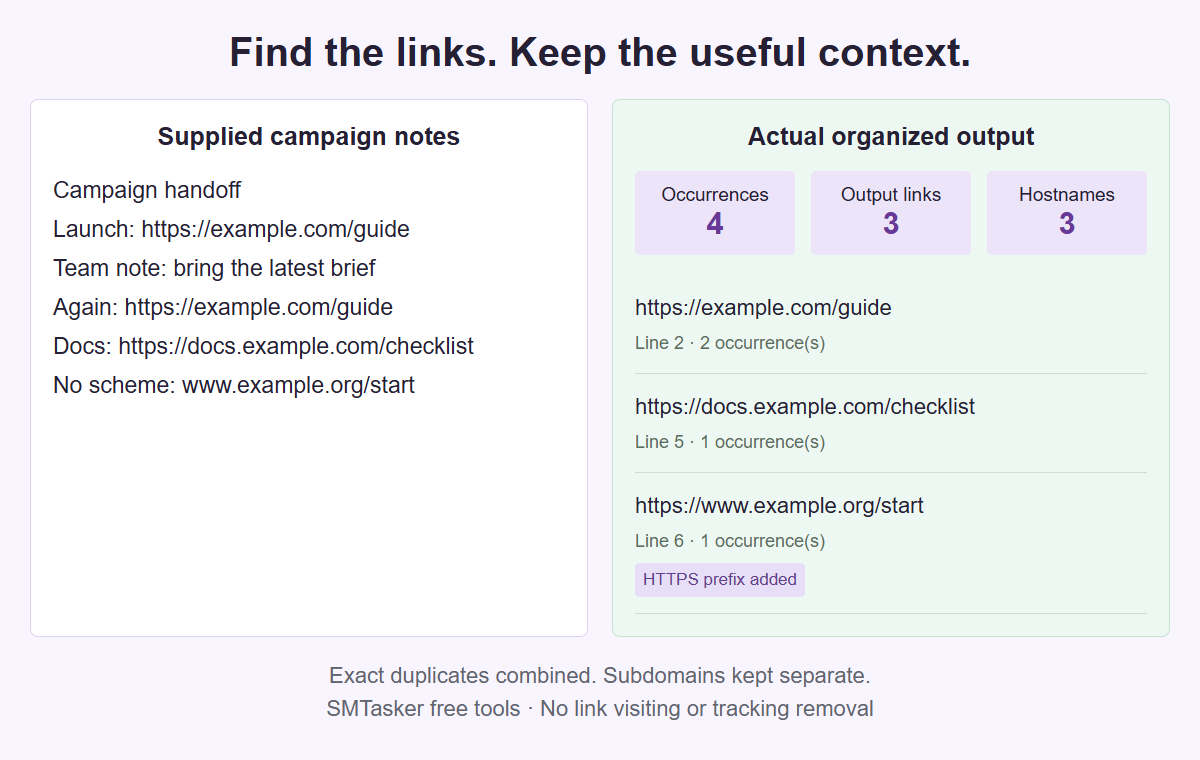
A fictional campaign brief processed by this tool. The list shows text that was recognized, not a check that a destination exists or is safe to visit.
One source. A reusable URL inventory.
Extract the links you need to organize
Paste plain text and choose whether to recognize only full HTTP(S) links or also recognizable domains without a scheme. Review every URL before sharing the list.
Project JSON keeps all your source text. Copied lists and report exports exclude the original prose, but the URLs themselves can still contain private query values. This tool does not remove tracking or certify links.
Your supplied text
Up to 40,000 Unicode characters, 1,000 text lines and 500 recognized web-link candidates.
Your organized links
Hostnames keep subdomains and ignore the port and scheme. Grouping is not proof that links belong to one business, reach the same destination or are safe.
Hostname overview
Counts describe accepted URL occurrences and output rows, not visits, reach, clicks or unique people.
| Exact hostname | Occurrences | Output links |
|---|
Your source text is processed in this browser, without a private-data upload, account connection or background saving. Platform is a context label, not a different URL-recognition engine. Normal site analytics are separate.
Recognize the URL text
A local parser finds web-link candidates in the words you supply. The optional domains mode marks links where an HTTPS prefix was added.
Keep repeats under control
Exact duplicates can become one output row with an occurrence count. Different paths, queries, fragments or spelling remain separate URLs.
Hand off an organized list
Review source lines and hostname groups, then copy the URLs or export a report. The next decision about each destination stays yours.
Build an inventory from the notes you actually have
A campaign handoff often mixes several kinds of information in one note: a landing address, a reminder to update an offer, an old resource, and the same address repeated below a caption draft. This extractor separates recognized web URLs from that surrounding prose. The result is an inventory of strings present in the supplied text, not a list discovered across an account or website. Start with a concrete question, such as which addresses appear in the launch notes. Keep the original note available so you can still read why an address was included before deciding what to do with it.
The tool does not visit a URL, query DNS, follow a redirect, resolve a shortened address, or check whether a page is available. It also does not inspect safety, account access, ownership, or whether a social placement makes a link clickable. Those are different questions from finding text that looks like a web address. A row in the result means a candidate was recognized and accepted under the extraction method. It does not mean the destination is current, public, or appropriate for your campaign. Label the next review task accordingly rather than calling every extracted row a working link.
Choose Instagram, TikTok, YouTube, Facebook, LinkedIn, Threads, X (Twitter), Snapchat, or Reddit as the context for the note. These nine choices do not run nine different algorithms. They help identify the work you are organizing while the same text extraction method handles the source. A note about a video description and a note about a profile campaign can therefore produce the same URL rows when their text is identical. The useful difference lies in your follow-up questions: which resource belongs with the video, or which campaign destination belongs in the profile brief. No native export availability is implied.
Prepare plain text without changing the evidence
Paste the relevant text rather than an address that you expect the tool to read remotely. If your notes live in a document, copy the actual wording into the source field. This is not a native social export importer, an HTML reader, or a Markdown parser. An address inside supplied markup may be recognized as text, but the tool does not understand an anchor label or the relationship between markup fields. It does not decode entities such as an encoded ampersand. Use a plain text version when that is the material you intend to inventory, and retain a separate reference to the original.
A source can contain up to 40,000 Unicode codepoints, 256 KiB of UTF-8 data, and 1,000 LF lines. All three limits apply. Codepoints measure text units, bytes measure encoded size, and LF lines describe the source layout; none is a word count. CRLF and CR line endings become LF before line numbers are assigned. Blank lines still affect those numbers. If an address sits on line 18 after several blank separators, the report points to line 18 rather than compressing the note into a new list. Keep that layout stable while checking a report against its source.
Visual wrapping is not the same as a source newline. A long address may appear on two screen lines while remaining one continuous string in the text. An actual newline inserted halfway through an address is different: the extractor does not join the pieces or repair the break. Likewise, it does not unwrap a copied paragraph or reconstruct hidden characters. If your only source is a picture, the separate Image to Text Converter can help recover visible wording first. Check every recovered address against the picture before treating that reviewed text as extraction input.
Choose Explicit or Domains for a clear reason
Explicit mode looks for full HTTP or HTTPS addresses with a written scheme, such as https://example.com/launch. It is a useful starting point when your question concerns complete web URLs already present in a brief. A bare example.org/notes is not added by this mode simply because a reader might understand it. Neither an email address nor a mailto or FTP address becomes an output web link. This narrower scope can make the first pass easier to explain: you are collecting the recognized full HTTP(S) addresses, not interpreting every dotted word as a possible destination.
Domains mode also recognizes supported bare domains, www addresses, and protocol-relative forms. For a recognized example.org/notes, it adds https://; for //example.net/files, it adds https:. The result marks that scheme as inferred rather than pretending it was written in the source. Recognition uses a fixed library snapshot and its punctuation boundaries, not a complete list of every possible top-level domain or every imaginable URL spelling. Choose this broader mode when a note mixes complete addresses with shorthand. Then inspect the inferred rows as a separate part of your review rather than assuming their transport scheme was confirmed.
The scheme-added summary counts accepted occurrences, including repeated ones. Suppose a bare address appears three times and produces one row after deduplication. All three occurrences needed an inferred prefix, so the scheme-added count is three, not one. This measure describes how the output was formed; it does not describe three successful HTTPS connections. If a scheme matters to the handoff, return to the writing brief and supply the intended full address explicitly. Rerun after that edit, and keep the before-and-after distinction in your task notes. Do not silently describe the first inferred output as a verified replacement.
Work through a mixed launch note line by line
Imagine a six-line launch note. Line 1 says Launch pack. Line 2 says Main: https://example.com/launch?ref=brief. Line 3 says Help: example.org/help. Line 4 says Caption repeat: https://example.com/launch?ref=brief. Line 5 says Assets: //media.example.net/kit. Line 6 says Contact: desk@example.org. The editor wants one inventory before assigning review work. In Explicit mode with deduplication on, the result contains one output URL with two occurrences, first found on line 2. The shorthand help and asset addresses are outside that mode; the email is not an output web URL.
Switch the same note to Domains mode and keep deduplication on. The recognized help address becomes https://example.org/help, and the asset address becomes https://media.example.net/kit. The report now has four accepted occurrences, three output links, three unique URL strings, and three hostnames. Two occurrences received an added scheme. The launch row still points to line 2 with count two; the other rows point to lines 3 and 5 with count one each. These totals describe this exact supplied note. They do not count links elsewhere in the campaign or include the contact email as a fourth destination.
Turn deduplication off for a placement-oriented pass over that six-line note. You now get four output rows in source order, each with count one, while the exact unique URL count remains three. The repeated launch address has separate rows for lines 2 and 4. This version helps an editor remember that the same destination appears in two source positions. It still does not assign those positions to live posts or prove where they were published. Keep a separate work note saying launch brief and caption draft if those roles matter. The extractor preserves source references, not the full meaning of every surrounding label.
Read exact duplicates without merging different strings
Deduplication compares the exact output URL string. It keeps the first accepted occurrence and its source line, then counts later exact repeats. It does not decide that two addresses lead to equivalent content. For example, https://example.com/launch and https://example.com/launch/ remain separate. So do strings with different query values, fragment identifiers, letter case, or written schemes. This is useful when your notes need faithful inventory rather than a guessed canonical address. Before combining rows manually elsewhere, name the reason for doing so and retain the original strings so another editor can understand the decision.
The matched URL text is retained, apart from an explicitly added scheme in Domains mode. Parsing helps validate a candidate and derive its hostname, but the tool does not replace the output with a newly serialized address. It does not sort query parameters, remove tracking tags, tidy percent encoding, or discard fragments. A private query value can therefore remain in a perfectly accepted row. Read the complete string before sharing it. The absence of surrounding private prose does not make a URL anonymous, and a short visible path can still carry a sensitive token later in the query.
When changing parameters is a separate goal, move a reviewed list to the URL Cleaner and choose its removal settings deliberately. Do not describe extraction itself as cleanup. Two links that differ only by a campaign parameter may be intentionally distinct for measurement, while two visually similar paths may refer to different resources. Keep the extracted inventory as the record of what the supplied note contained, and treat a cleaned list as a later version with a different purpose. That separation makes it easier to explain why the number of rows changed after the editing step.
Use hostname groups as a review aid
Hostname groups use the ASCII hostname returned by URL parsing. Subdomains remain distinct: media.example.net is not grouped with example.net. Scheme and port do not define the group, so http://example.com/a and https://example.com:8443/b share the hostname example.com while remaining separate URL strings. A trailing dot is retained, which means example.com. and example.com are different hostname groups. Use these exact labels when checking a report. They are a mechanical grouping key, not a registered-domain summary or a map of organizations behind the addresses. Notice that an uppercase host spelling in an output URL can still produce the same lowercase hostname group as its lowercase spelling. The address strings remain different for exact deduplication. Keep both columns visible in your own review: one answers which written addresses appeared, and the other answers how those rows gather under a parsed host label. Neither comparison replaces the other.
Groups appear in first-seen order, not as a ranking of important sites. Their occurrence totals include repeats, while output-link totals depend on the deduplication choice. In the six-line example, the launch hostname has two occurrences even when it contributes only one deduplicated row. That tells the editor where repeated text is concentrated. It does not indicate traffic, clicks, unique visitors, campaign importance, or a stronger relationship with that destination. Assign review effort from the brief as well as the count; a resource appearing once can still be the most important item in the handoff.
Build a small review queue outside the extractor using the hostname groups. One person can check the intended landing copy against the launch brief, while another confirms which asset address belongs in the production packet. Do not assign a hostname to a person or registered owner simply because its name looks familiar. The tool does not resolve identities or inspect registration records. Keep your queue factual: hostname, source line, intended role, and unresolved question. This is enough to divide work without turning a text inventory into an unsupported claim about who controls a destination or what its page contains.
Handle missing matches and limits without guessing
Some recognized HTTP candidates are skipped because they contain credentials, control or bidirectional characters, an invalid URL structure, or more than 4,096 codepoints. The report records a source line and fixed reason for each skipped candidate, not its raw rejected address. Return to that line in your retained source to investigate. A skipped row is not a security verdict, and an accepted row is not a safety certificate. Keep this distinction when reporting a problem to another editor: say a candidate was excluded for the stated extraction reason, not that the destination was scanned and found dangerous.
A missing item is not always a skipped candidate. It may be an email, an unsupported protocol, shorthand outside the selected mode, an unrecognized domain ending, or text split by a real newline. Punctuation boundaries also affect recognition. Compare the exact source spelling and chosen mode before making a correction. If the note contains HTML entities or Markdown wrappers, remember that this tool does not decode or interpret them. Prepare a deliberate plain text revision if that is the appropriate source. Keep the original separately so you do not confuse a repaired writing draft with the material originally inventoried.
There is a cap of 500 recognized candidates, counted before deduplication; repeated candidates still use that allowance. Exceeding the cap fails the run rather than returning the first 500 as a complete inventory. Oversized source input is also refused, and a run has a six-second deadline. Split a large note into clearly named batches before retrying, preserving the batch names outside the report. Line numbers then refer to each batch, not the original combined document. An empty source can produce a valid zero-link report, but downloads and copying require output links. Zero matches never proves the wider campaign has no URLs.
Choose the right handoff and save deliberately
Copy and TXT contain only the output URL list, one address per LF line. CSV carries the links, hostname groups, settings, method, and skipped line numbers with reasons. Report exports omit the original prose and raw skipped URLs, but accepted URLs can still contain private paths or query values. The PDF has three pages, including a declared visual excerpt of the first eight links and hostname groups, plus full report JSON and CSV attachments. Read the complete report before distributing it. A short PDF excerpt does not mean the attached inventory is limited to those visible rows.
Save project is a different action: its JSON backup includes all source text together with platform, mode, and deduplication settings. It is an explicit local backup, not a source-free report or an autosave. Open project accepts the strict project format up to 1 MiB. Choose that file only when the next session needs the complete note, including prose that ordinary report exports leave out. Keep a meaningful revision name in your storage and rerun analysis after changing the source. A report alone cannot reconstruct the note or independently prove what surrounded an address on its recorded source line.
Finish by naming the next job rather than sending an unexplained list. In the launch example, hand over three destination strings, the report settings, and a separate instruction to confirm the current help resource. If new campaign tags are needed, use the UTM Campaign Link Builder as a deliberate authoring step after that review. Extraction does not create tags or record visits. Keep the inventory version distinct from the newly authored campaign URLs so later reviewers can tell which addresses came from the note and which were prepared for the next launch.
Give the list a useful next step
Platform and link organization guides
Work through the kind of text in front of you, or learn how to review extracted URLs and hostname groups in more detail.
Instagram Campaign URLs
Separate bio destinations, caption references, and older campaign addresses from a supplied Instagram planning note without guessing where links are clickable.
Read the guideTikTok Creator Resource URLs
Pull product references, setup resources, and production addresses from a supplied TikTok creator brief while keeping their different jobs clear.
Read the guideYouTube Description URLs
Inventory resource addresses in a supplied long description while keeping chapter timestamps, credit wording, and repeated references in their proper roles.
Read the guideFacebook Event Links
Collect booking, volunteer, map, and checklist URLs from community event notes, then hand over a resource list with clear source references.
Read the guideLinkedIn Resource Inventory
Inventory newsletter references and recruiting resources from supplied text without scraping profiles, retrieving posts, or treating repeats as people.
Read the guideThreads Discussion Sources
Review URLs across an opening note and several replies, distinguish exact repeats from section links, and preserve context in a separate handoff note.
Read the guideX Link Variant Review
Separate repeated short addresses from supplied destination URLs, compare query and fragment variants, and hand over an exact-string link inventory.
Read the guideSnapchat Campaign Link Notes
Turn campaign briefs and attached-link notes into a counted URL list, then check which destinations belong to each creative.
Read the guideReddit Resource Comment Links
Review web addresses written in resource comments, reply drafts, and Markdown notes without confusing plain recognition with rendered-link parsing.
Read the guideExtract Links from Text
Prepare pasted text, inspect punctuation and broken lines, and reconcile the extracted URL list with the material you started from.
Read the guideOrganize Links by Hostname
Compare exact hostname buckets while keeping subdomains, trailing dots, repeated strings, schemes, and ports in their proper roles.
Read the guideQuestions about extracting URLs from text
Does this tool fetch URLs or read social accounts?
No. It extracts recognized web addresses from plain text you provide locally. It does not fetch pages, connect accounts, query DNS, resolve redirects, or test availability, clickability, ownership, or security.
What changes between Explicit and Domains mode?
Explicit recognizes full HTTP(S) addresses. Domains also recognizes supported bare, www, and protocol-relative forms and marks an inferred HTTPS scheme. It does not recognize every possible domain ending. Emails and other protocols are not output web links.
Which duplicates are combined?
Only identical output URL strings. With deduplication on, the first source line is kept and occurrences are counted. Different schemes, query values, fragments, case, or trailing slashes can remain separate. Hostname groups use a different grouping key.
What happens when the note exceeds a limit?
The whole run fails rather than returning a partial inventory. Source limits are 40,000 codepoints, 256 KiB, and 1,000 LF lines, with at most 500 recognized candidates before deduplication. Divide larger material into named batches and interpret line numbers within each batch.
Do report downloads contain my original notes?
Copy and TXT contain output URLs only. CSV and PDF reports include URL inventory details but omit source prose and raw skipped addresses. Accepted URL values may remain private. The PDF attaches full report JSON and CSV. Save project deliberately includes all source text.
After the destinations are reviewed
Give the campaign handoff a clear next step
Explore SMTasker for supported social account work. Keep destination review and the manual choice of campaign content separate from extraction.