The Save Posts Tool
Platform algorithms weigh engagement signals differently. A view is cheap — it happens passively. A like takes one tap. A comment requires effort.
When you save a post, you’re telling the algorithm that the content was valuable enough to return to — a signal that no amount of passive views can replicate. Platforms respond by distributing that content more broadly, because if someone saved it, others probably want to see it too. The SavePosts tool automates this signal at scale across your niche. It’s the most underused tool in SM Tasker, and for accounts that add it to their stack, the impact on their own content’s algorithmic reach is measurable — because the save signal flows both ways.
Quick Setup Reference
- Go to Automations → select the account → click ADD AUTOMATION
- Select SavePosts from the tool list
- Configure Settings and Sources before starting
- Click Start
Note: SavePosts is available on Instagram and TikTok. It is not available on Threads.
Why Saves Flow Both Ways
The strategic value of SavePosts goes beyond the direct signal it sends. When SM Tasker saves posts from accounts in your niche, two things happen:
First, the saved account receives a notification and a stronger algorithmic signal on their content — which means active posters in your niche get a visibility boost from your saves. This creates goodwill and, more practically, positions your account as a engaged community member rather than a passive presence.
Second — and this is the part most users don’t consider — saving content in your niche calibrates the platform’s understanding of your account. Instagram and TikTok use your save history to understand what type of content your account values. An account that consistently saves niche-specific content gets treated by the algorithm as a niche authority, which in turn influences how the platform distributes your content to similar accounts. Saves are both an outbound signal and an inbound signal at the same time.
Settings Explained
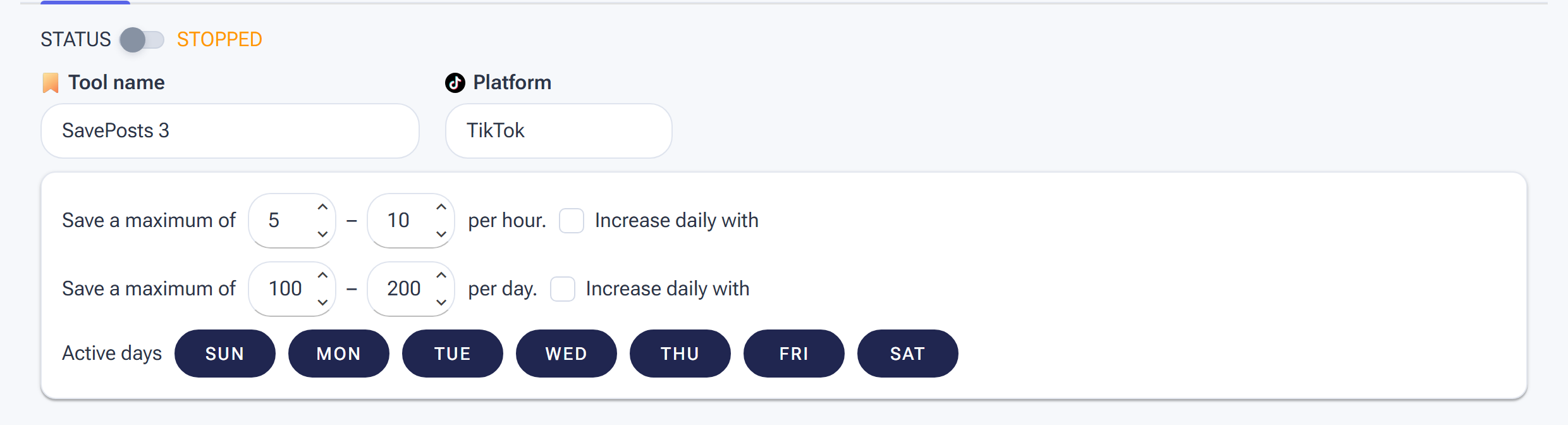
SavePosts Settings: saves are lightweight, but keep the hourly/daily ranges modest so the pattern stays human.
Min/Max Per Hour
SavePosts is one of the safest tools in SM Tasker — saving posts is a completely natural, encouraged behavior on both Instagram and TikTok. That said, saving dozens of posts per hour every hour looks mechanically consistent rather than naturally enthusiastic. Keep the range moderate and varied.
| Account Stage | Min/Hour | Max/Hour |
|---|---|---|
| Warm-up (days 1–14) | 3 | 8 |
| Standard (established account) | 5 | 15 |
Refer to the Daily Action Limits guide for the platform-specific daily caps that apply to save actions.
Min/Max Per Day
Keep your daily save total consistent. Because SavePosts runs quietly in the background without triggering the same scrutiny as Follow or Comment, it can sustain steady daily totals without the fluctuation management other tools require. Set a realistic daily range based on your hourly limits and active hours, and leave it.
Active Days
5–6 active days per week. SavePosts is gentle enough that 6 days is fine for most accounts. Stagger its rest day away from Like and LikeComments so the engagement profile across the week stays varied. Because all three of these tools operate on similar risk levels, having them rest on different days creates the kind of inconsistent-but-active pattern that real users exhibit naturally.
Engage with Profile
Keep ON. SM Tasker visits the post creator’s profile before saving the post, consistent with how a real user would navigate — you see a post, visit the profile to understand the account, and save the content you want to keep. The profile visit adds a secondary touchpoint to every save, compounding the notification the account owner receives.
Interaction Level
Use Just Browsing. SavePosts is a volume-oriented tool — the value comes from the breadth of niche content you’re saving and the consistent algorithm signal that generates. Deeper per-profile interaction via Open to Interaction or Want to Connect reduces the number of saves per hour without meaningfully improving the outcome. Keep it light and let the tool do its work at pace.
Source Strategy for SavePosts

SavePosts keeps targeting simple: one source — Specific Users — so it saves posts from exactly the accounts you list.
Unlike the engagement tools, SavePosts doesn’t browse hashtags or the Explore feed — it has exactly one source: Save posts from Specific Users. That makes your strategy question very simple: whose posts are worth saving? The tool is only as good as the account list you feed it.
- Niche authorities — the recognised names in your space. Saving their content aligns your account with the content your audience already values, and authorities are exactly the accounts whose attention is worth earning through save notifications.
- Engaged mid-size accounts — creators big enough to post consistently but small enough to actually notice a save notification. This is the reciprocity sweet spot.
- Accounts you want a relationship with — potential collaborators, shoutout partners, or accounts whose audience overlaps yours. A steady, low-volume stream of saves is the least intrusive way to stay on their radar.
Build the list once (10–30 accounts is plenty), reuse it via Lists, and refresh it monthly — accounts that stop posting are wasted budget. For the general targeting principles behind a good account list, see Sources & Targeting Mastery.
Platform-Specific Notes
Saves are the metric Instagram publicly acknowledges as a top signal for content distribution — it’s mentioned explicitly in creator guidance from Instagram itself. When your account saves a post, Instagram registers it as a high-quality content signal and factors it into how widely that post gets distributed. For accounts in active engagement with your saves, this creates a positive relationship dynamic — you’re contributing to their growth, which makes them more likely to notice and reciprocate.
Instagram organises saved posts into Collections — labelled folders within the saved posts section. SM Tasker saves to the default saved folder; the collection organisation feature is manual. If you use Instagram natively and want to keep your genuine saved content separate from what SM Tasker saves, the Collections feature lets you do this.
TikTok
TikTok calls saved content “Favourites” — the bookmark icon on each video. Saving a video on TikTok sends the creator a notification and contributes to the video’s engagement score, which directly influences how TikTok’s algorithm distributes it to the For You Page of other accounts.
TikTok’s algorithm is particularly responsive to save signals because video completion rate and saves are the two metrics it most heavily weights for content distribution. Automating saves in your niche therefore has a more direct and observable impact on content performance in TikTok than on Instagram, where saves are one of several weighted signals. If your stack runs on TikTok, SavePosts is worth prioritising.
When to Add SavePosts to Your Stack
SavePosts earns its place in the stack at two specific moments:
During account warm-up (days 1–14): Save activity is so algorithmically natural that it’s one of the best warm-up actions available. Adding SavePosts in the first week alongside StoryViewer builds an account activity history that looks like a genuinely curious, content-appreciating user — not an account that exists purely to follow and engage at volume. The algorithm treats warm-up saves as positive niche-interest signals, which improves how it categorises your account before you start running heavier tools.
As a permanent background tool: Once your core stack (Follow, Like, StoryViewer, Comment) is running, add SavePosts as a continuous background signal. It operates independently of the other tools, adds no meaningful risk to the account’s overall action profile, and consistently reinforces your account’s niche identity to the algorithm. This is one of the few tools you configure once, start, and genuinely don’t need to revisit unless your source lists need refreshing.
Combining SavePosts with Your Engagement Stack
SavePosts works best when it’s part of a coordinated multi-tool approach targeting the same niche pool. The full engagement combination on any given post looks like this:
- StoryViewer — views the account’s story, creating the first soft touchpoint
- Like — likes a post from the account, generating the post-like notification
- LikeComments — likes a comment in the post’s comment section, reaching an active commenter
- SavePosts — saves the post, sending the strongest single engagement signal
- Comment — leaves an AI-generated comment, the highest-impact direct interaction
No single account will receive all five signals from your automation on any given day — the tools work across the source pool, not all on the same account simultaneously. But as your tools run consistently, the same niche community gets exposed to your account through multiple different signals over time, creating the compounding familiarity effect that no single tool can achieve alone.
Common Mistakes
| Mistake | Why It Hurts | What to Do Instead |
|---|---|---|
| Skipping SavePosts entirely | Misses the strongest per-action algorithm signal available; leaves consistent niche authority signalling on the table | Add SavePosts to every account’s stack — it’s low-risk, low-maintenance, and delivers signals no other tool sends |
| Not adding it during warm-up | Misses the window where save activity has the most impact on how the algorithm categorises a new account | Add SavePosts in the first week of warm-up alongside StoryViewer; it’s one of the safest possible warm-up actions |
| Using different source pools from Like and Comment | Fragments the account’s niche identity across different content pools; weakens the algorithm signal coherence | Use the same hashtag list across Like, LikeComments, Comment, and SavePosts for a consistent, coherent niche identity |
| Setting very high limits to “maximise signal” | Even low-risk tools look automated at very high consistent volumes; the signal quality doesn’t improve with more saves per day | Run at moderate, consistent limits; the algorithm values steady saves over time more than volume spikes |
What to Do Next
- The ReelViewer Tool: Feed the Instagram Algorithm and Get Discovered — Add the next visibility layer to your Instagram stack: automated Reel viewing, which feeds the algorithm signals that expand your content’s reach.
- The VideoViewer Tool: Train TikTok’s Algorithm to Work for You — The TikTok equivalent of ReelViewer. If your stack runs on TikTok, this is the next tool to add.
- Using Lists to Power Precision Targeting — Make sure your hashtag list is tuned for the kind of quality niche content that makes SavePosts most effective — mid-range, active-community hashtags where the content is genuinely worth saving.