The Story Viewer Tool: The Safest Way to Get on People’s Radar
Story viewing is the most underestimated action in SM Tasker. It generates a notification, drives a profile visit, and leaves no public trace — no like count…
That combination — meaningful discovery signal, near-zero platform scrutiny — makes StoryViewer the tool you should be running on every account, at every stage. During warm-up it’s your safest way to build activity history. During active growth campaigns it multiplies the effectiveness of Follow and Like. During cooldown periods after a block it keeps the account alive without risking a second strike. No other tool in SM Tasker offers that range of utility at that level of safety.
Quick Setup Reference
- Go to Automations → select the account → click ADD AUTOMATION
- Select StoryViewer from the tool list
- Configure Settings and Sources before starting
- Click Start
Note: StoryViewer is available on Instagram and TikTok. It is not available on Threads.
How It Works: The Notification Mechanic
When SM Tasker views someone’s story, that person can see your account in their story’s viewer list — the list of accounts that have watched the story. On Instagram, this list is visible to the story poster for 24 hours after the story was published. On TikTok, story view notifications work similarly.
The conversion path is simple: target sees your account in their viewer list → they tap your profile out of curiosity → they see your content → they follow if it’s relevant to them. The notification is passive — it doesn’t interrupt the target the way a follow request or a comment does — but it’s consistently acted on because people are naturally curious about who viewed their content.
This passive quality is also what makes StoryViewer so safe. It doesn’t initiate contact, it doesn’t leave public marks, and it performs an action that every user performs manually every day. Platforms have almost no reason to flag it.
Settings Explained
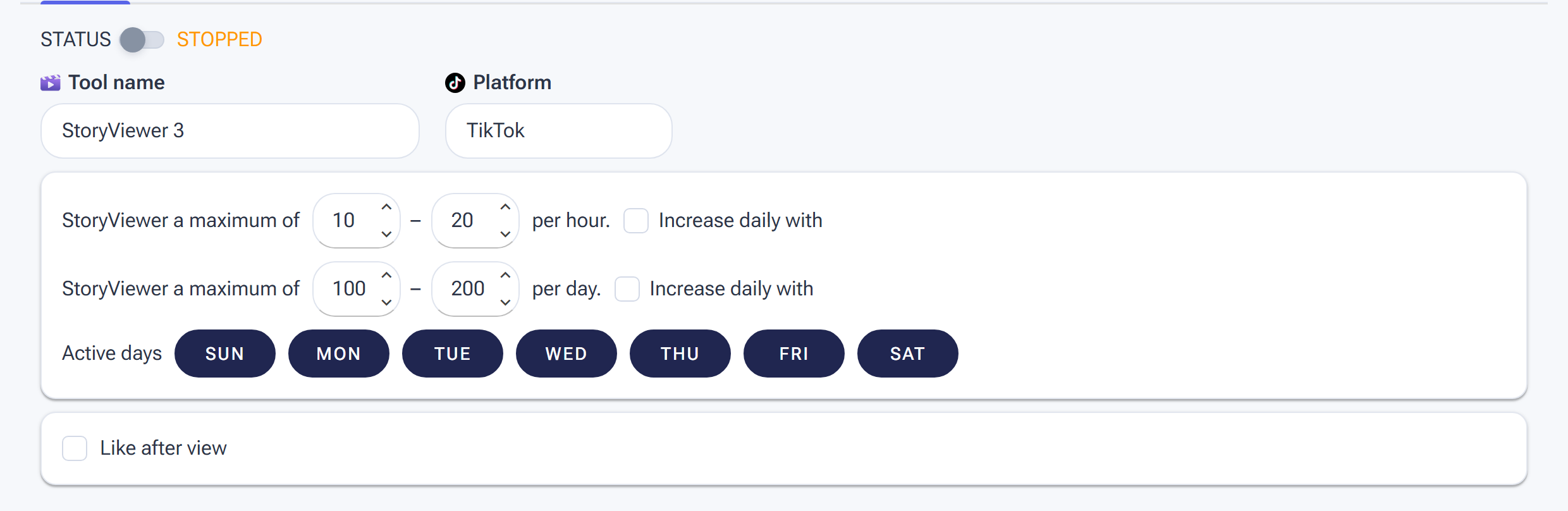
StoryViewer Settings: view ranges per hour and per day, Active days, and the optional Like after view for a stronger signal.
Min/Max Per Hour
StoryViewer’s generous safety profile means you can run it at higher rates than Comment or even Follow without meaningful risk. That said, the same randomization principle applies — a range creates more natural behavior than a fixed number.
| Account Stage | Min/Hour | Max/Hour |
|---|---|---|
| Warm-up (days 1–14) | 5 | 15 |
| Conservative (post-warm-up) | 10 | 25 |
| Standard (established account) | 15 | 40 |
Check the Daily Action Limits guide for the platform-specific daily caps on story views.
Min/Max Per Day
StoryViewer can sustain higher daily totals than any other action tool in SM Tasker. The practical ceiling is determined by how many accounts in your source pool are actively posting stories on a given day — if the pool runs low, the tool pauses naturally and resumes when new stories appear. Set your daily maximum generously and let the source pool be the limiting factor rather than an artificially low cap.
Active Days
Stories are posted every day of the week — there’s no reason to give StoryViewer more than one rest day per week. Because it’s your safest tool, it can run on more days than Follow or Comment without adding meaningful risk. Set it to 6 days and stagger its single rest day away from your other tools.
Engage with Profile
Keep this ON. With Engage with Profile enabled, SM Tasker navigates to the account’s profile first, then opens their story — exactly how a real user would discover and watch a story. With it off, SM Tasker accesses stories more directly, creating a pattern that’s less consistent with normal app behavior. The profile visit it adds also contributes to the account’s overall profile-visit activity, which is a positive signal in itself.
Interaction Level
Use Just Browsing for StoryViewer in most setups. The tool’s value comes from the story view notification, not from secondary engagement during the profile visit. Just Browsing keeps the action lightweight and fast — which means higher story view volume per hour for the same action budget.
The exception: if you’re running StoryViewer as part of a deep-engagement strategy on a small, targeted account list (rather than broad discovery), switch to Open to Interaction to add a secondary touchpoint during each profile visit. This works well when StoryViewer is targeting the same accounts as a Follow or Contact campaign and you want to maximize the interaction signal before the follow or message lands.
Source Strategy for StoryViewer

Choose whose stories get viewed on the Sources tab.
StoryViewer’s sources need to surface accounts that are actively posting stories — not just accounts that exist. An account that hasn’t posted a story recently has nothing for SM Tasker to view, so the tool skips it and moves on. Your sources should be directed at active, frequent story posters in your niche.
For the full source reference, see Sources & Targeting Mastery. For StoryViewer specifically:
- Target Account Followers — not available for StoryViewer directly, but you can achieve the same effect by building a username list of competitor followers and assigning it as a Specific Users source.
- Hashtag Search (rank 150–200) — the primary source. Find accounts actively posting content under your niche hashtags. Active posters are also active story posters — the correlation is strong.
- Explore Feed (rank 100) — surfaces accounts that are currently trending or receiving high engagement. Good supplementary source for variety.
- Specific Users (rank 100–150) — if you’re running a targeted campaign where you want to view stories from a specific list of accounts (e.g., prospects in a lead-gen campaign), assign a username list here.
Use the same hashtag list you’ve built for your Like tool — consistency across your source pools means SM Tasker is creating multiple touchpoints (a like and a story view) with the same niche audience, which compounds visibility.
Platform-Specific Notes
Instagram’s story viewer list is visible to the story poster for 24 hours after the story was published. After 24 hours, the viewer list disappears — the story expires and the viewer data goes with it. This has a practical implication for timing: SM Tasker should be viewing stories while they’re fresh, not hours after they’ve been up. Configure your active hours to align with when your target audience is most likely to be posting — typically mornings and evenings in their timezone.
Instagram also distinguishes between regular Stories and Highlights. SM Tasker views active Stories — the 24-hour content — not saved Highlights. Keep this in mind when assessing source quality: accounts that primarily post Highlights rather than regular Stories will generate fewer view opportunities.
One additional Instagram behavior worth knowing: when an account has a large following, their story viewer list becomes harder to read at volume — your account gets buried among hundreds of viewers. StoryViewer is most effective at driving profile visits on mid-size accounts (1K–100K followers) where the viewer list is short enough that your account stands out.
TikTok
TikTok Stories work similarly to Instagram Stories in terms of the view notification mechanic — creators can see who viewed their story. TikTok’s Stories feature has grown significantly and is now a regular part of how creators maintain daily engagement with their audience. The same principle applies: active story posters are active community members, and showing up in their viewer list puts your account in front of exactly the right people.
TikTok’s overall tolerance for story view activity is high — it’s treated as natural app behavior. Run StoryViewer at standard limits on TikTok without the extra caution required for Follow or Comment.
Pro Strategies
StoryViewer as Your Warm-Up Foundation
When onboarding a new account to SM Tasker, StoryViewer should be the first tool you activate — before Like, before Follow, before anything else. Here’s why: story viewing creates a clean, low-risk activity trail that establishes the account as a normal, active user without triggering any of the scrutiny that follows or likes attract during the critical first days.
The recommended warm-up sequence:
- Days 1–3: StoryViewer only, at warm-up limits
- Days 4–7: StoryViewer + Like
- Days 8–14: StoryViewer + Like + Follow (at conservative limits)
- Day 15+: Full stack including Comment, once the account has an established activity history
See the Account Warm-Up guide for the complete schedule with daily action targets for each stage.
StoryViewer During Cooldown Periods
If an account receives a block on Follow or Comment and those tools are suspended by Auto-Suspend, StoryViewer can keep running safely. It doesn’t share the action quota that triggered the block, and its risk profile is low enough that continuing it during a cooldown period is unlikely to cause any additional issues.
This is the correct approach to a block situation: pause the blocked tool (or let Auto-Suspend handle it), let StoryViewer continue, and use the cooldown period to review your limits and source configuration before restarting the suspended tool. The account stays active, the target audience keeps seeing your name in their story viewers, and the block window passes without the account going completely dark.
Follow + StoryViewer: The Two-Touch Sequence
Run StoryViewer and Follow on overlapping source pools. The timing typically works out so that the story view lands before the follow — SM Tasker views a story from the same pool of accounts it’s queuing up to follow. By the time the follow notification arrives, the target has already seen your account name in their viewer list. They’ve had one passive, no-pressure touchpoint with you before you make the more direct move of following them.
This sequence consistently produces higher follow-back rates than Follow alone. The story view creates familiarity — and familiarity converts. Assign the same hashtag list to both tools’ Hashtag Search sources to keep the targeting pools aligned without any manual coordination.
Common Mistakes
| Mistake | Why It Hurts | What to Do Instead |
|---|---|---|
| Not adding StoryViewer to the stack at all | Missing the safest, most versatile touchpoint available — profile visits go unrealized and follow-back rates stay lower than they should | Add StoryViewer to every account from day one; it earns its place immediately |
| Pausing StoryViewer during a block on another tool | Unnecessarily halts the one tool that’s safe to run during a cooldown period, leaving the account completely inactive | Pause only the blocked tool; let StoryViewer continue during any cooldown window |
| Targeting accounts that rarely post stories | SM Tasker skips inactive accounts and burns source capacity without generating views; low daily output despite the tool running | Use Hashtag Search to target active content posters — frequent post activity strongly correlates with frequent story activity |
| Using the same source pool as other tools without considering story timing | Viewing stories hours after they were posted reduces the chance of appearing prominently in a shorter, more-recent viewer list | Configure active hours to overlap with when your niche posts most frequently — early morning and evening are typically the highest-activity windows |
| Running StoryViewer on mega-accounts only (500K+ followers) | Your account disappears in a viewer list of thousands; nobody notices and the profile-visit conversion is near zero | Target mid-size accounts (1K–100K followers) where your appearance in the viewer list is noticeable |
What to Do Next
- The Publish Tool: Build a Content Calendar That Runs Itself — StoryViewer drives people to your profile; Publish ensures there’s compelling content waiting for them when they get there.
- Using Lists to Power Precision Targeting — Refine your StoryViewer source pool with a well-built hashtag list. The better your list, the more active story posters SM Tasker finds.
- The Follow Tool: How to Build a Targeted Audience on Autopilot — If you’re not already running Follow alongside StoryViewer, set up the two-touch sequence now.