Sources and Targeting Mastery
Sources are how every automation in SM Tasker finds the people it acts on. Get the targeting right, and your tools land in front of people who actually care…
This guide is the strategy layer: how to think about sources, how to research good ones, and how to combine them. The per-tool articles (Follow, Like, Comment, Contact, and so on) cover the exact source types each tool supports and how to tune them. Read this one first.
Quick Wins From This Article
- Define your audience before you pick sources. Sources are tools for finding the people you’ve already decided you want to reach — not the other way around.
- The best targeting comes from people already engaged in your niche. Followers of a competitor or users who recently commented on a niche post almost always outperform broad keyword or hashtag searches.
- Layer 2–3 sources per tool. Single-source targeting exhausts pools faster and looks more pattern-like to the platforms. Variety is both safer and more effective.
Starting small? If you’re managing one or two accounts, focus on the first three sections — define your audience, research one or two good competitor accounts, and pick a small starter set of sources. The layering and List-based scaling techniques further down pay off most when you’re running many accounts.
Where Sources Live in SM Tasker
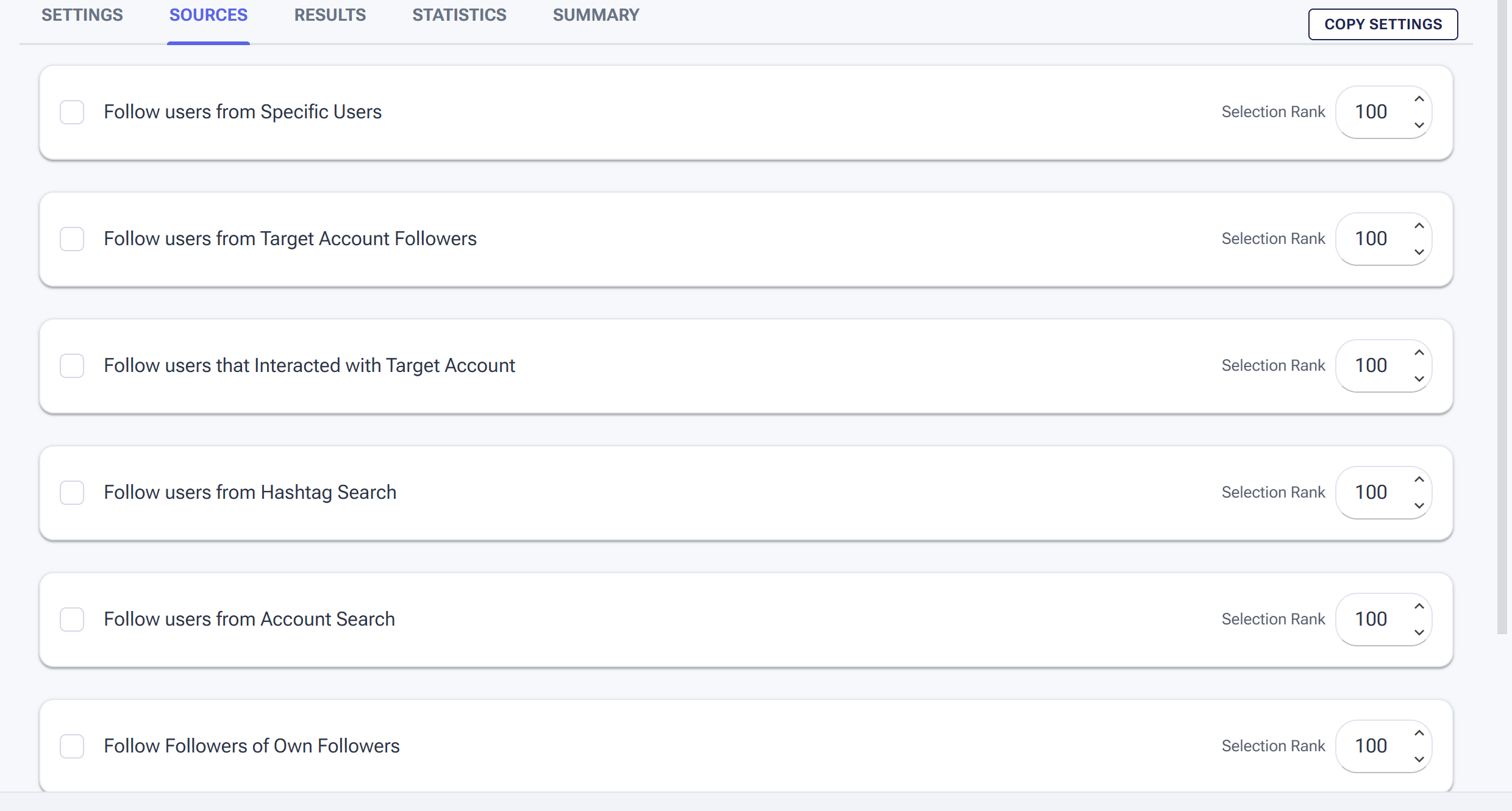
Every engagement tool has a Sources tab — this is where you tell it who to target.
Every tool has its own Sources tab. To open it, go to Automations, click the tool’s name, then click the SOURCES tab. Each available source type is listed with a checkbox to enable it and a Selection Rank field (more on that below), here’s an example for the follow tool:
The source types you’ll see depend on the tool. The Follow tool has the broadest set because it’s targeting users to add. Engagement tools like the Like, Comment, and StoryViewer focus on content-based discovery. The exact list for each tool is documented in that tool’s article — this guide stays at the strategy level.
The Four Categories of Sources
Across all tools, sources fall into four categories. Knowing which category you’re using helps you reason about who you’re actually reaching — and avoid picking sources that conflict with your goal.
| Category | How It Works | Best For |
|---|---|---|
| Direct lists | You provide an exact list of usernames or accounts. SM Tasker acts on those exact targets — no algorithmic filtering. | Curated outreach (a prospect list, a VIP set, a manual research batch). |
| Account-based discovery | SM Tasker finds users through their relationship to specific accounts you nominate (their followers, the people engaging with them, the accounts your own followers also follow). | High-intent growth and outreach. People already in your niche, identified through accounts you trust. |
| Content-based discovery | SM Tasker uses hashtags, keywords, or post content to find users who are actively participating in your niche right now. | Engagement-led growth and reaching active community members. Volume + freshness. |
| Platform-algorithm discovery | SM Tasker uses the platform’s own discovery feed (Instagram Explore, TikTok For You) — content the algorithm thinks the account would be interested in. | Account warm-up and adding natural variety. Looks the most organic of any source. |
Most well-tuned setups use a mix — one account-based source as the primary driver, one content-based source for variety, and sometimes a platform-algorithm source to keep the activity pattern looking natural.
Define Your Audience Before You Pick Sources
The most common targeting mistake is picking sources before deciding who you’re actually trying to reach. Sources are tools for finding a specific audience. If you don’t know what that audience looks like yet, no source will give you good results.
Take 10 minutes before configuring anything to answer:
- Who is your ideal follower or customer? Be specific. Not “people interested in fitness” but “women 25–40 interested in strength training and at-home workouts.”
- Where do they already hang out online? Which accounts do they follow? Which hashtags do they use? Which kinds of posts do they engage with?
- What problem are you solving for them? Their pain point becomes your filter — “people complaining about post-pregnancy fitness routines” is a sharper signal than “people who like fitness.”
Once you have that picture, picking sources becomes mechanical. You’re not guessing — you’re matching your audience to the source category that best reaches them.
How to Research Good Competitor Accounts
When using account-based discovery, the quality of your competitor list determines almost everything. The pattern most users get wrong is picking the biggest accounts in their niche and stopping there.
Don’t pick the biggest accounts. A mega-account with 500K followers usually has a passive audience — followers who scrolled past once, hit follow, and never engaged again. Their follower pool is huge but low-intent.
Look for high engagement, not high follower count. A competitor with 20K followers and 1,000 likes per post has a tighter, more active community. Their followers are the kind of people who actually reply, comment, and click through. Those are the people you want to reach.
Pick 5–10 accounts that cover different angles of your niche. If you’re a fitness coach, your list might include: a strength training coach, a nutrition expert, a transformation-focused influencer, a home workout content creator, and a yoga teacher. Different angles = a broader, more diverse audience pool.
Refresh your list quarterly. Audiences evolve. New accounts gain traction; old ones go stale. A list you built six months ago is rarely as good as one you built last week.
For accounts running multiple SM Tasker accounts in the same niche: vary the competitor list across your accounts. If ten of your accounts target the same five competitors, you’ll saturate that follower pool quickly. Diversify with 8–12 competitors total, and rotate which accounts use which subset.
How to Pick Good Hashtags
Hashtag-based sources reach people actively posting in your niche right now — they’re a strong signal of engagement and intent. But the hashtag selection makes or breaks the result.
Avoid mega-hashtags. Anything over ~5 million posts (think #fitness, #love, #travel) is too broad to be useful. The content under those tags is generic, the audience is mixed, and your actions get buried in noise.
Aim for the 50K–2M range. This is the sweet spot. The community is active and engaged, the content is on-topic, and your actions actually surface.
Mix broad and narrow tags. A list of only ultra-niche tags (“#postpartumstrengthtraining”) gives you precision but small volume. Pure broad tags give you volume but lower relevance. A mix of 3–4 narrow + 10–15 mid-volume tags is balanced.
Build a rotating set of 20–50 tags. Don’t run on the same 5 tags forever — the source pool exhausts and the patterns become predictable. Twenty to fifty tags rotated regularly keeps things fresh.
How to Pick Good Keywords
Keyword-based sources work by searching profile bios or account names. They’re a useful supplement, but they need real specificity to convert.
Use words your audience puts in their bios. “Real estate investor”, “personal trainer”, “indie hacker” are bio-style phrases — people in those niches use them to describe themselves. Generic single words (“fitness”, “marketing”) return too many irrelevant accounts.
Use profession or role titles when possible. “Yoga teacher” finds yoga teachers. “Yoga” finds anyone who’s mentioned yoga once. The first is who you want; the second is noise.
Test before scaling. Try a keyword on one account for 24–48 hours. Look at who actually got followed/contacted. If the matches are off-target, refine the keyword before running it on more accounts.
Layering: Use 2–3 Sources Per Tool
Running a tool on a single source is rarely the right call. Even when one source is clearly your strongest, layering 2–3 complementary sources gives you two practical wins:
- Bigger pool, slower exhaustion. A single competitor list runs out of fresh users faster than a mix of competitor + hashtag + algorithm sources.
- More natural activity pattern. Real users don’t discover other accounts through one channel only. They scroll the Explore feed, click hashtags, and follow recommendations. A varied source mix mirrors that.
Selection Rank: prioritizing between sources
When you enable multiple sources for a tool, each one has a Selection Rank field. The default is 100 — meaning sources at the same rank get used equally. Set your most important source higher (say, 150 or 200) to pull from it more often, and lower rank (say, 50) for supplementary sources you want used occasionally.
The exact tuning depends on the tool and your goal — see each tool’s article for the recommended Selection Rank values for that specific tool.
Direct Entry vs. Lists: Two Ways to Manage Sources
Within each source on a tool’s Sources tab, you have two ways to provide the actual targets:
- Type them directly into the tool. Paste usernames, hashtags, or keywords straight into the source’s input field. Fast and simple — best when the source applies to one tool only.
- Assign a List from Content. Build the list once in Content > Lists, then click ADD LIST on the source to plug it in. Edit the list later, and every automation using it picks up the change automatically.
If you’re going to use the same competitor accounts or the same hashtag set across multiple tools or multiple accounts, Lists save you real time at scale. If you’re running one or two accounts and don’t expect them to grow, direct entry is fine.
For the full List management workflow — see Using Lists to Power Your Automation.
Common Targeting Mistakes
| Mistake | Why It Hurts | What to Do Instead |
|---|---|---|
| Picking sources before defining your audience | You end up reaching people who don’t care; conversion stays flat no matter what tools you tune | Spend 10 minutes defining your ideal follower first; pick sources that go where they already are |
| Targeting only the biggest accounts in your niche | Mega-account followers are passive; your engagement rate stays low | Pick mid-size accounts (high engagement-to-follower ratio) covering different niche angles |
| Using mega-hashtags (5M+ posts) | Content quality is low; your actions get buried in noise | Stick to mid-volume tags (50K–2M); mix in a few narrow tags for precision |
| Running a single source per tool | Source pool exhausts faster; activity pattern looks one-dimensional | Layer 2–3 complementary sources |
| Reusing the exact same source list across every account | Source pool saturates fast | Diversify across account groups; rotate competitor and hashtag sets monthly |
| Never refreshing source lists | Even great sources go stale as accounts evolve and audiences shift | Set a monthly or quarterly reminder to revisit competitor accounts and hashtag sets |
What to Do Next
- The Follow Tool: How to Build a Targeted Audience on Autopilot — The Follow tool uses the broadest range of source types. Start here for the per-source deep dive on follower growth.
- Using Lists to Power Your Automation — Build and manage the username lists, hashtag lists, and keyword lists that plug into your sources. Covers Delayed Until cooldowns, rotation, and the EXPORT / IMPORT workflow.
- Building Your Growth Stack: The Pro Setup Workflow — Now that you know how to think about targeting, this guide shows you how to combine tools and sources into a complete growth setup.
- Mastering the Automations Dashboard — Where you’ll spot whether your tuned sources are actually working — the #Actions Today column tells you in seconds.
Bottom Line
Your automations are only as good as who they’re targeting. Spending 15 minutes thinking about your audience, researching the right competitor accounts, and building a solid hashtag list will do more for your growth than any other configuration change. Start with the audience, pick sources that go where that audience already is, layer 2–3 of them, and iterate as you learn what’s working.