The Comment Tool: AI-Powered Commenting That Builds Real Relationships
A comment does something no other action in SM Tasker does: it starts a conversation. When you like a post, you leave a notification. When you follow someone…
The difference between right and wrong is almost entirely about comment quality. Platforms don’t just monitor how many comments you leave — they analyze what those comments say. Generic, repetitive comments (“Great post!”, “Love this ????”, “Amazing content!”) are identified and filtered by every major platform. Unique, contextually relevant comments that read like a real person wrote them are not. That’s the entire case for AI-powered commenting — and it’s why the Comment tool, configured correctly, is one of the most powerful growth levers in your stack.
Quick Setup Reference
- Go to Automations → select the account → click ADD AUTOMATION
- Select Comment from the tool list
- Before starting: confirm your OpenAI API key is connected in Settings > AI — see How to Connect ChatGPT to SM Tasker if you haven’t done this yet
- Configure Settings and Sources, write your AI prompt, then click Start
Settings Explained
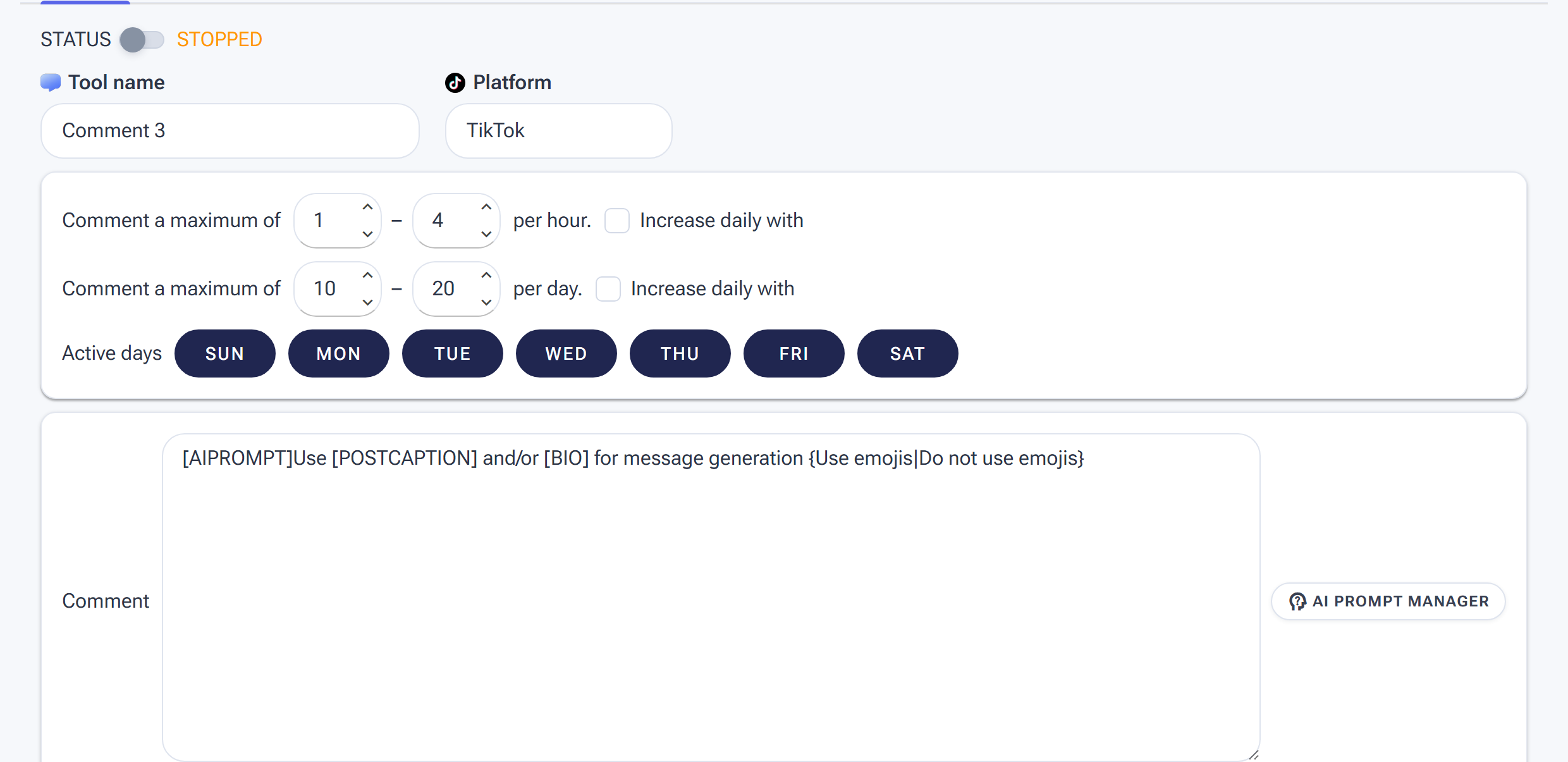
Comment Settings: conservative hourly/daily ranges, Active days, and the Comment box where the AI prompt and AI Prompt Manager generate a unique comment per post.
Min/Max Per Hour
Comment is the most scrutinized action in SM Tasker. Set your hourly range conservatively — commenting is not a volume game. A small number of high-quality, relevant comments does more for your account than a large number of generic ones, and the platform risk curve rises steeply as comment volume increases.
| Account Stage | Min/Hour | Max/Hour |
|---|---|---|
| Conservative (first 30 days of Comment being active) | 1 | 3 |
| Standard (established account with comment history) | 2 | 5 |
These ranges look low compared to Like or Follow — that’s intentional. Comment blocks are faster to trigger and slower to recover from than follow blocks. Refer to the Daily Action Limits guide for the platform-specific daily caps that apply to commenting.
Min/Max Per Day
Keep your daily comment total modest and consistent. An account that leaves 5 comments one day and 80 the next creates an erratic pattern that attracts attention. Slow, steady, and consistent is the correct approach for Comment — it compounds over weeks, not days.
Active Days
Give Comment more rest days than your other tools — 4 or 5 active days per week rather than 6. The reduced frequency, combined with AI-generated variety, makes your comment activity look like an engaged person who comments when they feel moved to, not a machine working through a list.
Engage with Profile
Leave this ON. SM Tasker visits the post creator’s profile before commenting — establishing a profile visit in the activity trail that makes the subsequent comment look like the natural result of genuine interest. A comment that appears with no preceding profile visit is a behavioral anomaly. Keep Engage with Profile enabled.
Interaction Level
Use Open to Interaction for Comment. This adds a secondary engagement (a like or story view) during the profile visit before the comment lands. The result is a richer interaction trail: profile visit → secondary engagement → comment. That sequence mimics how a real person discovers a post, gets interested in the account, and decides to leave a comment. It’s also more effective at driving profile visits back — people who receive a comment after a like and a story view take the interaction more seriously.
AI-Powered Comments: Getting the Most Out of the Integration
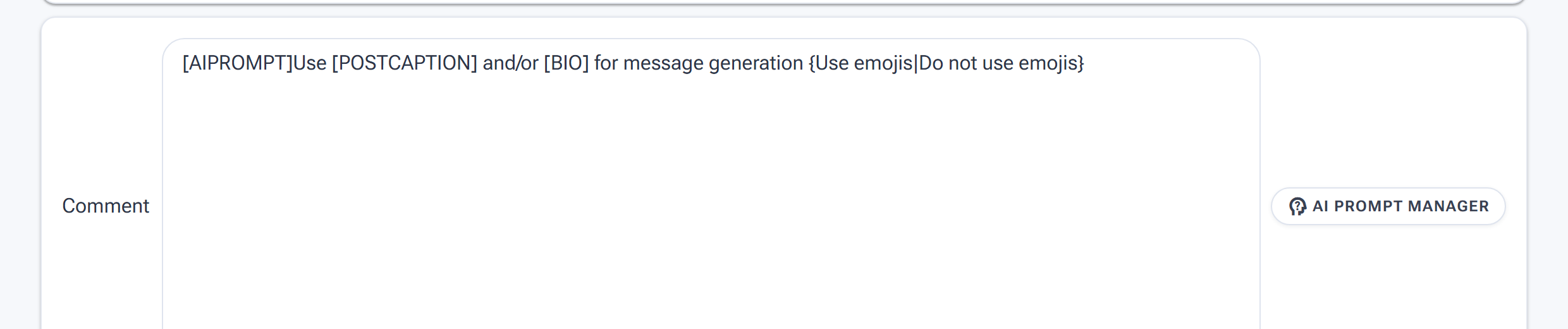
The Comment box wired for AI: [AIPROMPT] generates a fresh comment per post, with [POSTCAPTION] as context and {…|…} alternates for variety — manage saved prompts via AI Prompt Manager.
This section assumes your OpenAI API key is already connected. If not, complete the setup in How to Connect ChatGPT to SM Tasker first.
When AI is enabled, SM Tasker sends each post to your OpenAI account along with your prompt, and the AI generates a unique comment based on the post’s actual content. No two comments are the same. The comment is relevant to what was actually posted, reads like a real person wrote it, and varies in structure, tone, and length — exactly the kind of comment that platforms can’t filter and real users respond to.
Writing an Effective AI Prompt
Your prompt is the instruction you give the AI — it defines what kind of comment to generate, in what tone, with what constraints. A weak prompt produces generic output. A strong prompt produces comments that could have been written by a real, engaged follower in your niche.
The four elements of a strong Comment prompt:
- Role — tell the AI who it is. “You are an engaged follower in the [niche] space.”
- Comment type — specify the kind of comment to generate. Options: a genuine question, a relatable opinion, an observation about the content, a compliment that references something specific, or a value-add that builds on the post.
- Tone and length — short and conversational beats long and formal every time for comments. Specify: “Keep it under 15 words” or “Write 1–2 casual sentences.”
- Constraints — what to avoid. “Do not use generic phrases like ‘great post’ or ‘love this.’ Do not use hashtags. Do not include emojis unless they feel completely natural.”
Prompt Templates by Niche
The following prompts are starting points — adjust the niche, tone, and comment type to match your account’s voice and audience.
Fitness & Wellness:
“You are an engaged follower passionate about fitness and healthy living. Read the post and leave a short, genuine comment — either a question about the approach shown, a relatable observation about the struggle or achievement described, or a casual compliment that references something specific in the post. Keep it under 15 words. Do not use generic phrases. Do not use hashtags.”
E-commerce & Product Brands:
“You are a potential customer genuinely interested in this product or brand. Read the post and leave a natural comment — either a curious question about the product, a short opinion on how it could fit into your life, or a specific detail from the post you found interesting. Keep it to 1 sentence. Sound like a real shopper, not a brand account.”
SaaS & B2B:
“You are a business professional in the [industry] space. Read the post and leave a thoughtful comment — either a follow-up question that shows you understood the point, a brief opinion that adds to the conversation, or a short observation about how this applies in practice. Keep it under 20 words. No jargon, no flattery, no generic praise.”
Lifestyle & Personal Brand:
“You are a genuine fan of this creator’s content. Read the post and leave a comment that feels personal and specific — reference something actually shown or said in the post. Ask a follow-up question or share a quick relatable reaction. Maximum 2 sentences. Avoid generic compliments entirely.”
Real Estate & Finance:
“You are a curious follower interested in real estate / personal finance. Read the post and leave a comment — a practical question about the strategy described, a brief opinion on the advice given, or a short observation about how this applies to your situation. Keep it under 15 words. Sound like someone genuinely learning, not a bot.”
Comment Types: When to Use Each
| Comment Type | What It Does | Best For |
|---|---|---|
| Question | Invites a reply; starts a conversation thread | Lead generation, relationship building, accounts where DM conversations are the goal |
| Relatable opinion | Shows genuine engagement; often gets likes from other commenters | Community-building, lifestyle niches, personal brand accounts |
| Specific compliment | References something in the post; feels personal and genuine | Creator-to-creator outreach, influencer niches, product accounts |
| Value-add observation | Adds something to the conversation; positions you as knowledgeable | B2B, SaaS, finance, education — niches where expertise matters |
Manual Comment Templates: The Fallback Option
If your API key isn’t set up yet, or if you want a backup for times when the AI connection is unavailable, SM Tasker also supports manual comment templates — a rotating list of pre-written comments the tool cycles through.
If you use manual templates, follow these rules to minimize spam detection risk:
- Write at least 20–30 different templates — the more variation, the harder the pattern is to detect
- Vary the length — mix one-word reactions, short sentences, and 2-sentence comments
- Include some with questions, some with observations, some with emoji-only responses — variety in format matters as much as variety in wording
- Avoid any phrase that appears in more than one template — duplicate phrasing across templates is the first thing spam detection looks for
- Never use templates that could apply to any post regardless of content — “This is so inspiring!” could be a comment on anything. It will be flagged.
Manual templates are a temporary solution. AI comments are categorically more effective at avoiding spam detection and producing genuine engagement responses. Prioritize getting your API key connected.
Source Strategy for the Comment Tool

Choose which posts get commented on — tick sources and weight them with Selection Rank.
Comment works best on posts with active engagement — posts that already have comments and likes, published recently, by accounts with an engaged audience. These posts are visible, being watched by the community, and the comment will land in an active thread rather than disappearing into silence.
Best sources for Comment:
- Hashtag Search (rank 150–200) — target active posts under niche hashtags. Configure the source to prioritize recent posts rather than top posts, so your comments land while the content is still receiving traffic.
- Account Search (rank 100) — find active accounts in your niche and comment on their recent posts. Useful for targeting specific content types rather than hashtag communities.
- Explore Feed (rank 75) — algorithm-curated content that is currently receiving high engagement. A good source for finding posts that are actively being discovered by your target audience.
For the Comment tool, avoid sources that lead to low-engagement posts — commenting on posts with zero prior engagement rarely results in a response or a profile visit back to you. See Sources & Targeting Mastery for the full source strategy guide.
Platform-Specific Notes
Instagram runs the most sophisticated comment analysis of the three platforms. Its systems have been trained to detect repetitive phrasing, emoji-only comments, and comments that don’t relate to the post content. AI comments sidestep most of these checks — but volume still matters. Keep daily comment totals conservative on Instagram and never push past the platform-safe limits in the Daily Action Limits guide.
Instagram comment blocks are typically temporary (a few hours), but repeated blocks escalate — a second block within 48 hours of the first triggers a longer suspension. Auto-Suspend handles this automatically, but the best strategy is never reaching a second block in the first place. If you receive a comment block, reduce your daily limits before restarting.
TikTok
TikTok’s comment culture is high-energy and conversational — short, punchy, reaction-style comments perform well here and blend naturally into the typical comment section. Calibrate your AI prompt to generate comments that match TikTok’s tone: brief, direct, and often framed as a reaction or quick take rather than a thoughtful observation.
TikTok also tends to be more lenient with comment volume than Instagram, but that’s not a reason to push limits — it’s headroom to absorb occasional spikes without immediate consequences, not permission to run aggressively.
Threads
Threads is a text-first platform where the comment section (replies) is the primary mode of interaction. Comments here carry more weight than on Instagram or TikTok — a thoughtful reply on Threads can spark a visible conversation thread that other users engage with. Prioritize value-add comments and genuine questions on Threads. The platform rewards substantive replies with more visibility than it does lightweight reactions.
Pro Strategies
Comment → Follow: The Double-Touch Sequence
Run Comment and Follow targeting the same source pool. The sequence works like this: SM Tasker comments on a post from a target account, then follows that account. The target receives two notifications — a comment and a follow — within a short window. They’ve now seen your name twice and read something you wrote. The follow-back rate on accounts that received a comment before a follow consistently outperforms cold follows with no prior touchpoint.
To implement: assign the same hashtag list to both Comment (via Hashtag Search) and Follow (via Hashtag Search). The tools will naturally interact with overlapping account pools. You can tune how frequently they overlap by adjusting Selection Rank on each tool.
LikeComments + Comment: Full Community Immersion
Combine the Comment tool with LikeComments on the same niche content. SM Tasker leaves a comment on a post and likes the existing comments left by other users. Your account shows up twice in the comment section: once as a commenter, and once as someone who engaged with other people’s comments. This creates a presence in the comment thread that feels like an active community member rather than an account dropping in to self-promote.
Common Mistakes
| Mistake | Why It Hurts | What to Do Instead |
|---|---|---|
| Running Comment without AI enabled | Manual templates rotate through identifiable patterns; platforms flag repeated phrasing quickly at any meaningful volume | Connect your OpenAI API key first — it takes 5 minutes and makes every other effort more effective |
| Writing a vague AI prompt | Generic prompts produce generic comments — the AI defaults to safe, bland output without specific direction | Specify role, comment type, tone, length, and constraints in every prompt |
| Setting comment limits as high as Like limits | Comment is 3–5x more scrutinized than Like; matching the volume triggers rapid blocks | Start Comment at 1–3 per hour; scale slowly after 30 days of clean history |
| Targeting low-engagement posts | Comments on posts nobody sees produce no profile visits and no responses | Configure sources to target recent, actively-engaged posts — not old or zero-engagement content |
| Ignoring a comment block and restarting immediately | Restarting too quickly escalates a temporary block into a longer restriction | Let Auto-Suspend handle the timing; reduce daily limits before restarting; see What to Do If You Get Action-Blocked |
| Using the same AI prompt across all accounts in all niches | A fitness account and a SaaS account need different comment voices; mismatched tone looks inauthentic and reduces response rates | Write a distinct prompt per niche — it takes 10 minutes and dramatically improves comment quality and relevance |
What to Do Next
- The StoryViewer Tool: The Safest Way to Get on People’s Radar — Add StoryViewer to your stack to create an additional low-risk touchpoint that compounds your Comment and Follow activity.
- The LikeComments Tool: The Underrated Signal That Builds Community — Pair LikeComments with Comment for a deeper presence inside the comment sections of your niche’s most active posts.
- Safety Features: Restrictions, Auto-Suspend & Ignore Lists — Understand how Auto-Suspend handles comment blocks automatically, and how to read your Restrictions dashboard to stay ahead of issues.