Chat Export Viewer
Chat Export Viewer
Turn supported Instagram-style or Messenger-style message JSON into a readable conversation without connecting an account.
A fictional conversation, easier to read
Your messages in a readable view
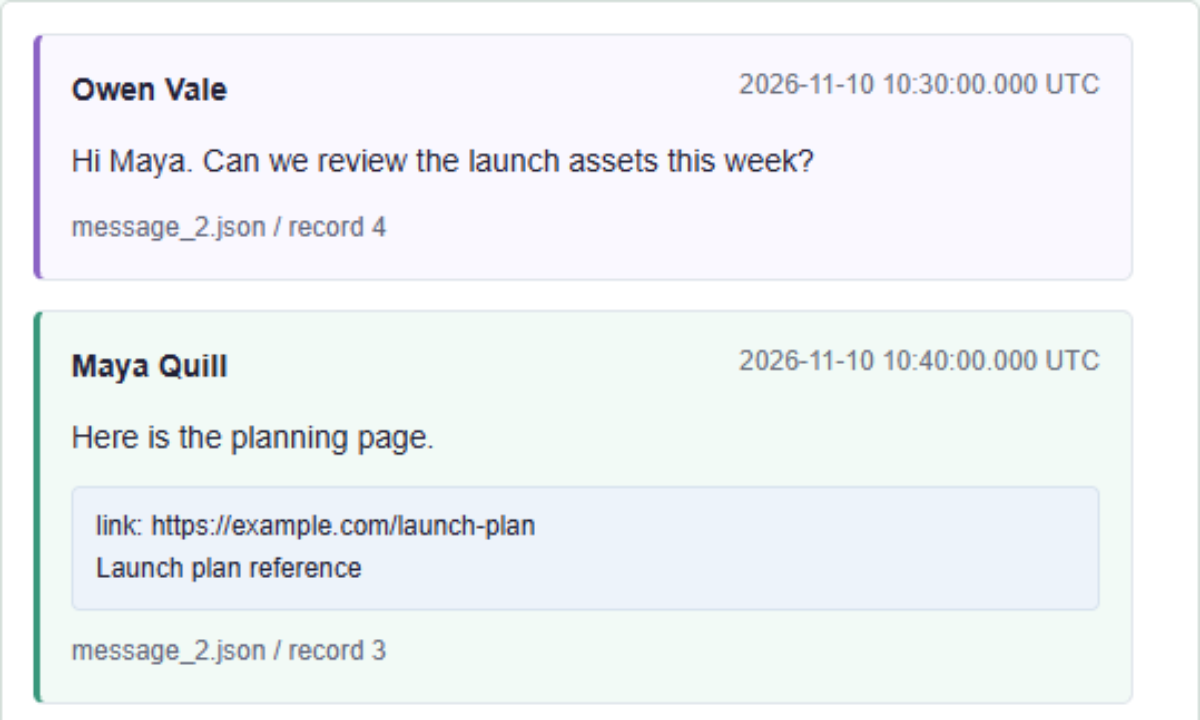
An actual conversation excerpt from the viewer, using fictional sample messages rather than customer data.
Read one exported conversation
Open your extracted message JSON files
Use supported Instagram or Messenger-style message JSON. Extract the files locally first; ZIP archives and HTML exports are not supported.
Messages are read locally inside an isolated workspace. Message text and filenames are not sent to the parent page; normal website assets and analytics still run outside the workspace.
No account connection, upload, cloud save, or message history. Your original files stay unchanged.
Input
Load 1 to 6 individual JSON files from one conversation: up to 4 MiB each, 16 MiB combined, and 20,000 messages. Multiple parts must have matching thread keys, titles, and participant names.
Review
Filter displayed sender and message text, choose a sender, or narrow inclusive UTC dates. Review 25 messages per page and open the full message when a preview is shortened. Text repair is optional.
Export
Download all matching messages as TXT or spreadsheet-safe CSV, not just the visible page. Known annotations and source positions are included; unknown source fields are omitted.
Supported files and workspace limits
Compatibility depends on the supported participants and messages shape, not a promise about every Meta export version. No ZIP, HTML, arbitrary JSON, WhatsApp, Telegram, or ChatGPT imports. Attachments are not fetched, shown, or played. There is no deleted-message recovery or authenticity certification.
Imports replace the workspace, not append to it. No automatic deduplication is performed. A failed or cancelled import preserves the previous conversation. Clear workspace removes the local view. Each action has a 10-second deadline; exports are limited to 16 MiB each. Save useful results before leaving.
Technical details & licenses
Use the Chat Export Viewer below, or start with the Instagram guide or Messenger guide for platform-specific context.
Start with a conversation file you can identify
A chat export is easier to review when you know what question you want it to answer. You might need to find a delivery address, check the wording of a proposal, or understand why a discussion changed direction. Begin with one conversation and keep its original files untouched. This viewer accepts individual JSON files with a supported message structure, not the entire download package from an account. If your files are inside a ZIP archive, extract them locally first. Do not rename a different file type to JSON and expect its contents to become compatible with the reader. Check that you are choosing an extracted file rather than a shortcut or a similarly named account-settings document. Keep its original label available so that source references in the readable result remain meaningful when you revisit the review later.
The supported structure has a participants array containing name objects and a messages array containing message objects. Individual messages need a sender name and a safe timestamp in UTC milliseconds. A title and thread path can help identify the conversation, although a single file can omit those two fields. Compatibility depends on this structure, not simply an Instagram or Messenger label on a folder. HTML pages, plain text transcripts, arbitrary JSON, and exports from other services are outside this version. A rejection therefore does not automatically mean that an original account download is broken or that its messages have disappeared.
For a fictional example, consider Nora Bell reviewing a packaging discussion for Lattice Paper Studio. She wants to check which sample color was agreed, so she selects the conversation associated with that supplier instead of collecting every message file from her account. She also keeps a separate note of where the original download came from. That small preparation makes the eventual transcript easier to interpret and reduces accidental mixing of unrelated discussions. The viewer can organize supplied records, but it cannot identify the real people behind names or certify that a supplied collection represents the whole conversation.
Load a bounded batch without mixing threads
Choose Load JSON files and select between one and six individual files for the same conversation. Each file must be no larger than 4 MiB, with a combined limit of 16 MiB. The conversation can contain at most 20,000 messages and 128 participant or sender names. These limits keep the workspace bounded; they are not an invitation to trim records until a preferred account of events remains. If a source exceeds a limit, the batch is rejected instead of silently dropping its ending. Use Load example first when you want to understand the controls without choosing any personal material.
Multiple parts require nonempty, exactly matching thread paths, titles, and participant name sets. File names alone are not enough to establish that relationship. Two people with similar display names may have entirely separate conversations, while a changed title may prevent otherwise familiar material from passing the consistency check. The viewer does not merge identities or automatically remove repeated messages. It rejects byte-identical or text-identical source parts, but overlapping records in different valid files still need your attention. The guide to combining message JSON files explains how to approach source parts without assuming that every numbered file belongs together.
A successful import replaces the current conversation rather than appending to it. A failed or cancelled import leaves the previous committed conversation and its filters in place, so an unsuccessful experiment should not become a half-loaded workspace. Cancel stops the current operation; it is not an instruction to edit or delete your originals. When choosing a new batch, check the conversation identity again before relying on the result. A matching thread key is a useful consistency guard, not proof of account ownership, message authenticity, or permission to distribute the discussion. Those judgments remain separate from whether a file can be read.
Read the timeline before drawing conclusions
The initial view shows messages from oldest to newest. Message order can switch to Newest first when you are looking for a recent exchange, but the underlying timestamp remains the sorting basis. Equal timestamps preserve the source-file and record-position order rather than acquiring an invented sequence. All displayed times are UTC. A local calendar date remembered by a participant may therefore differ from the UTC day shown beside a message, especially near midnight. Before treating a sequence as contradictory, compare the actual times and the surrounding replies instead of relying only on the day someone remembers.
The conversation is presented in pages of 25 messages. A long body can have a shortened preview, with Read full message opening the complete message inside a bounded scroller. Only one full-message view is expanded at a time. This keeps browsing manageable without making the preview the authoritative text. A sentence that appears incomplete may simply continue beyond the preview, so inspect the full message before quoting it. Previous page and Next page move through the current result set. Changing pages does not limit a later download to the visible page or remove other matching records from the view.
Missing text also deserves a careful reading. A message whose content field is absent or null is marked No text supplied; an explicitly empty string is a different source condition. Neither tells you what a person intended to write. Known annotations may explain that a record includes a photo reference, a reaction, or a shared link, but they do not reconstruct the missing body. For Nora’s sample discussion, the useful sequence might be an offer, a short correction, and a later acceptance. Reading those together is more reliable than treating the first mention of a color as the final agreement.
Narrow the view with deliberate filters
Sender selects an exact source identity rather than a loosely matched display name. Search messages performs a literal, case-insensitive contains search on the displayed sender and body, with Unicode normalization. It is not a semantic assistant and does not interpret a request such as find the final price. Search for a distinctive word or phrase that actually appears in the discussion. A search for sample may find a useful opening, while a more specific product code can reduce unrelated matches. The query limit is 256 code points. Names, dates, and the selected text display can all influence what you see.
From date (UTC) and To date (UTC) accept optional inclusive calendar dates in YYYY-MM-DD form. You can use either boundary alone, or both when the start is not later than the end. Show can retain All messages, choose Text field present, or choose Known media or link references. A message can have a text field without containing a useful sentence, and the references option means recognized references rather than a guaranteed inventory of every attachment. Combine these controls only as far as the review question requires. Excessively narrow criteria can hide the reply that explains why an apparent agreement changed.
Press Apply filters after editing the draft controls; Enter in search also applies them. Downloads are disabled while draft changes remain unapplied, which prevents a file from representing a different view than the settings you just entered. Read the matching-message count against the conversation total before exporting. Reset filters is useful when you need to return to a broader reading and test whether a search excluded important context. The chat history search and filter guide develops this approach further. Keep a note of your review question, then compare focused results with nearby messages before summarizing the exchange.
Review your conversation
Bring the relevant exchange into focus
Open supported JSON, check the timeline, and apply only the filters your review needs.
Compare text display without rewriting the source
As exported is the default Text display setting. It preserves the supplied human-readable strings for inspection instead of assuming that unusual characters are mistakes. Some older text has the appearance of UTF-8 bytes that were previously interpreted as Latin-1 characters. Repair legacy UTF-8 offers a conservative, opt-in attempt to display those strings more clearly. It is a display transformation, not an update to the JSON file on your device. Start by checking a familiar name or short phrase in the original view, then compare it after changing the setting and applying the view.
Repair is intentionally limited. A candidate human string must fit the byte-range test and decode as valid UTF-8; already Unicode or mixed strings may remain unchanged. The changed-field count helps show that a transformation occurred, but it is not a quality score and does not prove that every affected word is now correct. Sender names, conversation titles, bodies, reactions, and share text can be candidates. File paths and links are not repaired. This distinction matters because changing an address-like reference could point somewhere different, while changing a visible word is a separate reading decision that can be compared against its original.
Searching uses the chosen display, so apply the intended text setting before making a final search or download. Exact sender identities remain separate even when repaired labels look alike, with duplicate display labels annotated rather than merged. A spelling that looks clearer is not evidence that two records came from the same person. If the repair does not help, switch back to As exported and preserve that uncertainty in your notes. The chat export encoding guide explains the difference between a readable display improvement and missing or damaged source information that this viewer cannot invent.
Keep references and annotations in proportion
A conversation can refer to more than text without containing the referenced material itself. Recognized photo, video, audio, file, sticker, and share information appears as text annotations where the supported fields are present. Those paths and links are inert references: the viewer does not fetch them, turn them into active destinations, render images, or play recordings. A reference to a revised brief therefore does not establish what that brief said. If the attachment is essential to your decision, review the separately held original through an appropriate local application and record that it is a separate source of context.
Reactions and supported message flags can add useful detail, but they are not a substitute for an explicit reply. A reaction does not by itself certify approval of a price, delivery date, or permission request. Likewise, a timestamp is not evidence of a delivered or read status. If a record includes an unsent flag, that does not give the viewer the power to recover withdrawn text. Treat source annotations as descriptions of supplied fields rather than explanations of hidden platform behavior. This makes the reading useful for practical work without turning a convenient transcript into an unsupported technical or forensic conclusion.
The reader also reports unhandled field names. Unknown source fields are not displayed or included in the readable downloads, so a valid import is not the same as a complete archive rendering. Retain the originals when an unfamiliar field might matter later. In Nora’s fictional case, a note referencing a packaging mockup can help locate the right moment in the discussion, but the mockup itself still needs separate inspection. A good working summary can say that the messages reference a sample without claiming that its appearance or contents were verified. Keeping those boundaries explicit makes later collaboration more precise and less dependent on assumptions.
Choose a useful handoff format
Download view (TXT) produces a readable text version of every message matching the applied settings, not just the 25 messages on screen. Download view (CSV) creates a spreadsheet-safe table for sorting or review in a spreadsheet application. Both include UTC time, source file label and record information, and known annotations. Neither is a raw JSON archive, and unknown source fields are omitted. The readable chat transcript guide helps you decide which format suits the next task. Check your filters and text display first, because those choices determine the view that leaves the workspace.
Spreadsheet-safe CSV deliberately treats formula-like string cells cautiously. Such values receive a leading apostrophe, including cases with leading ASCII whitespace, a byte-order mark, or controls before a potential formula. Proper CSV quoting handles separators and line breaks, but quoting alone would not serve the same purpose as this formula precaution. The result is designed for spreadsheet review, not character-for-character reconstruction of the original strings. TXT provides the chosen display text without spreadsheet prefixes when that distinction matters. There is no exact CSV mode, so do not remove the precaution and then describe the altered file as the viewer’s protected output.
Each output is limited to 16 MiB. If a download would exceed that bound, it fails without dropping rows, and the readable view remains available. Consider a clearly documented narrower scope instead of assuming that a smaller file contains everything. The download names are generic, so give any retained copy an appropriate name in your own file system and follow your handling rules for private correspondence. A transcript can contain names, addresses, commercial terms, or personal details. Before sending it to a colleague, confirm that the selected conversation and date range are necessary and that you have a proper reason to share them. Include a separate scope note when a recipient could otherwise mistake filtered results for the complete exchange. That note can identify your question and explain why particular dates or senders were selected without changing the exported message text itself.
Close the workspace with privacy in mind
Message-file reading and processing take place in the isolated viewer on your device, without an account connection or an upload of the selected message contents. The enclosing website can still load its ordinary assets and analytics. That distinction is important: local processing describes the tool’s data path, not a promise that every component of your computer or browser is beyond observation. Browser extensions, device access, and local download folders have their own risks. Use a device you trust, and avoid assuming that the word private grants permission to handle a conversation that you were not authorized to access.
There is no workspace autosave, cloud history, or saved project to reopen. Clear workspace cancels work and releases the conversation, associated source data, and private display from the tool; it does not delete the original files or downloaded transcripts on your device. Switching focus away from the page does not ordinarily wipe your work, so return to the workspace deliberately when finishing. Clearing is not a secure-memory-erasure guarantee. If you create a handoff copy, remember that it has a separate lifetime from the page and must be handled under the same practical privacy expectations as the original correspondence.
Keep your closing note modest and useful: which files you reviewed, which UTC interval mattered, whether you changed the text display, and what question the selected messages helped answer. Preserve uncertainty where the supplied records leave a gap. The viewer is a reading aid, not a live inbox, recovery service, decryption utility, identity check, or authenticity certificate. You can return to the Tools directory for other tasks without treating this workspace as a permanent case file. For the next conversation, clear the current material or deliberately load a replacement, then repeat the same source and context checks.
Keep the conversation context
Chat export reading guides
Prepare supported files, combine matching parts, search your history, and save a readable transcript.
Instagram Chat Export
Review a supported Instagram DM export with the proposal, corrections, and replies kept in conversation context.
Read the guideMessenger Chat Export
Read supported Messenger thread JSON while keeping file compatibility separate from encrypted storage and account access.
Read the guideCombine Message JSON Files
Read supported JSON parts together while keeping source positions, repeated records, and the original archive separate.
Read the guideSearch and Filter Chat History
Narrow one exported conversation by literal text, exact sender, inclusive UTC dates, and recognized message references.
Read the guideFix Export Encoding
Understand garbled characters and compare an optional legacy UTF-8 display repair without changing your JSON files.
Read the guideSave a Readable Transcript
Export every matching message as readable TXT or spreadsheet-safe CSV, with UTC times and supported source annotations.
Read the guideQuestions about reading chat exports
Which files can I open?
Use one to six individual JSON files with the supported participants and messages structure. Each file can be up to 4 MiB, the batch up to 16 MiB, and the conversation up to 20,000 messages. Extract ZIP files locally first; HTML, text, arbitrary JSON, and other platform formats are not supported.
Are my messages uploaded or saved as a project?
The isolated viewer processes selected message data locally and has no cloud save or workspace history. The surrounding website still uses its ordinary assets and analytics. Original files and any transcripts you download remain on your device until you manage them separately.
Can I combine separate parts of a conversation?
Yes, within the six-file limit, when every part has an exactly matching nonempty thread path, title, and participant name set. Imports replace the workspace. There is no automatic deduplication, and unrelated conversations cannot be combined.
Does the download contain only the visible page?
No. TXT and CSV include all messages matching the applied filters and text display, not only the current page. Known annotations and source references are included; unknown source fields are omitted.
Can it recover deleted messages or decrypt an archive?
No. It reads supported JSON that you already have. It does not connect to accounts, decrypt secure storage, recover deleted or unsent content, or guarantee that a supplied export is complete.
A readable working copy
Finish with a view you can explain
Check the source, scope, and surrounding replies before downloading TXT or spreadsheet-safe CSV.