A clear record and a practical DNS handoff
DMARC Record Generator
Turn your domain, reporting addresses and policy choices into a clear DMARC TXT draft. Keep the DNS hostname separate from the value, understand every selected tag, and take a setup note to the person managing your DNS.
The right value needs the right name
One policy. Clear DNS fields.
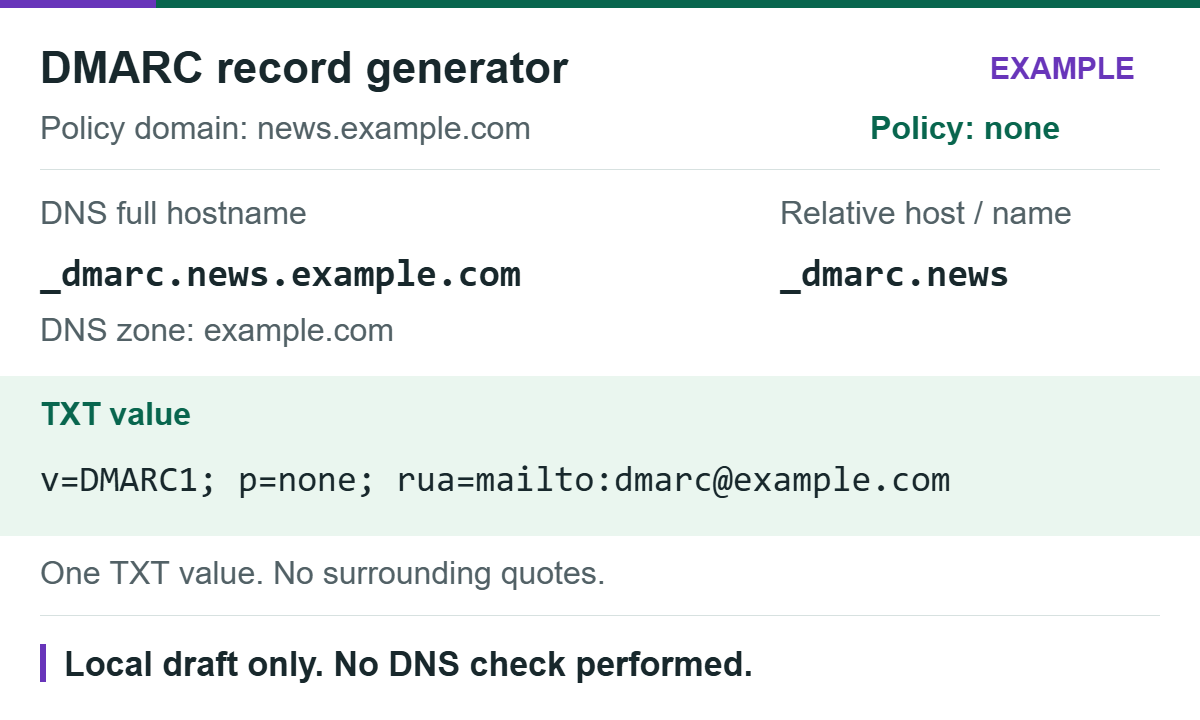
A draft for review, not a live DNS result. The example keeps the full name, relative label and TXT value visibly distinct.
Your domain, your policy choices
Build a DMARC record you can explain
Choose the requested policy and optional tags. Review the generated value before any manual DNS change. This generator does not query, publish or verify your configuration.
The domain and reporting destination
Choose your DMARC draft
The DNS zone controls the relative host label, not DMARC policy discovery. A report address must already be able to receive mail; this tool does not create a mailbox.
DNS draft, not a published configuration
Your TXT record
Type: TXT. A local draft does not prove that DNS, mailboxes or sending services are configured correctly.
No DNS request is made. Domain and mailbox fields stay in this browser workflow.
The selected tags, explained
| Tag | Value | Meaning in this draft |
|---|
Review before publishing
A separate look at an existing value
Already have a DMARC record?
One concatenated TXT value, not a DNS zone-file line or quoted chunks. Inspection lists tags and review points. It is not a complete standards validator and does not replace the builder draft.
| Tag | Value | Registry status / review |
|---|
Separate the DNS fields
A full hostname is not the TXT content. An optional managed zone helps produce the relative label without guessing what a DNS panel appends.
Policy domain + optional zoneMake the choices explicit
Current policy and alignment tags appear only when selected. A separate inspector highlights historic or unrecognized tags without silently converting an existing record.
Readable tags, no hidden migrationReview, then publish manually
Copy the unquoted value or download the setup handoff. Confirm actual sending alignment, DNS ownership and report destinations outside this local generator.
A draft is not a live validationSupported scope and working limits
This generator covers one policy domain, an optional ancestor DNS zone, three conventional email destinations for aggregate reports, p, sp, np, adkim, aspf and t. Domain names are normalized to lowercase IDNA A-labels; the output makes that form visible. It does not generate PSD, failure-reporting, historic percentage, interval or report-format settings. The separate inspector recognizes more tags, but does not certify complete standards compliance or import them into the form.
Domain inputs allow 512 Unicode code points before DNS length checks. Canonical DNS labels allow 63 bytes and full names 253 bytes; the _dmarc prefix must also fit. The generated value is capped at 2,048 ASCII bytes. Inspection accepts one unquoted single-line value, up to 4,096 ASCII bytes and 32 tags. No DNS lookup, API, mailbox connection, auto-publication, cloud storage, history, PDF or project file is involved. Clipboard contents and downloaded files remain yours to manage.
Technical details & licenses
Create a DMARC record from explicit policy, alignment, and aggregate report choices. Review the hostname, unquoted TXT value, warnings, and setup note before publishing through your DNS provider.
Use the DMARC record builder, or read the monitoring policy guide before planning report collection. This local generator drafts text; it does not inspect live DNS, publish records, or configure your mail services.
Start with the domain and the decision you own
A DMARC record generator is useful when a team has agreed what it wants to publish but needs an exact, readable draft. Start by identifying the domain used in the visible From address, the person responsible for its DNS, and the mail services that use it. Put these details in a change request outside the tool. The generator takes your selections and produces text; it does not discover your senders or decide which messages are legitimate. A clean result therefore means the draft fits the supported input rules, not that the surrounding email setup has been checked or approved for enforcement.
In this fictional example, Alderline Maps wants a reviewable draft for mail.alderline.example. Ada Fen owns the mail service inventory, and Bram Lee manages the alderline.example DNS zone. They record the intended reporting mailbox and agree that the first draft requests None. These names and domains are invented for the exercise. Ada also notes a separate customer support sender that still needs investigation. That open question stays in the change request rather than disappearing behind a successful build. Their goal is a precise handoff for one policy location, not a claim that every company message is already authenticated. Ada writes the approval question in plain language: does this exact draft match the agreed domain, destinations, and requested handling? Bram can answer that question without being asked to certify an entire mail system from a text preview.
Keep unrelated data out of the form. It needs public DNS draft material, not account passwords, private keys, report attachments, message bodies, or a list of customers. The builder runs locally without making DNS requests or connecting a mail account. There is no saved project, history, share link, or automatic publication step. Keep the approved inputs in your own working records if a colleague must reproduce them later. Load example fills and builds a sample, while Clear wipes the current working state. Neither action retrieves an existing domain policy, and an example record is not a recommendation for your particular domain.
Enter a bare policy domain and the managed zone
Enter mail.alderline.example in Policy domain. Do not enter a website URL, an email address, or the final _dmarc hostname. The tool adds that prefix when it builds the owner name. It accepts a bare domain and visibly normalizes supported input, including lowercase domain spelling, internationalized domain conversion, and removal of one final dot. Review that normalized spelling before continuing. A pasted URL such as https://mail.alderline.example/ is rejected rather than repaired. This helps keep a deliberate domain choice separate from a guess about which part of a longer string you meant to use.
DNS zone (optional) describes the zone you actually manage, not a second policy domain. Bram enters alderline.example because that is the zone shown in his DNS account. The zone must equal the policy domain or be its ancestor at complete label boundaries. A similar ending is not enough. A zone of line.example does not become a valid ancestor just because those letters appear near the end of Alderline’s name. If the managed zone is unknown, leave this field empty and ask the DNS administrator. The generator still provides the full hostname without inventing a relative name.
Use input errors as a reason to check the source, not to shorten a name until it passes. DNS labels and complete owner names have length limits, and adding _dmarc. also consumes space. Unsupported characters, IP addresses, ports, paths, and hidden controls are not accepted domain shortcuts. For an internationalized name, compare the displayed canonical domain with the administrator’s intended zone before approving the record. The tool’s normalization is a text operation; it does not establish domain ownership, find the Organizational Domain, consult a public suffix list, or confirm that the entered zone exists in authoritative DNS.
Keep the DNS hostname separate from the TXT value
A DNS handoff has at least three distinct pieces: the owner name, record type, and record value. For this example the full owner is _dmarc.mail.alderline.example, the type is TXT, and the value begins v=DMARC1; p=none. The hostname does not belong inside the value. The value does not belong in the DNS panel’s host field. Keeping those pieces on separate lines in the change request prevents a common mistake where a perfectly reasonable policy string is published at the wrong name. Copy full hostname and Copy TXT value intentionally serve different parts of that handoff.
With alderline.example supplied as DNS zone (optional), the relative host is _dmarc.mail. If the managed zone instead equals mail.alderline.example, the relative host is simply _dmarc. Both can describe the same full owner, but only in their stated zones. Some DNS panels append a zone to their host input, while others accept a full name. Bram checks his provider’s own field behavior before pasting. Without a supplied zone, the tool leaves the relative host unknown. It does not assume that every panel automatically appends the policy domain or that an at sign means the right location.
The generated value is unquoted text, not a complete zone file statement. Do not copy the hostname, TXT label, explanatory warnings, or surrounding presentation into the value field. A provider may display one TXT resource record as several quoted strings; that storage representation is different from publishing two competing DMARC policy records at the same owner. Ask the administrator to review the current records before adding another. The generator cannot detect duplicates already in DNS. It also does not choose a TTL or promise a propagation time. The correct panel entry and a later authoritative check remain separate parts of the administrator’s work. In the change request, label the full name, relative name, and value explicitly. This gives a reviewer three independent comparison points instead of one ambiguous line copied from a chat message.
Choose policy and alignment with evidence in view
Requested policy offers None, Quarantine, and Reject. For Alderline’s draft, choose None while Ada gathers evidence about its senders. Existing subdomains and Non-existent subdomains can each use Use parent selection (omit) or an explicit policy. Omission leaves the corresponding tag out of the generated string; it is not proof of which policy every child domain will discover. Applicability depends on discovery, domain existence, and explicit child records, which this tool does not determine. Review the subdomain policy guide before using a broad setting to express a decision about several different mail domains.
DKIM alignment and SPF alignment each offer Relaxed (default, omit), Relaxed (explicit r), and Strict (s). The first two express the same alignment choice with different text: one leaves out the default tag, while the other writes it explicitly. DMARC needs an aligned SPF or DKIM pass. Relaxed alignment is not permission to use any unrelated domain, and strict alignment is not automatically the best operational choice. Ada records which identities her legitimate services actually authenticate before changing these controls. A selected mode cannot create a DKIM signature, repair SPF, generate a selector, or establish that a real message will pass.
Test mode deserves its own review. Not included (default n) omits the tag, Off (explicit n) writes t=n, and On (t=y) writes t=y. Under the current standard, testing requests one lower level for an enforcing policy: reject becomes quarantine, and quarantine becomes none. Older receivers may ignore the tag and apply the original policy. It is not a universal safe switch or a percentage rollout. For the initial Alderline draft, leave it omitted. Read the impact warnings whenever any policy selection uses Quarantine or Reject, including either subdomain control; a parent None selection does not erase those choices.
Review the complete draft
Build your DMARC hostname and TXT value
Choose the policy and report destinations, then compare the generated record with its warnings before handing it to the DNS administrator.
Add report destinations without implying authorization
Aggregate report email 1, Aggregate report email 2, and Aggregate report email 3 each accept one bare mailbox. Ada enters dmarc+ops@alderline.example in the first slot and leaves the others empty. Do not paste a display name, a comma separated list, or a ready made mailto URI into one slot. Blank slots are ignored. The local part keeps its spelling, while the domain is canonicalized. The resulting report URI contains dmarc%2Bops@alderline.example because the plus character is encoded for its place in a URI. That encoding is not a request to rename the mailbox or remove its plus suffix.
A report mailbox needs an owner and an operating plan outside this generator. Ada confirms who can read it, how attachments will be handled, and where any investigation notes belong. Leaving all three slots empty produces no rua tag and a warning that aggregate reports are not requested. It does not turn off receiver filtering. Adding an address only writes a request into the draft; the tool cannot create the mailbox, test delivery, schedule reports, or guarantee that receivers send them. Use the report address guide when destination ownership and collection arrangements need a separate review.
Because the destination host differs from mail.alderline.example, the output includes a conditional authorization candidate at mail.alderline.example._report._dmarc.alderline.example, with TXT value v=DMARC1. This is not a finding that permission is missing. The domains could share an Organizational Domain, making that authorization unnecessary. Bram asks the recipient DNS administrator to decide in context. Any needed authorization belongs in recipient DNS, not automatically alongside the sender’s policy record. The generator neither looks it up nor verifies it. A candidate name can also exceed DNS length limits even when the main record fits; review that warning without treating the main draft as an authorization verdict.
Inspect an existing value as a separate review
Use Inspect pasted record when you already have a policy string to examine. Supply one raw, single line, unquoted TXT value rather than a screenshot, a complete zone file, or several quoted chunks. The inspector accepts up to 4,096 ASCII bytes and 32 tags. It lists the supplied tags and bounded issues, but does not import them into the builder or produce a replacement record. Keep the original alongside the review notes. If the input includes wrappers or line breaks, obtain the concatenated value through your normal DNS review process instead of assuming the inspector will reconstruct it for you.
For a deliberately dated review case, Ada pastes v=DMARC1; p=none; pct=25; ri=86400; xnote=review. The inspector should identify pct and ri as historic, and xnote as unrecognized. These classifications do not silently remove those fields or convert pct into Test mode. The builder does not offer pct, ri, or rf controls. It also recognizes some current tags that it does not generate, including ruf, fo, and psd. Read the current and legacy tags guide before replacing an existing record whose intent is broader than the builder’s supported choices.
Treat an issue list as a prompt for review, not a certificate. The inspector can flag duplicate tags, suspicious structure, unsupported names, and selected value problems, but it is not a complete DMARC validator or receiver simulator. Current rules distinguish an otherwise valid record without p from the older requirement to include p; this generator always writes an explicit policy. Neither observation tells you how every receiver will handle every malformed record. Inspecting a string also says nothing about where it was published, whether another policy exists there, or whether the report recipient has authorized it. Keep those questions assigned to their actual owners.
Build and compare a complete worked draft
For the complete Alderline case, enter Policy domain mail.alderline.example, DNS zone (optional) alderline.example, and Requested policy None. Leave both subdomain controls at Use parent selection (omit), both alignment controls at Relaxed (default, omit), and Test mode at Not included (default n). Put dmarc+ops@alderline.example in Aggregate report email 1 only. Select Build DMARC record. Expect full host _dmarc.mail.alderline.example, relative host _dmarc.mail, and value v=DMARC1; p=none; rua=mailto:dmarc%2Bops@alderline.example. Compare all three outputs, not just the familiar opening tags, before approving this draft for a DNS handoff.
Run a controlled text comparison before returning to the intended settings. Change DKIM alignment to Relaxed (explicit r), build again, and expect adkim=r before rua. Then choose Strict (s) and rebuild to see adkim=s and the alignment warning. These are draft comparisons, not live mail tests. Ada returns to Relaxed (default, omit) and builds the original result again for approval. Any builder edit invalidates the preview and exports, so a colleague must not assume that an earlier copied string reflects the current form. State the approved settings in the change request to prevent a temporary comparison from becoming the published choice.
Check a rejection case as well. Replacing the domain with https://mail.alderline.example/ should fail rather than generate a shortened guess. Supplying a zone outside the policy domain’s ancestry should also fail. Restore the correct fields and rebuild before using Copy TXT value, Copy full hostname, or Download setup TXT. Browser permission can affect copying, so confirm the text in its destination rather than assuming a button press completed the handoff. None of these local exercises queries DNS or sends email. Their conclusion is narrower: the draft, displayed names, warnings, and chosen settings agree for the input being handed to Bram.
Hand off the setup note and verify separately
Download setup TXT creates a human readable plan containing the record details, explanations, warnings, and conditional authorization information. It is not a zone file to import automatically. Bram pairs it with the change request, the intended zone, the current record captured through his own process, and the person authorized to approve replacement. Keep the full hostname visible even when the panel expects the shorter relative host. That gives a second reviewer something concrete to compare after publication. Do not forward only the TXT value and expect the recipient to infer its DNS location from the report mailbox or from a website address. For a revised handoff, mark which earlier draft it replaces and repeat the domain and zone. A filename alone should not decide which policy the administrator treats as approved for the pending change.
Before making a change, the DNS administrator checks what is already published and resolves any competing DMARC policy records through the organization’s normal process. Afterward, a separate DNS check should compare the actual owner and concatenated TXT value with the approved draft. The generator does not perform that check, know when caches expire, or report deployment success. Ada separately tests representative legitimate mail through authorized sending services and reviews evidence from receivers. A correct published string and a healthy mail stream are different checkpoints. Keep the observed results, any delivery concerns, and the person responsible for follow up in the same change record.
Close the task with a practical status: draft approved, publication pending, publication independently checked, or mail evidence still under review. Do not label the domain protected or delivery guaranteed merely because a record was generated. The quarantine versus reject guide supports a later policy decision, while the SPF and DKIM alignment guide helps frame identity questions for the sending service owner. For Alderline, the immediate conclusion is an agreed hostname and TXT handoff with one unresolved sender investigation. That is useful progress without turning a text generator into a DNS service, mail backend, or security guarantee.
Choose the decision you are working through
DMARC policy and DNS setup guides
Understand monitoring, enforcement requests, subdomains, reporting addresses, alignment and the difference between current and historic tags.
DMARC Monitoring Policy
Plan a p=none monitoring record, organize aggregate reports, and separate sender problems from gaps in the evidence.
Read the guideQuarantine vs Reject
Compare quarantine and reject with a mixed-mail review, exact record examples, and current versus legacy test-mode expectations.
Read the guideSubdomain DMARC Policy
Work through existing and non-existent subdomains, explicit child policies, new brands, and relative DNS hostnames without guessing discovery.
Read the guideReport Addresses
Prepare up to three report mailboxes, inspect encoded rua values, and separate recipient DNS authorization from mailbox readiness.
Read the guideSPF and DKIM Alignment
Trace Header From, DKIM d, and the SPF envelope identity through worked cases before choosing relaxed or strict alignment.
Read the guideCurrent and Legacy Tags
Distinguish active, historic, and unrecognized tags without importing an old record into a lossy replacement draft.
Read the guideQuestions about generating DMARC records
Does this generator publish or check my DMARC record?
No. It builds a local draft and setup note from supplied settings. It makes no DNS requests, confirms no domain ownership, and does not publish records or configure SPF and DKIM. Check publication independently through your authorized DNS workflow.
Should I copy the hostname or the TXT value?
They belong in different fields. Copy full hostname gives the owner name. Copy TXT value gives the unquoted policy text. If you supplied a DNS zone, compare the relative host too, and confirm whether your DNS panel appends that zone.
Will p=none guarantee that my mail reaches the inbox?
No. None is not a receiver filtering bypass. Separate subdomain policy choices can still request enforcement, and receivers make their own handling decisions. The generator cannot predict message delivery.
Does inspecting a pasted record fill the builder?
No. Inspect pasted record is a separate, limited review that preserves supplied tags in its output. It does not populate the form, strip historic or unknown tags, or convert a legacy percentage setting into test mode.
Is Download setup TXT an importable DNS zone file?
No. It is a human readable handoff with record details and warnings. Review it before entering the correct fields in your DNS provider. There are no PDF, CSV, JSON project, history, or share exports.
Prepare the DNS handoff
Generate a record you can review
Return to the builder to create the exact hostname, TXT value, and setup note for your approved settings. Publication and verification remain separate tasks.