A useful next step at the end of your email
Email Signature Generator
Turn your name, contact details and chosen links into a clear email signature. Build a full introduction or a shorter reply, then take the HTML and text versions to your email app.
Keep the contact details readable
One identity. Two useful versions.
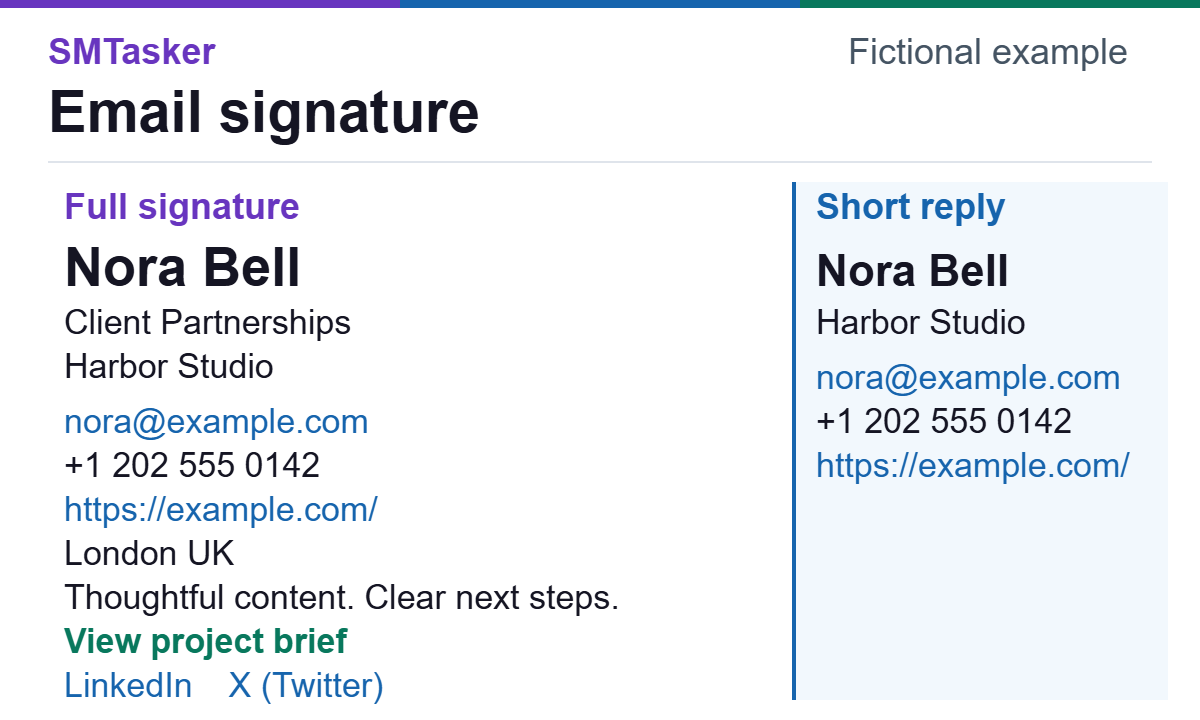
Give a new contact the full picture. Keep an ongoing conversation lighter. Your signature stays editable text, not one large image.
Your details, your links, your email app
Build an email signature worth keeping
Choose a layout and add the contact details you want to share. Review the result before installing it in the intended email account.
Make the next reply easy
Your email signature
- HTML fragment
- —
- Text alternative
- —
- Current version
- —
Off by default. Enabling this makes a direct image request; the host can receive your IP and URL. Exported signatures still use the supplied logo URL.
Your draft is local. No email account is connected.
Branding, logo & social links
Choose up to six profiles. Email output uses readable text links, including X (Twitter), rather than image icons.
HTML source and plain-text alternative
No API, signature upload, automatic saving or history. Normal website delivery and analytics remain. Clipboard and downloads can contain contact data. Save draft includes all fields, even details omitted from Short reply.
This is a browser preview, not a mailbox rendering test. Paste into the intended email app, check the account defaults and send a test message. Remote images can be blocked or reformatted.
Start with the right identity
Use the name, role and contact route for this account. Add selected social profiles or one clear next step, rather than a long menu of unrelated links.
Contact hierarchy before decorationKeep a lighter reply version
Short reply keeps your name, company, email, phone and website. The complete draft still holds your other fields for the full signature.
Current-version exports, full saved draftTest after installation
Browser rendering is not a promise about every mail app. Check your pasted layout, reply defaults, links and blocked-image fallback in a real test message.
Preview, install, then verifyWorking limits and compatibility
Up to six social profiles, a 400-character note over no more than six lines, and 32 KiB UTF-8 JSON drafts. Generated HTML fragments are capped at 16 KiB without truncation. Names and text support Unicode; email local parts use conventional ASCII mailbox syntax. HTTPS links are syntax-checked, not checked for ownership, availability or image compatibility. The generator does not host files, install signatures, send email or certify identical rendering in Gmail, Outlook, Apple Mail or mobile apps.
Technical details & licenses
Create an email signature from your contact details, choose a layout, and review the full or reply version. Copy formatted content or download HTML and TXT without connecting a mailbox.
Start with the Email Signature Generator, then install the result in your email client yourself. Build signature prepares the output; it does not send a message or change an account. Browse the free tools directory for other preparation tasks.
Decide what someone needs after reading your message
A signature should answer the small questions left after the message: who wrote this, what organization they represent, and how to continue the conversation. Start with those decisions before adding decoration. A consultant arranging a project may need a role, company, email address, and portfolio. Someone answering an established thread may need only a name and a dependable contact route. The generator prepares that footer from individual fields, rather than accepting arbitrary HTML. It is not an email composer, mailing service, account connector, or API. You remain responsible for the message and for installing the approved footer in your chosen client.
Full name is the required identity field when you build. Job title, company, email, phone, website, and location are separate optional entries, so leave an irrelevant item empty instead of adding filler. Use the name recipients recognize and a role that explains your responsibility. A location can be a city or service area; it does not need to disclose a home address. Avoid putting confidential project names into a public footer merely because a field is available. Read the proposed content as if it were forwarded beyond the original recipient, because the contact details can travel with the conversation.
Set one purpose for the optional supporting material. A tagline can clarify your work, while a call to action can point to a useful destination such as selected work or a contact page. They do not both need to repeat the same claim. A notice should contain approved wording that genuinely belongs on these messages, not a long collection of unrelated policies. The tool offers controlled formatting, not legal review or evidence that a statement is accurate. Ask the responsible colleague to approve organizational wording before distributing it. A small, maintained footer is easier to trust than an impressive collection of outdated details.
Build the fictional Harbor Studio example field by field
The tool’s synthetic example uses Full name Nora Bell, Job title Client Partnerships, Company Harbor Studio, and Email nora@example.com. Set Phone to +1 202 555 0142, Website URL to https://example.com, and Location to London, UK to reproduce those entries manually. Nora and the studio are fictional; the example-domain contact details are not a working business identity. Keep the email address alone in its field, without a display name or angle brackets. The formatted phone entry supplies a readable label, while the generated telephone link uses the accepted number characters in a simpler dialing form.
Open the initially closed Branding, logo & social links group for the additional fields. Enter Short tagline Thoughtful content. Clear next steps., Call-to-action label View the project brief, and Call-to-action URL https://example.com/brief. Add LinkedIn with https://www.linkedin.com/company/example/ and X (Twitter) with https://x.com/example, matching the demonstration entries. These are illustrative destinations, not verified accounts belonging to Nora. Leave Short note or disclaimer, Hosted logo URL, and Logo alternative text empty. The complete example has no logo and needs no image request. Replace the synthetic identity and review every destination before professional use.
Choose Layout Side logo, Font Arial, Full signature, Signature text size 14, Accent color Purple, and Logo display width 80. Side logo maps to the core’s split layout; without a logo it reserves no empty image cell. Load example fills and builds this recipe automatically. For manual entry, select Build signature to prepare it. After any edit or a switch to Short reply, select Build signature again before copying or downloading. Download HTML and Download TXT use the currently built version. Save draft retains every entered field and style choice, including full-only material, so the short export is not a complete editable backup.
Choose a layout and a deliberate full or reply version
Layout offers Compact, Stacked, and Side logo, which maps to the split layout. With a logo, Compact places it below the identity and contact information, Stacked places it above, and Side logo places it to the left. Without a logo, the layout does not reserve an empty image cell. Compare the options using your longest real line, not only a short sample name. A long company name beside a logo can create an awkward balance even when both entries are valid. Choose the arrangement that makes the contact hierarchy easiest to scan; a more elaborate shape is not automatically a better fit for everyday correspondence.
The full variant includes the nonempty optional fields, including role, location, tagline, call to action, notice, logo, and supplied social links. The reply variant deliberately contains only full name, company, email, phone, and website. It is not a freeform second design, and it does not keep a tagline simply because that line is short. If Nora needs her job title in a particular reply, she can choose the full version for that use or handle the message separately. Do not relabel a field to bypass the intended structure. Keep reusable contact information semantically correct so future revisions remain understandable.
Font offers Arial, Georgia, or Verdana; Signature text size offers 12, 14, or 16 px. Accent color choices are Purple, Blue, Green, Ink, and Rose. Logo display width offers 48, 64, 80, 96, or 120 px when artwork is present. These bounded choices keep the generated structure predictable; they are not a guarantee of identical display in every inbox. For a restrained business footer, begin with readable body text and one accent. Review the result at a narrow width before increasing the logo or text size. If hierarchy is unclear, remove a competing line before trying to make every element more prominent.
Keep contact links valid and social choices selective
Text fields have individual limits. Full name accepts 70 code points; Job title, Company, Location, Short tagline, Call-to-action label, and Logo alternative text each accept 80. Email allows 254, Phone 40, and each URL 500. Short note or disclaimer permits 400 code points across six lines. The whole draft has a 6,000-code-point budget. Treat these limits as boundaries, not targets. Shorten an overlong role thoughtfully instead of expecting automatic trimming. Single-line fields reject line breaks, and unsupported hidden controls are not a formatting method. If a copied address fails validation, re-enter the intended visible text rather than repeatedly pasting the same problematic string.
Supply HTTPS addresses for website, CTA, logo, and social destinations. A CTA needs both its label and URL, or neither; an attractive label without a destination is incomplete. The email check concerns syntax, not mailbox existence. URL checks likewise do not establish that a page is available, belongs to you, or is appropriate for recipients. Phone accepts common digits and separators with an optional leading plus, requiring 7 to 20 digits; extensions are not supported. Use a suitable direct number or omit it. Test actual business destinations separately in your browser before approving them, especially when a copied link includes account-specific parameters.
You can supply up to six distinct social platform entries from the available labels, but a signature rarely needs every available channel. Choose destinations that support this conversation: a professional profile, a portfolio-focused channel, or a maintained public page. Exported social links are readable text, not SVG icons or automatically discovered handles. The selected platform label is your assertion about the supplied URL, not a verification result. For Harbor Studio, two carefully reviewed destinations would be easier to maintain than six neglected ones. Remove a link when its purpose disappears; a signature is not obliged to reproduce the entire navigation of your website.
Treat a hosted logo as an optional external resource
A logo is optional, and the first useful version can be entirely text. If you add artwork, provide a public HTTPS image URL and descriptive logo ALT, then choose a displayed width. There is no image upload or automatic hosting in this tool. A local file path, a private drive location, or an image visible only after signing in is not an equivalent public resource. Arrange hosting through your own approved process. The generator checks the address format within its rules; it does not retrieve the file to confirm its dimensions, content, ownership, or future availability. Keep the organization name readable outside the image.
The preview uses a placeholder by default instead of loading the hosted logo. Selecting Load hosted logo in preview is an explicit opt-in to a direct HTTPS image request from your browser. The remote host can receive request information, including your IP address. Decide whether that request is appropriate before enabling it, particularly with an unfamiliar third-party image host. The option affects preview loading, not whether the exported full signature references the entered URL. Leaving the preview image blocked does not remove that remote resource from the signature you later paste or download. Remove the logo URL if you want a logo-free full export.
Recipients may load or block the hosted image according to their own email environment. Design the footer so that neither choice hides the sender’s identity or the only useful contact route. ALT should describe the actual mark briefly, such as the approved studio name, rather than stuffing in promotional keywords. Choose a smaller width when the artwork competes with the message, and inspect the actual asset yourself for legibility. This tool does not add a tracking pixel, but an external image remains an external request when loaded. Do not describe a hosted logo as a private embedded file or claim that its display is universal.
Build before copying and choose the right export
Build signature validates the fields and prepares the current output. Editing an input or changing between Full signature and Short reply invalidates the previous result, so build again before attempting the handoff. Review names and destinations after a successful build, not only after typing them. The HTML fragment must fit within 16 KiB; invalid or oversized content is refused, not silently shortened. If an error concerns a full-only field while Short reply is selected, correct that field as well: the draft still contains it and must remain valid. This keeps a hidden problem from resurfacing only when you switch back to the full version later.
Copy formatted prepares HTML and plain-text clipboard representations for a rich-text destination. A browser permission or unsupported clipboard operation can prevent that action; read its actual status instead of assuming the click succeeded. A plain-text paste is not proof that formatted copying worked. Download HTML is a separate way to retain a complete standalone document containing the selected signature, while Download TXT saves its plain-text equivalent. The HTML output uses tables and inline styles rather than external fonts or scripts. It does not add a promotional link to your signature. Neither download installs the footer or proves how an email client will reinterpret it.
Choose TXT when readable contact content matters more than visual arrangement. It retains the applicable website, social, and CTA destinations as text but does not include logo URL or ALT. Consequently, the text file is not an image-hosting record or an editable project. HTML is useful for retaining the formatted artifact; a draft is useful for rebuilding it later. Give each downloaded file an identifiable name in your own storage and distinguish full from reply copies. Open the actual downloaded artifact before distributing it, especially if you changed variants shortly before export. The file you inspect should be the file you intend another person to use.
Save a complete draft without creating hidden history
Save draft downloads a JSON project containing all supplied fields and settings, including details absent from a reply export. A private mobile number, an old campaign URL, and a full-only notice remain in that file if they remain entered. Inspect the complete form before sharing a draft with a colleague. Do not distribute a reply draft on the assumption that it contains only the five visible reply fields. If the colleague needs just a finished short footer, an appropriate current-variant export may be sufficient. A reusable project is a more revealing handoff than the small visible signature it can generate.
Open draft restores a valid saved project; cancelling the file choice or importing an invalid file should leave the current work intact. Draft JSON is limited to 32 KiB. Use the tool’s draft format, not an arbitrary HTML document or a renamed text file. Entered strings are retained without automatic trimming or truncation, except that notice line endings are normalized. Generated email and URL link destinations may use validated canonical forms, such as normalized domains, without changing the stored draft string. This distinction matters when comparing a project with its HTML. Compare the intended destination and visible content rather than expecting character-for-character identity in every representation.
There is no automatic draft history, mailbox backup, or account synchronization. Save a project deliberately before closing or clearing the page, then keep it in a location appropriate for the contact information inside. Clipboard contents and downloaded files can outlive the browser session. Ordinary website resources and analytics are separate from local signature preparation, and optional logo loading adds the request described above. Clearing the form is not a promise of secure memory erasure or deletion from your downloads folder. For an organizational handoff, record the approved owner and revision outside the tool so someone knows which draft should be maintained next.
Install, inspect, and maintain the approved result
Move the approved formatted content into the signature editor of the email client you actually use, following the relevant guide. Pasting rendered content is different from pasting visible HTML source into a rich-text box. Preserve an existing useful signature before replacing it, and check the selected sending identity before saving account settings. New-message and reply choices belong to that client, not to this generator’s variant selector. Building a reply version does not set a mailbox default automatically. Where the client allows separate choices, install and name the intended versions clearly enough that you can tell which belongs in an opening message and which belongs in a thread.
Use a test message you send yourself to assess the installed version. Compare the sender identity, visible contact details, link destinations, spacing, and any image behavior with the approved draft. Also inspect a reply and a narrow reading view relevant to your audience. These are checks to perform, not claims that this page has already certified Gmail, Outlook, or another client. If the installed result differs, identify the stage where it changed: generator output, clipboard transfer, signature editor, composition, or received message. Correct one cause at a time. A smaller text-led version is a useful fallback when a decorative element creates unnecessary uncertainty.
Schedule maintenance in your own workflow when a role, phone number, public profile, or campaign destination changes. Replace the installed signature as well as the saved project; updating one does not update the other. Remove time-sensitive CTAs after their purpose ends, and ask a new team member to verify inherited contact routes before reuse. A successful result is a readable, accurate footer that supports the conversation without overwhelming it. It does not establish email authentication, improve deliverability by itself, or replace account security. Keep those separate responsibilities visible when you hand the finished signature to someone who will use it every day.
Choose the context that matches your next step
Email app and signature design guides
Follow the right installation path or work through a specific branding decision. Each guide addresses a different part of the email-signature handoff.
Gmail Signature
Prepare distinct desktop new-message and reply signatures, review Send mail as identities, and keep a readable text alternative for mobile correspondence.
Read the guideOutlook Signature
Build a signature for new Outlook or Outlook on the web, apply it to the intended account, revise it carefully, and inspect new messages and replies.
Read the guideClassic Outlook for Windows
Build a table-based signature for classic Outlook on Windows, paste formatted content, separate full and reply versions, and diagnose spacing, linked-logo, and account-default problems.
Read the guideApple Mail on Mac
Prepare an Apple Mail signature for Mac, assign it to the intended account, choose a font policy, review quoted replies, and keep a separate text signature for iPhone.
Read the guideAgency Signatures
Keep agency identities, approved links, and client handoffs consistent without confusing who owns the next reply.
Read the guideCreator Signatures
Give collaboration partners the right contact, one useful media-kit action, and a focused selection of social links.
Read the guideSignature Logos
Choose a hosted HTTPS logo, set a sensible displayed width and ALT, and diagnose placeholders, private URLs, and blocked images.
Read the guideQuestions about email signatures
Does this tool install my signature or send email?
No. It builds browser-based signature output without an API, mailbox connection, login, installation, or sending service. You copy or download the result and configure your email client yourself.
Why is my saved draft larger than my reply signature?
Reply output contains only full name, company, email, phone, and website. Save draft retains every entered field and setting, including full-only logo, social, CTA, and notice data.
Can I upload a logo or export social icons?
No. A logo needs your own public HTTPS image URL; the tool does not upload or host it. Exported social destinations use readable text links rather than icons.
Does leaving logo preview off remove it from HTML?
No. The preview setting controls the optional browser request. A full HTML export still references an entered logo URL. Remove that URL for a logo-free full signature; reply output omits the logo.
Will the generated HTML look identical in every inbox?
That is not promised. Review the installed signature and a received test message in the clients that matter to you. Keep contact details readable without images and retain a TXT alternative.
Keep preparation separate from account operations
Explore SMTasker for your social account workflows
For teams maintaining the social accounts linked from their signatures, review SMTasker plans separately. The free generator does not send email or manage a mailbox.