Relevant dates, practical plans
Social Media Holidays & Campaign Dates Calendar
Choose useful occasions from a curated calendar, build a selected plan, and give your next campaign a clear preparation date.
An occasion with a next step
Brightday Studio campaign dates
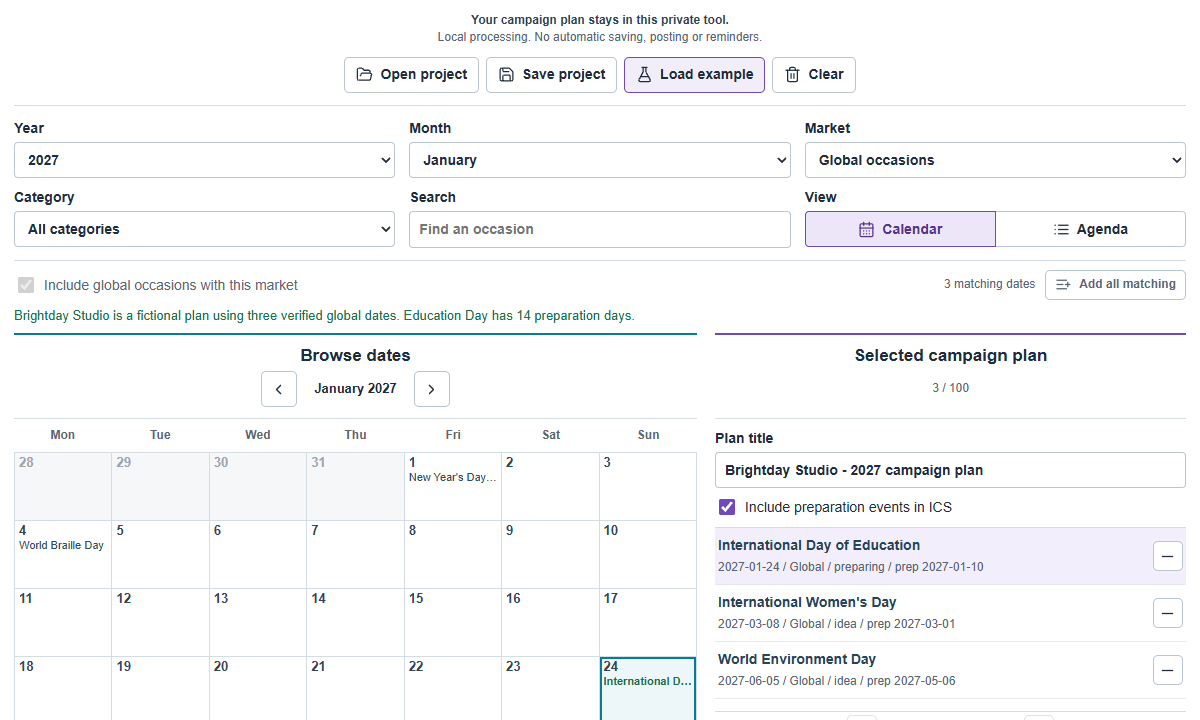
Choose the dates that fit your audience
Your occasion calendar and campaign plan
Browse 2026-2028, select relevant dates, and give each one a preparation lead time or a clear campaign note.
Your selected plan, custom dates and notes are processed locally in an isolated workspace. Only its height is shared with the surrounding page, where ordinary website assets and analytics still run.
Coverage and date sources
This is a selected planning collection for 2026, 2027 and 2028, checked on 29 November 2026. Global occasions are separate from US federal dates and bank holidays for England and Wales, Scotland, and Northern Ireland. Regional customs and statutory coverage are not interchangeable. Each built-in event identifies its source, scope and verification method. User dates are not independently verified.
Government-list rows use published dated lists. Organizer rows repeat a checked annual date. Rule rows apply a documented convention; they are not announcements of a future retailer offer or local campaign. Recheck important dates before use. This is not a complete legal, closure or employment calendar.
Primary references include GOV.UK bank holidays, US OPM federal holidays, UNESCO international days, WHO campaigns and the UN Indonesia observance list. Individual source references are displayed with each date.
Working limits and export scope
The selected plan supports 100 dates and 30 custom dates, with notes up to 500 Unicode code points each. Filters do not narrow exports: CSV, ICS, TXT and PDF use the entire selected plan. JSON saves the editable project, including notes and custom dates; there is no automatic history or cloud save.
Preparation lead times count calendar days, not working days. Optional ICS preparation entries are separate all-day events, not timed alarms. Files are snapshots, not subscriptions. Reimporting can create duplicates. Project files are limited to 256 KiB UTF-8; CSV/ICS/TXT to 1 MiB; PDF to 10 MiB and 40 pages. Import and export work has a ten-second deadline. If a character is outside the PDF font, use another format to preserve it rather than accepting a broken glyph.
Technical details & licenses
Explore supported dates for 2026, 2027, and 2028, compare market context, and turn a thoughtful selection into a practical campaign reference.
Choose dates that give your campaign a purpose
A useful social media holiday calendar helps you decide what deserves attention, not how to mention every occasion on the page. Start with your audience, the work your brand genuinely does, and the result you want from the campaign. An occasion is worth selecting when it gives that work a relevant setting or helps your team prepare. It is not automatically a reason to publish. Use this calendar to discover possibilities, compare their context, and keep the dates that support a clear decision. The strongest plan usually has an explanation for each selection, not simply a full-looking month.
Brightday Studio is a fictional creative business preparing an educational resource for its clients. Its team wants to share something useful and leave enough time for review. It begins with the resource, then looks for an appropriate occasion, rather than collecting holiday names and inventing a connection afterward. A related observance might strengthen the context; a commercial convention might be irrelevant. Brightday can also add its own client preview date when the milestone comes from the campaign itself. This distinction keeps the calendar grounded in actual work instead of making the brand dependent on a stream of unrelated celebrations.
Before selecting a date, finish this sentence: our audience will benefit because we can offer this specific contribution. That contribution might be a practical explanation, a relevant resource, a considered message, or a useful service update. If the sentence remains vague, investigate further or leave the date out. A plan is allowed to have quiet periods. For help turning a relevant occasion into a useful editorial idea, the social media holiday content planning guide develops the next step. The calendar supplies a date reference; your team supplies the reason to use it and the content that earns attention.
Read the market, type, and source basis together
The curated English catalogue covers 2026, 2027, and 2028 across five supported markets: Global, US federal, England and Wales, Scotland, and Northern Ireland. You can include global occasions alongside a chosen regional market. Global does not mean that every person or country observes an occasion, and US federal does not mean every state, school, or private business follows the same arrangements. The UK regional scopes are separate for a reason. Treat the market as the beginning of a relevance check, not a universal statement about participation, opening hours, paid leave, or the availability of a particular colleague.
Event types distinguish public holidays, observances, commercial conventions, seasonal references, and custom dates. Those categories do not carry equal authority. A commercial convention can be useful for a campaign without becoming an official public holiday. Built-in records provide source information, scope, a checked date, and a verification basis. An official-list basis means a published list supports the record; a rule basis identifies a derived date; an organizer basis connects it to the responsible organization. Read these details together. A familiar title alone cannot tell you whether the record matches your market, purpose, or assumptions about the date.
Also distinguish the nominal occasion from an observed or substitute date. An audience message may concern the occasion itself, while a preparation or availability discussion may concern the observed holiday. Neither date should silently stand in for the other. The catalogue is versioned rather than a live feed, and it is not a complete worldwide or legal calendar. Confirm local arrangements where the decision depends on them. The regional holiday planning guide explains how to separate audience relevance from operational availability without treating a market filter as proof that every organization follows the same calendar.
Browse the calendar without confusing the view and the plan
Use the year, month, and market filters, the Category control, and search to answer a focused discovery question. The calendar view helps you inspect the shape of a month; the agenda gives a list-based view and supports browsing across all months. Choose a specific month before switching to the calendar. Search is literal and case-insensitive, so try the actual wording of an occasion or a useful term rather than expecting semantic recommendations. A narrow result is not evidence that nothing else is relevant. Broaden the filters when needed, then review the source and scope of any record before deciding to select it.
A day preview is a starting point, not necessarily the complete set of occasions on that date. Inspect the full day details when the preview indicates that more entries are available. The agenda is paginated, so another matching occasion may be on a later page. These boundaries keep browsing manageable without changing the underlying selection. Brightday uses the month view to spot a crowded period and the agenda to examine relevant records more carefully. It does not interpret the visible page as the whole catalogue or assume that every matching result should become part of the campaign.
Filters change discovery, not the selected plan. Dates already selected remain when you change the year, month, market, Category, search, or view. That makes cross-market and cross-month planning possible, but it also means that an item can belong to your plan while being absent from the current results. Review the selected plan directly before handing it over. If a date no longer belongs, remove that selection explicitly. Hiding it through a filter does not remove it from the plan, and the visible calendar is not an export scope or a substitute for reviewing the decisions you have retained.
Build a selected plan with notes that explain the work
Give the plan a title that identifies the campaign or decision, then add dates deliberately. Selecting an individual occasion makes it easier to keep its purpose in mind. If you add matching dates together, review the resulting selection with the same care; matching a filter does not establish brand relevance. The plan is a working shortlist rather than a demand to produce something for every item. Brightday keeps an occasion only when someone can explain its relationship to the educational resource, the client preview, or a concrete preparation decision. This makes the selection understandable to a colleague who did not build it.
Use the note to record the proposed contribution, the audience, and the next question that must be resolved. For example, Brightday might note that a resource needs a client-facing explanation and a check that its examples are suitable for the intended audience. That is more useful than writing make a post. The available statuses, idea, preparing, and ready, help distinguish an undecided approach from active preparation and a reviewed item. They are simple planning signals, not approval enforcement or automatic task assignment. Agree what ready means for your team before treating that label as evidence that work can move forward.
Add a custom date when the campaign has a milestone that is not represented by a built-in occasion, such as a client preview or an internal review. Supply its title, supported date, and market, and keep its purpose clear. Custom information comes from you; it is not independently verified by the catalogue. Do not disguise an internal deadline as an official observance. If the connection between a public occasion and your proposed message is still uncertain, the awareness days and brand relevance guide provides a more detailed way to decide whether participation is useful, credible, and appropriate.
Choose your next useful date
Build a plan around one real campaign
Compare the supported occasions, check their scope, and select the dates that give your team a clear next step.
Set preparation leads that reflect the actual work
For each selected item, choose no preparation lead or a lead of seven, fourteen, or thirty days. The preparation date is the occasion date minus that many calendar days, not working days. Weekends and other holidays are not skipped. Choose the lead according to the work required: a straightforward review may need less preparation than a resource with several contributors and client approval. The calculation gives you a reference point, not a production estimate. If the resulting date is impractical, adjust the plan and organize the work deliberately rather than assuming the calendar has checked everyone’s availability for you.
Preparation can fall in a different month or year. If Brightday adds a custom client preview on January 10, 2027 and chooses fourteen days of lead, its preparation date is December 27, 2026. That is an example of the studio’s own milestone, not a claim about a public holiday. The earlier date needs review even while the team is focused on January. Check the relevant people and dependencies before accepting it as a useful start point. A mathematically correct date is only helpful when the team understands what should be ready or started by then.
The calendar displays occasions, not a separate schedule of preparation tasks. Preparation is an all-day planning reference, not a timed alarm, and the tool does not send background reminders. Recording a lead does not notify a reviewer or schedule publication. For a campaign with several stages, use the calculated date as an anchor and organize the intermediate work in your normal workflow. The campaign countdown planning guide explores that approach in more depth. Keep the occasion, the preparation reference, and any actual timed appointment distinct so colleagues do not mistake one for another during the handoff.
Turn Brightday Studio’s shortlist into a campaign brief
Brightday selects International Day of Education on January 24, 2027 from the Global market and checks its organizer-based source and observance scope. It adds this contribution note: Share a free worksheet that helps clients make educational handouts clearer; review the examples and confirm the download before sharing. The team chooses a fourteen-day preparation lead, producing January 10, 2027 as the preparation date. It sets the status to preparing while the worksheet and destination are checked, then uses ready only after that review. The result is one explained occasion with a concrete deliverable and an earlier work checkpoint, not an automatic publishing instruction.
The brief separates the shared idea from the work around it. Brightday needs a reviewed resource, a concise introduction, and an agreed destination for interested clients. The holiday planner does not generate those assets or decide their format automatically. It holds the date reference, preparation lead, status, and note that make the next step clear. The team can then use the Content Calendar Generator as a separate planning aid for the surrounding sequence. There is no automatic transfer between tools; carry over the relevant decisions intentionally and check that the wider plan still matches the selected occasion.
Not every campaign will follow Brightday’s educational approach. If your selected occasion supports a genuine offer, check stock, service capacity, terms, and the customer experience before building the message around it. A commercial date is a convention to assess, not evidence that a promotion is suitable or profitable. The ecommerce campaign calendar guide focuses on those operational choices. In either case, leave the review with a clear contribution and a realistic next action. A polished date plan cannot compensate for an unsupported claim, an unavailable offer, or a message that does not help the intended audience.
Hand over the complete selection in the right format
CSV, ICS, PDF, and TXT outputs cover the complete selected plan, including selections outside the visible filters or agenda page. Review that whole set before exporting. Choose CSV for structured review, PDF for a readable plan, TXT for a plain-text reference, and ICS for a separate calendar import. Each serves a different handoff need; none turns the plan into scheduled content. The default spreadsheet-safe CSV mode can transform formula-like text to reduce spreadsheet interpretation risks. Use literal mode only when preserving the exact text is necessary and you understand how the receiving spreadsheet may interpret it.
ICS contains all-day occasion events. The preparation-event option controls only whether ICS also includes separate preparation events for selected items with a positive lead. It does not change the selection, remove lead settings, or narrow the other export formats. The file has no alarms and is a static snapshot, not a subscription or account connection. Repeated imports may create duplicates rather than update older entries. For a calendar handoff, follow the campaign calendar ICS import guide and inspect the destination after import. Agree who will manage later revisions instead of assuming that a new export replaces copies already shared.
Save a manual JSON project when you need to reopen the editable plan, including its supported settings, filters, custom dates, and selected items. Opening a project is different from importing an ICS file into a calendar application. CSV, PDF, TXT, and ICS are not project reopen formats for this tool. A project must match the supported schema and catalogue version, so retain useful handoff copies as well as the working file. There is no automatic save or cloud history. Brightday saves its project before leaving the page and identifies which exported revision the team should use for the campaign discussion.
Review the plan as the campaign changes
A selected plan is most useful when someone owns the next review. Revisit it when the audience changes, the deliverable changes, a reviewer becomes unavailable, or a custom milestone moves. Check both the occasion and the preparation consequence rather than updating only the title of a document. The catalogue is bundled and versioned, so it does not monitor official announcements or client arrangements in the background. Confirm important external details at the point of use. Brightday keeps the reasoning in its notes short enough to scan while retaining enough context to explain why each date remains part of the campaign.
Before a handoff, ask a colleague to read the plan without relying on the current calendar view. Can they identify the intended market, explain the selected contribution, distinguish custom dates from sourced occasions, and find the preparation reference? Do they know which decisions are still ideas and which have been reviewed? Remove selections that no longer have a purpose, and make a new export when the working plan changes. An old file is not updated automatically. The value of the review is a shared understanding of the work, not simply a list of dates with every status changed to ready.
Keep the next layer separate from this free planning tool. Once the dates, content, and responsibilities are settled, your team can choose its usual production and publishing workflow; SMTasker is an optional next step to explore, not an automatic connection from this calendar. The useful result here is already complete: a considered shortlist, clear context, practical preparation references, and an export that matches the selected plan. Start with one real campaign, make each date earn its place, and leave colleagues with decisions they can act on rather than an obligation to celebrate every occasion the calendar happens to contain.
Give the date a useful job
Campaign calendar planning guides
Choose relevant occasions, prepare the work, compare regional dates and hand off a calendar snapshot.
Holiday Content Planning
Choose relevant occasions, protect evergreen posts, and turn selected dates into workable content briefs.
Read the guideAwareness Days and Brand Fit
Check audience relevance, choose a practical action, and approve a credible message before committing to an awareness day.
Read the guideEcommerce Campaign Calendar
Connect retail occasions to a workable offer, a clear asset brief, and confirmed service availability.
Read the guideCampaign Countdown Planning
Choose a calendar-day lead, handle month and year boundaries, and build a concrete approval and materials checklist.
Read the guideRegional Holiday Planning
Separate audience occasions from observed holidays, local availability, and regional campaign decisions.
Read the guideImport a Campaign Calendar
Import all-day campaign dates, understand preparation events, and manage static snapshots without assuming automatic updates.
Read the guideQuestions about the holiday calendar
Which years, markets, and date types does the calendar support?
The curated English catalogue covers 2026, 2027, and 2028. Markets are Global, US federal, England and Wales, Scotland, and Northern Ireland, with optional global occasions alongside a regional market. Types distinguish public holidays, observances, commercial conventions, seasonal references, and your custom dates. It is not a complete legal or worldwide calendar.
Will changing filters remove dates from my plan or narrow an export?
No. Filters change the discovery view, while selected items remain across year, month, market, Category, and search changes. CSV, ICS, PDF, and TXT exports cover the complete selected plan. Remove unwanted selections explicitly before preparing a narrower handoff.
How are preparation dates calculated, and will I receive an alert?
Choose zero, seven, fourteen, or thirty days of lead. Positive leads subtract calendar days from the occasion and may cross a month or year boundary. These are all-day planning references, not timed alarms. The tool does not send reminders, assign tasks, or schedule posts.
What does the preparation-event option change?
It affects ICS only: when enabled, selected items with a positive lead also produce a separate all-day preparation event. It does not remove preparation settings or change the selected-plan scope of other exports. ICS has no alarms, and repeated imports may duplicate entries.
How do I save a plan to edit later?
Save the manual JSON project and reopen that supported project file when needed. Projects require the supported schema and catalogue version. There is no automatic save or cloud history, and CSV, ICS, PDF, and TXT outputs cannot reopen the editable project in this tool.
An optional next step
Explore SMTasker for your wider workflow
Keep this calendar as your date-planning reference, then explore whether SMTasker fits the next stage of your social media work.