Social media automation used to mean scheduling posts, repeating routine actions, and setting rules that would run while you were doing something else. That remains useful, but automation’s role is changing.
AI is making social media tools more capable of understanding context, interpreting instructions, spotting problems, and helping people decide what should happen next. Instead of simply following a fixed sequence of commands, newer systems can work more like an operational assistant: you describe an outcome, the system helps translate it into a workflow, and you review the result.
This does not mean social media managers are becoming unnecessary. In fact, the more capable automation becomes, the more important human judgment becomes. Someone still needs to decide what a brand should say, which audiences matter, what risks are acceptable, and whether an action makes sense.
The shift is therefore less about replacing social media management with AI and more about changing where human attention is spent.
Traditional Automation Was Built Around Rules
Traditional automation is easiest to understand as a set of instructions: if this happens, do that.
A social media manager might create a workflow that publishes a prepared post at a certain time, performs a defined action on content matching selected criteria, or repeats a task according to a schedule. Once configured, the automation does not need to understand the broader business objective. It simply follows the rules it has been given.
That model is still valuable because predictable tasks are excellent candidates for automation. The problem appears when the workflow becomes more complicated than the rule itself.
Imagine an agency managing 30 client accounts. One account needs daily publishing. Another needs a smaller engagement routine. A third has recently changed its content strategy. Several accounts are connected to different devices, while some workflows have stopped producing activity.
A traditional system can execute each configuration. But the operator still has to move between accounts, inspect settings, identify exceptions, remember why a workflow exists, and decide what needs attention.
That is where AI changes the equation. Instead of requiring the operator to know exactly which screen and setting to open, an AI-assisted system can interpret a request such as:
“Check these accounts and tell me which ones have workflows that need attention.”
The important development is not that AI can produce a sentence in response. It is that AI can potentially connect the conversation to the operational context behind the request.
This mirrors a broader change happening across marketing technology. Research from the Content Marketing Institute found that 87% of surveyed technology marketers were using generative AI, while many were still using it on an ad hoc basis rather than integrating it deeply into daily workflows. This illustrates the transition from experimentation toward more systematic use.
AI Changes the Interface, Not Just the Features
One of the most practical differences between traditional automation and AI-assisted automation is the interface.
With conventional software, you generally learn the software first and then perform the task. You find the relevant account, locate the automation, choose a source, configure limits, select a schedule, save the settings, and then check whether everything works as expected.
An AI-assisted workflow can reverse that process.
You start with the outcome you want and use natural language to explain it. The AI then helps identify the relevant settings or steps. This can reduce the amount of product knowledge required to perform routine operational work.
A practical example
Suppose a social media manager wants to prepare a new workflow for an Instagram account. Instead of navigating through every available setting, they could describe the job more directly:
“Prepare a workflow for this account using the selected source, keep it active only during my existing working hours, and leave the automation stopped so I can review it first.”
A useful AI-powered system should not simply respond with instructions. It should understand which account is being discussed, identify the relevant configuration, prepare the proposed changes, and make those changes reviewable.
This is an important distinction. AI that merely talks about automation is helpful, but AI that can work with the actual context of the automation can remove an additional layer of manual work.
Google is already applying a similar concept beyond social media. Its marketing products have introduced agentic capabilities designed to help marketers analyze information, create work, and optimize campaigns while keeping the marketer involved in directing the process. Google’s overview of agentic capabilities for marketers shows how the broader marketing industry is moving toward systems that can participate in workflows rather than simply provide isolated recommendations.
What AI Can Actually Do for Social Media Managers
The most useful AI applications are not necessarily the flashy ones. For people managing multiple accounts, some of the biggest opportunities are operational.
1. Turn goals into configurations
Instead of manually remembering every setting, an AI assistant can help translate a goal into a proposed workflow. The manager can then check whether the proposed sources, limits, schedules, and targets make sense.
2. Diagnose problems
When an automation stops behaving as expected, the first challenge is often finding the relevant information. AI can help inspect available account, device, workflow, and activity information and point the operator toward the most relevant settings to check.
3. Audit multiple accounts
Auditing 20 or 50 accounts manually is tedious. A useful AI system can help identify exceptions such as inactive workflows, unavailable devices, missing inputs, or configurations that deserve review.
4. Explain what happened
Logs contain useful information, but operators do not always want to interpret every entry manually. AI can summarize activity and highlight errors or unusual situations that warrant a closer look.
5. Create repeatable operating patterns
Agencies often want consistency without making every client identical. AI can help prepare similar structures across selected accounts while preserving account-specific settings and limits.
The key is to use AI where interpretation reduces work, rather than adding AI simply because it is available.
There is also a useful human check at every stage: AI should prepare, explain, summarize, or recommend; the operator should decide what is appropriate for the account.
Meet Skye: An Example of AI Inside an Automation Workflow
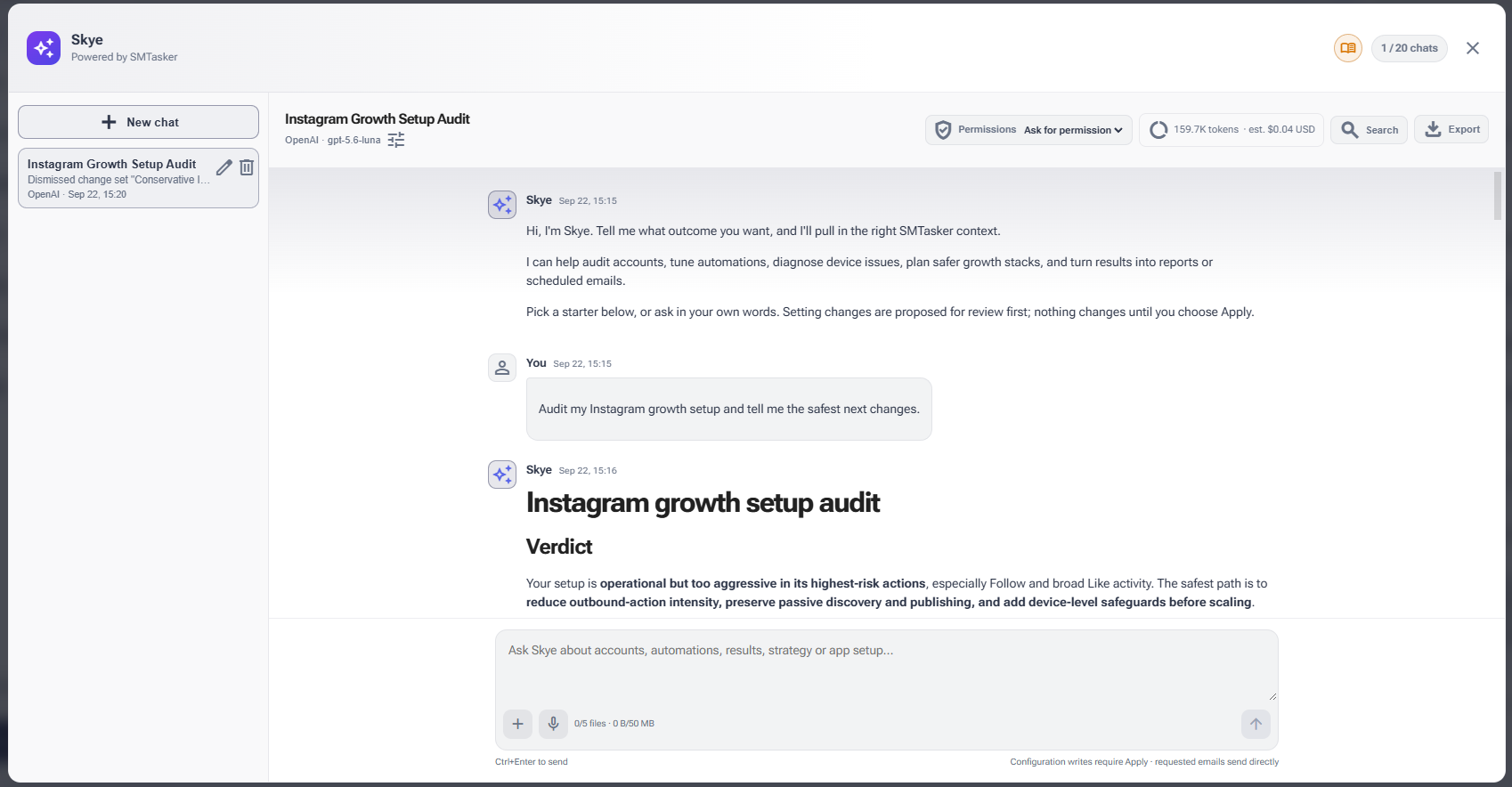
SMTasker’s Skye provides a useful example of where this model is heading. Rather than existing as a separate chatbot that only answers general questions, Skye is built into the SMTasker workspace and works with the context available there.
A manager can ask Skye to explain a setup, investigate an issue, prepare an automation, audit selected accounts, or create a report. Skye can then use the relevant workspace information to prepare a practical response or proposed change.
For example, instead of asking, “How do I create a comment automation?”, a manager could ask Skye to prepare one for a particular account using an existing source and specified operating limits. The important part is that the request is connected to the actual workspace rather than being a generic conversation about how social media automation works.
Skye also illustrates an important principle for AI-powered automation: reviewability matters. Its workflow is designed around preparing changes for review before they are applied, allowing the operator to inspect what was proposed and decide whether it should go ahead.
That makes the AI useful without turning the entire operation into a black box. The person managing the accounts can still inspect settings, adjust them manually, start or stop automation, and review activity.
For someone managing several accounts, the practical benefit is not necessarily having an AI “run social media.” It is reducing the amount of time spent searching through settings and interpreting operational information.
That distinction is important because AI-assisted automation should make an existing workflow easier to understand and operate, not encourage indiscriminate activity.
If you want to see how this approach works in practice, an overview of AI-assisted workflow management with Skye explains how the assistant can help configure, inspect, troubleshoot, and review work inside SMTasker.
The Human Layer Becomes More Important as AI Gets Smarter
There is a temptation to think that better AI means less human involvement. For social media management, the opposite can often be more useful.
AI can process settings, summarize activity, identify patterns, and prepare changes. It does not automatically know whether a particular action fits a brand’s reputation, audience, campaign objective, or relationship with its customers.
Consider a simple example. An AI system notices that one account has generated fewer interactions than another and recommends increasing activity. That may be technically logical, but it does not necessarily mean increasing activity is the right business decision. The account could be preparing for a product launch, changing its audience, or intentionally reducing activity while its content strategy is being revised.
The manager supplies that context.
This is also why AI governance deserves attention. Content Marketing Institute’s research found that many organizations have introduced guidelines covering acceptable AI use, data handling, security, and other issues. Research into how enterprise marketing teams are establishing AI guidelines shows that adoption is increasingly being accompanied by rules around how AI should be used.
For social media teams, a practical AI policy can be straightforward:
- Define which tasks AI can prepare or perform.
- Specify which decisions require human approval.
- Do not provide AI systems with information they do not need.
- Review generated captions, replies, and other public-facing material before publishing when accuracy or brand voice matters.
- Keep platform rules and account-specific restrictions in the workflow.
- Review automated activity regularly rather than assuming a workflow remains appropriate forever.
The goal is not to slow automation down. It is to make automation accountable.
How to Move From Automation to AI Without Overhauling Everything
You do not need to rebuild your entire social media operation to start using AI effectively. A better approach is to identify the parts of your workflow that consume time because they require interpretation rather than simple execution.
Start with one repetitive problem
Choose something measurable. For example, you might spend 30 minutes every morning checking which accounts have errors, inactive devices, or workflows that did not run.
Document what you currently do
Write down the checks you perform and the decisions you make. This gives you a baseline against which an AI-assisted workflow can be evaluated.
Let AI assist before letting it act
Start with read-only questions, summaries, audits, and proposed configurations. This gives you an opportunity to see whether the system understands the context correctly.
Introduce approval points
For changes that affect public-facing activity, keep a human approval step. Review the proposed account, source, content, schedule, limits, and other relevant settings before starting the workflow.
Measure the time saved
Do not judge AI by how impressive the conversation sounds. Compare the old process with the new one. Did the weekly account audit take 90 minutes instead of three hours? Did troubleshooting become easier? Did the team spend more time on strategy because less time was spent navigating settings?
That is the real test.
AI should earn its place by reducing operational friction, improving visibility, or helping a manager make better-informed decisions—not simply by adding another feature to an already crowded toolset.

The Next Era Is Human-Led, AI-Assisted
Social media management is moving beyond the old distinction between “manual” and “automated.” The more useful question is becoming: which parts of the workflow should humans handle, which should software execute, and where can AI connect the two?
AI can already help with content creation, analysis, troubleshooting, workflow configuration, and campaign operations. Social platforms themselves are also incorporating increasingly sophisticated AI capabilities. For example, Meta has expanded generative AI tools for video editing and creative production, showing how AI is becoming part of the content workflow itself. The latest developments in AI-powered video editing provide one example of how quickly these capabilities are moving into everyday social media creation.
But better automation does not eliminate the need for strategy. A brand still needs a clear voice. A campaign still needs an objective. An audience still needs to be understood. And automated activity still needs boundaries.
The biggest opportunity is therefore not to automate every possible task. It is to remove the repetitive operational work that prevents social media professionals from spending time on the work that requires judgment.
Traditional automation gave social media managers more time. AI-assisted automation can give them a more conversational way to manage increasingly complex workflows. The teams that benefit most will likely be the ones that treat AI not as a replacement for management, but as another layer of operational support—one that can prepare, explain, organize, and surface what needs human attention.
The next era of social media management is not about handing the entire operation to a machine. It is about building workflows where machines handle more of the repetitive complexity while people remain responsible for the decisions that matter.
Thank you for sharing such an insightful article. Your piece provides a great mental refresh when it comes to accepting and being more open to using AI.