Make the next reply easier to choose
Comment Question Organizer
Turn supplied comments into a review queue. Group repeated wording, check question flags and add your own topics, next steps and notes.
From a text pile to a useful queue
See the questions. Keep the wording.
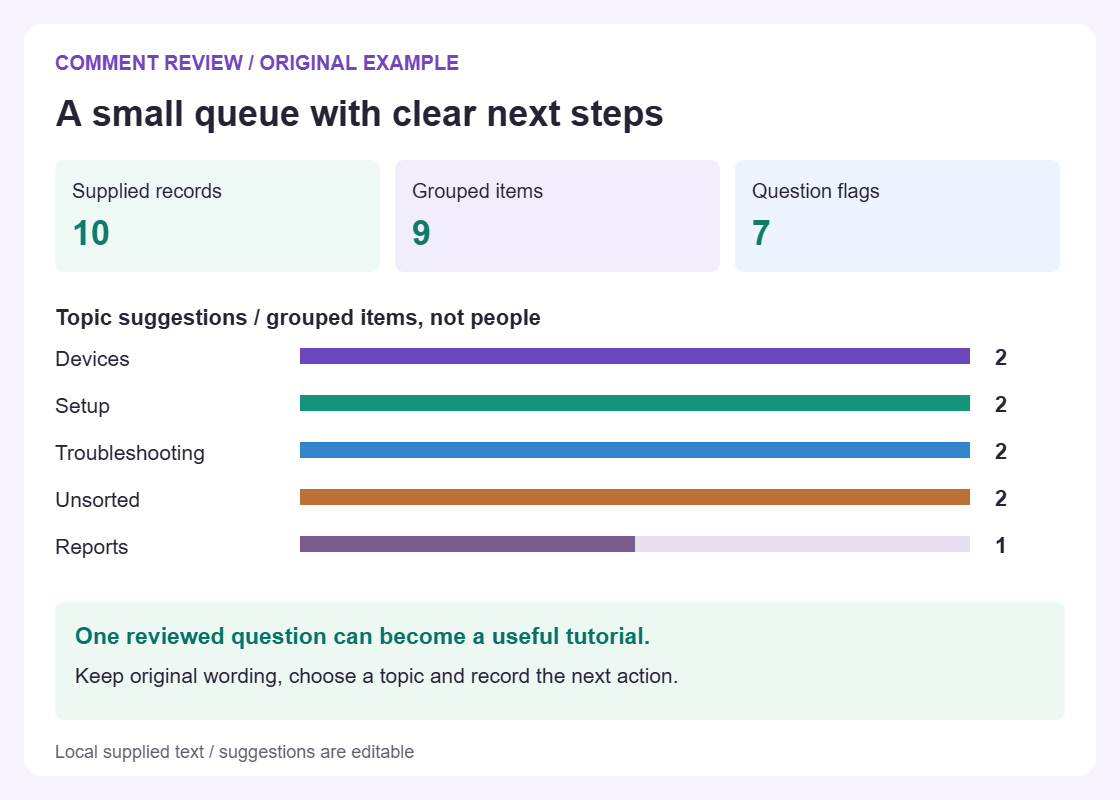
Original example, not live comments or an audience-demand score.
How the queue is built
Preserve the comments. Review the interpretation.
Group repeated wording
Case, compatibility characters and repeated whitespace are normalized for grouping. Original variants remain in the project.
Make the topic choice explicit
One matching topic becomes a suggestion. Several matches stay Unsorted, and you can enter a manual topic.
Choose a useful next step
Mark open, planned, answered or ignored. Keep the next action in a note and export only the chosen groups.
Know what evidence your queue actually contains
A comment queue starts with a limited piece of evidence: text someone supplied. It may reveal a missing explanation, a practical obstacle, or a request worth answering. It does not by itself establish how many people share that concern, whether the writer tried a suggested step, or what an entire audience wants. The Comment Question Organizer keeps that boundary visible. It compares wording, suggests review categories, and lets you annotate the resulting groups. It has no independent observation of the original discussion. The quality of the eventual answer depends on your source selection, context, factual checks, and judgement about what the supplied words mean.
The worked case is a fictional software-workshop launch. An instructor plans a live session using a sample workbook and has collected twenty comments about preparation, joining, and later access. The instructor needs a reply queue before registration closes and a short preparation notice before the session. Those are separate deliverables: one responds to particular questions, while the other gives all attendees a consistent starting point. Neither is generated by the organizer. The queue helps identify what is still unresolved, which wording has repeated, and what needs a factual check before it appears in a public promise about the workshop.
Platform contexts cover Instagram, Facebook, LinkedIn, TikTok, YouTube, Snapchat, Threads, X, and Reddit. They identify the supplied-text setting; they do not grant access to comments, story replies, profiles, or private communities. There is no scraping, social API ingestion, account login, OCR, or live mention feed. A native export is not automatically understood either. Use the same evidence discipline in every context: identify the batch you prepared, retain relevant context, and avoid treating the absence of a question as proof that nobody has it. The tool can organize the material present, not estimate the discussion or audience that was never supplied.
Prepare valid input and apply it deliberately
The simplest input is one comment on each pasted line. Blank lines are ignored, but every other line becomes its own record. If a comment itself contains line breaks, use the explicit CSV template instead of accidentally splitting it into several comments. That template is comma-delimited and requires the exact lowercase comment header; source is an optional header for a short reference label. Quote fields containing commas or line breaks. For the workshop, neutral source labels such as Registration notice and Preparation reminder are more useful than a long copied page title. The label records your supplied reference and is not a verified account identifier.
A source must stay within 1 MiB and contain no more than 300 nonempty comments. Each comment allows up to 1000 Unicode code points and 20 explicit lines. A source label is limited to 80 code points and a single line. Do not satisfy those bounds by silently chopping a long question into independent records or removing a crucial qualification. Choose a smaller, well-defined batch or prepare a documented excerpt for the review instead. Malformed CSV is rejected transactionally, without replacing the current applied data with just the rows that happened to parse. Correct the candidate file before trying to apply its content.
Input text and topic rules remain drafts until you press Organize comments. This explicit Apply step matters when an older result is still on screen. A pending or invalid draft disables exports and annotation editing so you cannot accidentally label or share the old queue as the new one. Apply valid input to proceed, or use Restore input to return to the applied dataset. In the workshop case, confirm that the twenty intended records are present before adding decisions. A newly typed extra question changes the draft, not the evidence behind the last applied totals, until you deliberately apply that revision.
Understand wording groups through a checkable example
Duplicate grouping uses a defined text key: NFKC normalization, lowercase conversion using the English locale, trimming, and collapsing whitespace. It does not strip punctuation or detect equivalent meanings. Which version should I install? can group with a version that uses different capitalization and extra spaces. Which version should I install without the question mark stays separate. What release do we need? stays separate too. All raw variants and all occurrences are preserved rather than replaced by a cleaned-up sentence. The method reduces repeated review of normalized wording; it does not decide that two people want the same answer or that two differently worded requests are interchangeable.
Construct the twenty-record workshop example with four case or spacing variants of Which version should I install?, two variants of Where is the sample workbook?, and two variants of Will a recording be available? Add twelve other distinct comments about joining instructions, time zone, installation errors, workbook format, exercise files, keyboard differences, preparation time, live attendance, recording access, captions, registration, and a thank-you. The result is fifteen groups: three repeated-wording groups plus twelve singles. Its raw total is twenty because four plus two plus two plus twelve equals twenty. This example checks grouping arithmetic without claiming to reproduce a real audience or an actual workshop.
Now inspect the difference between recurring wording and recurring intent. The single question about recording access may concern an expiry date, while Will a recording be available? asks whether a recording will exist at all. Both can inform a preparation notice, but they require different facts. Keep both groups and make that relationship an editorial decision in your notes. Fifteen grouped items are not fifteen attendees; twenty occurrences are not twenty unique people or votes. The topic chart also counts grouped items, not importance. One isolated installation blocker can deserve attention before four repeats of a question already answered clearly in the registration material.
Treat question flags and keyword topics as suggestions
Question detection uses a visible question mark, including supported Arabic and fullwidth forms, or one of the fixed English question starters. It is a heuristic you can correct with a manual Question or Comment kind. Need the workbook before Friday could be an actionable request without receiving the expected question flag. A sentence quoting someone else asking a question may receive a flag without requiring an answer itself. Read the words and the context you have supplied. The organizer does not perform language understanding, assess urgency, or decide whether an English-looking sentence is a sincere request rather than a quotation or rhetorical remark.
Keyword topics are optional. Leave the rules blank for a fully manual topic pass, or start with a few literal rules such as Setup: install, version; Files: workbook, sample; and Attendance: live, recording. You may enter up to eight rules, one per line. Each label allows 32 single-line code points, with up to eight terms of at most 40 code points each. Matching ignores case and uses word or phrase boundaries. It is not regex matching, translation, or semantic classification. A term that appears in a negated sentence still appears literally, so the topic suggestion does not explain the whole sentence.
One matching rule supplies a suggested topic. No matches and multiple matches both leave a group Unsorted; overlapping matching topics are shown for review rather than resolved by rule order. Does installing this version change the sample workbook? contains terms from Setup and Files. Decide which topic best supports the next human action and record any second dependency in the note. A manual topic can override a suggestion and survives rule edits. That persistence protects deliberate work, but it also means you should revisit overrides when you redesign the categories. Editing a keyword list is not a fresh human review of every previously annotated group.
Create a queue with a real next action
Assign a status only after deciding what it means for this review. Open means work is unresolved. Planned means a concrete next action has been arranged. Answered records your decision that an appropriate answer has been delivered outside the tool. Ignore records a deliberate exclusion from the active queue. These are manual states, not observations of account activity. For the workshop, checking the supported software version is Open until someone takes responsibility for the check. It can become Planned when the instructor agrees to test the exercise on that version. It is not Answered merely because a preparation notice has a blank space reserved for the result.
Use a note to make the dependency concrete: Instructor checks the exercise on the stated version; update joining email after confirmation. The field allows up to 1000 code points and 20 explicit lines per group. Owner names, review dates, and approvals are ordinary note text, not separate assignments or reminders. Keep an actual handoff in your team process. A second note might say Recording availability undecided; ask session lead before replying. That is more useful than a polished but unsupported answer. The organizer neither writes the response nor tests the software, and it has no basis for promising a recording or a particular access period.
As a hypothetical review state, divide the fifteen groups into five Open, six Planned, three Answered, and one Ignore. That totals fifteen grouped items; it says nothing about how the twenty raw occurrences are distributed across those states unless you inspect them. Mark the version group Planned and the recording group Open until their separate facts are checked. If one group contains several occurrences, annotate the common wording without assuming every original context is identical. Keep raw variants available for review. A short next-action note is valuable because it tells the next reviewer what to do and what evidence is still missing, not because it makes the queue look complete.
Choose sharing scope independently of the view
Search and filters answer what should I inspect now? Export scope answers what should this recipient receive? They are separate controls. Filtering to Files or Open does not silently narrow All groups. Select the intended rows, using Select visible when appropriate, then explicitly choose Selected groups. Check the group and occurrence counts together. Selecting the four-occurrence version group and the two-occurrence workbook group in the example gives two groups and six raw occurrences. That scope can support an instructor check without disclosing unrelated comments. Clear or adjust the selection deliberately when preparing a different handoff; a new view alone does not redefine the sharing boundary.
CSV, TXT, and copy include the full chosen scope. CSV has one row for each grouped item, including its complete representative comment, sources, occurrence count, kind, status, topic, and note, with spreadsheet-formula protection. It is not the raw archive. Standalone JSON saves the entire applied project, including all raw input, annotations, selection, and settings, up to 8 MiB. A small selection does not make this project save small in privacy scope. Use it for an editable record with trusted reviewers, and do not confuse it with a selected-row handoff. Pending draft input must be applied or restored before saving the project.
The PDF visibly previews the first ten groups in the chosen scope, preserving full comments and notes. Its JSON attachment contains all chosen groups, including those beyond that preview. For Selected groups, the attachment excludes unselected raw comments and annotations; it never hides a full private dataset behind a selected preview. With all fifteen workshop groups chosen, five are beyond the visible preview but remain in the scoped attachment. Read the scope summary and omitted-preview count. The PDF is bounded at 20 pages and 20 MiB, with a clear refusal rather than silent text truncation. Use the complete chosen-scope text or data alternatives if that report cannot be produced.
Convert reviewed questions into a separate launch brief
The queue is evidence for a brief, not the brief itself. For the workshop, extract three decisions after review: which software version attendees should prepare, where the checked sample workbook can be found, and what is confirmed about attendance and recording. Each needs an owner and a factual basis outside the comment list. A useful launch brief names the required asset, the person checking it, and the condition for approval. It does not copy every comment into an announcement. Keep a separate record of unanswered individual requests so the broad preparation notice does not become an excuse to overlook questions that require a personal clarification.
Choose a manageable production plan after those decisions are clear. The Content Calendar Generator can hold a separate preparation plan for the notice, a short exercise demonstration, and a later reminder. Transfer the reviewed topics manually and include the time needed to check links and test files. The organizer does not create those assets, move tasks automatically, or schedule a social action. If the recording decision remains unresolved, the corresponding content item needs that dependency in its brief. Giving an unapproved idea a date does not turn it into a commitment the instructor can safely announce to registrants.
If the team wants to learn which future workshop subject people would prefer, formulate a separate question with the Poll Builder. The supplied comments are not poll responses, and repeated wording is not a voting system. Likewise, do not turn a local grouped-item count into an audience report or a forecast of registrations. Keep the chain of reasoning visible: this wording was supplied, this issue was checked, this response was prepared, and this next action was chosen. Other free tools in the tools directory can support distinct preparation jobs, but none changes the evidence contained in this queue.
Save deliberately and review the next revision
The organizer processes comments locally and does not secretly upload input or automatically save a private project. Ordinary website assets still load, so this is not a claim that the entire site is offline or makes no network requests. Before entering material, remove private details that are unnecessary for the task. Before sharing, inspect comments, source labels, and notes in the intended export. An internal note can reveal a private plan even when the representative comment is harmless. Download a project before leaving when you need to continue later, and identify the revision clearly enough that a collaborator will not mistake it for the latest approved queue.
When changed input is applied, annotations remain on groups with matching normalized text. The tool requests confirmation if annotated groups would disappear. This protects continuity without claiming semantic history: rephrased questions can create new groups, and identical wording can need a fresh answer when circumstances change. If the workshop date changes, revisit the attendance notes yourself; the software does not discover every consequence. Keep raw duplicates rather than deleting them to improve a completion percentage. Compare later batches only with their collection boundaries stated. The tool has no independent reach, identity, or outcome data that would explain why a later batch contains fewer or more questions.
A final review should distinguish three things: what the supplied comments say, what your team has verified, and what has actually been communicated. That is enough to make a launch queue useful without pretending it is autonomous support. When the recurring problem becomes supported account actions, schedules, device coordination, or activity review, evaluate SMTasker as a separate workflow. The free organizer does not run Skye, use an AI provider, or turn CSV rows into automations. Keep answer writing and approval with the person who understands the case. A repeatable process can reduce routine work while still requiring a deliberate decision about each factual claim and each recipient.
Work from the actual context
Platform and comment-review guides
Choose the conversation you are reviewing, or learn how to turn a topic queue into a useful content brief.
Instagram Comments
Separate product questions from reactions to an Instagram launch, while retaining the original wording.
Read the guideTikTok Comments
Review recurring questions beneath short tutorials without treating repeat comments as different people.
Read the guideYouTube Comments
Connect viewer questions to specific lessons and plan a useful tutorial follow-up.
Read the guideFacebook Comments
Give a local event team a readable queue for dates, access and practical questions.
Read the guideLinkedIn Comments
Keep professional questions, detailed objections and editorial follow-ups in separate work streams.
Read the guideThreads Comments
Review conversational replies without removing the context that makes a short question meaningful.
Read the guideX Release Feedback
Organize supplied X replies around a release, issue or recurring explanation.
Read the guideSnapchat Replies
Work with supplied story replies or Spotlight comments as text, not an account connection.
Read the guideReddit Troubleshooting
Preserve technical details from a discussion before deciding what needs a reply or documentation.
Read the guideComments to Content Ideas
Turn a reviewed question into a clear content brief, not an unsupported popularity claim.
Read the guideComment Topic Grouping
Write simple literal topic rules and resolve overlaps without pretending they are AI understanding.
Read the guideQuestions about organizing comments
Does this tool fetch comments or use AI to answer them?
No. It works on text you supply, using normalized wording, question heuristics, and optional literal keyword rules. There is no account access, scraping, AI clustering, sentiment analysis, answer generation, or automatic replying.
Which pasted or CSV input is accepted?
Paste one comment per line, or use the comma-delimited template with the exact lowercase comment header and optional source header. Quoted multiline fields are supported. The limits are 300 nonempty records, 1 MiB of source, and 1000 code points with 20 explicit lines per comment. Native exports are not mapped automatically.
Why are related questions separate or marked Unsorted?
Grouping compares normalized wording, not meaning, and keeps punctuation. Topic rules are optional literal matches. No matching topic or multiple matching topics produce Unsorted for manual review; you can override topic and Question or Comment kind.
Does filtering restrict exports or the saved JSON project?
No. View filters are separate from All groups or Selected groups export scope. CSV, TXT, and copy use the chosen scope. Standalone JSON saves the whole applied project, so inspect it before sharing even when only a few groups are selected.
What is included in the PDF beyond its first ten groups?
The visible review previews the first ten chosen groups. A scoped JSON attachment contains every chosen group, including those beyond the preview. Selected scope excludes unselected raw comments and notes. Oversized PDFs are refused rather than silently truncated.
Put a recurring workflow to the test
Try SMTasker for 5 days
Use Android devices with the Windows or macOS local client to evaluate supported account workflows and their logs. The organizer remains separate: no direct CSV automation import, automatic answers, or account connection.
Start with the text you have
Build a clear comment review queue
Paste one comment per line, or import a CSV with comment and optional source columns. Topic rules and question flags remain yours to correct.
Your supplied comments
No usernames required. Each nonempty line is one record. For a comment containing line breaks, use quoted CSV instead.
Applied review snapshot
Topics in this queue
No applied comments yet.
Counts describe supplied records, not unique people. Question detection uses punctuation and English starters, not AI understanding.
Input has changed. Apply it or restore the saved input before editing or exporting this queue.
Simple rules. Visible matches.
Use one line per topic:
Setup: connect, install, tutorial. Matching is literal and case-insensitive at word boundaries. Overlapping matches stay Unsorted until you choose.Up to eight topics, with eight terms each. Manual topic choices and review notes survive rule changes for comments still in the list.
Search and view filters do not change export scope.
Local review, not an inbox connection. Up to 300 nonempty comments, 1,000 characters and 20 lines per comment; input CSV or text up to 1 MiB. No fetching, automatic replies or autosave. Site resources still load normally.
CSV and text include the full export scope. PDF visibly reviews its first 10 groups and attaches a project with every chosen group and original variant. Unselected comments are excluded from that attachment. Save whole project includes the entire applied input and notes. Review private text before sharing. PDF pages are rasterized; keep CSV or text for selectable wording.