Turn a dense header into useful evidence
Email Header Analyzer
See who the message names, what authentication was recorded and how its Received timestamps compare. Read the supplied evidence locally, without an API or access to your mailbox.
A public teaching example
Separate the signals before drawing conclusions
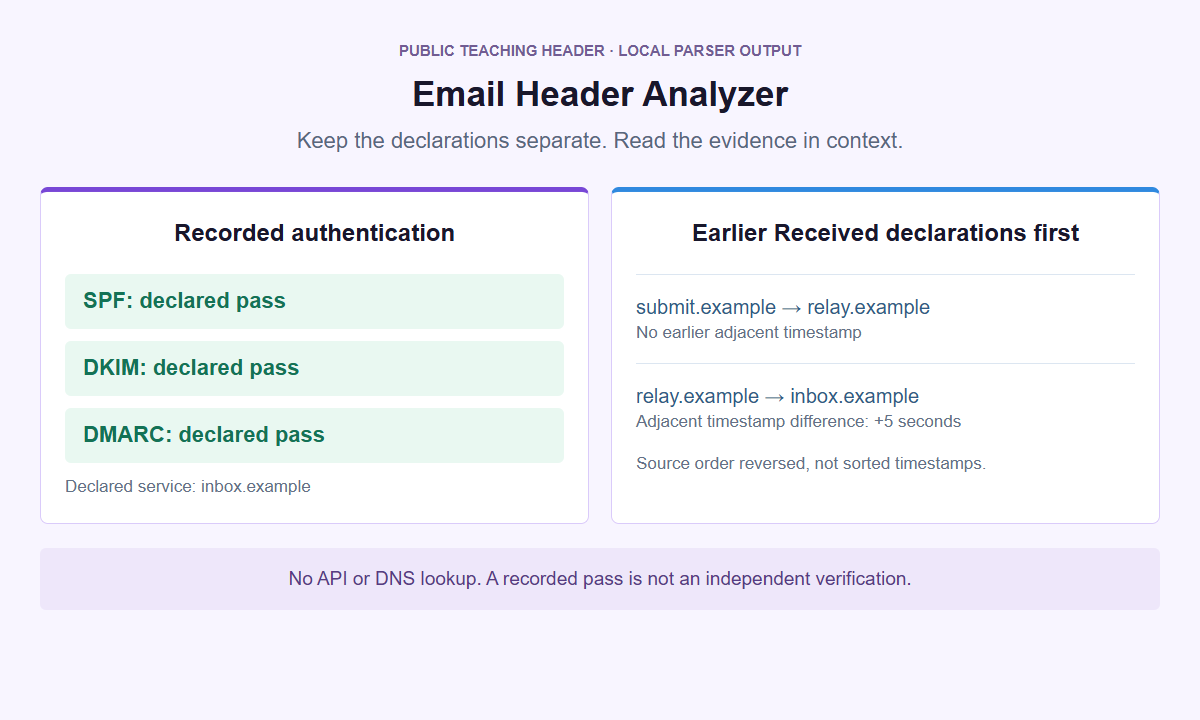
A readable report helps you ask better questions. It does not certify the sender, prove a route or predict inbox placement.
One supplied header. Its declarations kept separate.
Inspect the evidence in your message header
Copy the original header text from your email provider. Use the public example first to explore the report without entering private message details.
Analysis stays inside the isolated panel, not in a WordPress request or external service. Normal website delivery is separate. Open the analyzer on its own if needed. Clear removes the working input and report; it does not guarantee erasure of all browser-memory copies.
Keep the original header structure
Repeated fields and their source order matter. The first blank line ends the headers; message bodies and attachments are not part of this analysis.
Read each authentication entry
SPF, DKIM, DMARC and ARC declarations remain separate. A recorded pass is not a fresh DNS lookup, signature verification or safety verdict.
Review timing in context
Received fields are shown in reverse source order. Adjacent timestamp differences are clues; missing dates or clock differences are not invented away.
Email headers can explain what a message declares about its sender, handling, and authentication checks. Email Header Analyzer organizes that supplied text locally. It does not observe delivery, verify a sender, or decide whether a message is safe. Use it to prepare a precise question, not to award an email a trust badge.
Open Email Header Analyzer with a public example first. Load example fills the Email headers textarea only. Choose Analyze headers explicitly to read the current text, and Clear when finished. No email account connection is needed.
Start with the original header block
Collect headers from the particular received message you want to understand. A sender name, an inbox preview, or the short details beside a reply button is not the complete raw header block. Neither is the familiar From, Sent, To, and Subject text inside a forwarded message body. Use the Gmail email headers guide or Outlook email headers guide to locate the appropriate source view. Check the selected message carefully when a conversation contains several replies. Each received copy can have different handling declarations, even when its subject resembles another message in the thread.
Paste raw header text into the textarea, not a screenshot, attachment, HTML page, or mailbox export. Header fields have names followed by colons; a long value may continue on a line beginning with whitespace. Preserve those continuation lines and their order. Parsing stops at the first empty line, which separates headers from the message body. Anything after that separator is not interpreted as more headers. Avoid including it anyway: excluded from parsing does not mean absent from the input you supplied. There is no body rendering or attachment inspection, and no reason to paste a private conversation to read its metadata.
The source limits are 128 KiB of UTF-8 text, 2,000 lines, 500 fields, 128 Received fields, and 32 fields across Authentication-Results and ARC-Authentication-Results combined. Each header value, including its retained folding whitespace and line breaks, must fit within 8,192 UTF-16 units. All apply, rather than offering alternative allowances. Oversized or malformed source is rejected as a whole, not silently shortened into a convenient result. An orphan continuation or a non-header line before the separator is unsupported input. Reopen the source and check the selection instead of deleting inconvenient fields until it passes. A smaller edited sample can teach syntax, but it no longer represents the complete supplied header. Rejection is a processing boundary, not evidence of fraud, spam, or unusual danger.
Separate message identity from address declarations
Begin with the field count and the basic message declarations: Subject, Message-ID, and Date. These help you check that you selected the intended message before interpreting technical details. A folded field remains one field, while repeated fields remain separate entries; the count is not a count of people or servers. Decoded text can make an encoded subject or display name readable, but decoding does not authenticate its author. A Message-ID is a declared identifier, not a receipt proving delivery or a searchable account connection. Avoid publishing these values casually, because a subject can reveal a project and an identifier can correlate private correspondence.
Read From, Reply-To, and Return-Path separately. From declares an author address; Reply-To, when present, declares an address for replies; Return-Path records the return-path declaration associated with message handling. Different values can be ordinary in a newsletter, ticket system, delegated workflow, or bounce-processing setup. The analyzer does not collapse them into a single true sender and does not treat a mismatch alone as proof of spoofing. If Reply-To is missing, it stays absent rather than being invented from From. The From, Reply-To, and Return-Path guide explores the distinct questions those fields help you ask.
Keep display names and mailbox addresses conceptually separate. A familiar display name can accompany an unfamiliar address, while an unfamiliar service domain can appear in a legitimate operational role. Neither observation independently identifies the person who sent the message. If a request would change payment details or disclose confidential information, verify the request through an established contact route outside that email. Do not reply to an address merely because the parser displayed it neatly. The tool performs no mailbox-ownership check, identity search, domain reputation lookup, or account verification. Its useful contribution is showing which address was declared in which role without disguising uncertainty as a conclusion.
Read every authentication result in its own context
Each Authentication-Results field stays distinct in source order, with its authserv-id and supported method declarations. The authserv-id is the identifier the field gives for the evaluating service; displaying it does not establish that service as trusted. Several fields may describe different evaluations, and their SPF, DKIM, or DMARC results may disagree. Do not combine a pass from one field with a fail from another into a single overall status. The analyzer does not select a trusted evaluator automatically, even when a familiar provider name appears or a field sits near the top. Preserve that attribution when discussing what the supplied text says.
SPF, DKIM, and DMARC declarations answer different authentication questions. SPF concerns the sending host and an evaluated envelope identity; DKIM concerns a signature associated with a signing domain; DMARC concerns domain alignment using authentication results. Here they are reported statements, not fresh tests. A declared pass does not prove that the current text is authentic, that its content is benign, or that every recipient accepted it. Unsupported syntax remains unsupported rather than becoming an invented pass, fail, or missing value. Use the SPF, DKIM, and DMARC header results guide when you need to distinguish a method result from a broader claim about the message.
DKIM-Signature domains and selectors are parsed declarations, not cryptographic verification. Reading a signing domain and selector does not retrieve its public key, check signed bytes, or establish who controlled it. ARC fields are separate from direct Authentication-Results and do not substitute for a trusted direct check. A forwarded message can preserve earlier assessments alongside later, different results. The forwarded email authentication guide explains why those layers matter. No DNS request, remote API, independent authentication test, or secret provider integration runs behind the display. Do not describe this local interpretation as a fresh SPF check or a successful signature validation.
Read Received order without inventing a route
The Received view reverses source order to present declarations from the bottom of the supplied block upward. That is often a useful reading direction, but it is not chronological sorting and not an independently verified network route. A row describes text in a field, not a server that the tool contacted. Missing fields, copied text, unusual ordering, or invented declarations remain possible. Do not infer a trusted boundary from position alone. A bottommost row is not automatically the original sender, and a topmost row is not automatically the only trustworthy one. The display helps inspect the source without pretending to reconstruct everything that happened.
Timestamp differences are signed comparisons between adjacent declarations in that reversed source order. For example, a later displayed row at 10:03 following one at 10:01 produces a positive two-minute difference when both timestamps are supported. A row at 09:59 following 10:01 produces a negative difference. The latter is evidence of a timestamp or ordering inconsistency, not negative delivery time. The analyzer does not reorder rows to make the arithmetic look plausible. An unknown timestamp stays unknown, including any adjacent difference that cannot be calculated reliably. Never bridge a missing value by treating it as zero or borrowing the message Date field.
A large positive interval is a useful support question, not proof of which machine delayed the message. Clock disagreement, queueing, source omissions, and different handling stages can complicate the explanation. The message Date declaration also does not measure when a recipient saw the email, and a person opening Outlook hours later is not necessarily evidence of transport delay. The Received headers and delivery delays guide separates these observations. State the two adjacent declarations and their supported timestamp difference, then let an authorized administrator compare actual service records. There is no live tracing, geolocation, or delivery monitoring in this analyzer.
Keep sensitive metadata inside a short session
Raw headers can contain personal addresses, IP addresses, private subjects, provider identifiers, internal hostnames, and relationship clues even without a body. Treat them as potentially sensitive records. The genuine analyzer runs in an opaque-origin sandbox served by a standalone PHP document with no-store responses and a content security policy that includes connect-src none. Analysis uses a local, terminable worker with a six-second deadline. Those controls concern the supplied text inside the analyzer; the surrounding website still makes ordinary page-loading requests. A timeout means the job did not complete within its processing window, not that the message has unusual security properties.
Choose Analyze headers deliberately after entering or changing the text. Typing does not request analysis, and Load example fills only. Clear stops active work and removes the input and all derived result DOM, including content that was hidden. The same wipe and job termination occur when the page becomes hidden and on pagehide, pageshow, and freeze. Returning from another tab or browser lifecycle transition does not restore an earlier session. There is no history, persistent storage, Copy action, PDF, export, or project feature. Plan the question before pasting so you do not rely on keeping private results parked while you search elsewhere.
These controls are not an absolute privacy guarantee. They do not prevent extensions, compromised device software, screen recording, a hostile parent page replacing the genuine interface, or copies made outside the tool. Clearing working interface data does not promise secure memory erasure or removal from the browser clipboard. Input-derived values appear as plain text, without automatic links or active HTML, but that does not make the underlying message safe. The share email headers safely guide helps decide what a support recipient actually needs. Keep an original only in an approved location when your own retention rules require it, not in this temporary interface.
Choose a narrow next step
Finish with a statement another person can investigate: the selected message declared a particular Reply-To, one named evaluator reported a particular method result, or two adjacent Received timestamps differ by a stated amount. Include uncertainty and distinguish an edited sample from original source. Avoid summaries such as verified sender, clean message, or guaranteed delivery, because none follows from parsing headers. If the concern is a suspicious request, follow your organization’s established reporting process without opening attachments or following its instructions. The analyzer cannot quarantine mail, inspect a mailbox, recover a missing message, or replace an administrator’s access to authorized service evidence.
A URL question is a different task. Use Link Inspector when you need to examine the structure of a separately selected URL, or URL Cleaner when you want to review removable tracking parameters in a URL you already understand. No header content or detected address is handed to those tools. Do not paste an entire header into a URL field, and do not treat cleaning a link as making its destination trustworthy. The header analyzer intentionally leaves input-derived URLs inactive. A relevant next tool should answer a new, explicit question rather than turn email metadata into an invitation to browse.
For another task, return to the Tools directory instead of extending this result into an unrelated assessment. Paid SMTasker supports social automation across nine platforms with Skye and MCP workflows. It is not an email sender, security suite, or mail analytics service, and this free analyzer does not send header text into a social automation project. Teams can use public examples to learn field roles without collecting colleagues’ mail. A useful stopping point is a well-attributed observation, a suitable support route when needed, and a cleared session. Keeping the conclusion small often makes the next conversation more productive than an impressive but unsupported verdict.
Choose the question behind the header
Email-header guides
Get the original text, interpret a declaration or prepare a useful support question without confusing a local parser with independent verification.
Gmail Email Headers
Find the original headers for one Gmail message, preserve the raw block, and interpret authentication and timing declarations without a safety verdict.
Read the guideOutlook Email Headers
Find message headers in new Outlook, classic Windows Outlook, or the web, then separate address roles, authentication declarations, and timestamp evidence.
Read the guideSPF, DKIM and DMARC Results
Interpret declared authentication results, separate reporting services, and understand why parsed pass or fail is not a fresh test.
Read the guideReceived Headers and Delays
Read Received declarations in source order, compare usable timestamps, and turn unexplained gaps into precise troubleshooting questions.
Read the guideFrom, Reply-To, Return-Path
Separate the declared author, suggested reply destination, and delivery-error address without treating a difference as proof of spoofing.
Read the guideForwarded Email Authentication
Understand why forwarding affects SPF and DKIM differently, what ARC declarations contribute, and which delivery copy you actually have.
Read the guideShare Email Headers Safely
Prepare a separate, manually redacted header copy outside the analyzer, document changed fields, and preserve the limits of the remaining evidence.
Read the guideQuestions about analyzing email headers
Does this analyzer verify the sender or tell me an email is safe?
No. It parses supported header declarations locally. It does not independently authenticate a sender, verify DKIM signatures, query DNS, inspect attachments, or issue a spam, safety, or deliverability verdict. A declared authentication pass is not a safety certificate.
Why are there several Authentication-Results entries?
The supplied text can contain assessments attributed to different evaluators. Each field remains separate with its authserv-id and supported method declarations. The analyzer neither merges conflicting results nor chooses a trusted field from its position or provider name.
What does a negative Received timestamp difference mean?
It means adjacent supported timestamps disagree with the reversed source reading order. It is not negative delivery time. Rows are not chronologically sorted, and the tool cannot establish whether clock error, source ordering, or another cause explains the difference.
Can I paste the whole message or connect my inbox?
Use raw headers only. The first empty line ends header parsing; no body or attachment is rendered. There is no inbox connection. Complete source limits still apply, so including unnecessary message content can cause rejection and expose more text in the input.
Why did my input disappear after switching tabs?
Hidden-page and lifecycle cleanup stops jobs and wipes input plus all derived result DOM. There is no stored history to restore. This cleanup does not promise secure memory erasure or remove copies from your clipboard, screenshots, extensions, or other software.
A precise question is enough
Inspect one header, then clear
Return to the analyzer for supported local parsing. Keep identity, safety, and delivery decisions outside its result.