Understand the link before the click
Link Inspector
Find the hostname a browser actually parses. Separate domain boundaries, encoded text and query fields without opening the destination or sending the supplied link to an API.
Look beyond the familiar words
See which part is really the host
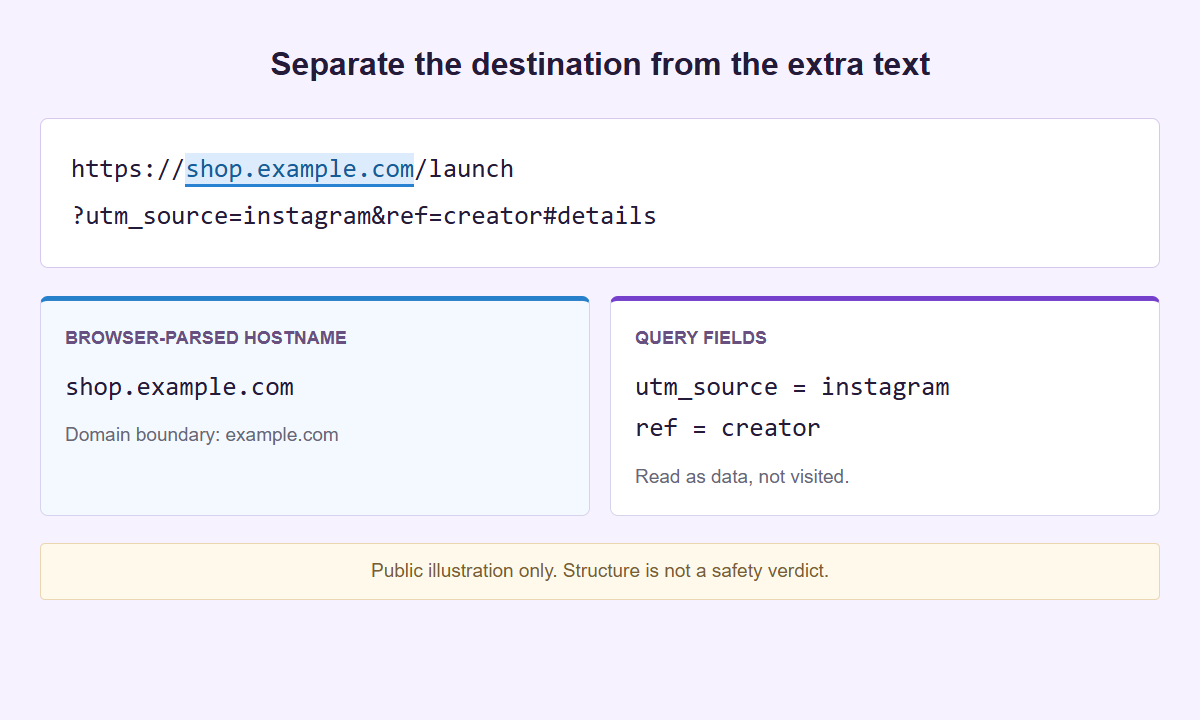
A brand name inside a path, a parameter or a subdomain does not identify the owner. Inspection explains structure, not reputation.
Read one supplied address locally
Break down your link
Paste a complete HTTP(S) URL. Inspect the host first, then reveal the full path and parameter details only when you need them.
The supplied URL stays inside the isolated inspector, not in a WordPress form or a request to its destination. Normal website traffic is separate. Open the inspector on its own if needed. Extensions, a compromised device or a replacement interface remain outside this boundary.
Find the browser-parsed host
Separate user information, hostname, path, query and fragment. Compare ASCII and Unicode domain spellings and the bundled public-suffix boundary.
Read the fields in order
Inspect repeated names, blank values, tracking-style keys and once-decoded text. Embedded URL candidates remain data, not followed redirects.
Choose the next check yourself
Copy the normalized address or just the hostname deliberately. Verify intended destination and access through the relevant trusted service separately.
Start with one complete web address
Use an address beginning with http:// or https://, including its hostname. A caption, a paragraph of links, and a bare domain name are not the same input. The inspector accepts one absolute URL at a time, not a list. Load example supplies a teaching address under shop.example.com, with an embedded candidate under example.org and no real account or token behind it. That is the right place to learn the controls before handling anything private. Inspect link reads the text locally; it does not visit the address, submit a form, or check whether the page exists.
The input limits are 8,192 Unicode code points, 32 KiB of UTF-8 data, and 200 query fields. These are separate limits: a short-looking string with many encoded or non-ASCII characters can use more bytes than expected. Repeated query fields still count as fields. If a limit is exceeded, go back to the source and identify the intended single address. Do not cut a long link in half, remove an unknown field, or shorten a signed value merely to make it fit. The edited string would be a different item, not a successful inspection of the original.
Relative paths, custom schemes, control characters, bidirectional formatting controls, backslashes, and internal spaces are rejected. Ordinary outer ASCII spaces are trimmed and that change is flagged. A rejected address is not automatically malicious; it may be incomplete, copied with formatting, or outside this tool’s scope. Likewise, an accepted address is not approved for use. Keep those two decisions separate. If a message includes punctuation beside a link, obtain the actual link target from the source instead of guessing which characters belong to it. Correct the source copy deliberately, then inspect that complete value again.
Find the hostname and its domain boundary
Read the hostname as its own field rather than searching the whole address for a familiar word. In https://accounts.example.test/help, the host is accounts.example.test; the path does not help establish who operates it. A familiar name can also appear inside a query value or before an at sign without being the host. Compare the complete hostname against a trusted address you obtained independently. Similar spelling, an extra word, or a recognizable brand somewhere in the text does not turn a different host into the one you intended to use.
The summary shows ASCII and Unicode hostname forms. Internationalized names can have an ASCII representation using xn-- labels and a human-readable Unicode form. These are two ways to examine the parsed name, not two independent identity checks. Some letters from different scripts look alike; neither display guarantees that you will notice every visual resemblance. When a hostname is unfamiliar, compare its complete ASCII form as well as its visible spelling. Do not assume an internationalized name is bad, or that an all-ASCII name is good. The tool reports representation, not intent.
Public Suffix List rules separate suffix, domain, and subdomain, including private suffix entries used by hosting services. The domain field is a boundary derived from that list, not a business owner or a certificate of control. Private suffix support matters because a hosted tenant boundary can differ from the last two labels. A listed suffix does not prove registration, availability, or current operation. For an IP address, there is no registrable domain to invent. Use the fields to compare address structure, and obtain any needed ownership confirmation through an appropriate independent process rather than this local parser.
Read protocol, port, and findings without a verdict
The protocol states whether the supplied address uses HTTP or HTTPS. The effective port accounts for the protocol default when an explicit port is absent: 80 for HTTP and 443 for HTTPS. An explicit nondefault port deserves comparison with the expected service address, but it does not diagnose a problem by itself. A browser can normalize away an explicitly written default port, so an omitted port in the normalized view is not evidence that the input had no port text. Inspect what the tool actually reports rather than treating visual shortening as a network observation.
Findings point out properties in the supplied text. User information, unusual hostname forms, and a query value containing another web address are reasons to look carefully at the relevant part. They are not a ranked threat score. A public campaign URL can have several findings for entirely ordinary reasons; a harmful address can look simple. Use a finding to ask a precise question, such as whether this is the expected host or whether a parameter belongs in a public post. Do not replace that question with a green-light interpretation when no finding appears.
There is no DNS lookup, HTTP request to the destination, actual HTTP status, reputation lookup, TLS check, shortener expansion, or observed redirect chain. The inspector cannot tell whether a page returns 200, whether a certificate is valid, or where a short link will lead. HTTPS in the text is not a completed secure connection. A hostname that resembles an official service is not ownership proof. If your task needs live service testing, arrange that separately for an authorized public test address and describe its evidence separately. Do not ask this result to answer a question it never measured.
Reveal the parts that explain the link
Reveal details exposes the normalized URL, path, ordered query fields in raw and decoded forms, and fragment. Those details start hidden because a private URL can contain a secret in any of those places, not just in a parameter named token. The normalized address is the parser’s serialized version, not a copy of the web page and not proof that the service accepts it. Changes such as hostname casing or default-port presentation explain representation. They do not authorize you to replace an original signed or single-use URL with a rebuilt version. For a public address, compare the normalized copy with the approved source before using it elsewhere; Copy inspected URL is not a promise of byte-for-byte preservation.
Read query rows in order and keep repeated names visible in your reasoning. For a fictional public example, ?view=grid&view=list&label=June+class contains two view fields, followed by a label. The destination decides how to use duplicate keys; the inspector does not decide which one wins. Decoded text makes percent escapes and form-style plus signs easier to read, while the raw view preserves the encoded spelling for comparison. Neither view should be pasted into a new query by hand as if it were a lossless editing recipe. Encoding and duplicate handling can affect application behavior.
A query value containing https://shop.example.test/classes is an embedded URL candidate only. It might be a return address, a documentation example, or unused text. Its presence does not establish a redirect or a final destination. Fragments also need context: they can name a document section or carry data read by an application. Treat a fragment as potentially private even though it is separate from the query. For a publishing task, follow the campaign link preflight checklist to compare the intended page, attribution fields, and final placement without confusing candidates with observed navigation.
Keep private addresses inside a short working session
Inspection runs in an isolated sandbox document with an opaque origin, delivered separately with no WordPress bootstrap. Its response uses Cache-Control: no-store, and its content policy includes connect-src 'none'. Entered text is not sent to a model, AI service, server, or remote API for inspection. The genuine frame sends only its height to the parent page, not URL content or derived findings. Loading the tool document and surrounding website still involves web requests. These controls describe the inspection boundary, not a claim that the entire website or your whole browsing session is offline.
Clear removes the input and all derived nodes, including hidden detail text, hostname output, query rows, and status messages containing input data. Cleanup also runs when the page becomes hidden and on pagehide, pageshow, and freeze. Returning to the page does not recover the previous inspection. Copy before leaving when you deliberately need a value elsewhere. Copy inspected URL transfers the normalized address; Copy hostname transfers only the hostname. Neither action opens a destination. Check which control you chose, because copying a full private address carries much more information than sharing its host.
Clearing the tool does not erase your clipboard, clipboard history, screenshots, or copies elsewhere. There is no history, persistent storage, project, PDF, export, or download feature. Isolation also does not defeat extensions, device software, or a hostile parent page that replaces the genuine interface. It cannot promise complete memory erasure. Use a trusted device and avoid revealing sensitive details while screen sharing. The login, reset, and invitation link guide explains why access links need a different workflow from public campaign addresses, including when to leave the complete link out of an inspection altogether.
Choose the next step for the actual task
For a public resource link, decide whether you are inspecting structure, changing attribution, or reading an image. The URL Cleaner is the separate tool for reviewing selected tracking removal; inspection here does not remove anything. Keep functional fields and signed URLs out of casual cleanup. The UTM Campaign Link Builder helps prepare campaign labels for a public destination; this inspector does not create a measurement plan or confirm that analytics collected a visit. Use each tool for its named task, and review any changed public address as a new version.
If the address came from a QR image, the QR Code Reader can read supported local images without treating their contents as a navigation instruction. Not every QR payload is a public URL. Login approvals and enrollment material can be sensitive, and custom schemes are outside this inspector’s accepted HTTP(S) scope. There is no automatic handoff of secrets between these tools. For a team review, share a public test address or a nonsecret description of the issue, such as an unexpected host or duplicate campaign field, rather than a screenshot of private detail rows.
Finish with a concrete statement about what you learned: the parsed hostname matches your reference, a campaign value differs, or a private field needs removal from a public draft. Keep unanswered questions visible instead of calling the link safe. Paid SMTasker supports social automation across nine platforms, with Skye and MCP workflows; it is not a security suite or credential vault. A useful connection is preparing approved public links before using them in social work. Link Inspector does not save those links to an account, configure an automation, authenticate a provider, or supply private URL contents to Skye.
Choose the part you need to understand
Link and URL inspection guides
Read a domain correctly, review campaign parameters or handle an invitation link without confusing local parsing with online verification.
Find the Real Domain
Find the hostname, understand the domain boundary, and separate address facts from claims made in a message.
Read the guideTracking Parameters and UTM Tags
Review campaign names, duplicate tags, blank values, and unfamiliar fields before deciding whether a shared link should change.
Read the guideRedirect Parameters and Short Links
Separate an outer address, an embedded URL candidate, and an opaque short-link token without inventing a redirect chain.
Read the guideEncoded URLs and Query Strings
Understand percent escapes, plus signs, repeated query fields, and malformed encoding without rewriting the address you are inspecting.
Read the guidePunycode and Lookalikes
Read ASCII and Unicode hostname views, compare internationalized names, and understand what a lookalike review cannot establish.
Read the guideSocial Profile Links
Check profile, bio, campaign, and QR link structure before a publishing handoff without pretending to verify accounts.
Read the guideLogin, Reset & Invitation Links
Distinguish public addresses from login, reset, and invitation links. Compare nonsecret structure without treating local parsing as account verification.
Read the guideCampaign Link Preflight
Review public campaign destinations, query fields, encoding, and placement copies before publishing, while keeping local findings separate from live tests.
Read the guideQuestions about inspecting links
Does Link Inspector tell me whether a link is safe?
No. It reports parsed structure and findings, not a risk verdict. It does not contact the destination, check reputation or TLS, prove ownership, or confirm that a page exists.
Can it reveal the destination of a shortened link?
No. It can read the short URL you supply, but it does not expand shorteners or follow redirects. Another URL inside a query is only an embedded candidate, not an observed destination.
Why are the path and query hidden at first?
They may contain credentials, invitations, account identifiers, or other private data. Reveal details is deliberate visibility, not decryption or permission to share. The input itself must also be handled privately.
Why did my input disappear after changing tabs?
The hidden-page and lifecycle cleanup removes the input and derived output. Copy an intentionally needed value before leaving. Returning will not restore it, and cleanup does not erase the device clipboard.
Does the domain field identify the website owner?
No. It is a Public Suffix List boundary, including private suffix rules. It is not a registration record, ownership check, availability test, or endorsement of the hostname.
Read the supplied address first
Inspect the next link deliberately
Return to the inspector for one HTTP(S) address. Compare the hostname, reveal only the details you need, and clear the working copy when finished.