Originally published May 6, 2026. Substantially updated October 21, 2026.
Renewing a Facebook Marketplace listing means using a renewal control when Facebook offers it for that particular item and account. It is different from editing the description, marking an item sold, or creating another listing. The practical goal is to maintain an accurate available offer and review whether it is attracting suitable buyers, without assuming that pressing Renew guarantees a higher position or a sale.
This guide explains how to inspect the available controls, diagnose a missing renewal option, improve the underlying listing, and keep inventory and buyer conversations consistent. Interface labels, eligibility, and transaction features can vary. Follow what Facebook actually displays for your account instead of building a workflow around a universal renewal interval quoted in an older guide.

Begin with the item’s real status
Confirm that the item is still available, the condition has not changed, and the proposed collection or delivery arrangement remains practical. If the item has sold, update its status through the appropriate control. A renewal schedule should never decide that an item is sold merely because it has completed a certain number of review cycles.
Review outstanding conversations before changing the offer. A buyer may be arranging an inspection or expecting a particular price. If a detail changes, make the current terms clear. Keep the listing’s status aligned with the transaction so someone does not travel to collect an item that is no longer available or was described differently.
Meta’s overview of ways to sell on Facebook distinguishes Marketplace, groups, and other selling contexts. Check which surface you are managing before applying instructions. An action available for a Marketplace item should not be assumed to behave identically for an ordinary Page post or a separate group listing.
Find the controls available for that listing
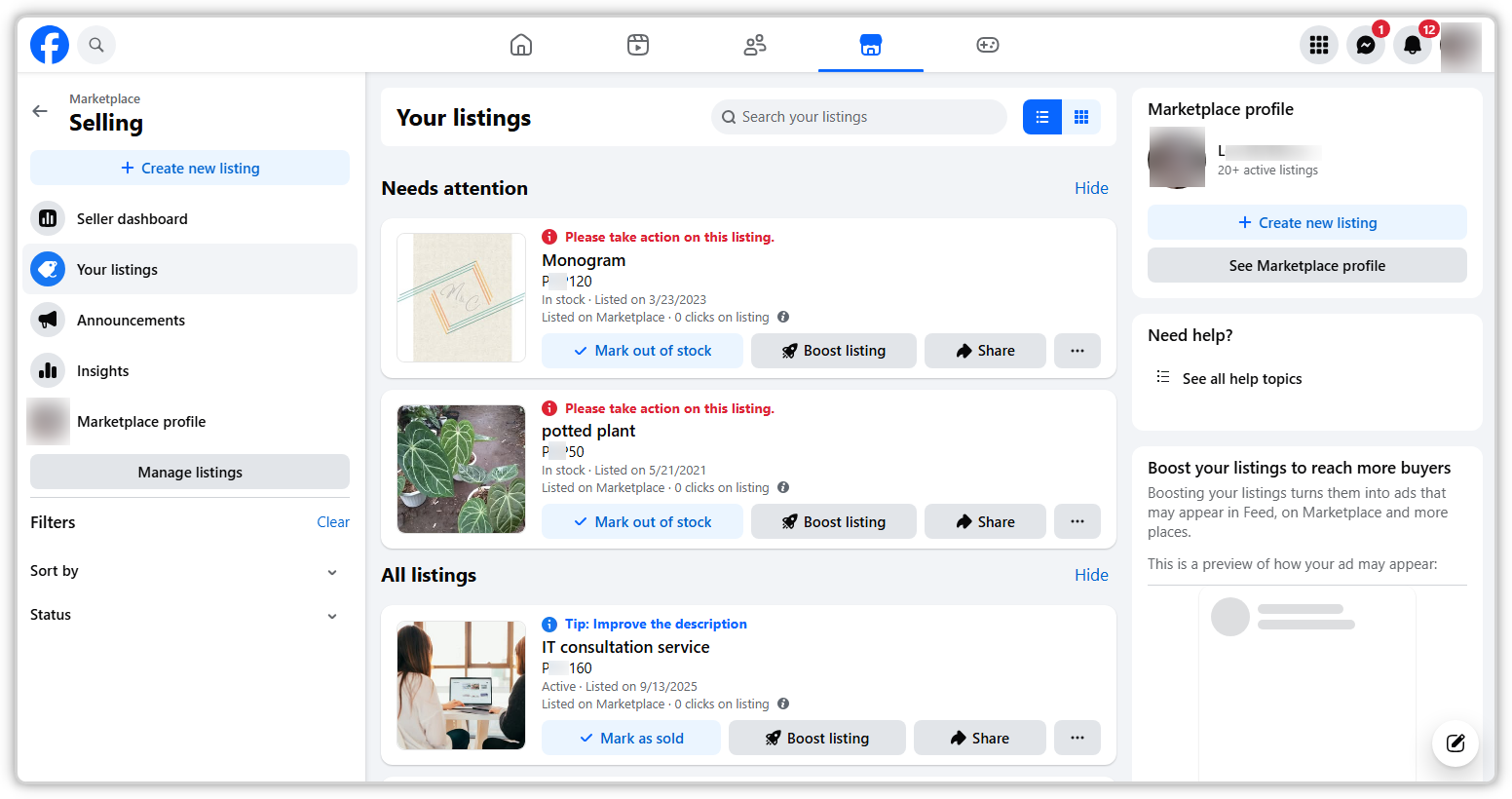
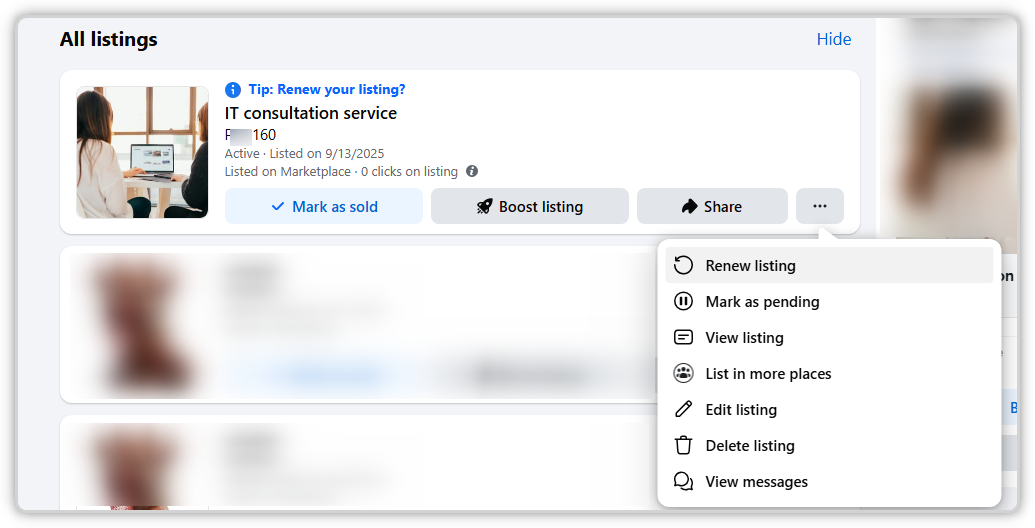
Open Marketplace from the intended Facebook account and navigate to the area showing your selling activity or listings. Select the relevant item and inspect its management menu. If Renew is available, read any eligibility or timing information Facebook provides before confirming the action. The wording and position of the menu can differ by interface.
Use the current account screen as the reference. The retained screenshots illustrate earlier listing-management and renewal controls; they do not establish that every account has the same option today. If a screenshot and the live interface differ, verify the account, listing type, and app or web surface before assuming the tool is broken.
After an available renewal succeeds, inspect the item again. Confirm that the title, photographs, description, price, and status remain as intended. Record the result rather than simply assuming that a button press completed the action. A visible confirmation is more useful than repeatedly submitting the same operation without checking what happened.
Keep renewal, editing, and relisting distinct
Editing changes the information in the existing offer. Renewal uses a control offered for the existing listing. Creating another listing or using a delete-and-relist option is a different action with its own prompts and potential consequences. Read those prompts rather than treating every method of refreshing an offer as interchangeable.
If the item needs a clearer measurement or a corrected price, editing addresses that problem directly. A renewal does not add missing information or repair an inaccurate photograph. Choose the action that resolves the issue you identified. More activity around a weak offer is not a substitute for helping the buyer understand it.
Before deleting or replacing a listing, consider the conversations and records associated with the existing offer. Keep the information needed to follow through with interested buyers, and avoid creating confusing duplicate availability. The appropriate choice depends on the listing’s actual condition and the controls Facebook provides, not on a universal instruction to repost everything regularly.
Investigate a missing Renew option methodically
Check that you are managing the item from the correct account and that it is still an active, relevant listing. Read any message about status, eligibility, review, or timing. If the interface says a particular action is unavailable, record that information and follow the offered route. A missing button does not by itself identify a technical fault.
Compare the current app and an appropriate web view if practical, keeping the account and item the same. This can reveal an interface difference, while ordinary app updates may address a local display issue. Avoid interpreting a different layout as proof that a listing has been penalized or that repeated reinstalls will create renewal eligibility.
If access or approval is the issue, use the account’s available help or review process. Describe the exact message and listing state. Creating duplicates or repeatedly trying to trigger the action adds confusion and does not resolve the underlying condition. Keep the next step focused on the information Facebook actually shows.
Improve the offer before increasing attention
Read the title as a buyer unfamiliar with the item. Include the identifying details that matter, such as the item type, model, size, or meaningful condition. Remove unrelated keywords and exaggerated claims. A clear title helps a person decide whether to inspect the offer; it does not need to imitate an entire search-results page.
Check the description for the questions buyers repeatedly ask. Measurements, included parts, visible wear, known faults, and collection requirements can be more useful than additional promotional language. State uncertainty honestly when a detail is unknown. Avoid describing an untested item as fully working merely to make the listing more attractive.
Compare the price with suitable alternatives and the item’s actual condition. A lower price is not automatically the right answer; the issue may be unclear information or an impractical handoff. Record why you change the offer so later results can be interpreted. Adjusting price, photographs, timing, and wording simultaneously makes the cause of any change difficult to understand.
Review photographs for decision-making value
Use clear photographs of the actual item, including useful angles and material defects. Make the main image easy to interpret at the size displayed in Marketplace. If other objects appear in the frame, explain what is included in the sale. A buyer should not need several messages to learn which part of the photograph represents the offer.
Keep editing faithful to color and condition. Overly strong filters can obscure wear or make the item appear different from what a buyer will inspect. The photo-editing guide discusses the broader principle of preserving the subject’s important characteristics. Use that principle even when the publishing surface is different.
Replace unclear images with better evidence rather than adding many similar pictures. A close-up of a connector, label, or damaged corner can answer a real question. A sequence of nearly identical wide shots may add little. Choose photographs that improve the buyer’s understanding of the specific item.
Keep buyer follow-up part of the review
Assign time to read and answer relevant inquiries after updating a listing. Have the necessary details available and keep the terms consistent with the live offer. If several people ask the same question, add the answer to the listing. That reduces repeated work and makes the next buyer’s experience clearer.
Treat an inquiry, an appointment, and a completed sale as different states. Maintain a simple record if several items are active, so the team does not confuse tentative interest with a confirmed transaction. Update availability promptly after the actual outcome and make any changed arrangement clear to people already involved.
For payment and handoff questions, use the Marketplace safety workflow to review the practical transaction checks. Confirm payment through the appropriate independent route and keep the exchange manageable. A renewal should never create pressure to rush a transaction that remains unclear.
Keep automation claims tied to verified capabilities
If you evaluate a listing-management tool, confirm that it supports the exact Marketplace action you need in the current version. A general Facebook publishing tool does not establish renewal support. Check the action, account requirements, status handling, and way the result is recorded before building a recurring process around it.
The SMTasker Facebook hub documents publishing and engagement workflows. Verify any additional Marketplace-specific capability in the actual product or with support before relying on it. Schedules and delays do not create eligibility for a missing Facebook control or establish a guaranteed position in Marketplace results.
Start any supported process with a small, reviewable scope. Confirm the intended item, the requested action, and the resulting state. Keep sold or unavailable inventory out of recurring work. The important operational result is accurate activity and availability, not simply a high count of attempted refreshes.
Measure useful interest with appropriate limits
Record the listing’s available performance information, relevant inquiries, practical arrangements, and completed sales over a defined period. Note when you changed price, photographs, or wording, and when an eligible renewal occurred. These observations can help improve the offer, but they do not establish that one action caused every subsequent inquiry.
Compare reasonably similar situations. Demand, location, season, condition, category, and competition can all affect what happens. A listing that sells after renewal may also have benefited from a better price or a buyer arriving at the right time. Keep the interpretation modest enough that the next decision follows evidence rather than a story built around the last button pressed.
Use a manageable inventory-review routine
Set a regular opportunity to inspect active offers for accuracy, availability, unanswered questions, and eligible actions. The review schedule can be consistent even when the platform does not offer renewal on a fixed universal interval. Keep the action conditional on the listing’s actual state and the information displayed at the time.
Renewing Facebook Marketplace listings works best as one part of responsible offer maintenance. Begin with accurate inventory, improve what buyers need to understand, use the controls available, and verify the result. That process gives interested people a clearer buying decision and gives the seller a dependable record of what was actually done.