Every social media manager knows the fleeting thrill of watching a post collect hundreds of likes in its first hour. Notifications light up, the dashboard feels active, and the initial reaction looks positive. Yet, when you check your reach metrics forty-eight hours later, discovery has flatlined. The post failed to cross into the Explore tab, non-follower reach remained negligible, and audience growth stayed completely flat.
Likes have become the cheapest currency on modern social media. A double-tap requires a fraction of a second, zero cognitive commitment, and almost no intent. Instagram recognized this behavior years ago, quietly deprioritizing likes in favor of deeper, high-friction actions that signal genuine utility. If your objective is non-follower discovery, sustainable audience growth, and consistent Explore distribution, there is one metric that matters far more than double-taps: your save-to-reach ratio.

The Algorithm’s Value Hierarchy: Why Likes No Longer Move the Needle
Instagram does not treat all engagement equally. Behind the scenes, the recommendation engine weighs interactions across a strict hierarchy of user intent. The more effort, investment, and future intent an interaction requires, the heavier its algorithmic weight in determining discovery distribution.
Understanding this ladder helps marketers align content formats with the platform’s distribution priorities:
- Shares (Direct Message Sends): The ultimate viral multiplier. When a user sends your post to a colleague or friend via DM, they endorse your content directly within their private network. Recent evaluations of how Instagram prioritizes direct sends and shares emphasize that private distribution is now one of the strongest discovery triggers across the entire platform.
- Saves (Bookmarks): The definitive utility signal. Saving a post indicates that the viewer found the material so actionable, insightful, or reference-worthy that they intend to return to it later. It is an explicit declaration of value that keeps users hooked on the platform’s archival features.
- Comments: A conversation and community signal. Writing a thoughtful comment takes active cognitive effort, signaling dwell time and community resonance. However, automated bots and generic one-word reactions have reduced the algorithmic weight of standalone comments over time.
- Likes: Passive applause. A like indicates quick visual appreciation, but it requires virtually no dwell time or ongoing commitment. In digital analytics, foundational frameworks for measuring applause versus amplification metrics illustrate why surface praise rarely correlates with meaningful business results or algorithmic expansion.
When you evaluate your content through this lens, the reason behind stagnating reach becomes obvious. If your creative prompts a quick double-tap but fails to trigger a save or a share, Instagram treats it as disposable entertainment. It serves existing followers who already browse your feed, but it provides no justification for the platform to award you expensive Explore placement.
How the Explore Algorithm Decides What to Recommend
To grasp why saves drive Explore distribution, you must distinguish between Feed ranking and Explore ranking. Your primary Feed algorithm focuses on relationship strength, displaying content from accounts you actively follow, interact with, and message. Explore, by contrast, operates as an interest-based discovery engine designed to show users high-performing media from creators they do not follow yet.
As documented in technical breakdowns of Instagram’s multi-algorithmic distribution signals, the Explore system uses machine learning classifiers to cluster posts around specific topical entities, visual patterns, and engagement velocity. When you publish a new post, the Explore engine initiates a multi-stage testing loop:
- Cohort Testing: The post is initially distributed to an initial cohort of active followers and engaged accounts within the first 60 to 120 minutes.
- Friction Analysis: The algorithm measures engagement depth. If the cohort generates a disproportionate ratio of saves and shares relative to total impressions, the system classifies the asset as high-utility.
- Entity Lookalike Expansion: The post is pushed to a small secondary bucket of non-followers whose past browsing, search queries, and saved collections match the semantic topic of your post.
- Velocity Threshold Scaling: If that secondary test group also demonstrates a strong save-to-reach response, the asset enters wider Explore clusters, compounding non-follower impressions for days or weeks.
Saves are the linchpin of this sequence because they indicate bookmark utility. Instagram wants users spending sustained time inside the application. When your post convinces hundreds of people to create a personal bookmark in their saved folders, the platform recognizes your account as an authority worth displaying to broader topical audiences.
The Save-to-Reach Formula: Calculating True Content Utility
Many social media managers calculate engagement rate by dividing total interactions by their follower count. This legacy method produces misleading data because account reach fluctuates wildly depending on format, posting frequency, and platform volatility. If you have 50,000 followers but your post only reaches 4,000 accounts, calculating metrics against your total follower count distorts your actual performance.
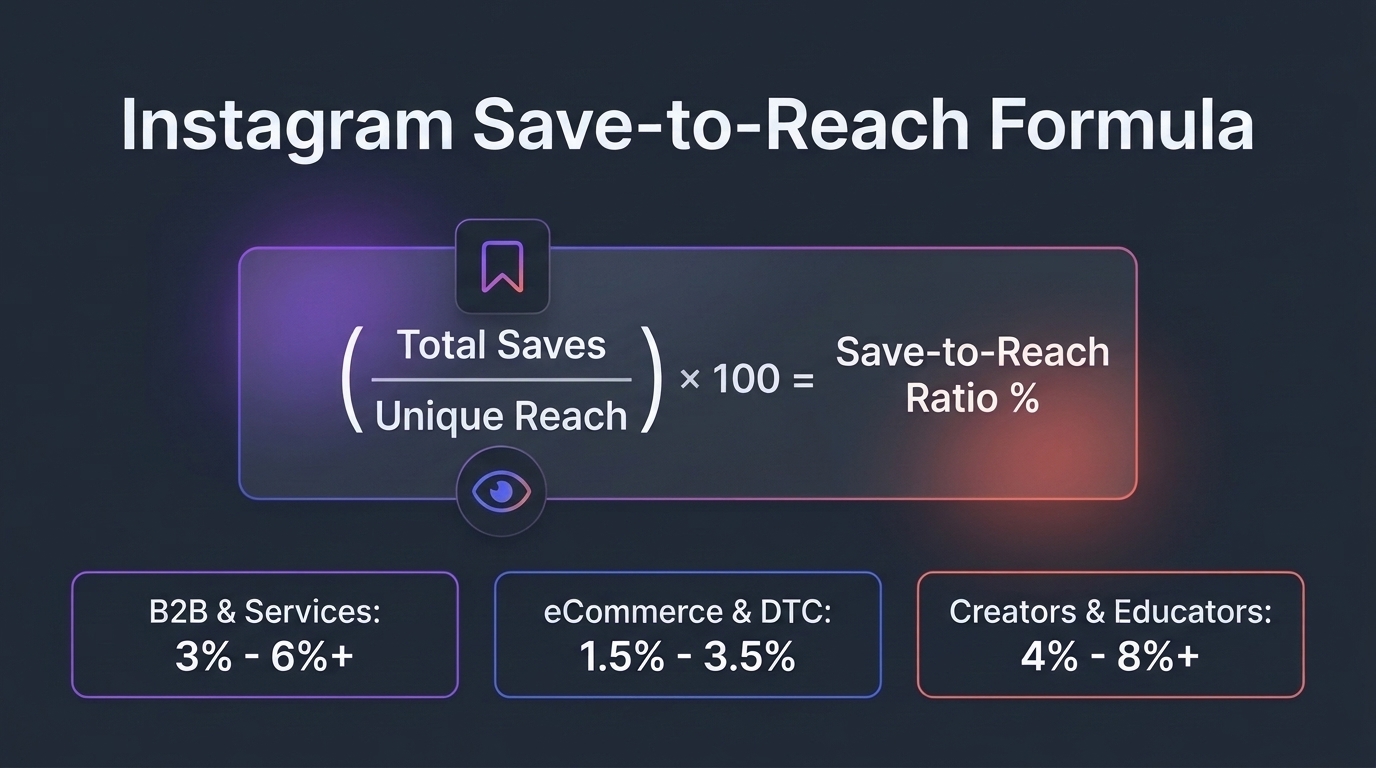
To isolate content resonance, professional analytics teams evaluate the save-to-reach ratio. The mathematical formula is straightforward:
Save-to-Reach Ratio (%) = (Total Saves / Unique Accounts Reached) × 100
By measuring saves against unique accounts reached rather than impressions or followers, you isolate how many actual human beings deemed your information valuable enough to retain. When you use tools like the Instagram Engagement Rate Calculator, benchmarking this specific ratio against broader engagement helps identify whether your audience is passively scrolling or actively consuming your strategic assets.
Benchmark Standards Across Industry Verticals
Healthy save-to-reach ratios differ dramatically depending on your business model and target audience. A consumer lifestyle brand will rarely hit the same bookmark numbers as a technical software company because their audiences consume media with different intentions.
- B2B and Professional Services (Target: 3.0% to 6.0%+): B2B audiences use Instagram during breaks or dedicated learning sessions. They actively hunt for productivity shortcuts, software workflows, operational frameworks, and market data. If a B2B post reaches 10,000 accounts, achieving 300 to 600 saves is an achievable benchmark that frequently triggers Explore distribution.
- eCommerce and Direct-to-Consumer Brands (Target: 1.5% to 3.5%): eCommerce accounts face higher friction because product showcases naturally attract likes rather than bookmarks. To drive saves, DTC brands must pivot toward utility-driven context: styling guides, sizing comparison charts, routine sequences, and recipe pairings.
- Creators, Educators, and Niche Specialists (Target: 4.0% to 8.0%+): Educational creators command the highest save rates on the platform. Their audience follows specifically for curated expertise. Posts delivering comprehensive breakdowns or downloadable-style resources often exceed an 8% save-to-reach ratio, creating persistent long-tail discovery on Explore.
Diagnosing Content Performance Across Multi-Account Portfolios
Managing social media across multiple brand profiles or agency clients introduces distinct operational challenges. It is easy to misdiagnose an underperforming profile by focusing on top-line follower counts rather than structural engagement quality. When a client complains that their account has hit an algorithm plateau, the problem is rarely posting frequency; it is content utility.
Consider a realistic agency scenario: an agency oversees three distinct accounts—a boutique fitness apparel line, a corporate SaaS startup, and a commercial real estate consultancy. Each profile posts five times per week. The fitness brand racks up hundreds of double-taps on aesthetic gym photography, but its non-follower reach sits at less than 4%. The SaaS startup garners fewer overall likes, but its workflow carousels achieve a 5.2% save-to-reach ratio, pulling 42% of its total impressions directly from Explore.
To identify where client accounts are losing algorithmic traction, social media managers should follow a standardized diagnostic checklist:
- Isolate Non-Follower Exposure: Review the account’s top twenty posts over the past ninety days. Filter by Reach, and note the percentage of impressions originating from non-followers on Explore and Search.
- Audit Profile Architecture: Conduct an Instagram Profile Audit to ensure that the profile bio, keyword tags, category selections, and highlight structures clearly signal your topical focus to Instagram’s indexing algorithms.
- Separate Aesthetic Posts from Utility Assets: Categorize your historical posts into inspiration (entertainment, branding) versus utility (tutorials, breakdowns, cheat sheets). Compare the average save rate of each group.
- Streamline Workflow Management: Managing high-utility assets across multiple accounts requires disciplined production. Platforms like SMTasker help teams organize content pipelines, track account-wide deliverables, and ensure that research-heavy carousels are scheduled consistently without manual coordination errors.

The Visual Blueprint: 3 Content Formats Built for Maximum Saves
You cannot simply take a standard graphic, append the phrase “Don’t forget to save this,” and expect your save rate to surge. Audience behavior is transactional: users save content when the information is too dense, valuable, or structured to absorb in a single sitting. Below are three tactical formats engineered specifically to maximize your save-to-reach ratio.
1. The Multi-Slide Swipe Carousel (The Modular Mini-Course)
Multi-slide carousels remain the most effective vehicle for generating bookmarks because they demand extended dwell time. Each swipe forward signals to the algorithm that the viewer is engaged, while the progressive depth of the information justifies saving the post for subsequent review.
Structure your 7-to-10 slide carousel using this proven blueprint:
- Slide 1 (The Specific Hook): Frame an exact, solvable problem. Instead of “How to Improve Your SEO,” use “The 6-Step Technical Audit Checklist We Use Before Launching Any Client Site.”
- Slides 2 to 4 (The Core Framework): Break the concept into clear, sequential milestones. Use minimal design elements, high-contrast typography, and concise bullets.
- Slides 5 to 7 (Real-World Application): Provide concrete before-and-after scenarios, code snippets, tool recommendations, or calculation examples.
- Slide 8 (The Summary Cheatsheet): Consolidate the entire lesson onto a single, high-density slide. This slide alone triggers the majority of your bookmarks because it provides immediate at-a-glance reference value.
- Slide 9 (The Purpose-Driven CTA): Direct the viewer explicitly: “Save this checklist to your marketing folder so your team can reference it during your next quarterly sprint.”
2. The Reference Cheat Sheet and Decision Matrix
Single-slide infographics and two-slide comparison matrices work exceptionally well for busy professionals who need quick operational guidance. These assets serve as digital reference cards that professionals pull up while performing day-to-day tasks on desktop or mobile.
Effective examples include:
- Keyboard Shortcut Cheat Sheets: Visual maps of design software shortcuts, video editing hotkeys, or CRM query operators.
- The ‘Do This, Avoid That’ Matrix: A two-column table comparing outdated tactical advice against modern execution standards.
- Budget and Pricing Allocation Tables: Clear percentage distributions showing how companies at various revenue tiers allocate their paid marketing spend.
- Formulas and KPI Glossaries: Mathematical definitions of essential metrics with worked examples that managers can reference during team meetings.
3. Copy-and-Paste Prompt Templates and Outreach Scripts
Nothing earns a bookmark faster than ready-to-use copy that eliminates creative friction. Marketers, sales teams, and small business owners consistently save posts containing scripts, email frameworks, and prompts because they intend to copy them into their desktop workflows later.
For example, a marketing consultancy might publish three tested customer service templates for handling shipping delays, or an agency might share five AI prompts for auditing competitor ad copy. Because readers rarely need the prompt at the exact moment they scroll past it on their phone, saving the post is the only logical choice. That delayed utility turns everyday scrollers into active bookmarkers.
Strategic Next Steps to Systematize Your Save-First Strategy
Transitioning from a like-focused content strategy to a save-first publishing model requires deliberate operational adjustments. Rather than attempting a wholesale creative overhaul overnight, execute these four tactical steps across your next publishing cycle:
- Repurpose High-Performing Text into High-Density Carousels: Examine your historical analytics across customer emails, blog entries, and LinkedIn updates. Identify the topics that generated the most in-depth questions, and convert those core arguments into 8-slide educational carousels on Instagram.
- Write Captions that Complement Rather Than Duplicate: Avoid repeating the text displayed on your visual slides inside your caption. Use the caption to provide supplementary context, link back to your resource hub, or list an additional bonus tip that rewards deeper reading.
- Design Dedicated Bookmarking Cues: Replace generic calls-to-action with specific functional prompts. Give your audience a practical reason to save the asset: “Tap the bookmark icon to save these prompts before your next campaign planning session.”
- Track Metrics on a 30-Day Lag: Explore distribution does not always happen within twenty-four hours. High-utility carousels often accumulate saves steadily over weeks, gradually triggering Explore recommendations long after their initial publication. Measure your save-to-reach ratio over thirty-day intervals to capture true asset longevity.
Building Content That Lasts
Chasing likes is a fast track to algorithmic burnout. It forces social media teams onto a relentless treadmill of superficial hooks and reactive trends that fail to build long-term brand equity or sustainable reach. The Instagram algorithm has evolved to reward genuine utility, and its Explore page distribution reflects that standard.
When you focus on the save-to-reach ratio, your content strategy shifts from disposable entertainment to lasting intellectual property. By creating multi-slide mini-courses, actionable cheat sheets, and plug-and-play templates, you signal to Instagram’s recommendation engines that your profile produces irreplaceable value. Track your ratios, optimize for intentional user retention, and let utility unlock your next wave of organic discovery.