The Contact Tool: Automated DMs That Don’t Feel Automated
The Contact tool sends direct messages on your behalf — to a curated prospect list, to people who just followed you, or as automated replies to incoming DMs.
Done carelessly, it’s also the fastest way to look like spam. Platforms watch DM activity closely, and so do recipients — a generic, obviously-automated message reads as junk the moment it lands. This guide walks you through the four steps to use the Contact tool well — configure, add sources, activate, and monitor — with every setting and every source explained as you go.
Quick Wins From This Article
- Keep volumes low. The Contact tool defaults to 1–3 messages per hour and 10–20 per day for a reason. DMs are scrutinized far more closely than follows or likes. Quality and timing beat volume every time.
-
Use the message variables. Inserting
[FULLNAME]or referencing[BIO]turns a generic DM into something that feels written for the recipient. The variables are the single biggest lever for response rate. - Pick the right source for the right job. Outreach to a curated list (Specific Users), welcoming new followers (New Followers), and replying to incoming DMs (Reply to Messages) are three different campaigns — don’t try to do all three from one Contact tool.
Just adding the Contact tool for the first time? The basic flow: set conservative limits, write a friendly opening message using the template variables, enable one source (start with Specific Users for outreach or New Followers for welcomes), then flip Active to ON. The deeper detail below is for when you’re ready to scale or layer multiple campaigns.
Step 1: Configure the Settings
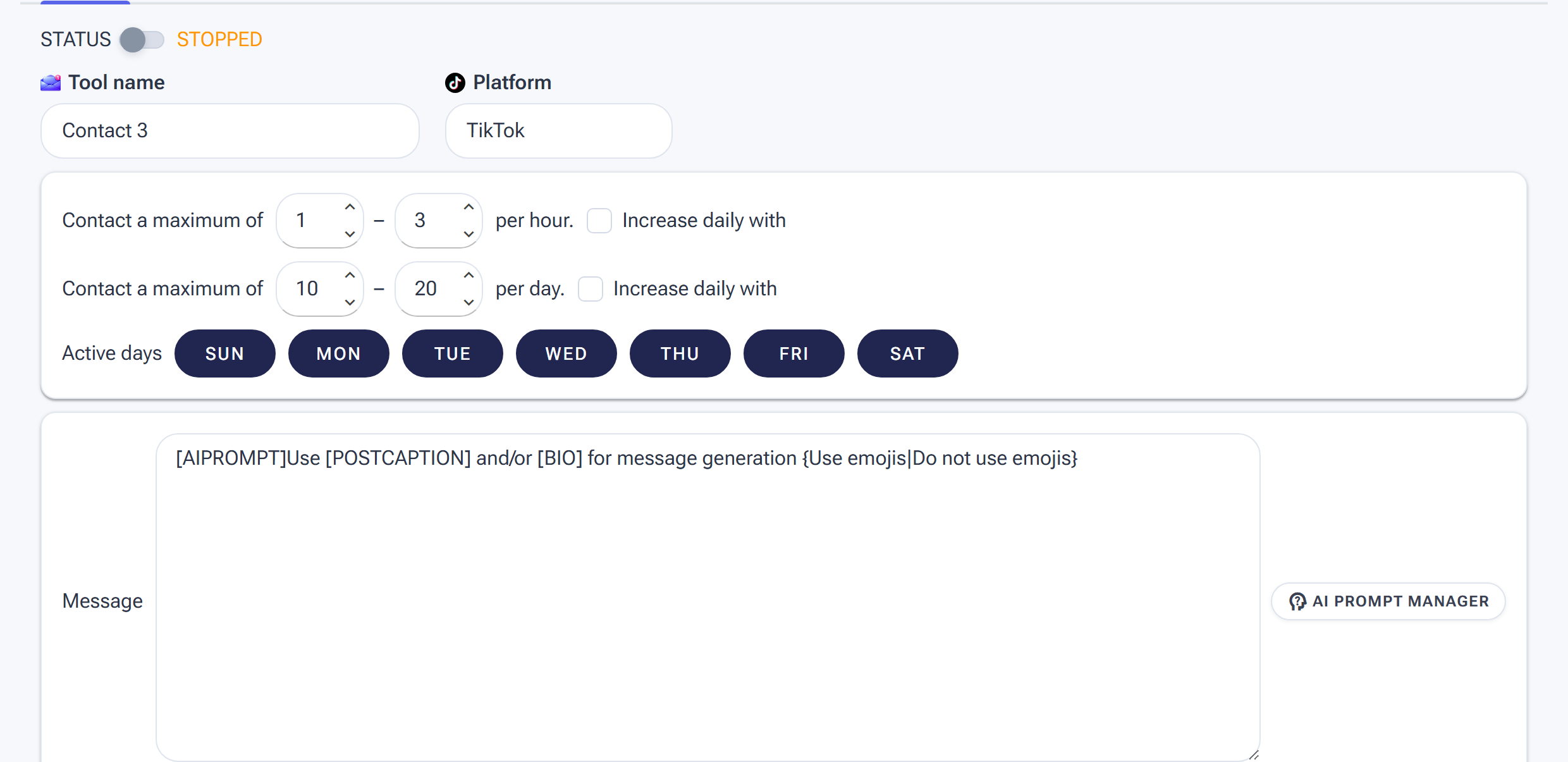
Contact Settings: note how low the default ranges are — DMs are the most sensitive action — plus the Message box with AI prompt support for personalised messages.
Open the Contact tool and click the SETTINGS tab. Here’s every setting, in the order they appear:
1. Tool name and Platform
The tool name field defaults to “Contact 1” and is just a label — rename it if you’re running multiple Contact setups on the same account and want to tell them apart in the dashboard. Platform is read-only and is set when you add the tool.
2. Tool maximums per hour and per day
SM Tasker randomizes its Contact actions within the ranges you set here. Defaults are 1–3 per hour and 10–20 per day — much more conservative than Follow’s or Like’s defaults. Stick close to these numbers. DMs are the action platforms scrutinize most, and aggressive outreach is one of the fastest ways to land an action block on the account.
The range matters more than the ceiling. A min of 1 and max of 3 creates noticeable variation between hours; a flat 3-and-3 looks robotic. Use a wider gap for safety.
Increase daily with
Tick the Increase daily with checkbox next to either the per-hour or per-day line to auto-scale that limit. SM Tasker bumps the range by a random percentage each day until it reaches a target ceiling. For Contact specifically, keep the daily ramp very slow — 1–2% per day, capped at limits well below your platform’s safe maximum.
3. Active days
Toggle which days of the week the Contact tool runs. No real person sends DMs at the same intensity every day — giving Contact one or two rest days is one of the simplest safety improvements you can make.
If you’re running other tools alongside Contact, stagger the rest days across them. The varied pattern across tools is much harder to flag than every tool going dark on the same day.
4. Message
This is the heart of the Contact tool — the actual DM SM Tasker will send. The default message is an AI prompt that generates each message based on the recipient’s context:
[AIPROMPT]Use [POSTCAPTION] and/or [BIO] for message generation {Use emojis|Do not use emojis}
You can edit it freely. Two approaches work, and you can mix them.
AI-generated messages. Start the message with [AIPROMPT] followed by instructions, and SM Tasker will generate a unique message for each recipient using your connected AI configuration. The default prompt pulls from the recipient’s recent post caption or bio, which makes the resulting message feel personally researched. For AI to work, you need to have connected ChatGPT to SM Tasker first.
Manual templates with variables. Skip [AIPROMPT] and write a fixed message that uses the variable chips to personalize. Available variables (click them below the message field to insert):
- [USERNAME] — the recipient’s username
- [FULLNAME] — their display name
- [BIO] — the bio text from their profile
- [AIPROMPT] — switches that part of the message into AI-generated mode
- [LASTRECENTMESSAGES] — recent message thread context (for the Reply to Messages source)
A manual template might look like: “Hey [FULLNAME], your recent posts about indoor cycling caught my eye — would love to share a workout I think you’d dig.”
AI PROMPT MANAGER — the button at the top right of the message field opens a manager where you can save prompts as reusable templates. Useful if you’re running multiple Contact tools across accounts and want to share a tuned prompt without retyping it.
Rules of thumb for a message that converts:
- Open with their name or something specific to them. Generic openings (“Hey there!”) read as spam instantly.
- Keep it short. Two or three sentences max. Long DMs from strangers don’t get read.
- One clear ask or hook. A question, an offer of value, or a specific reason you’re reaching out. No vague “let me know if you’re interested” closings.
- Don’t pitch in the first message. Especially for outreach — earn the conversation first, sell later.
- Avoid sales triggers. Words like “guarantee,” “amazing offer,” “limited time,” and “click the link” get flagged by platform DM filters. Write like a human, not a brochure.
5. Skip already contacted users
When ticked, SM Tasker skips any account it has already messaged from this tool. Leave this on unless you’re deliberately running a follow-up sequence. Messaging the same person twice from the same setup almost always reads as spam.
Step 2: Add Sources
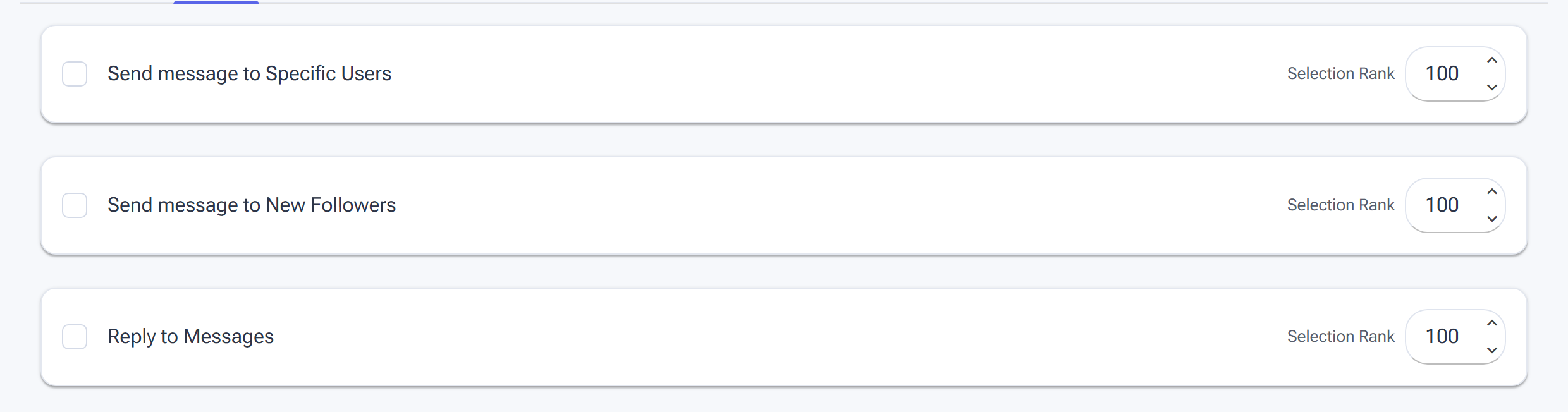
The Sources tab decides who receives your messages — curated lists beat broad sources for DMs.
Open the SOURCES tab. The Contact tool has three sources, and each one represents a distinct messaging campaign. Don’t enable all three on the same Contact tool — pick the source that matches the campaign you’re running and configure the message accordingly. If you want to run two campaigns in parallel, add a second Contact tool with its own message.
Send message to Specific Users
Sends your configured message to the exact list of usernames you provide. No discovery — just the people you’ve identified.
This is the outreach use case. Build a curated list of prospects, leads, or accounts you’ve researched manually, and Contact will message each one with your tuned template. Pairs naturally with the Follow tool using the same user list — you follow them, give them a few days to notice your account, then DM the ones who didn’t follow back with a softer reintroduction.
Send message to New Followers
Sends your message to people who recently followed your account. Effectively an automated welcome DM.
This is a high-conversion source because the recipient has just self-identified as interested in you. A short, friendly welcome that points them to your best content or asks a question converts at noticeably higher rates than the equivalent outreach DM. Keep the tone warm, not transactional — this is hello, not a pitch.
Reply to Messages
Replies to incoming DM threads in your inbox. Combined with an AI prompt that pulls in the conversation history via [LASTRECENTMESSAGES], this turns the Contact tool into an AI-powered first-line response system for your inbox.
Useful when you’re getting more inbound DMs than you can handle manually — the tool can answer common questions, qualify prospects, or send a holding response that buys you time before you reply personally. Review the AI prompt carefully before enabling this source; you want to instruct the AI to handle the routine messages and leave anything sensitive or unfamiliar for human follow-up.
Step 3: Activate the Tool
Once Settings and Sources are configured, toggle the Active switch to ON. SM Tasker will start sending messages on your phone according to the schedule and limits you set.
Pair Contact with the right tool for your campaign. For outreach, pair with Follow using the same user list — follow first, message a few days later for a softer two-touch approach. For new-follower welcomes, no pairing needed; the source picks up your fresh follows automatically. For inbox replies, no pairing needed; the tool reads your DM threads directly.
Step 4: Monitor Performance
Contact rewards close attention more than any other tool. Open these tabs daily during the first week, and weekly once the campaign is stable.
Results tab
The Results tab lists every account the tool has messaged, with the source it came from, the date of the action, and the message status. Each row shows the username, display name, and account context.
After 24 hours, open Results and spot-check 3–5 rows: look at the actual messages sent (especially if you’re using AI generation) and verify they read naturally. If the AI is producing generic or off-target messages, refine the prompt before scaling.
The EXPORT button downloads the result list — useful for tracking reply rates offline or analyzing which message variants converted best. REMOVE ALL clears the history.
Statistics tab
The Statistics tab shows a graph of messages sent per day over time. With a few days of data, the line tells you whether the tool is hitting your daily target consistently or whether some days are coming up short.
If the line is flat at zero on days the tool should be running, check three things: Is the Active toggle on? Is the device online? Has the source pool run dry (e.g., no new followers yesterday, or your Specific Users list is exhausted)?
Summary tab
The Summary tab is a chronological activity log of every messaging event — preparation, completion, and errors. Each entry shows the source it ran on, the result, and the timestamp.
Use Summary when a day shows fewer actions than expected on the graph. The Summary log will tell you why — often a source returned no fresh targets, or a platform soft-block paused the tool briefly. The Activity column has a filter, so you can narrow to errors only or to a specific source.
Platform-Specific Notes
Instagram is the most sensitive platform for DM activity. Volume restrictions on outbound DMs from non-mutual accounts are tight, and platform filters scan for sales-trigger phrases (links, “guaranteed,” urgency words) that flag a message as spam before the recipient even sees it. Keep limits conservative, keep messages personal, and avoid links in the first DM whenever possible. If a block lands, see Safety Features Built Into Your Automations for what happens next.
TikTok
TikTok’s DM system is less central to the platform than Instagram’s, but the same principles apply: low volume, personalized content, no spammy phrasing. New TikTok accounts are particularly restricted in their first weeks — give a fresh account time to warm up before running Contact at any meaningful volume.
Threads
Threads’ direct messaging is tied to Instagram’s DM infrastructure. Aggressive DM activity on Threads can affect the standing of the linked Instagram account, so maintain the same conservative limits you’d use on Instagram.
Common Mistakes
| Mistake | Why It Hurts | What to Do Instead |
|---|---|---|
| Pushing limits past the defaults too early | DMs are the action platforms scrutinize most; aggressive volume triggers blocks quickly | Start at 1–3 per hour and 10–20 per day; scale up only after a clean week |
| Generic opening (“Hey there!”) | Reads as spam in the first second; recipient never reads the rest | Use [FULLNAME] or reference [BIO] to open with something specific to the recipient |
| Pitching in the first message | Cold sales DMs convert at near-zero rates and damage the account’s DM reputation | Earn the conversation first — a question or a relevant compliment — then pitch later in the thread |
| Including a link in the first DM | Platform DM filters flag external links from unknown senders as spam | Save links for the second message after the recipient replies; keep the first message link-free |
| Running multiple campaigns from one Contact tool | One message can’t serve outreach + welcomes + replies — the tone and content needed are different | Add a second Contact tool per campaign type; each gets its own message and source |
| Setting and forgetting (especially with AI prompts) | An off-target AI prompt sends dozens of awkward messages before you notice | Spot-check actual sent messages in the Results tab after the first 24 hours; tune the prompt before scaling |
| Forgetting to tick Skip already contacted users | The same people get messaged repeatedly — instant spam complaint | Leave it on by default; only turn it off for an intentional follow-up sequence |
Writing Messages That Get Responses
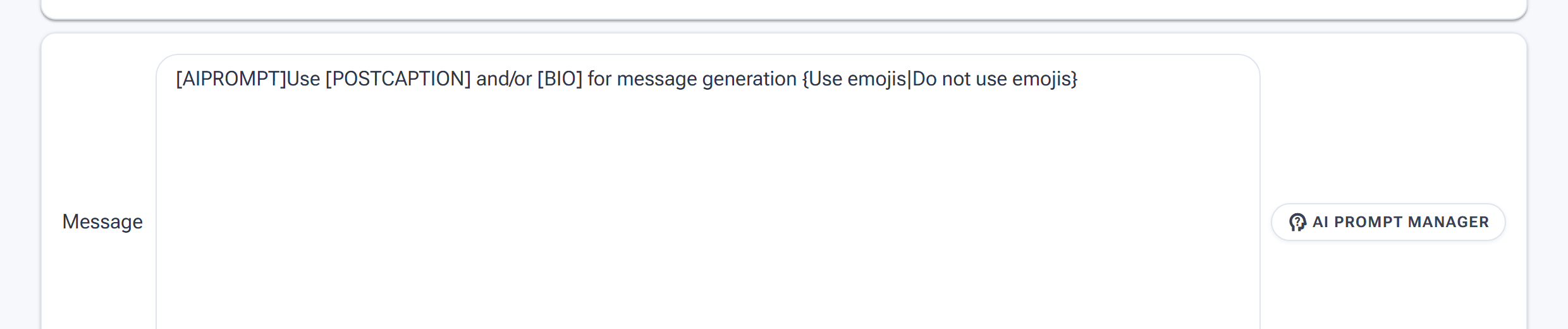
The real Message box: the [AIPROMPT] tag hands writing to the AI per recipient — [POSTCAPTION] and [BIO] feed it context, and {option A|option B} spins variations so no two DMs read identical.
The message is everything. A perfectly configured Contact tool with a bad message will generate spam reports. A simply configured Contact tool with a genuinely good message will generate responses, follows, and sales. Invest most of your setup time here.
The Rules for DMs That Don’t Feel Automated
Every message SM Tasker sends should pass a simple test: if a real person on your team sent this DM manually, would it make sense? If yes, send it. If it sounds like a template, rework it until it doesn’t.
Specific guidelines that make the difference:
- Keep the first line non-promotional — the first thing the recipient reads when the notification appears is the first line of your message. If it starts with “Hey, I noticed your page and wanted to share something special…” it reads as spam before they even open it. Start with something niche-specific and human: a genuine observation, a relevant question, a reference to their content type.
- Reference the niche, not the account — you don’t know which specific post SM Tasker viewed before sending, so don’t pretend you do. Niche-level specificity (“I’ve been following a lot of [niche] creators lately”) is honest and still personal. Fake post-specific references (“I loved your recent video about X”) are easy to spot and destroy credibility.
- One ask per message — the message should have a single, clear reason for sending. Whether that’s a question, a resource offer, a collaboration invite, or a soft introduction — one thing, clearly stated. Multiple asks in a single cold DM look desperate and unfocused.
- No links in the first message — links in cold DMs are the fastest route to the spam folder and to platform flags. Get a response first, then share a link in the reply thread if relevant.
- Short is better than long — 2–4 sentences is the sweet spot. Long cold DMs signal that the sender doesn’t respect the recipient’s time. Short messages that make their point clearly and leave room for a reply perform better across every use case.
What to Do Next
-
How to Connect ChatGPT to SM Tasker — AI-generated messages need an AI connection. Set that up before you rely on
[AIPROMPT]in your Contact message. - The Follow Tool: How to Build a Targeted Audience on Autopilot — Contact’s Specific Users source pairs naturally with Follow for two-touch outreach campaigns.
- Sources and Targeting Mastery — How to research and pick the right people to put into your Specific Users source list.
- Mastering the Automations Dashboard — Where you’ll spot whether your Contact campaigns are running on volume — the #Actions Today column tells you in seconds.
Bottom Line
Contact rewards thoughtfulness more than any other tool. A small daily volume of well-crafted, personalized messages converts at rates that high-volume generic outreach can’t match — and keeps the account safe in the process. Pick the right source for your campaign, write a message that doesn’t read as automated, keep volumes conservative, and check Results often.