Using Lists to Power Your Automation
Every tool in SM Tasker needs to know where to find its targets. Sources answer the question of how SM Tasker discovers them — Hashtag Search…
Lists are the targeting layer that sits beneath your sources. Build them well and your automations run on clean, relevant, high-converting data. Neglect them — use too few entries, never rotate them, or skip them entirely — and your tools burn through their daily action budget on a shallow, exhausted pool of targets. This guide covers how to build, configure, and maintain the lists that keep your automation stack performing over time.
Where to Find Lists
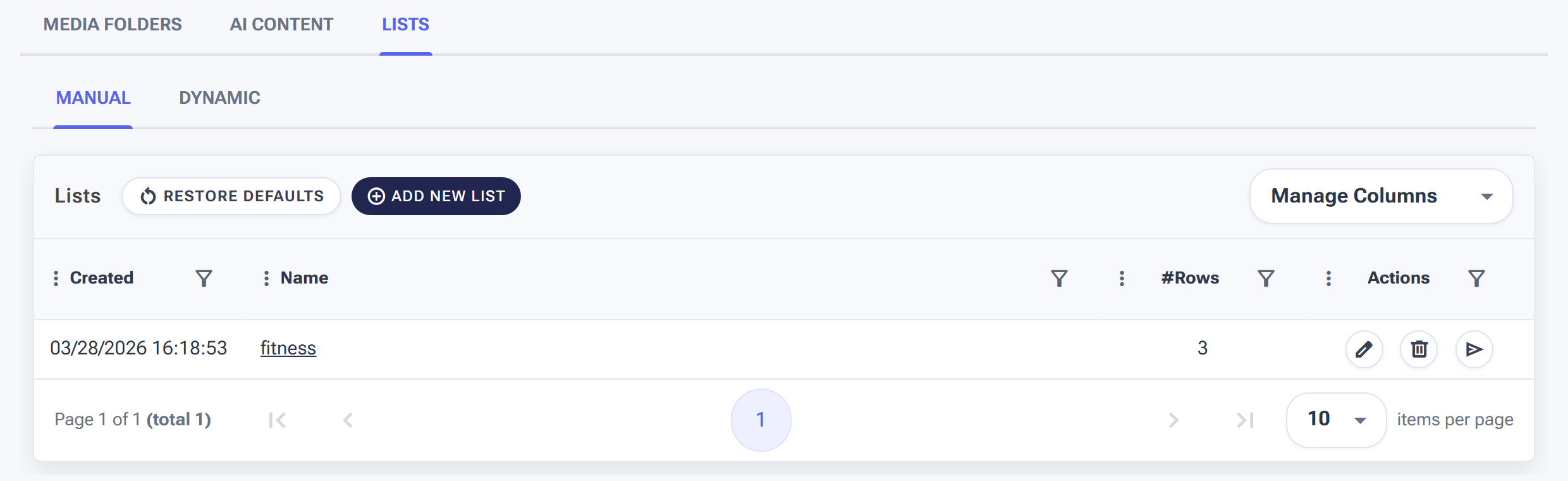
Lists live under Content → Lists.
Go to Content > Lists in the SM Tasker dashboard. This is where you create, manage, and review all your targeting lists. Once a list is created here, you can assign it to any compatible source on any automation tool — across multiple accounts simultaneously if needed.
Manual Lists vs. Dynamic Lists
SM Tasker supports two list types. Understanding the difference determines which one to use for each targeting scenario.
Manual Lists
A Manual List is exactly what it sounds like — a list you build and maintain yourself by adding individual entries (called Words). You control every item in the list: what goes in, what comes out, and in what order SM Tasker uses them.
Manual Lists are the right choice when precision matters more than scale. A carefully researched list of 30 competitor usernames outperforms an auto-generated list of 200 loosely related ones. A hand-picked set of 40 mid-range niche hashtags delivers better targeting quality than a broad keyword sweep. Use Manual Lists for your core targeting data — the inputs that define who your automations actually reach.
Dynamic Lists
Dynamic Lists are auto-populated based on rules you define. Instead of adding entries manually, you configure criteria and SM Tasker fills the list over time — for example, collecting usernames from accounts that have interacted with a specific post, or building a list of users who followed back after your Follow tool reached them.
Dynamic Lists are the right choice when you need scale or when the targeting data is generated by SM Tasker’s own activity. Use them for retargeting (acting on users who have already interacted with your account in some way) rather than for primary discovery.
Quick decision guide:
| Use Case | List Type | Why |
|---|---|---|
| Hashtag targeting for Like/Comment | Manual | Quality and relevance of hashtags requires human judgment; auto-generation produces too many irrelevant tags |
| Competitor account list for Follow | Manual | You need the right 8–12 accounts, not hundreds — precision over volume |
| Outreach prospect list for Contact | Manual | Every prospect on a DM list should be intentional; auto-generation risks messaging irrelevant accounts |
| Retargeting users who engaged with your content | Dynamic | SM Tasker generates the list from real activity data; manual entry would be impossible at scale |
| Large-scale keyword discovery at volume | Dynamic | Scale matters more than precision; auto-generation provides the volume manual entry can’t |
Building a Manual List: Step by Step
- Go to Content > Lists → click Create List
- Give the list a descriptive name — something that makes its purpose immediately clear (e.g., “Fitness Competitors IG,” “Niche Hashtags – Vegan,” “Outreach Prospects Q2”)
- Choose the list type: Hashtags, Usernames, or Keywords — this determines what kind of entries the list accepts and which source types it can feed
- Add your Words — the individual entries in the list (hashtags, usernames, or keywords depending on type)
- Configure Delayed Until for each entry if needed (explained below)
- Save the list, then assign it to the relevant source in your automation’s Sources tab
Usage Tracking: Know When a Source Is Getting Stale
Every Word in a Manual List tracks how many times SM Tasker has used it. This usage count is visible in the list view and is one of the most useful diagnostic signals in the entire platform.
When a Word’s usage count climbs high, it means SM Tasker has pulled from that entry many times — it may be approaching the bottom of the available content or accounts under that hashtag or username. When every Word in a list has a high usage count, the list is exhausted and needs refreshing.
What to look for during a list audit:
- Words with usage counts much higher than others — SM Tasker is over-relying on these entries, possibly because others have been skipped or blocked
- Lists where every Word has a high count — time to add new entries or rotate out old ones
- Words with zero usage — they may be misconfigured, incompatible with the source, or blocked at the platform level
Delayed Until: Preventing Repetition and Maintaining Natural Patterns
Delayed Until is the most underused setting in SM Tasker’s list system — and one of the most valuable for long-term automation health.
When you set a Delayed Until cooldown on a Word, SM Tasker won’t reuse that entry until the specified period has passed. For example, if you set a hashtag to Delayed Until 48 hours, SM Tasker will use it once, then wait two days before pulling from it again. This prevents the tool from hammering the same hashtag or account repeatedly, which creates a detectable repetitive pattern.
Recommended Delayed Until settings by list type:
| List Type | Recommended Cooldown | Reasoning |
|---|---|---|
| Hashtag lists (Like, Comment, StoryViewer) | 24–48 hours | Allows fresh content to accumulate under each hashtag before SM Tasker revisits it |
| Competitor username lists (Follow) | 7–14 days | Prevents cycling back to the same competitor’s follower pool before meaningful new followers have accumulated |
| Outreach prospect lists (Contact) | 30+ days | Prevents re-contacting the same prospect within a campaign cycle; protects against spam perception |
| Keyword lists (Account Search) | 12–24 hours | Keyword searches refresh with new accounts frequently; shorter cooldowns are appropriate |
List Strategies by Use Case
Hashtag Lists for Like, Comment, and StoryViewer
The goal of a hashtag list is to surface active, niche-relevant content and accounts for your engagement tools to interact with. Quality and specificity matter more than volume.
How to build a 40-hashtag niche list:
-
10 highly specific tags (under 200K posts) — the most targeted, lowest-competition tags where your interactions are most visible and the audience is most relevant. Example for a personal finance niche:
#debtfreejourney,#financialindependenceretire -
20 mid-range tags (200K–1M posts) — the core of the list. Active communities with enough volume to sustain daily interactions. Example:
#moneytips,#budgetingforbeginners -
10 broader category tags (1M–3M posts) — volume tags for when the more specific ones are running low. Example:
#personalfinance,#savemoney
Set Delayed Until to 24–48 hours on every hashtag. With 40 hashtags and a 24-hour cooldown, SM Tasker cycles through the full list every day with no repetition — a clean, natural pattern that keeps the source pool perpetually fresh.
Competitor Username Lists for Follow
A competitor list feeds the Target Account Followers and Users that Interacted with Target Account sources on the Follow tool. The accounts you add here define the audience pool SM Tasker draws from.
What makes a strong competitor list:
- 8–12 accounts — enough variety to prevent pool exhaustion, not so many that the list becomes unfocused
- Prioritize engagement over reach — an account with 15K followers and consistent post engagement has a more valuable follower base than one with 200K followers and minimal interaction. The followers of engaged accounts are themselves engaged.
- Include a mix of sizes — 2–3 established accounts in your niche (50K–500K followers) plus 5–8 actively growing mid-size accounts (5K–50K). The mid-size accounts have newer, more active followers who are still in discovery mode.
- Refresh monthly — after SM Tasker has worked through a competitor’s follower base, the same pool starts recycling. Swap out 3–4 accounts each month to keep the source pool fresh.
Outreach Prospect Lists for Contact
A prospect list for the Contact tool is a curated list of specific usernames you want to DM. Unlike the Follow tool’s competitor list (which is a list of accounts whose followers you target), a Contact prospect list is a list of accounts you want to contact directly.
Build this list manually and intentionally. Every username on it represents a real outreach decision. Set Delayed Until to 30+ days to prevent re-contacting the same prospect within a campaign cycle, and review the list after each campaign to remove anyone who has responded and is now in a different stage of your sales or relationship pipeline.
Keyword Lists for Account Search
Keywords for Account Search describe the type of accounts you want to find — terms that appear in account bios, usernames, or profile descriptions. For example: “fitness coach,” “vegan chef,” “startup founder,” “real estate agent.”
Keep keyword lists shorter and more specific than hashtag lists — 10–20 high-quality keywords outperform 100 generic ones. Account Search uses these terms to find matching accounts, so vague keywords produce vague audiences. Test new keywords by checking whether the accounts they surface are actually relevant before adding them to a production list.
Assigning Lists to Automations
Once a list is created, assign it to a source inside an automation tool:
- Open the automation tool → click the Sources tab
- Find the source type that matches your list (Hashtag Search for hashtag lists, Target Account Followers for username lists, etc.)
- Enable the source and select your list from the dropdown
- Set the Selection Rank for this source relative to your other sources
The same list can be assigned to multiple tools and multiple accounts simultaneously. A single hashtag list can feed Like, Comment, and StoryViewer tools on every account you manage — update the list once and every tool that uses it picks up the changes automatically.
Auditing and Refreshing Lists Over Time
Lists that aren’t maintained degrade silently. The tool keeps running, the usage counts climb, and performance slowly drops as SM Tasker cycles through an increasingly exhausted pool. A monthly list audit takes 15 minutes and prevents this entirely.
Monthly audit checklist:
- Open each list in Content > Lists and scan usage counts — flag any Words with very high counts relative to the list average
- For hashtag lists: remove any tags that have become oversaturated (rapid growth in post count making them too broad) or too small (niche contracting). Add 5–10 fresh tags to replace them.
- For competitor lists: rotate out accounts whose follower pools have been heavily worked. Replace with fresh competitors you’ve identified since the last audit.
- For keyword lists: remove any keywords that are producing off-niche accounts. Add new terms based on how language in your niche has evolved.
- Reset Delayed Until on any Words that have been sitting idle for more than 30 days — they may have been skipped and their cooldown may have lapsed without being used.
Common Mistakes
| Mistake | Why It Hurts | What to Do Instead |
|---|---|---|
| Building lists after starting automations | Tools run on empty sources for days while you catch up; wasted action budget with no targeting | Always build lists first — see The Pro Setup Workflow |
| Using fewer than 15 hashtags in a list | Small pool exhausts quickly; SM Tasker cycles back to the same tags before content refreshes, creating a repetitive pattern | Build hashtag lists with a minimum of 30 entries; 40–50 is ideal |
| Not setting Delayed Until on any Words | SM Tasker hammers the same entries repeatedly; creates detectable patterns and exhausts pools faster | Set Delayed Until on every Word in every list — use the recommended cooldowns in the table above |
| Never auditing or refreshing lists | Performance degrades silently as pools exhaust; growth slows with no obvious cause | Schedule a monthly 15-minute list audit; treat it as recurring maintenance, not optional |
| Sharing identical lists across accounts in the same niche | Multiple accounts pulling from the same pool simultaneously depletes it faster and creates a coordinated pattern | Vary lists slightly across account groups — rotate different subsets of hashtags or competitors across accounts |
What to Do Next
- Managing Media Folders: Your Content Library for Auto-Publishing — Lists power your engagement tools; Media Folders power your Publish tool. Set up both and your full automation stack has everything it needs to run.
- Sources & Targeting Mastery — Revisit this guide now that your lists are built. The source strategy section shows exactly how to connect your lists to the right sources at the right Selection Rank.
- Safety Features: Restrictions, Auto-Suspend & Ignore Lists — Learn about Ignore Lists — a special list type in Settings that protects specific accounts from being unfollowed or targeted by your automations.