TikTok Automation Without the Official API: What Device-Native Execution Enables That API Tools Cannot
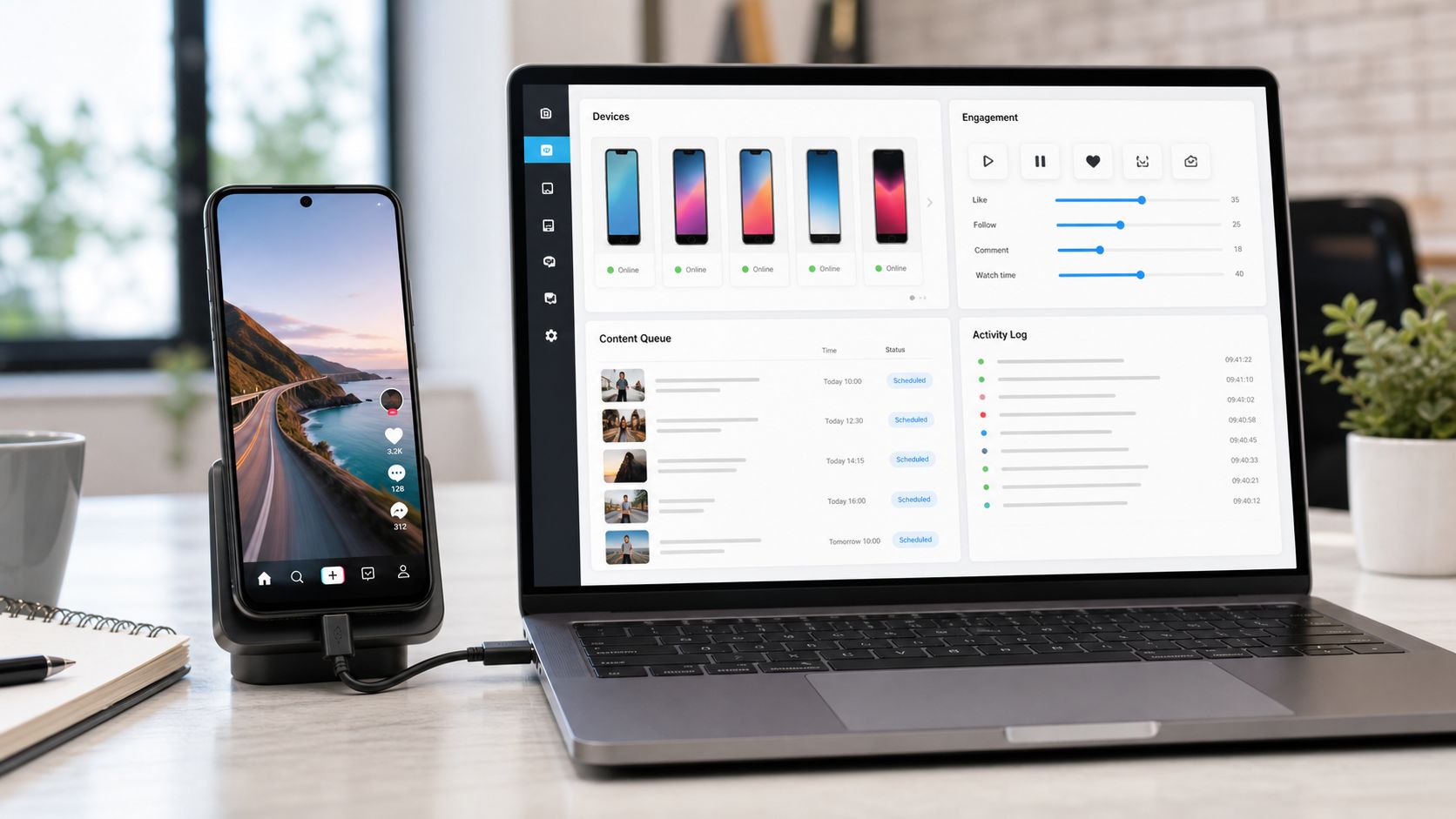
TikTok automation without official API access is often described as though it were one technology. It is not. A data scraper that retrieves trending videos, a private mobile API client that sends signed requests, a browser robot clicking TikTok.com, and an Android phone controlled through ADB may all be sold as “TikTok automation,” yet they run through completely different execution layers.
That distinction determines far more than speed. It determines which actions exist, how account sessions are maintained, what breaks when TikTok changes its application, whether an operator can see what happened, and how easily an agency can pause one client without interrupting every other account.
I approach this as a marketer and operator, not as someone trying to win a benchmark for the highest number of requests per minute. A useful TikTok system has to support the actual work: understanding the For You feed, finding relevant creators, publishing consistently, creating profile visits, responding to comments, managing conversations, and showing a team what ran. Raw action capacity is only one small part of that job.
This guide explains the full architecture behind the market in 2026. It covers official APIs, cracked or reverse-engineered APIs, browser wrappers, Android execution, reported grey-hat limits, account warming, DMs, and agency operations. It also explains why SMTasker’s TikTok automation uses connected Android phones and emulators as the execution layer.
What “TikTok API” Means in 2026
When a vendor says it uses a TikTok API, ask one follow-up question: which API?
There are four practical answers.
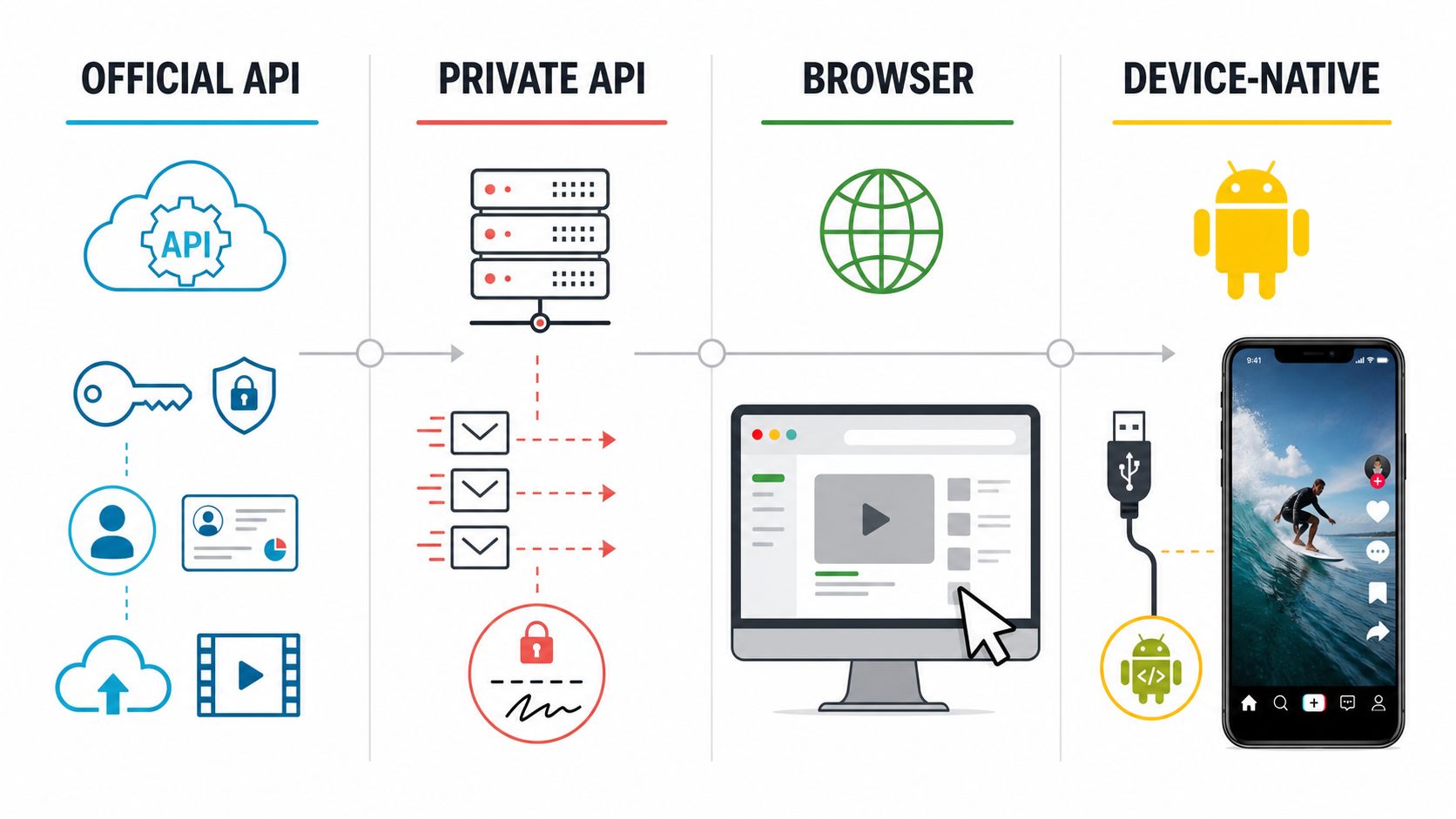
1. An official TikTok developer API
This is an approved product using documented endpoints, scopes, user authorization, access tokens, and defined use cases. It is the normal choice for profile display, content publishing, research access, advertising, Business Account messaging, and other supported integrations.
2. An unofficial web API wrapper
This usually calls routes used by TikTok.com to retrieve public data. It may launch a browser to obtain cookies or generate web request context, then expose convenient methods for trends, videos, users, comments, sounds, or hashtags. Calling it an API does not mean it can act as a logged-in user.
3. A private mobile API client
This model attempts to reproduce the network behavior of TikTok’s Android or iOS app. It constructs authenticated requests and recreates enough app, session, device, and signing context for private endpoints to accept them. This is what many operators mean by a cracked TikTok API.
4. A device-control API
Here, the dashboard talks to a phone or emulator rather than directly to TikTok’s servers. Android Debug Bridge, UI automation, screenshots, app-state checks, and a local control service are used to operate the application. The TikTok interaction still happens inside TikTok’s Android interface.
These labels matter because two tools can both advertise follow automation while one sends a private HTTP request and the other opens a profile in the app and taps Follow. The visible result is similar. The underlying session, maintenance model, failure mode, and operator visibility are not.
What Official TikTok APIs Actually Enable
The official ecosystem is broader than the phrase “TikTok has no API” suggests. The current TikTok scopes reference includes identity and profile scopes, public video reads, video upload, and direct publishing. Other products support research, data portability, ads, shops, and specialist business workflows.
For a marketer, the important split is between reading, publishing, managing owned interactions, and performing general engagement.
| Official product area | What it is designed to do | What it does not provide as a general creator action |
|---|---|---|
| Login Kit and user scopes | Authenticate a user and read authorized profile information | Browse FYP, follow users, like videos, send general outreach |
| Display API | Read an authorized creator’s profile and public video metadata | Act on arbitrary videos or accounts |
| Content Posting API | Upload drafts or publish videos/photos with supported settings | Run discovery, follow, like, save, or third-party engagement campaigns |
| Research API | Query approved public datasets for qualifying researchers | Operate commercial creator accounts or perform engagement |
| Business Messaging API | Manage eligible Business Account conversations and automatic messages | Universal cold outreach from every personal or creator account |
| Business comment tools | Read and manage comments around owned business content | Comment freely across unrelated third-party videos |
TikTok’s Content Posting guidelines show how specific the official publishing use case is. Unaudited clients have user and viewership restrictions, and posting clients must expose creator controls such as privacy and interaction settings. TikTok also describes a creator-level posting cap that typically sits around 15 posts per day through Direct Post, although the actual upper limit can vary.
Business messaging deserves special attention. TikTok does provide an official Business Messaging API for authorized Business Accounts, including real-time messages and automatic messaging features. That makes statements such as “TikTok has no DM API” incomplete. The real limitation is reach: it is not a generic endpoint that lets every personal, creator, or agency-managed account initiate arbitrary conversations with any user.
The Engagement Actions API-Only Tools Cannot Run
For an ordinary creator integration, the official scope list does not expose a general write endpoint for most engagement actions. An API-only dashboard cannot simply request “follow this creator” or “like the next relevant video” through a documented creator API.
The main gaps are:
- Watching and scrolling the personalized For You feed as the account.
- Searching inside the app and navigating results as a normal user.
- Visiting a source creator, video, sound, hashtag, or follower list and acting from that context.
- Following and unfollowing arbitrary accounts.
- Liking, saving, reposting, or sharing arbitrary videos.
- Commenting across third-party videos as part of a discovery campaign.
- Starting general outbound conversations from accounts outside eligible Business Messaging workflows.
- Using mobile-only creation and discovery surfaces that are not exposed as public endpoints.
- Observing in-app prompts, empty states, button availability, and account-specific friction in real time.
This is why “API access” and “TikTok account automation” should not be treated as synonyms. The API may be excellent for publishing or analytics while still being unable to perform the daily engagement routine a creator handles manually.
For agencies, the gap becomes operational. A publishing platform can queue ten client videos, but it cannot necessarily research each client’s FYP, engage around a creator source, save inspiration, follow selected profiles, or open a curated conversation. Teams then fall back to phones, virtual assistants, or a second automation layer.
How Cracked and Private TikTok APIs Work
A private TikTok API is not a secret official developer plan. It is a client built around endpoints used internally by TikTok’s own app or website.
What “cracked API” usually means
“Cracked API” is market shorthand, not a precise technical category. The seller may bundle a reverse-engineered signer into the bot, call a remote signing service, combine public web scraping with private mobile write actions, or maintain several protocol versions for different account groups. The operator normally receives a dashboard and simple commands while the complicated request work remains hidden behind the service.
This also explains why two black-hat tools with a similar feature list can behave very differently. One may only scrape public targets, then hand them to a separate authenticated worker. Another may implement follow and like but have no reliable DM or publishing module. A third may advertise a “full API” even though its working routes belong to an older app generation. The feature name is not evidence that the entire first-party mobile protocol has been reproduced.
At a high level, the process has five parts:
- The tool maintains an authenticated account session.
- It constructs the endpoint, query parameters, request body, and app-version context expected by a private route.
- It produces the dynamic signatures or encrypted metadata expected for that request family.
- It sends the request directly to TikTok without navigating the visible app interface.
- It parses the response and maps errors back to the automation dashboard.
The stack behind a black-hat API panel
Current reverse-engineering projects make the architecture easier to see. Mobile request clients commonly refer to dynamic headers such as X-Argus, X-Gorgon, X-Ladon, and X-Khronos, while web clients use a different signing and browser-session path. Those names are not magic ban-prevention switches. They are components used to make a request valid at the protocol layer.
| Panel layer | What it holds or does | What the operator experiences |
|---|---|---|
| Account and session store | Authenticated session material and account state | Accounts appear logged in until a session expires or needs attention |
| Device and app profile | App version plus device, operating-system, language, and regional context | An account is assigned to a profile even though no visible phone is running |
| Signer or encryption service | Produces the changing mobile or web request metadata expected by private routes | Actions work as simple commands while the signer remains invisible |
| Endpoint modules | Wrap follow, like, feed, profile, comment, message, or edit routes implemented by that tool | The panel’s feature menu reflects only the private routes its developer maintains |
| Target and action queue | Resolves source lists, schedules jobs, spaces actions, and controls retries | The user imports targets and chooses action counts or time windows |
| Result mapper | Converts private responses into success, skip, retry, expired-session, or failure states | The dashboard shows a status instead of the raw server response |
In practical use, the operator usually imports or connects accounts, supplies target sources, selects actions, and sets a schedule. A background worker resolves the target, builds a signed request, submits it, and records the result. It does not open the TikTok screen or wait for a visible tap. This is why private API panels can feel exceptionally fast and can coordinate large account lists from server infrastructure.
Some sellers maintain this complete stack. Others depend on an upstream signature service or a third-party private SDK. That distinction is rarely visible in the sales page, but it matters operationally: a remote signer outage or one incompatible app-version change can interrupt every downstream panel that depends on it.
Why a valid request is not the same as a durable workflow
That architecture is attractive because a direct request is fast. A server can theoretically coordinate many accounts without rendering video, loading screens, or waiting for touch transitions. Actions can be represented as simple functions, and data can be captured directly from responses.
The difficult part is that the private client must continue to resemble the first-party client closely enough for the request to work. App versions change. Signing logic changes. Parameters become mandatory or disappear. Session expectations evolve. A request can be syntactically valid yet inconsistent with the device and account context around it.
This maintenance burden is visible in public reverse-engineering repositories. They frequently announce updates to mobile or web signing pipelines, while older signature implementations are eventually described as obsolete or rejected. That is not a criticism of reverse engineering as a technical discipline. It is simply the economic reality of building on an interface whose owner is free to change it without maintaining compatibility for third parties.
A request that passes protocol validation proves only that the server accepted that request at that moment. It does not establish an account’s sustainable follow volume, the quality of its targets, the visibility of its DMs, or the survival of the same pattern across a thirty-account cohort. This is where black-hat marketing often collapses three separate claims into one: “the endpoint works,” “the action appears on the account,” and “the campaign can run at this rate for weeks.” Those are three different tests.
For an agency, the biggest weakness is not only that a request may fail. It is shared dependency. If fifty client accounts rely on the same signer, request template, or session service, one change can affect the entire account fleet at once. Debugging also begins at the request layer rather than with a visible screen an operator can inspect.
Why Many Unofficial TikTok APIs Are Read-Only Scrapers
Not every unofficial TikTok API is a cracked mobile client. This is one of the most important distinctions in the market.
An established open-source unofficial TikTok API wrapper explicitly states that it retrieves public data, cannot post or upload on behalf of a user, and has no support for authenticated routes that require login. It uses a browser layer to establish web sessions and then exposes public information through a Python interface.
That kind of wrapper is useful for:
- Collecting public video metadata.
- Studying creators, hashtags, sounds, comments, or trends.
- Building listening and research dashboards.
- Finding content sources for a separate workflow.
It is not useful for:
- Following an account.
- Liking or saving as an authenticated user.
- Sending a DM.
- Posting as the creator.
- Managing an account’s full in-app routine.
The lesson for marketers is simple: inspect capabilities, not labels. “Unofficial API” may mean a public-data scraper, a browser-assisted wrapper, a private mobile request client, or a hosted seller that combines all three. Only the last two categories are even candidates for authenticated engagement actions, and they have very different operational profiles.
What Device-Native ADB-Bridge Execution Means
Device-native automation moves the control boundary from TikTok’s request layer to Android’s device layer.
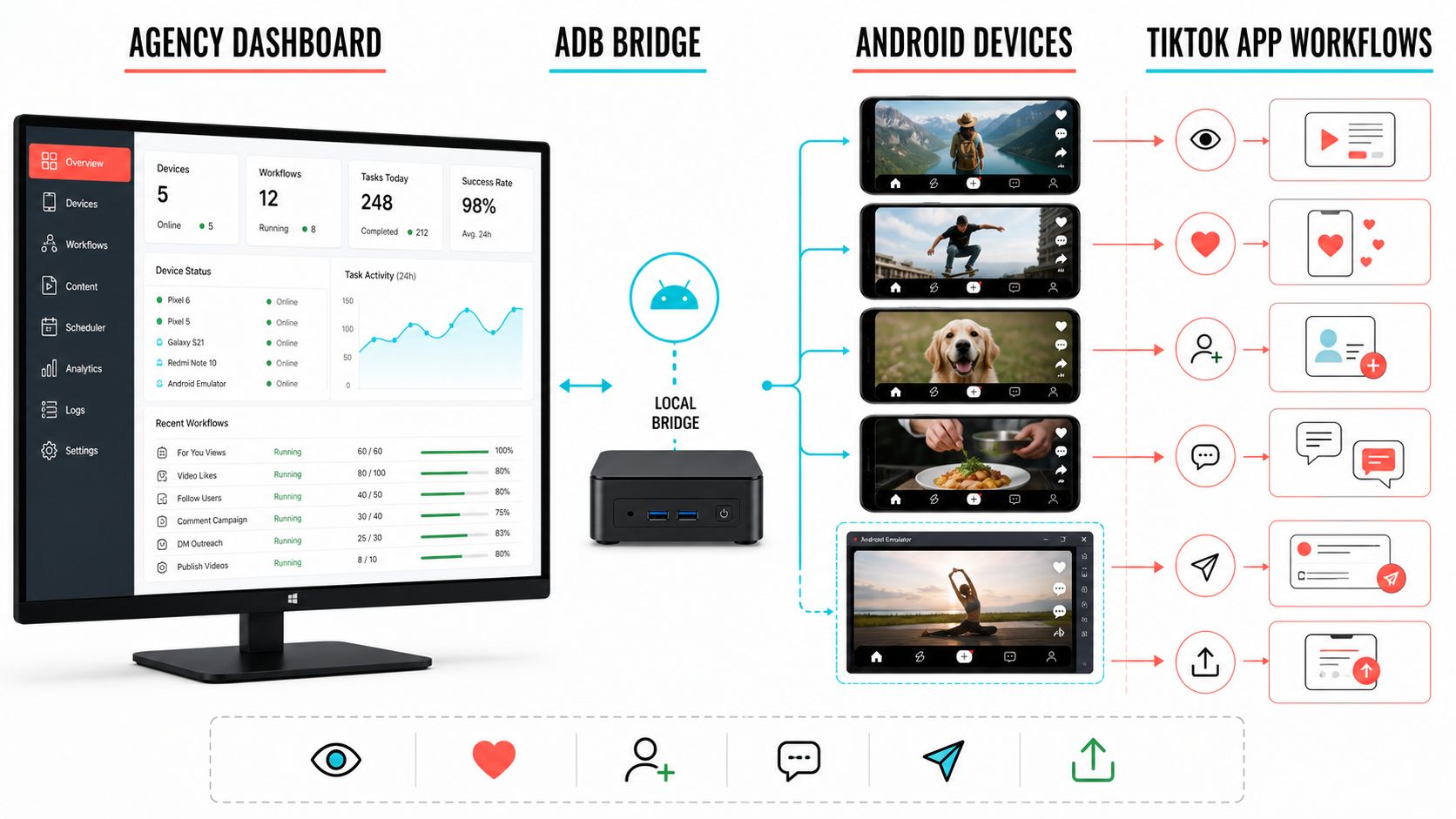
Google describes Android Debug Bridge as a client-server tool that lets a workstation communicate with a device. The ADB client sends commands, a daemon runs on the phone or emulator, and a server manages the connections. One host can see multiple connected devices and address them individually.
In a social workflow, ADB is the bridge, not the entire automation product. A complete system still needs:
- Device discovery and connection health.
- App launching and foreground-state checks.
- UI element recognition or controlled coordinates.
- Navigation logic for feeds, profiles, comments, inboxes, and publishing screens.
- Per-account source lists and action limits.
- Wait logic for loading states and variable network conditions.
- Logs, stop conditions, retries, and manual handoff.
- A dashboard that maps each workflow to the correct account and device.
The structural difference is crucial. ADB does not ask TikTok for an engagement endpoint. It asks Android to operate the phone, and the phone runs TikTok’s app. The account remains inside the mobile application environment throughout the workflow.
That makes device-native execution slower than firing headless requests, but speed is rarely the limiting resource in a quality-led TikTok campaign. The more valuable properties are visible state, access to mobile-only surfaces, and the ability to connect each action to the content and profile context around it.
What Device-Native Execution Enables Inside TikTok
The practical advantage of device-native execution is breadth. If an action is available to the account in the Android app and the workflow can identify the relevant screen state, it can be organized from the device layer.
FYP viewing and niche research
TikTok is unusually dependent on consumption signals. What an account watches, skips, replays, searches, and engages with shapes the feed it receives. A device-native VideoViewer can operate the actual FYP, use narrow sources, and create a visible watch log. An official profile or video API can retrieve data, but it does not experience the personalized feed as that account.
Search and source navigation
An operator can begin from a keyword, hashtag, creator, video, or curated username list, then navigate the same result surfaces available in the app. This connects research to execution. The source is not merely a database row; it is a path through TikTok’s live interface.
Likes, follows, saves, and cleanup
Device-native workflows can perform available in-app engagement around selected sources. They can also separate follow and unfollow routines, apply Ignore Lists, and stop when the expected state is missing. These are ordinary app actions, but they are absent from the general official creator API.
Comments beyond owned content
Official business tools can manage comments around eligible owned content. Device-native execution can reach comment surfaces on third-party videos, making it useful for creator discovery and niche participation. Because comment quality is reputational, prompts and review matter more than raw volume.
DMs and contact workflows
Where the account has access to the relevant message flow, device-native execution can open profiles, enter the inbox, work with message requests, send a curated opener, or support reply routines. This is the practical answer to how to automate TikTok DMs and engagement actions when a general official endpoint is unavailable for that account type.
Full in-app publishing
The official Content Posting API is useful, but the Android app exposes the complete creator experience available to that account. A device workflow can operate media selection, captions, visible settings, drafts, and app-specific creation screens as they appear. The operator can keep media folders and schedules in the dashboard while still publishing through the app.
Visible friction and human handoff
When the app shows an unexpected prompt, unavailable action, login request, or changed screen, the device state is visible. A well-designed workflow can pause and send the task for review. A request-only system often reduces the event to an error code that must be interpreted without the surrounding interface.
Architecture Comparison: Official, Private, Browser, and Device-Native
| Model | Execution layer | Strongest use | General in-app engagement | Main agency advantage | Main operational dependency |
|---|---|---|---|---|---|
| Official developer API | Documented TikTok endpoints | Publishing, authorized data, business workflows | Limited to exposed products and scopes | Stable structured integration | Product eligibility, scopes, and API design |
| Unofficial web wrapper | Public TikTok.com routes plus browser context | Public research and scraping | Usually none | Fast data collection | Web routes, cookies, browser signatures |
| Private mobile API | Reverse-engineered app requests | Headless authenticated actions | Potentially broad | High raw throughput | Signer, sessions, app versions, private schemas |
| Browser automation | TikTok web interface | Web-visible workflows | Partial | Easy prototyping | DOM, browser state, web feature availability |
| Device-native ADB | Android phone/emulator and TikTok app | Full visible mobile workflows | Broad where the account has the feature | Context, device mapping, logs, manual handoff | Device health and UI workflow maintenance |
No architecture wins every category. An agency may use an official API for approved publishing or business conversations, public-data tools for research, and device-native execution for the in-app work the other layers cannot perform.
The important decision is ownership. If the campaign depends on follow, FYP, third-party comments, saves, creator research, or general account DMs, an API-only stack leaves an execution gap. If the team fills that gap with a private SDK, it inherits signing and session maintenance. If it fills the gap with Android devices, it inherits device operations but keeps the workflow visible.
The Grey- and Black-Hat Limits Audit
Users searching for TikTok automation without official API access often want an exact follow, like, comment, or DM number. Grey- and black-hat sources publish plenty of them. The problem is not a shortage of numbers. It is the absence of a consistent method behind them.
Recent pages and forum discussions make claims spanning several multiples for the same action. Older threads claim even higher throughput from request-based private bots. The table below records the market’s reported bands so you can recognize them. It does not endorse them as settings or TikTok thresholds.
| Action | Low or warm-up claims seen | Aggressive claims seen | What is missing from the claim |
|---|---|---|---|
| Follows | 3-10/day | 50-100/day for new accounts; 100-200/day for mature accounts; older anecdotes reach 500/day | Cohort, survival period, combined actions, content performance |
| Likes | 10-30/day | 100-250/day for new accounts; 250-500/day for established accounts | Watch behavior, source quality, action density |
| Comments | 1-8/day | 30-50/day for new accounts; 50-200/day for established accounts | Text quality, duplicates, reports, moderation outcome |
| Outbound DMs | 0-10/day | 5-40/day to non-followers; 30-200/day in open conversations | Acceptance rate, recipient feedback, message eligibility |
| Profile visits | Usually not measured | 50-100/hour | Whether views are combined with follows, likes, or DMs |
| Video views | 30-100/day | Hundreds per day | Watch duration, completion, rewatches, niche relevance |
Several conclusions survive the disagreement.
First, request throughput is not an account limit. A private API may be able to submit hundreds of actions quickly, but that only demonstrates technical capacity. Second, daily totals hide density. Fifty follows spread through a mature account’s working day are not the same event as fifty requests in minutes. Third, action mix matters. A source that produces profile visits, follows, comments, and DMs creates a combined account pattern, not four isolated quotas.
Fourth, account age is an incomplete proxy for readiness. A three-year-old profile that has been dormant for eighteen months does not automatically behave like an active mature creator. Finally, the most important outcomes are often missing: whether posts retained normal reach, whether targets were relevant, whether messages received replies, and whether the account remained healthy after several weeks.
A Conservative TikTok Action Schedule for 2026
The following schedule provides exact operating ranges, but it does not pretend to reveal a private platform threshold. It is designed for marketers who need a starting configuration they can observe, explain, and adjust.
| Account stage | Video views/day | Likes/day | Follows/day | Comments/day | Curated DMs/day | Active sessions/day |
|---|---|---|---|---|---|---|
| Days 1-3 | 30-60 | 5-10 | 0-3 | 0-1 | 0 | 1-2 |
| Days 4-7 | 60-100 | 10-20 | 3-7 | 1-3 | 0-2, reply-led | 2 |
| Days 8-14 | 90-160 | 15-30 | 5-12 | 2-4 | 2-5 | 2-3 |
| Days 15-30 | 120-220 | 25-45 | 8-18 | 3-6 | 3-8 | 3 |
| 30+ days with clean history | 150-300 | 30-60 | 10-25 | 3-8 | 5-15 | 3-4 |
Do not run every action at the top of its range together. Choose one primary workflow. A new creator may focus on VideoViewer and publishing. A building local brand may use viewing plus a small number of likes around local creators. An established B2B account may use creator research, profile visits, and a tightly curated contact list.
Views also need a definition. A “view” should represent a real watch decision inside a relevant source pool, not an instant swipe used to inflate an activity counter. On TikTok, watch quality influences both research and the account’s own feed. A lower number of relevant completed views is more useful than a large random stream.
For active actions other than views, begin around two to four actions per active hour during the first week, four to eight while the account is building, and six to twelve for a mature account with clean history. DMs and comments should remain at the lower end because each one carries content and recipient context.
Increase one variable after three to seven clean operating days. That variable might be a second source, one additional active session, a modest follow increase, or a small DM list. If you raise all four, you lose the ability to identify what improved the campaign.
TikTok Account Warming Is Really FYP Training
Instagram warm-up is often discussed as a trust exercise. TikTok warm-up has an additional purpose: it teaches the account what its niche looks like.
The FYP is both a distribution surface and a research instrument. During the first days, the account should consume enough relevant content for the feed to become recognizable. A fitness creator should not see a random mix of comedy, gaming, beauty, finance, and local news after a week of focused setup. The feed should begin reflecting the content category the account plans to publish and engage around.
Days 1-3: Build the content map
Complete the profile, watch videos from a narrow set of niche creators, search core topics, save strong examples manually where useful, and note recurring hooks, sounds, caption styles, and comment themes. Keep outbound engagement minimal.
Days 4-7: Test light interaction
Add a few relevant likes, follows, and comments. Publish one or two pieces of content so profile visitors see a real account. Compare the FYP before and after each session. The milestone is not a follower count; it is a feed and source list that make sense.
Days 8-14: Connect content and engagement
Choose one campaign objective. If the objective is creator discovery, focus on views, saves, profile visits, and a small follow list. If it is local awareness, use local creators and search terms. If it is B2B outreach, build a reviewed prospect list before enabling Contact.
Days 15-30: Scale one loop
Repeat the workflow that produced the best combination of source relevance, profile visits, replies, and content insight. Add one controlled variable and keep review days. TikTok rewards learning speed, but an agency learns faster when it can tell which source and action produced the result.
How to Automate TikTok DMs and Engagement Actions
The phrase “how to automate TikTok DMs and engagement actions” combines two different jobs. Engagement creates context; the DM asks for attention. Running them as one undifferentiated volume campaign usually weakens both.
Start with source design. A contact list should have a reason to exist: creators in one category, prospects who match a service, recent followers, people who engaged with a campaign, or accounts reviewed by a team member. Avoid converting a broad scraped list directly into outbound messages.
Then decide what the first message must accomplish. Public operator reports often describe a limited message-request state for non-followers, which makes the opener especially important. Even where the interface allows a message, availability does not guarantee visibility or a reply. A concise personalized opener with one relevant reason to respond is more useful than a sequence of follow-ups planned before the person answers.
Use a contact workflow with four states:
- Eligible and reviewed.
- First message sent.
- Reply received or conversation opened.
- Human follow-up, nurture, or closed.
The dashboard should prevent duplicate contact, record the source, and keep an Ignore List for accounts that should not be approached again. Replies that involve pricing, complaints, nuanced collaboration terms, or client commitments should move to a person.
Comments require the same discipline. Use them to participate in a relevant conversation, not to announce that automation is running. A good comment refers to the video, adds a useful point, asks a real question, or reflects the account’s expertise. Generic praise, repeated emojis, and unrelated offers consume actions without building trust.
On SMTasker, the practical pattern is to separate VideoViewer, Like, Follow, Comment, and Contact into distinct tools with their own sources and limits. That makes it possible to pause Contact while viewing and publishing continue, or to change a weak creator source without rewriting the whole account routine.
TikTok Multi-Account Automation for Agencies in 2026
TikTok multi-account automation for agencies is not one campaign multiplied by the number of clients. Each client has a different content category, source pool, publishing rhythm, account history, and tolerance for outreach.
A useful agency operating model has five layers.
Device and account mapping
Every account should have an identifiable phone or emulator, login owner, market, time zone, and current status. The dashboard should answer where the account runs without asking an operator to remember which handset is which.
Source ownership
Store creator lists, hashtags, keywords, sounds, and prospect lists per client. Shared research can inspire several accounts, but the execution sources should remain attributable. This prevents a local restaurant from accidentally receiving the source pool intended for a software founder.
Content and publishing rhythm
Engagement works best when profile visitors find current content. Keep a media queue, caption state, approval status, and publishing window next to the engagement schedule. If the client has no approved content, the agency should know before it sends more profile visits.
Action budgets and active sessions
Set limits per account, not per plan tier. Use two or three active days during early warm-up, three or four during building, and a documented schedule for established accounts. Stagger operations so the team can monitor devices and replies, not to manufacture a detection-evasion pattern.
Review and client reporting
Report outcomes that a client understands: content published, source quality, relevant profile visits, follower fit, conversations opened, replies requiring action, and next-week changes. Raw likes or follows are supporting metrics.
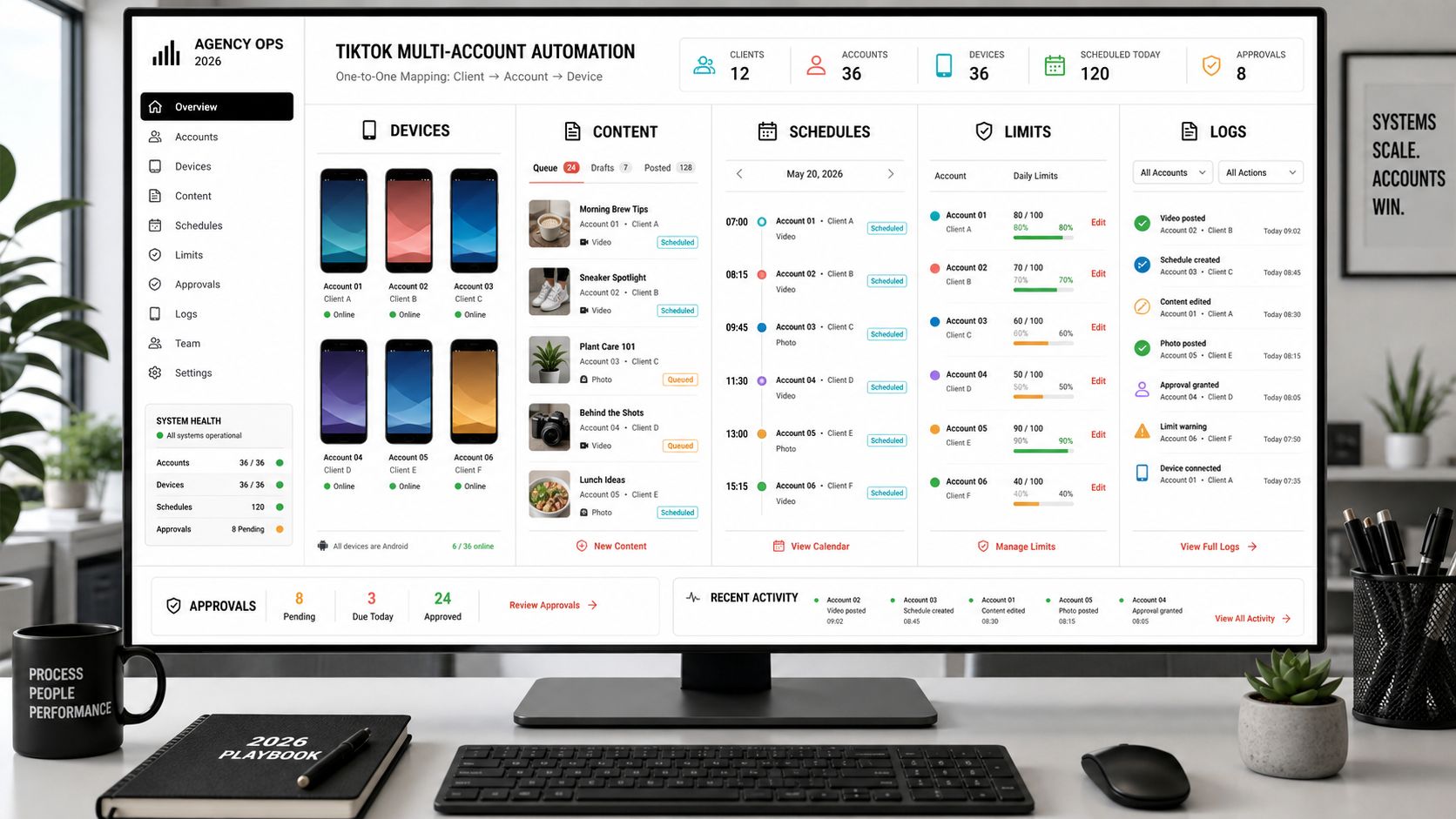
For someone searching “TikTok multi-account automation agency 2026,” this is the practical difference between owning a system and owning a collection of bots. The system connects devices, content, sources, limits, logs, and people. The bots merely produce actions.
Where SMTasker Fits
SMTasker is built around the device-native model. A Windows bridge connects Android phones or emulators, while the web dashboard organizes the account, device, source, tool, schedule, limit, and logs.
For TikTok, that means an agency can build a workflow from VideoViewer, Like, Follow, Unfollow, Comment, Contact, and Publish without depending on a general public engagement API or maintaining a cracked mobile signer. The value is not that every tool should run at once. The value is that each one can be configured and reviewed separately.
A clean launch might look like this:
- Week one: connect the device, complete the profile, configure VideoViewer, and prepare the media queue.
- Week two: add a small like or follow routine around one creator source.
- Week three: introduce comments or a curated contact list only if the profile and targeting are ready.
- Ongoing: use active days, limits, restrictions, Ignore Lists, Auto-Suspend behavior, and logs to keep the routine understandable.
The SMTasker Knowledge Base supports the operating side: connecting devices, configuring tools, reading logs, and handling account-specific workflows. Agencies can begin with one client and expand through the same dashboard instead of rebuilding the stack around a new private API session service.
Monitoring, Recovery, and Weekly Review
A reliable workflow defines its stop conditions before launch. Examples include an unexpected logout, a verification or confirmation prompt, repeated failure to find the expected control, an unavailable action, low-quality targets, duplicated content, or a sudden change in reply quality.
When friction appears, pause the affected tool and inspect the smallest relevant unit: device, account, source, action, and time window. Do not restart every workflow simultaneously. Keep publishing or passive research separate from the action that needs review.
Every week, answer six questions:
- Did the device and account remain connected and stable?
- Which source produced the most relevant profiles and content?
- Which published videos gave visitors a reason to follow or reply?
- Which action led to useful profile visits, follows, comments, or conversations?
- Did any workflow pause, skip repeatedly, or require manual handling?
- What is the single variable to keep, reduce, replace, or scale next week?
This review turns automation into accumulated knowledge. Without it, an agency can run thousands of actions and still know very little about why a client account grew.
FAQ
What is TikTok automation without official API access?
It is automation that does not depend on TikTok’s public creator endpoints for the action. It may use a reverse-engineered private API, a browser, or a device-native Android workflow. These architectures should not be treated as interchangeable.
Is a private TikTok API the same as ADB automation?
No. A private API client sends reconstructed requests directly to TikTok’s servers. ADB connects a computer to an Android phone or emulator, where automation operates TikTok’s visible app interface.
Can TikTok’s official API send DMs?
TikTok has Business Messaging capabilities for eligible, authorized Business Accounts and conversations. It does not provide a universal official endpoint for every personal or creator account to initiate arbitrary outbound DMs.
Which TikTok actions are missing from ordinary official API scopes?
General FYP browsing, arbitrary follow/unfollow, likes, saves, reposts, third-party comment campaigns, and unrestricted creator-account outreach are not exposed as ordinary official creator scopes.
Can device-native execution automate TikTok follows and likes?
It can operate those actions when they are visibly available to the account in the Android app. The campaign should still use narrow sources, account-specific limits, and logs rather than treating interface access as permission to maximize volume.
What are the exact TikTok follow limits in 2026?
TikTok does not publish a universal in-app follow threshold. Grey-hat sources report everything from single-digit warm-up levels to 100-200 follows per day for mature accounts, with older claims going higher. Those figures lack consistent methodology. This guide recommends 0-3 follows in days 1-3, 3-7 in days 4-7, 5-12 in days 8-14, and 10-25 for a mature account with clean operating history.
How should an agency automate TikTok DMs?
Use a reviewed source list, one clear opener, duplicate-contact prevention, low account-specific limits, and human handling for replies that require judgment. Keep Contact separate from viewing, publishing, and engagement so it can be paused independently.
How many TikTok accounts can an agency automate?
The meaningful limit is operational, not a universal account number. The agency needs enough identifiable device capacity, content, account-specific sources, review time, and reply handling for every account it adds. SMTasker plans support multiple connected devices and account mappings, but the workflow should scale in reviewed groups.
Does device-native TikTok automation replace the need for APIs?
No. Official APIs remain useful for supported publishing, data, ads, owned comments, and business messaging. A strong stack can use official products where they fit and device-native execution for visible in-app workflows the API does not expose.
How do I start with SMTasker for TikTok?
Start with one Android device, one TikTok account, one narrow VideoViewer or publishing workflow, and conservative limits. Review the feed and logs before adding Like, Follow, Comment, or Contact. The SMTasker setup page provides the available plans and device capacity.
Final Takeaway
The real question behind TikTok automation without official API access is not simply whether a tool can send a follow, like, comment, or DM. It is what execution model produces the action and what the agency must maintain around it.
Official APIs offer structured support for defined products. Unofficial web wrappers are often valuable read-only research tools. Private mobile APIs can expose authenticated actions by recreating app requests, but they depend on a changing signing and session layer. Browser automation works through the web surface, which does not contain every mobile workflow. Device-native ADB execution keeps the account in TikTok’s Android app and gives the operator access to the visible FYP, search, engagement, inbox, and publishing flows.
For agencies, that breadth matters only when it is paired with account-specific sources, conservative schedules, content readiness, logs, stop conditions, and human review. This is where SMTasker’s device-based approach is strongest: the phone or emulator handles repeatable in-app work, while the marketer keeps control of targeting, content, conversations, and scale.