Turn aggregate XML into a useful investigation
DMARC Report Analyzer & XML Viewer
Open your DMARC reports and understand their message counts, alignment results and source IPs. Read the evidence locally without connecting a mailbox, querying DNS or sending reports to an API.
A public teaching report
See the counts behind the percentages
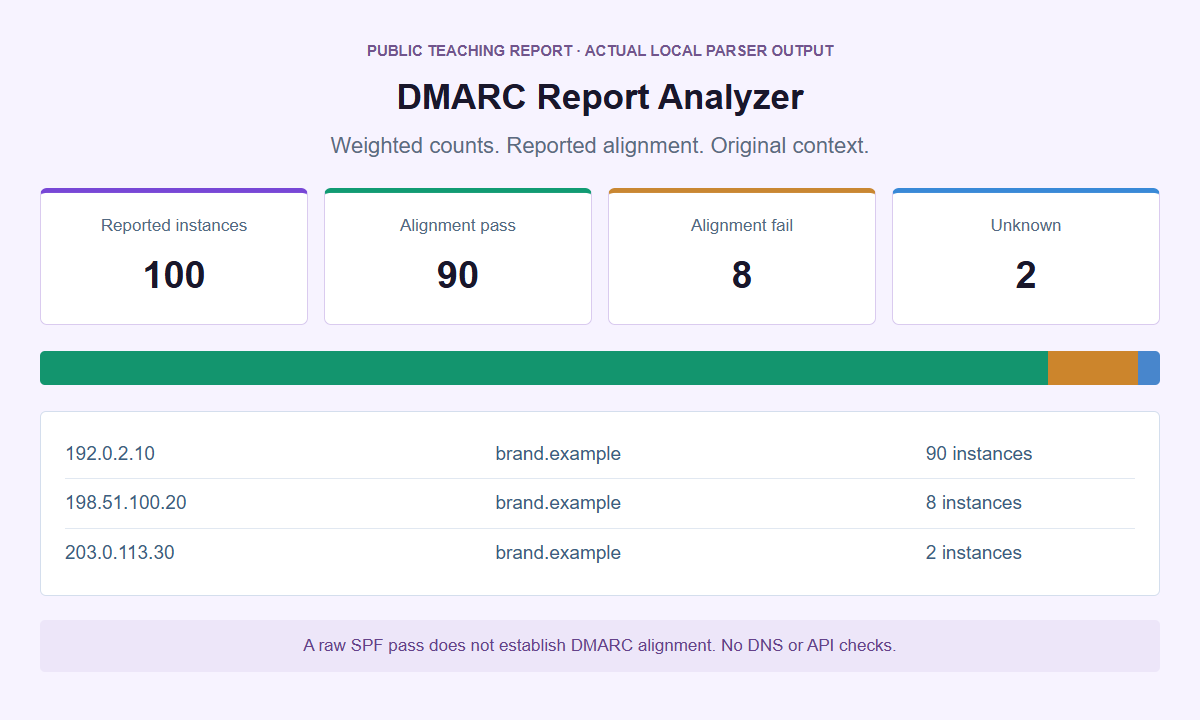
A raw SPF pass and a DMARC-aligned pass are not interchangeable. The viewer keeps the underlying report context available.
Keep the receiver, period and policy in view
Read your DMARC aggregate reports
Choose local files or paste one complete XML document. Load the public example first to explore the results without using private reports.
Files and parsed results stay in the isolated local reader, not in a WordPress upload or external API. Ordinary website delivery is separate. Open the analyzer on its own if needed. A compromised device, extension or replacement interface is outside this isolation boundary.
Open the report, not your mailbox
Read UTF-8 XML directly or from a supported GZ/ZIP file. The whole batch must pass its input and processing limits before results are displayed.
Weight results by the declared count
Alignment pass, fail and unknown totals follow each record’s message count. Reported dispositions remain separate from authentication and inbox placement.
Keep repeated observations in context
Matching duplicate report identities are counted once when their parsed content agrees. Conflicts stop analysis; overlapping periods remain an explicit warning.
A DMARC aggregate report summarizes what a receiving system reported about messages using a domain. DMARC Report Analyzer & XML Viewer makes those supplied records readable without connecting a mailbox. Inspect the reporting period, declared policy, alignment results, and weighted counts. The result is an interpretation of your files, not a new authentication test, delivery measurement, or assessment of sender reputation.
Open the DMARC Report Analyzer with a public example first. Files and Paste XML are separate modes. Load example fills the XML report textarea only; choose Analyze reports to process the input. Clear removes the working session.
Choose the report attachment, not the surrounding email
In Files mode, choose files using Report files. Supply the actual aggregate attachment rather than an email screenshot, a mailbox export, or the text of the notification carrying it. Supported extensions are .xml, .gz, and .zip. Paste XML instead accepts one complete XML document in the XML report textarea, not compressed bytes or several documents joined together. Selecting files, entering text, and loading the example do not themselves request analysis. Choose Analyze reports explicitly after preparing the input. There is no mailbox connection, attachment retrieval service, or background collection. The XML, GZIP, and ZIP guide explains how to distinguish the report from its packaging without changing the underlying evidence.
All resource bounds apply together: up to 10 files, at most 4 MiB per source file, and at most 16 MiB of source across the batch. Each expanded XML document must also fit within 4 MiB, with no more than 16 MiB of expanded XML across the batch. Reports are UTF-8 only; an optional UTF-8 byte-order mark is supported. A ZIP must contain exactly one XML file and may contain directory entries, but no other files, nested archives, or encrypted entries. The archive may contain at most 64 entries in total, including directories. Corrupt, ambiguous, or inconsistent archives are rejected, including integrity failures. Compression does not create a larger allowance, and archives are not extracted to disk.
The structural bounds are 5,000 rows per report, 10,000 rows across the batch, XML depth 24, 150,000 XML nodes, and 4,096 UTF-16 units for an individual leaf text value, comment, attribute value or element local name. The parser ceiling counts elements, attributes, text events and comments together. Node, depth, and text limits still apply to documents that fit the byte and row limits. DTD or entity declarations, external processing instructions, malformed XML, namespace spoofing, and unknown root namespaces are unsupported. A local worker also has a 12-second deadline. An error rejects the full batch rather than presenting an apparently complete partial total. Do not delete rows to disguise an oversized report as an original. A smaller authorized collection of whole reports is a different, clearly scoped analysis, not a recovery of omitted data.
Establish whose observations and which period you have
Start with report metadata before reading a percentage. The reporting organization and contact, report identifier, beginning and ending timestamps, policy domain, and published p policy are required. These are declarations within the supplied document; the analyzer does not authenticate the reporter. Timestamps must be safe integer epoch values in a supported UTC range, with begin no later than end. A missing period is not inferred from a filename or from the day you downloaded the attachment. Use the Google report guide or Microsoft report guide for provider-specific collection context.
The reader supports legacy feedback documents without a namespace, the named RFC 7489 namespace http://dmarc.org/dmarc-xml/0.1, and the RFC 9990 namespace urn:ietf:params:xml:ns:dmarc-2.0. Named legacy reports may have qualified or unqualified core children. Correctly bound prefixes are supported; a particular prefix spelling is not required. Matching local element names in a foreign namespace does not make them DMARC fields. Extension namespaces are ignored with an explicit warning, not silently treated as familiar fields. This is bounded syntactic and structural interpretation, not full XSD-conformance certification. The current aggregate reporting specification provides the standards context, while this tool deliberately accepts a narrower, resource-limited input contract. Successful parsing does not establish that every possible standards requirement has been satisfied or that the document came from the organization it names.
Read policy_published as the configuration reported for that observation, not a live DNS answer. Preserve distinctions between p, a supplied subdomain policy, alignment modes, and other supported options. Legacy pct is retained as a reported option; newer np, testing, and discovery_method fields also retain their reported meaning. The analyzer does not translate an old percentage into a new testing assertion or fill absent optional settings with a fictional configuration. Current RFC 9989 removed the legacy pct mechanism, so historical reports and provider documentation can use different policy vocabulary. Keep that historical context when comparing periods. There is no DNS API here to establish what is published now or when a particular receiver noticed a policy change.
Keep alignment separate from raw authentication and handling
The SPF and DKIM values under policy_evaluated describe reported DMARC alignment. The method results under auth_results describe raw authentication declarations. An SPF pass for an envelope domain unrelated to the visible author domain is not automatically an aligned SPF pass. Likewise, a reported valid DKIM signature for another domain does not independently supply aligned DKIM. The analyzer does not recalculate alignment from a convenient-looking domain match, perform an SPF evaluation, retrieve DKIM keys, or verify signed bytes. The SPF and DKIM alignment guide develops these field roles without turning a raw pass into a different result.
Derived DMARC status uses only the supported reported alignment values: pass when either aligned method is pass, fail only when both are fail, and unknown otherwise. If DKIM is pass and SPF is missing, the derived status can still be pass. If DKIM is fail and SPF is missing, it remains unknown, because the absent value could change the conclusion. Missing or unsupported aligned values produce warnings and stay unknown rather than becoming failure. Do not repair uncertainty by borrowing an auth_results pass or a disposition. This distinction matters when a report is incomplete or uses an unsupported value: a readable record may still leave the authentication conclusion unresolved. Unknown is an information boundary, not a poor score.
Counts are weighted by each record count, not by the number of rows. If one passing row represents 900 instances and one failing row represents 100, the reported passing share is 90%, not half. A zero denominator makes a percentage unavailable, not 0%. Dispositions are a separate view, including none, pass, quarantine, reject, and other. A disposition is not an alignment result; none does not prove inbox placement, and reject is not a measurement of every delivery attempt by your organization. Keep unknown alignment visible when describing the distribution. The analyzer reports what the selected records say about their weighted instances, with no promise that those records cover all traffic or every recipient.
Build a batch without inventing unique-email totals
A mailbox can contain multiple copies of the same aggregate report, including attachments saved under different filenames. The analyzer compares normalized reporter identity together with report ID, policy domain, begin, and end. Equal identity and equal meaningful parsed content identify a duplicate report, which is skipped with an explicit count. Filename similarity alone is not that identity, and a different compression wrapper does not necessarily make a new report. Review the skipped count so the number of selected files is not confused with the number of included reports. This behavior handles repeated reports, not repeated individual messages. It does not search your mailbox or reconcile report deliveries that were never supplied to the current batch.
The same report identity with different meaningful content is a conflict, not an invitation to choose whichever version has the better result. A conflict aborts the full batch. Other processing errors are also atomic: a malformed or oversized item does not quietly disappear while the remaining files produce a confident combined total. Investigate the original attachments through your authorized records and identify which collection you intend to analyze. Do not change report identifiers simply to force conflicting versions into the display. If a new analysis intentionally excludes a disputed file, describe that exclusion in your separate support context.
Overlapping or touching reporting periods produce a warning. Different reports are not silently discarded because they share an IP address, domain, or time range. Their sum is reported message instances, not unique emails, sent-message totals, recipient counts, or proof of delivery. Two receiving systems can report related traffic, and a repeated message can generate more than one observation without being a duplicate report. The report comparison guide explains how to retain those boundaries. Compare like periods and known reporting scopes, and keep an overlap warning attached to your conclusion. There is no message-level identifier map here capable of recovering a deduplicated population of actual emails.
Inspect a report, then follow the relevant row
Use the per-report filter before investigating a source IP or domain. A combined total can hide that one reporter supplied most of the instances or used a different policy snapshot. An IP address can appear in several rows because identifiers, authentication outcomes, or handling declarations differ. Inspect the relevant row rather than treating the IP summary as one uniform stream. Each record also requires header_from. Counts must be nonnegative safe integers, and source addresses must be supported IPv4 or IPv6 values. Those checks establish a usable representation, not ownership of the address. The failures and source IPs guide helps turn an unfamiliar row into a question for your own inventory.
Row detail keeps supplied identifiers, raw method results, and policy override reasons in context. The raw XML viewer shows the selected report as plain text, not rendered HTML, a clickable contact directory, or an executable stylesheet. Input-derived links remain inactive. There is no automatic redaction, so inspect what you are about to show someone on screen. A report contact address, internal domain, selector, or diagnostic comment can still reveal operational information. The tool does not provide Copy, export, or PDF actions. Even a recognizable organization name is still text supplied in the input document.
For an unfamiliar source, ask the authorized owner which service and domain roles were expected during that exact UTC period. Do not add an address to SPF simply because it appears in a report. No geolocation, ASN, reverse-DNS, reputation, or mail-provider recognition from IP runs here. The Yahoo report guide covers another reporting context without assigning special provider scores. If the question concerns one received message, use Email Header Analyzer with that message’s original headers instead. Aggregate XML cannot reveal its subject, reconstruct its route, or establish which recipient read it. A separate URL question belongs in Link Inspector, without transferring the report.
Finish within the temporary local session
The genuine analyzer processes supplied data inside an opaque-origin sandboxed frame served by a standalone PHP document with no-store responses. Its content security policy includes connect-src none, and interpretation runs in a local terminable worker with a 12-second deadline. These controls separate report processing from ordinary requests used to load the surrounding website. The parent receives only bounded height information, not report results. No report-upload endpoint, external analysis API, DNS request, or account connection participates in this workflow. The deadline and resource limits concern processing reliability; neither a timeout nor a rejection is a security verdict about the mail described by an attachment.
Clear stops active work and wipes selected files, the file input, pasted text, state, and all derived result DOM, including raw XML and hidden details. The same termination and cleanup occur when the page becomes hidden and on pagehide, pageshow, and freeze. Switching tabs can therefore end your session; returning does not restore earlier results. There is no persistent storage, history, project, or automatic recovery. Prepare a narrow question before entering operational data, and keep any required original in an approved location outside this temporary interface. A local analysis session is not a retention system. Do not rely on an open result remaining available while you visit another page to check its meaning.
Cleanup is not a promise of secure memory erasure, clipboard removal, or protection from browser extensions, screen recording, compromised devices, or a hostile page replacing the genuine interface. Keep organizational handling rules in force. Finish with an attributed observation: a named report declared a period, a row represented a stated count, and particular alignment values were available or unknown. Return to the Tools directory for a different task. SMTasker’s paid product supports social workflows across nine platforms with Skye and MCP; it is not a mail-monitoring or email-sending product. This free analyzer does not connect report data to that social workflow or turn a local reading into continuous monitoring.
Choose the question you need to answer
DMARC reporting guides
Understand a receiver’s report, investigate an alignment failure or compare periods without losing sight of what the supplied files can and cannot establish.
Google DMARC Reports
Collect a Google aggregate report, check its declared period and policy, and investigate alignment without confusing XML counts with Gmail delivery.
Read the guideMicrosoft DMARC Reports
Understand Microsoft 365 aggregate report delivery, inspect declared alignment and handling, and distinguish XML observations from Outlook message evidence.
Read the guideYahoo DMARC Reports
Inspect Yahoo report coverage, compare complete UTC windows, and investigate alignment changes through staged examples.
Read the guideSPF and DKIM Alignment
Work through raw passes, reported aligned results, multiple signatures, unknown states, and message-weighted DMARC counts.
Read the guideDMARC Failures and Source IPs
Prioritize count-weighted failures, compare sources with an approved sender inventory, and keep unknown IPs separate from unsupported attribution.
Read the guideCompare DMARC Reports
Separate report identities, exact duplicates, conflicting content and overlapping windows before interpreting count-weighted batch results.
Read the guideDMARC XML, GZIP and ZIP Files
Prepare supported UTF-8 report files, understand namespace and archive restrictions, and distinguish structural parsing from full schema certification.
Read the guideQuestions about reading DMARC reports
Does a raw SPF or DKIM pass mean DMARC passed?
Not necessarily. Raw auth_results values are separate from reported alignment under policy_evaluated. Derived DMARC passes if either supported aligned method passes, fails only if both fail, and is otherwise unknown. The tool does not independently retest authentication.
Can I combine reports into a unique-email count?
No. Totals are weighted reported message instances. Equal duplicate reports are skipped with a count; conflicting versions abort the batch. Different reports with overlapping or touching periods remain distinct with a warning, not message-level deduplication.
Does parsing certify RFC 9990 compliance?
No. The reader supports the RFC 9990 namespace, legacy no-namespace reports, and named legacy reports in http://dmarc.org/dmarc-xml/0.1 within its structural and resource bounds. Qualified or unqualified legacy children are supported with correct bindings. It is not full XSD certification, and it does not verify report origin, signatures, current DNS, IP ownership, or reputation.
Why did one file prevent all batch results?
Processing is atomic. An invalid archive, malformed XML, exceeded limit, timeout, or report-identity conflict rejects the full batch. No silently shortened collection is presented as complete. Check the original files before starting a differently scoped analysis.
Why did selected files and results disappear?
Clear and hidden-page or lifecycle cleanup stop the worker and wipe inputs plus all derived results. There is no history or storage to restore them. Cleanup is not secure memory erasure and cannot remove copies held by other software.
Keep the reporting scope attached
Inspect the report, then clear
Return to the analyzer for a bounded local reading without mailbox access, live lookups, or a saved report history.