Understand the pattern, not just the punctuation
Password Strength Checker
Check a proposed password locally and see why familiar words, dates or repeated patterns can be guessable. Get an estimated score and practical feedback without an API or breach-database request.
A public example, never a password to use
Complex-looking can still be predictable
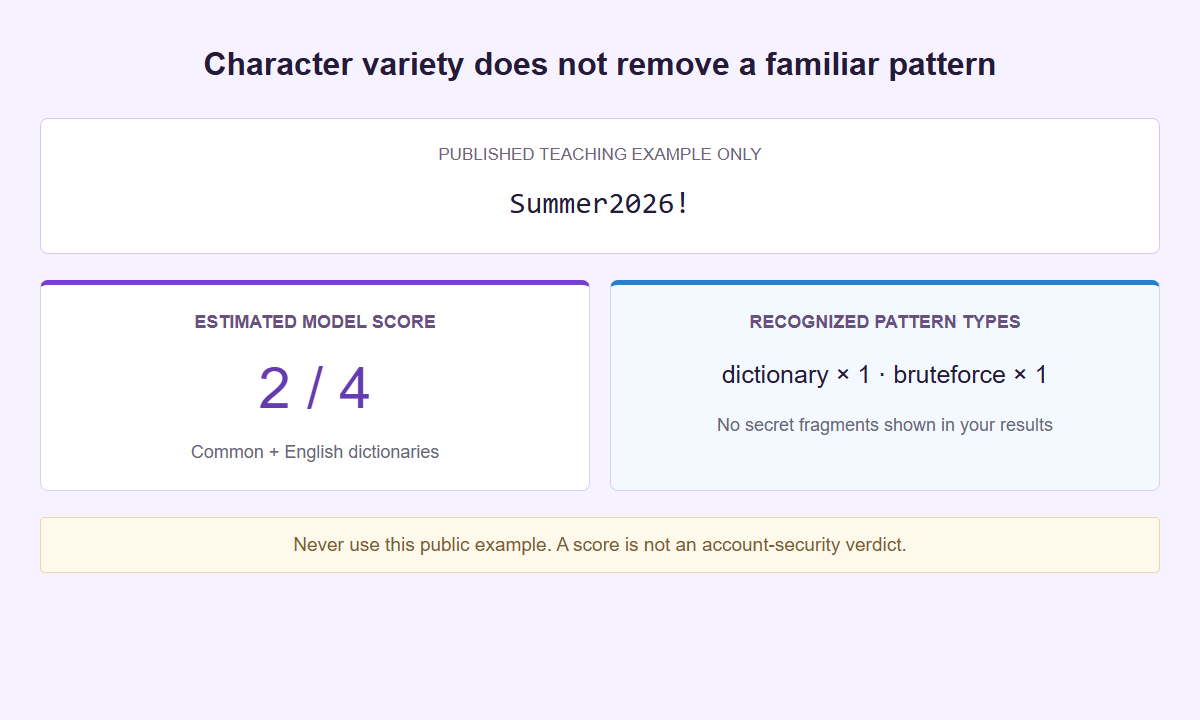
The score describes the configured model, not the protection of a real account. Your own candidate is never repeated in the feedback panel.
One candidate. An explanation you can use.
Check the idea before using it
Use a proposed single-line password. Analysis starts only when you ask, and the input stays masked until you choose Reveal.
The candidate and pattern analysis stay inside the isolated local checker, not in WordPress or an external API request. Normal website traffic is separate. Open the checker on its own if needed. A compromised device, browser extension or replacement interface remains outside this boundary.
Keep the accepted text exact
Spaces and Unicode characters are not trimmed or normalized. Unsupported line breaks and oversized inputs are rejected instead of silently shortening the candidate.
Read the model’s pattern feedback
Common and English dictionaries help identify patterns. The local check has a six-second budget and returns no partial score if it cannot finish.
Create a separate, fresh credential
Use the password and passphrase generator when you need a new independent candidate. Save the accepted credential in your own password manager.
A password can look complicated and still follow a familiar recipe. Password Strength Checker uses a local pattern model to estimate how guessable one candidate looks. It is a learning aid for choosing a new candidate, not proof that an existing secret is safe, unique, or uncompromised.
Open Password Strength Checker and start with Load example. That fills a public teaching example without running analysis. Choose Check password when ready. Prefer disposable candidates over real existing secrets, and never adopt an example published on this page.
Check one candidate with a deliberate action
The Password candidate field starts masked. Reveal makes its contents visible so you can inspect what you entered; Hide masks them again. Masking reduces casual screen exposure, but it does not encrypt the field or stop software on your device from observing it. Use a public example while learning, especially during screen sharing or a team demonstration. There is no need to supply a username, email address, platform name, or account background. The checker has one candidate field, not a login form. It cannot authenticate you, identify an account, or determine whether a password belongs to a particular service.
Choose Check password to request an estimate. Typing is not live analysis, and Load example only fills the field; neither action should be read as a completed check. After changing the candidate, deliberately check that version before interpreting a result. Keep the exercise focused on a question, such as whether a familiar word with a predictable ending still looks familiar to the model. A result from a previous version is not evidence about the new one. This is one candidate at a time, with no saved comparison list. The compare password ideas guide explains a sequential exercise using public examples.
Clear ends the working session by removing the input and all derived output, including hidden result content. Use it when finished, before another person uses the screen, or before starting an unrelated example. Do not treat the checker as a place to keep a draft secret while doing other work. It has no account, autosave, password history, or recovery function. If you want to understand a general rule, you can leave with that rule rather than the candidate text. For example, remember that a predictable ending did not change the underlying construction, without retaining a screenshot or writing down a secret to explain it later.
Preserve the exact text and understand the limits
The accepted maximum is 128 Unicode code points, 256 UTF-16 code units, and 2 KiB of UTF-8 data. All three bounds apply. They are processing limits for this checker, not a recommendation that every account should use a password of that size. An input outside the bounds is not scored as though part of it had been accepted. Return to the source and choose a different disposable candidate if necessary. Do not shorten an existing secret merely to obtain a result here. A score for a shortened version would describe another string and would say nothing reliable about the full original.
Only single-line candidates are supported. Line breaks are rejected, including paste or drop attempts containing carriage returns or line feeds; they are not silently removed to make a different candidate. All accepted characters, including leading and trailing spaces, stay exact: no trimming, normalization, or truncation. Two strings may look alike while containing different Unicode characters. The receiving service may have its own rules, which this checker does not reproduce. A local result does not prove that a sign-up form will accept the candidate or that you can enter it reliably from another keyboard. Review those practical requirements separately before any real account setup.
Code points and UTF-16 units explain different aspects of length. Many ordinary letters use one of each; some symbols use two UTF-16 units for one code point. A visible character can also contain several code points, such as a base letter plus a combining mark. Neither count measures visible boxes, syllables, or keystrokes. The Unicode passwords and length guide explains those differences. Use the lengths to understand the supplied text, not to claim that unusual symbols automatically improve it. If a candidate is hard to reproduce on your devices, that is a separate usability issue. A higher length count does not resolve it.
Read the score and guesses as model outputs
The result gives an estimated score from 0 to 4. These are five broad categories within the model, not five levels of account protection. A lower result suggests the model found an easier explanation for the candidate; a higher result means it estimated more guessing work under its own assumptions. A score of 4 out of 4 does not mean safe, approved, unbreakable, or never leaked. It also does not tell you whether someone already knows the candidate. The password strength scores guide explains why a compact rating is useful without turning it into a guarantee.
Model-estimated guesses appear as 10^L, where L is the estimated base-10 guess logarithm, only when that model value is valid. This notation describes estimated guessing work, not a counter from an attack that actually ran. A large exponent is not a claim that every attacker would need exactly that many attempts. Dictionaries, personal knowledge, and guessing strategies can change the task. If a valid model value is unavailable, there is no honest number to substitute. Read the estimate alongside the score and pattern summary. Do not report it as a measured attack cost or a minimum amount of work an attacker must perform.
There is no actual crack-time prediction or entropy measurement for human-chosen strings. Converting a guess estimate into hours or years would require assumptions about a real attack that this checker does not observe. A login service may limit attempts; stolen password data may be processed under very different conditions. The tool checks neither situation. Likewise, counting possible characters does not reveal how a person chose a phrase. Keep the conclusion narrow: this candidate received this estimate from this model. The result does not measure device health, phishing resistance, account recovery controls, or the quality of password storage at a service you might use.
Use pattern types without exposing secret pieces
The pattern summary reports types and counts, not actual matched tokens, their positions, or secret segments. A dictionary count means the model used dictionary-like material in its selected explanation. A repeat, sequence, date, or keyboard-pattern count describes another familiar structure. The common password patterns guide explains these categories. Counts are not a complete inventory of everything a person could recognize, nor should their sum become a risk score. The estimator chooses an explanation for the whole input, and possible explanations can overlap. Read the categories as construction clues, without expecting the interface to reveal which private substring produced each clue.
The bundled model focuses on English and common dictionaries. It is not a complete multilingual dictionary and does not know your personal circumstances. A phrase familiar in another language, a local saying, or a private reference known to colleagues may receive an estimate that misses its real predictability. Do not enter names, birthdays, platform details, or other context to compensate; there are no context inputs here. Instead, make the separate judgment that personally meaningful material is not made unpredictable by a quiet pattern summary. Absence of a dictionary finding means only that the selected model explanation did not report one, not that the words are unknown to other people.
Warnings and suggestions use generic, static English wording, without repeating the candidate or revealing matched pieces. Follow the idea behind the advice instead of chasing a small score increase through punctuation changes. A familiar base with a new year can remain a familiar recipe. The passphrase strength guide considers longer word-based choices. For a genuinely fresh candidate, the separate Password Generator is the appropriate handoff; this checker does not generate passwords. No candidate is transferred through the link or placed in a destination URL. Public examples and published phrases remain unsuitable for account use, however impressive an estimate might appear.
Know what the local boundary does and does not protect
The genuine checker runs inside an isolated, opaque-origin sandbox document served by PHP without bootstrapping WordPress. Its response uses Cache-Control: no-store, and its content policy includes connect-src 'none'. Analysis stays in a local worker rather than sending the candidate to an inspection server, remote API, or AI service. These are specific controls around the checker, not a promise that the whole website is offline. Loading the surrounding WordPress page, its ordinary resources, and the isolated document still creates normal page traffic. Keep those requests separate from the question of whether entered candidate text is submitted for analysis.
The worker is terminable, with a six-second limit for a job. A timeout is a processing failure, not a special score and not evidence that a candidate resisted a real attack. Clear stops the current job and wipes the input and all derived DOM content. Cleanup also runs when the page becomes hidden and on pagehide, pageshow, and freeze, terminating active work. Returning does not restore the earlier candidate or its results. This includes derived content that was not currently visible. Expect to start again with a disposable candidate after switching away, rather than treating the session as something the browser should recover.
Local processing is not absolute privacy. Extensions, compromised device software, screen recording, and a hostile parent page that replaces the genuine interface are outside this boundary. Clearing removes working interface data; it does not promise secure memory erasure or remove copies elsewhere. There are no Copy buttons, export, PDF, download, history, or persistent storage features. Manual browser clipboard actions remain outside tool control, and cleanup cannot erase their contents. Avoid using real existing secrets in demonstrations just because the input is masked. Public examples teach the controls with less at stake. Discuss the pattern lesson instead of sharing an image that could reveal private text.
Leave with a better decision, not a safety badge
Use the estimate to question an idea before it becomes a secret. Ask whether the construction depends on a common phrase, a familiar sequence, or a predictable edit. Then consider questions the checker cannot answer: whether the candidate is unique to one account, whether it has been disclosed, and whether you can manage it reliably. The tool performs no breach lookup and cannot certify an uncompromised password. If an existing secret is known to be exposed or reused, a favorable estimate is not a reason to keep it. Follow the check and replace weak passwords guide for the separate replacement workflow.
Password choice is only one part of authentication. A service may offer passkeys or an additional factor, and those choices belong in its official account settings. The separate 2FA Authenticator concerns a different task; a password candidate is not an enrollment secret or a one-time code. Do not paste such material into this field. The checker does not enable two-factor authentication, alter a login, sign you into a provider, or carry a candidate to another tool. Keep password selection, enrollment material, and account administration as distinct activities, with each value used only where it belongs.
For a team, teach with public examples without collecting existing passwords from colleagues or clients. The social media password strength guide keeps account responsibilities in view without creating a shared candidate list or leaderboard. Paid SMTasker supports social automation across nine platforms, with Skye and MCP workflows. It is not a security suite or credential vault, and this free checker does not submit a secret to Skye or configure provider access. A useful finish is to understand the estimate, clear the session, and handle any real credential decision through the appropriate trusted workflow. Social automation and password analysis remain separate responsibilities.
Choose what you want to understand
Password-checking guides
Interpret a score, review a passphrase or compare candidate ideas without confusing a local model with a check of your real account.
Password Strength Scores
Learn what a 0 to 4 score, model-estimated guesses, length counts, and pattern types can tell you, and what remains outside the result.
Read the guideCommon Password Patterns
Understand dictionary, keyboard, repeat, and date findings without treating a strength estimate as an account security verdict.
Read the guidePassphrase Strength
Separate random-word theory from a dictionary-based estimate, and interpret passphrase results without claiming measured entropy.
Read the guideCompare Password Ideas
Explore how predictable edits, repeated text, phrases, and character choices affect a local estimate using one public example at a time.
Read the guideUnicode Passwords and Length
Understand code points, UTF-16 units, exact input, and the limits of estimating multilingual password candidates.
Read the guideSocial Media Password Strength
Assess proposed social-account passwords without submitting usernames, confusing scores with account checks, or reusing a platform-based formula.
Read the guideCheck and Replace Weak Passwords
Start with checker feedback, discard predictable constructions, and separate a new candidate estimate from a completed provider change.
Read the guideQuestions about checking password strength
Does a score of 4 out of 4 mean my password is safe?
No. It is the highest estimated category in this model, not proof of safety, uniqueness, or absence from breaches. The checker does not test an account, inspect its protections, or know who may already have the candidate.
Does analysis run while I type or load the example?
No. Load example fills a public teaching candidate only. Choose Check password explicitly to analyze the current input. Reveal and Hide change visibility, not the meaning of the candidate or its security.
Are spaces removed, or can I check a multiline password?
Accepted leading and trailing spaces are preserved, with no trimming, normalization, or truncation. Candidates must be single-line: CR and LF line breaks are rejected. The limits remain 128 code points, 256 UTF-16 units, and 2 KiB of UTF-8 data.
Why did the candidate disappear after I changed tabs?
Hidden-page and lifecycle cleanup wipes the input and all derived DOM content and terminates the job. The checker has no history or autosave. Returning does not restore the session, and cleanup does not promise memory or clipboard erasure.
Can it generate a password or check for a breach?
No. It only estimates one supplied candidate locally. Password Generator is a separate tool with no candidate transfer through its link. There is no breach lookup, remote analysis API, password generation, or account login change here.
An estimate with clear limits
Check the construction, then clear
Return to the checker for one disposable candidate. Keep the result separate from account security decisions.