The Like Comments Tool: The Underrated Signal That Builds Community
Most automation strategies focus on the post — like it, comment on it, follow the person who posted it. The LikeComments tool targets something different: the…
This distinction matters more than it looks. When you like a comment, the person who wrote it gets a personal notification — not a generic “X liked your post,” but “X liked your comment.” That’s a more specific, more personal signal than a post like. It tells the commenter that someone noticed what they specifically said, not just that they happened to post something. The result is a higher rate of curiosity-driven profile visits relative to the action’s risk level — which is very low. Comment liking is one of the most natural behaviors on every platform, and platforms almost never flag it.
Quick Setup Reference
- Go to Automations → select the account → click ADD AUTOMATION
- Select LikeComments from the tool list
- Configure Settings and Sources before starting
- Click Start
Note: LikeComments is available on Instagram and TikTok. It is not available on Threads.
Settings Explained
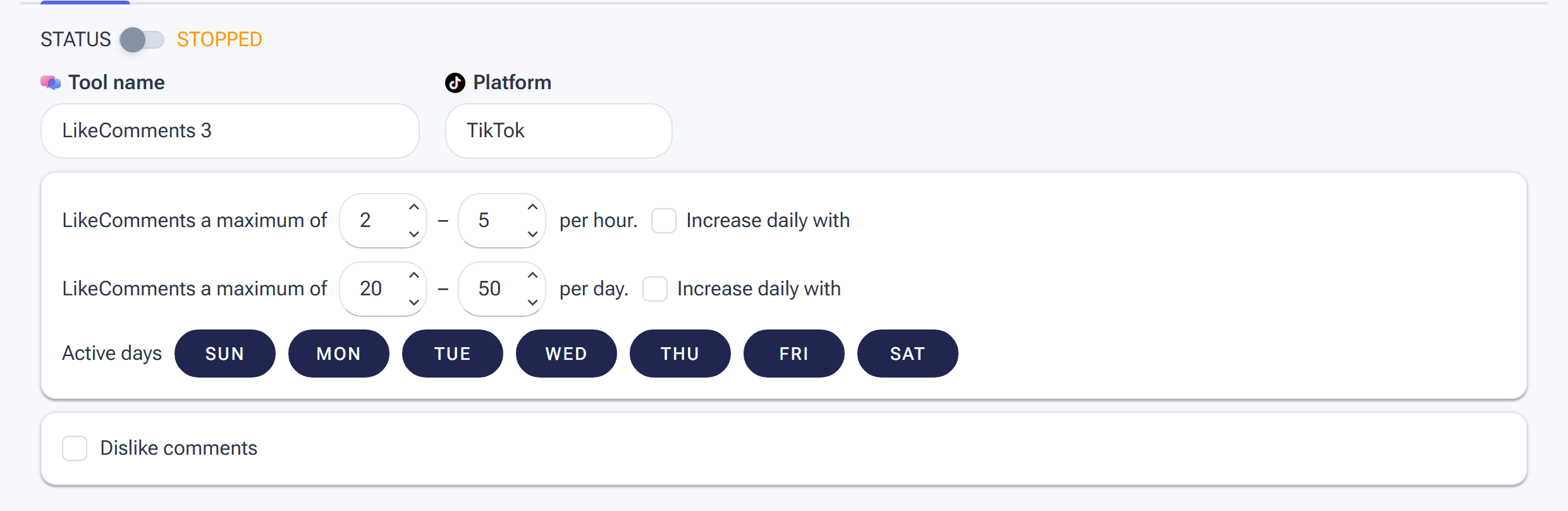
LikeComments Settings: hourly and daily ranges plus Active days — same safety pattern as every engagement tool.
Min/Max Per Hour
LikeComments is one of the safest actions in SM Tasker — treat it like a slightly more conservative version of the Like tool. The same randomisation principle applies: a range produces more natural behavior than a fixed number.
| Account Stage | Min/Hour | Max/Hour |
|---|---|---|
| Warm-up (days 1–14) | 3 | 8 |
| Standard (established account) | 5 | 15 |
Refer to the Daily Action Limits guide for platform-specific daily caps.
Min/Max Per Day
LikeComments can run at similar daily volumes to the Like tool — both are low-scrutiny actions. Set your daily cap proportionally to your hourly range and active hours, and keep it consistent day to day. Erratic daily volumes — 20 one day, 150 the next — are more detectable than steady, moderate totals.
Active Days
5–6 active days per week is the recommended default. Stagger the rest day away from your Like tool — if Like rests on Sunday, have LikeComments rest on Wednesday. The staggered pattern ensures the account always has multiple tools running while no single day carries all the activity weight.
Engage with Profile
Keep this ON. SM Tasker visits the profile of the comment author before liking their comment — adding a profile visit to the interaction trail. This is the same behavior that makes the Like tool a discovery driver rather than a passive action. The profile visit compounds the notification: the commenter sees both a comment like and a profile view from your account, making the touchpoint more memorable.
Interaction Level
Use Just Browsing for LikeComments. The tool’s value is in the volume of personal notifications it generates across a niche community — the interaction is intentionally light-touch. Adding deeper secondary engagement per profile visit via Open to Interaction or Want to Connect reduces the number of comment likes you can deliver per hour without meaningfully improving the outcome per interaction.
When to Use LikeComments vs. Like vs. Comment
These three tools target different points of the engagement ecosystem. Understanding the difference tells you when to deploy each — and how they work together.
| Tool | What It Targets | Notification Type | Best For |
|---|---|---|---|
| Like | Posts | “X liked your post” | Broad visibility; driving profile visits at scale |
| LikeComments | Comments on posts | “X liked your comment” | Personal, community-building; reaching active commenters |
| Comment | Posts (leaves a comment) | “X commented on your post” | High-impact engagement; conversation and visibility in the comment section |
The engagement ladder runs Like → LikeComments → Comment, from lowest to highest impact and lowest to highest risk. Use all three together for full-spectrum engagement in your niche — each one reaches a different group of people through a different interaction signal.
Source Strategy for LikeComments
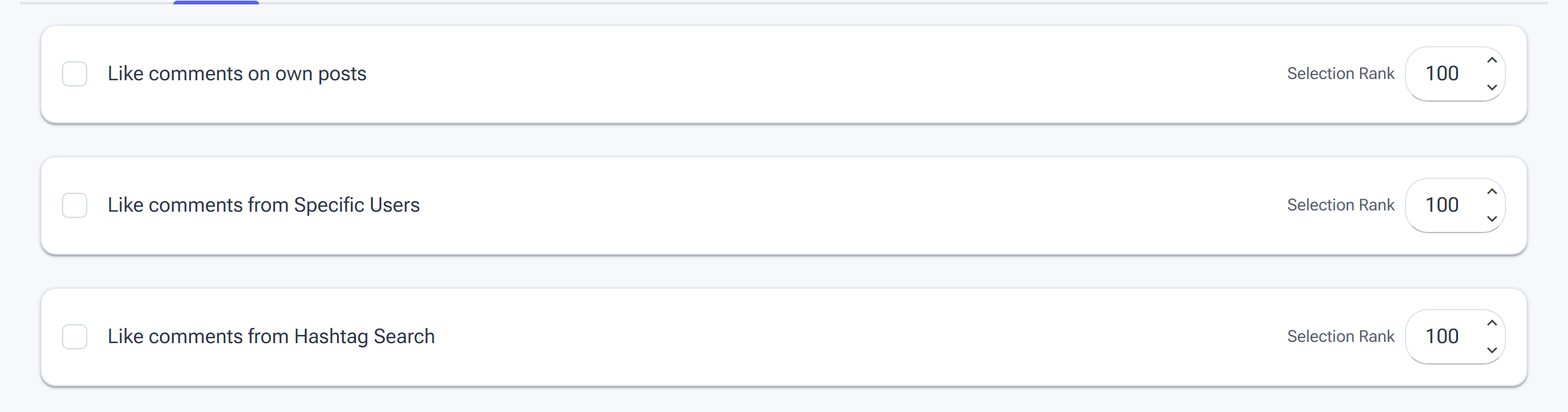
Pick the posts whose comment sections LikeComments works through on the Sources tab.
LikeComments needs to find posts with active comment sections — posts that have been commented on recently, by real, engaged users. A post with no comments gives the tool nothing to work with.
Best sources for LikeComments:
- Hashtag Search (rank 150–200) — your primary source. Target niche hashtags with active communities where posts regularly receive multiple comments. The same hashtag list you’re using for Like and Comment works here — consistent targeting across tools means SM Tasker is creating multiple touchpoints within the same niche conversations.
- Explore Feed (rank 100) — algorithm-curated content currently receiving high engagement, which by definition includes active comment sections. Good supplementary source for finding posts with the most comment activity.
- Account Search (rank 75) — useful for targeting accounts in specific niches where comment sections tend to be active and community-driven.
For the complete source strategy guide, see Sources & Targeting Mastery.
Platform-Specific Notes
Instagram comment likes are visible in the activity feed and generate a direct notification to the commenter. On posts with smaller comment sections (under 20 comments), your like on a specific comment is highly visible — the commenter sees it clearly and the curiosity-to-profile-visit conversion is strong. On posts with very large comment sections (hundreds of comments), individual comment likes are harder to notice. Calibrate your hashtag targeting toward mid-engagement posts where comments are present but not overwhelming — this is where LikeComments delivers the best return per action.
TikTok
TikTok’s comment culture is particularly active — comment sections on popular TikToks often contain threads of replies, debates, and jokes that accumulate large audiences of their own. Liking comments on TikTok puts your account in front of people who are deeply engaged with niche content, not just passive scrollers. The notification is prominent in TikTok’s activity feed, making the profile visit conversion rate on comment likes consistently solid.
One TikTok-specific consideration: comment sections on viral content can move very fast, with thousands of comments appearing in a short window. If your sources include very high-velocity posts, SM Tasker may encounter comment sections where individual likes get buried. Focus hashtag targeting on active but not viral content for the best LikeComments performance on TikTok.
Pro Strategies
LikeComments + Comment: Full Comment Section Presence
Run LikeComments and Comment on overlapping source pools — same niche hashtags, same target content pool. On any given post, SM Tasker can leave a comment and like existing comments from other users. Your account shows up twice in the same comment section: once as a contributor (your AI-generated comment) and once as an appreciative community member (liking what others wrote). That double presence in a single comment section is more memorable than either action alone — and it’s the kind of behavior that makes people actually click through to see who you are.
Poaching Engaged Users from Competitor Posts
Configure LikeComments with sources that target competitor posts specifically — accounts in your niche whose comment sections are full of your ideal audience. By liking comments on a competitor’s post, you’re reaching users who are actively engaged with content in your niche right now, self-selected as vocal community members, and most likely to appreciate and follow an account that recognises their participation.
This is a more targeted version of Target Account Followers — instead of following the competitor’s audience passively, you’re showing up in their active conversations. Build a username list of your top competitor accounts and assign it as a Specific Users source for LikeComments to target their recent posts directly.
LikeComments During Cooldown Periods
Like StoryViewer, LikeComments is safe enough to continue running when other tools are suspended after a block. If Follow or Comment is paused by Auto-Suspend, let LikeComments keep running — it maintains account activity, keeps generating profile visits, and doesn’t share the action type that triggered the block. Your account stays active and visible in your niche while the blocked tool’s cooldown window passes.
Common Mistakes
| Mistake | Why It Hurts | What to Do Instead |
|---|---|---|
| Skipping LikeComments because it seems minor | Misses a low-risk, high-personal-impact touchpoint that consistently drives profile visits from the most active niche users | Add LikeComments to every account’s stack alongside Like — it runs quietly and delivers outsized results relative to its risk |
| Targeting posts with no comment activity | No comments to like means the tool skips post after post without executing; wasted action budget | Use Hashtag Search on active niche communities where post engagement is consistently present; avoid very niche or inactive hashtags |
| Targeting viral posts with thousands of comments | Your comment like disappears in a sea of activity; the commenter never notices; profile visit conversion near zero | Target mid-engagement posts where comment sections are active but not overwhelming — 10–100 comments is the sweet spot |
| Pausing LikeComments during another tool’s cooldown | Unnecessarily halts a safe, active tool and lets account visibility drop during a period when it should stay active | Keep LikeComments running during any cooldown period; only pause the specific tool that was blocked |
What to Do Next
- The SavePosts Tool: Send the Strongest Algorithm Signal Possible — Add the final engagement layer to your stack: automated post saving, which sends the highest-weight signal of any engagement action to platform algorithms.
- The Comment Tool: AI-Powered Commenting That Builds Real Relationships — If you’re not already running Comment alongside LikeComments, set up the full comment section presence strategy now.
- Sources & Targeting Mastery — Refine your LikeComments source pool. The better the posts you target, the better the comment sections you appear in.