The Publish Tool: Build a Content Calendar That Runs Itself
Every other tool in SM Tasker drives people to your profile. The Publish tool determines what they find when they get there. Follow brings in a new visitor.
Consistent posting is the foundation the rest of your automation stack is built on. It signals to the algorithm that your account is active and worth distributing. It gives new visitors a reason to follow. It keeps existing followers engaged between campaigns. The Publish tool removes consistency as a variable — you batch your content once, configure a posting schedule, and SM Tasker handles distribution across Instagram, TikTok, and Threads automatically, every day, without you touching it again.
Quick Setup Reference
- Before setting up the Publish tool, create your Media Folders and upload your content — see Managing Media Folders for the full process
- Go to Automations → select the account → click ADD AUTOMATION
- Select Publish from the tool list
- In the Sources tab, connect the Media Folder that contains the content for this account
- Configure Settings, write your caption strategy, then click Start
The Publish tool will not run without a Media Folder assigned as its source. Set up your content library first — everything else in this article assumes that’s done.
Settings Explained
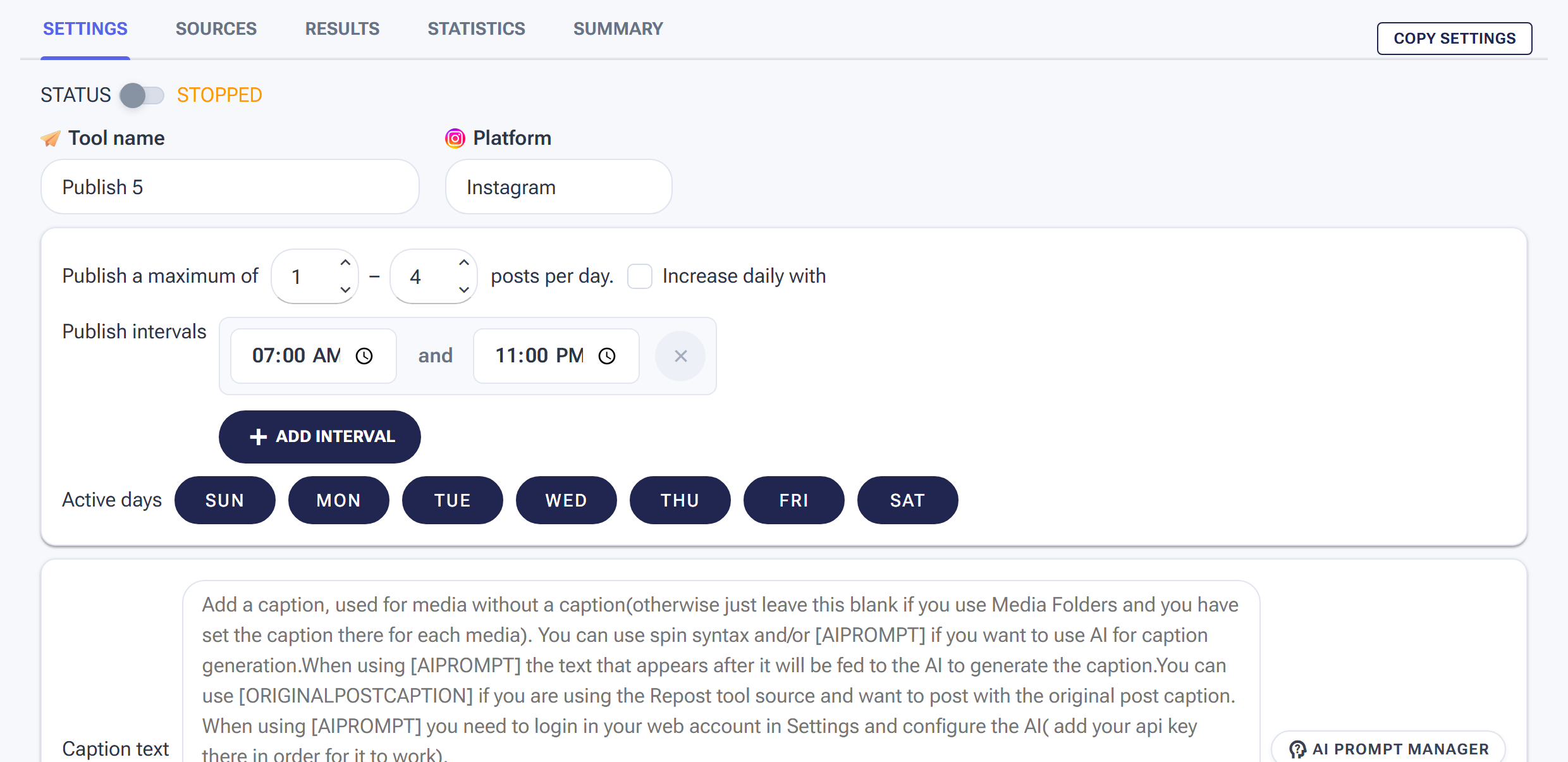
Publish Settings: how many posts per day and when — the queue drains from your Media Folder on this schedule.
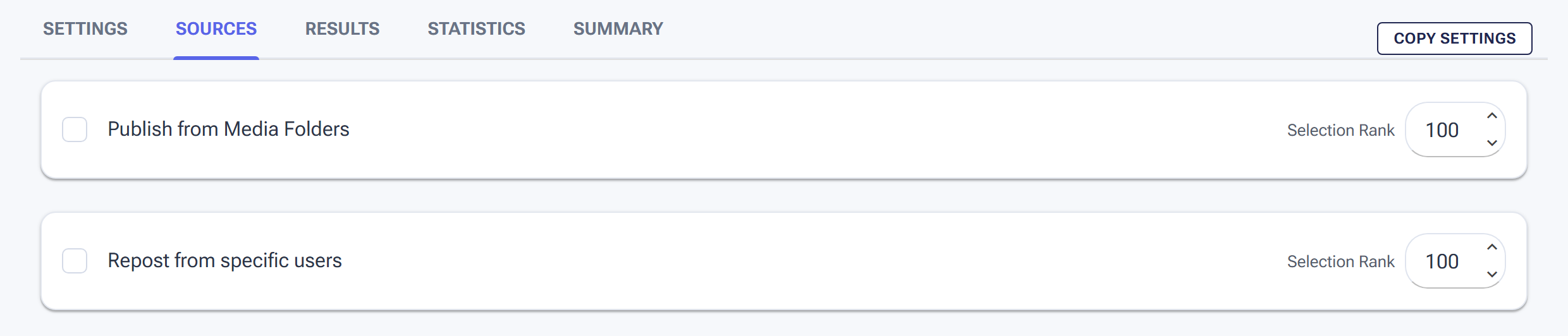
The Publish tool’s Sources tab is where you attach the Media Folder that feeds the queue.
Min/Max Per Hour
Unlike engagement tools, the Publish tool’s hourly range controls posting frequency, not interaction volume. For most accounts, posting more than once per hour looks unnatural — real users and brands don’t publish at that cadence. The hourly setting is better understood as a gate: how many posts can go out in any given hour if the daily schedule calls for it.
For most accounts, set Min/Hour to 0 and Max/Hour to 1. This allows one post per hour maximum and lets the daily settings control the actual cadence.
Min/Max Per Day
This is the primary lever for controlling your publishing schedule. How many posts per day depends on the platform and your content volume:
| Platform | Recommended Daily Range | Notes |
|---|---|---|
| 1–2 posts/day | More than 2 posts/day on IG risks feed fatigue and algorithmic suppression for individual posts | |
| TikTok | 1–3 posts/day | TikTok rewards consistent high-frequency posting; 3/day is sustainable for accounts with large content libraries |
| Threads | 2–4 posts/day | Threads is text-first and conversational; higher frequency works well because individual posts are lighter-weight than IG or TikTok content |
Set Min/Day to a number you can sustain with your content library. If you have 30 pieces of content and you set Min/Day to 2, you have a 15-day runway before the folder is empty. Plan content batches to stay ahead of that runway — more on batching below.
Active Days
Unlike engagement tools, the Publish tool can run 7 days a week without any safety concern. Consistent daily posting is good for the algorithm. That said, if you want to align posting days with your audience’s highest-activity windows, configure Active Days accordingly. For most niches, Tuesday through Saturday are the highest-engagement days on Instagram and TikTok. Sunday and Monday see lower organic reach on average — though this varies significantly by niche and audience timezone.
Caption Templates
The Publish tool offers three caption approaches, and you can combine them:
- Static captions — the same caption goes with every post from this folder. Use this for evergreen content where the caption is part of the media (e.g., a quote post where the text is baked into the image).
- Rotating caption templates — a list of pre-written captions that SM Tasker cycles through, using a different one for each post. Write 10–20 varied captions that could apply to any content in the folder.
- AI-generated captions — SM Tasker sends each post to your OpenAI account and generates a unique caption based on your prompt. Every post gets a fresh, non-repetitive caption. This is the recommended approach for any account where caption quality matters.
AI-Generated Captions: Writing Prompts That Work
This section assumes your OpenAI API key is connected. If not, see How to Connect ChatGPT to SM Tasker first.
When AI captions are enabled, SM Tasker generates a unique caption for each post using the prompt you write. The prompt is your brief to the AI — tell it what kind of account this is, what tone to use, what to include, and what to avoid.
The Elements of a Strong Caption Prompt
- Account context — describe the account and its audience: “This is a fitness coaching account targeting working professionals aged 25–40.”
- Caption style and length — specify format: “Write a 2–3 sentence caption. Start with a hook. End with a question to encourage comments.”
- What to include — hashtags, emojis, CTA, line breaks: “Include 5 relevant hashtags at the end. Use 1–2 emojis naturally in the caption body.”
- What to avoid — common pitfalls: “Do not start with ‘I’. Do not use generic motivational phrases. Do not repeat the same caption structure more than once across a batch.”
Caption Prompt Templates by Platform
Instagram (photo or carousel post):
“This is a [niche] account. Write a compelling Instagram caption for the image: start with a strong hook (a question, a bold statement, or a surprising fact), follow with 2–3 sentences of value or context, and end with a call to action or question that invites engagement. Include 8–12 hashtags at the end (mix of niche-specific and mid-range tags). Use line breaks for readability. Keep the total caption under 150 words. Do not start with ‘I’ or ‘We’.”
TikTok (video post):
“This is a [niche] TikTok account. Write a short, punchy TikTok caption for this video. Keep it under 3 sentences — TikTok captions are skimmed, not read. Include a clear CTA (save this, follow for more, comment your answer). Add 4–6 relevant hashtags including at least one trending tag in this niche. No formal language — write the way someone would caption a casual video for their audience.”
Threads (text-first post):
“This is a [niche] Threads account. Write a conversational Threads post that feels like a thought or observation someone would genuinely share. 2–4 short paragraphs or a short thread-style breakdown. End with a question or opinion that invites replies. No hashtags. Write in first person. Keep it direct, no fluff.”
Building a Prompt for a 30-Post Batch
When SM Tasker generates captions for a large batch of content from the same folder, the risk is repetition — the AI defaults to familiar structures if the prompt doesn’t actively prevent it. Add this instruction to any caption prompt for a large batch:
“Each caption in this batch must be structurally different from the others. Vary the hook type (question, statement, statistic, story opener), vary the CTA, and vary the emotional tone (educational, inspiring, challenging, conversational). Do not repeat the same opening word across more than 2 captions in the batch.”
Combining AI Captions with Static Hashtag Blocks
For Instagram, a practical hybrid approach works well: let AI generate the caption body, and append a static hashtag block that you’ve researched and curated. This gives you the variety of AI-generated copy with the precision of a hand-picked hashtag set.
Structure your prompt to generate the caption body only (no hashtags), then add your hashtag block as a fixed suffix. This way the hashtags are always exactly the ones you want — no hallucinated or irrelevant tags from the AI — while the caption itself stays fresh and non-repetitive.
Platform-Specific Content Strategy
Instagram supports three primary content formats through the Publish tool: single image posts, carousel posts (multiple images in one post), and Reels (video). Each has different algorithm behavior:
- Single image posts — the baseline. Consistent, easy to batch, reliable reach within your existing follower base.
- Carousel posts — typically get higher average time-on-post than single images because users swipe through. Instagram’s algorithm treats longer dwell time as an engagement signal. If your content type supports it, carousels are worth prioritizing.
- Reels — the highest-reach format on Instagram. Reels are pushed to non-followers through Explore and the Reels tab, making them the best format for new audience discovery. If you have video content, publish it as Reels rather than regular video posts.
Instagram hashtag strategy: Use 8–15 hashtags per post. Mix three tiers: 2–3 large tags (1M+ posts) for broad reach, 4–6 mid-range tags (100K–1M posts) for niche targeting, and 2–3 small tags (under 100K posts) where you can rank in the top posts. Place hashtags at the end of the caption or in the first comment — both approaches work, though in-caption is simpler to manage with automated publishing.
TikTok
TikTok’s algorithm distributes content primarily based on video completion rate, shares, and early engagement velocity — not follower count. This means the Publish tool on TikTok can drive discovery for brand-new accounts in a way that Instagram’s feed algorithm doesn’t allow. Every video has an initial test distribution; if early viewers engage, TikTok pushes it further.
Practical implications for publishing:
- Video length — 15–60 seconds performs best for discovery. Longer content (3–10 minutes) can work for established accounts with an engaged audience, but for growing accounts, keep videos tight.
- Captions — shorter than Instagram. TikTok users don’t read captions the same way. A hook sentence and 4–6 hashtags is the standard format.
- Posting frequency — TikTok rewards accounts that post consistently and frequently. 2–3 posts per day is sustainable if your content library supports it and doesn’t dilute quality.
Threads
Threads is directly integrated with Instagram — your Threads profile is your Instagram profile, and activity on Threads can influence your Instagram account’s overall engagement signals. Posting on Threads is a low-effort way to maintain daily activity presence on both platforms simultaneously.
Threads content strategy differs from Instagram and TikTok in one key way: the medium rewards text. Opinions, observations, short takes, questions, and conversational posts perform better than repurposed Instagram captions. If you’re publishing image content to Threads, pair it with a text-first caption that stands on its own — don’t assume the image carries the post.
Hashtags on Threads have limited functionality compared to Instagram — don’t rely on them for discovery. The Threads algorithm surfaces content based on engagement and account activity, not hashtag search.
Content Batching: How to Build a 30-Day Queue in One Session
The Publish tool runs on whatever content is in your Media Folder. The practical challenge is keeping that folder stocked without turning content creation into a daily task. Batching solves this — you create a month’s worth of content in one focused session, upload it to the folder, and SM Tasker handles distribution for the next 30 days without you touching it.
A practical batching workflow:
- Define your content pillars — pick 3–5 recurring content types for your niche (e.g., a fitness account might use: workout tips, nutrition facts, transformation stories, motivational quotes, client results). Every batch you create maps to these pillars in roughly equal proportions.
- Create in bulk — produce all content for the batch in one session using tools like Canva, CapCut, or your preferred editor. Batch by content type: create all quote posts first, then all workout tip posts, etc.
- Upload to Media Folder — upload the completed batch to the relevant folder in Content > Media Folders. SM Tasker can publish in sequential or random order — random order prevents your feed from looking like a production line.
- Schedule the next batch — before the current batch runs out, produce the next one. A 30-day queue with a batching session every 3–4 weeks is the most sustainable rhythm for most accounts.
The Publish → Engagement Flywheel
The Publish tool’s real power is unlocked when it runs alongside your engagement stack. Here’s how the flywheel works:
- Publish posts fresh content to the account daily
- Like and StoryViewer drive new visitors to the profile throughout the day
- Follow converts the most targeted visitors into followers
- New followers see the next published post in their feed and engage with it
- That engagement signals to the algorithm that the account is active and worth distributing
- The algorithm distributes the content to more non-followers — generating more profile visits — and the cycle continues
Without Publish, engagement tools drive visitors to a profile that isn’t actively posting. They visit, see nothing recent, and leave without following. The content is what closes the loop. Run Publish as the foundation everything else is built on, and each engagement action compounds instead of evaporating.
Common Mistakes
| Mistake | Why It Hurts | What to Do Instead |
|---|---|---|
| Starting Publish before the Media Folder is set up | The tool has no content source and won’t run; wasted setup time | Set up Media Folders and upload at least 7–10 pieces of content before starting the Publish tool |
| Using static captions for all posts | Identical captions across posts look automated; platforms may suppress repetitive content | Use AI captions or a rotating template library of at least 15–20 variants |
| Publishing too frequently on Instagram | More than 2 posts per day on IG competes with itself for algorithmic distribution; individual post reach drops | Cap Instagram at 1–2 posts per day; use higher frequency on TikTok and Threads where the algorithm rewards it |
| Letting the Media Folder run empty | Publish tool stops when the folder is empty; posting consistency breaks and algorithm momentum is lost | Schedule a batching session before the folder drops below a 7-day buffer; treat it like a recurring calendar item |
| Running Publish without any engagement tools | Content goes out but nothing drives new visitors to see it; growth stays flat despite consistent posting | Always pair Publish with at least Like and StoryViewer to close the discovery loop |
| Writing a vague AI caption prompt | Generic prompt → generic captions → repetitive content that doesn’t reflect the account’s voice | Specify account context, caption style, length, inclusions, and constraints in every prompt; test it on 3–5 posts before running at scale |
What to Do Next
- Managing Media Folders: Your Content Library for Auto-Publishing — If you haven’t set up your Media Folders yet, this is the next step before the Publish tool can run.
- Using Lists to Power Precision Targeting — With Publish running, refine your engagement tools’ targeting so the visitors they drive to your profile are the most relevant audience for your content.
- Building Your Growth Stack: The Pro Setup Workflow — See how Publish fits into the full automation stack and which engagement tools to pair with it for the content-led growth flywheel.